Loopy Pro: Create music, your way.
What is Loopy Pro? — Loopy Pro is a powerful, flexible, and intuitive live looper, sampler, clip launcher and DAW for iPhone and iPad. At its core, it allows you to record and layer sounds in real-time to create complex musical arrangements. But it doesn’t stop there—Loopy Pro offers advanced tools to customize your workflow, build dynamic performance setups, and create a seamless connection between instruments, effects, and external gear.
Use it for live looping, sequencing, arranging, mixing, and much more. Whether you're a live performer, a producer, or just experimenting with sound, Loopy Pro helps you take control of your creative process.
Download on the App StoreLoopy Pro is your all-in-one musical toolkit. Try it for free today.
QWERTET - Magic Keyboard -> MIDI + Chords (AUv3, Testflight)

I love using my iPad in a keyboard case like the Magic Keyboard, but I find it frustrating that some iPad DAWs don't support keyboard entry (Some do! Thank you Loopy and Drambo, as always!).
So, here's QWERTET: It does a few things, as an AUv3 MIDI plugin and standalone app:
https://testflight.apple.com/join/jVRggpPR
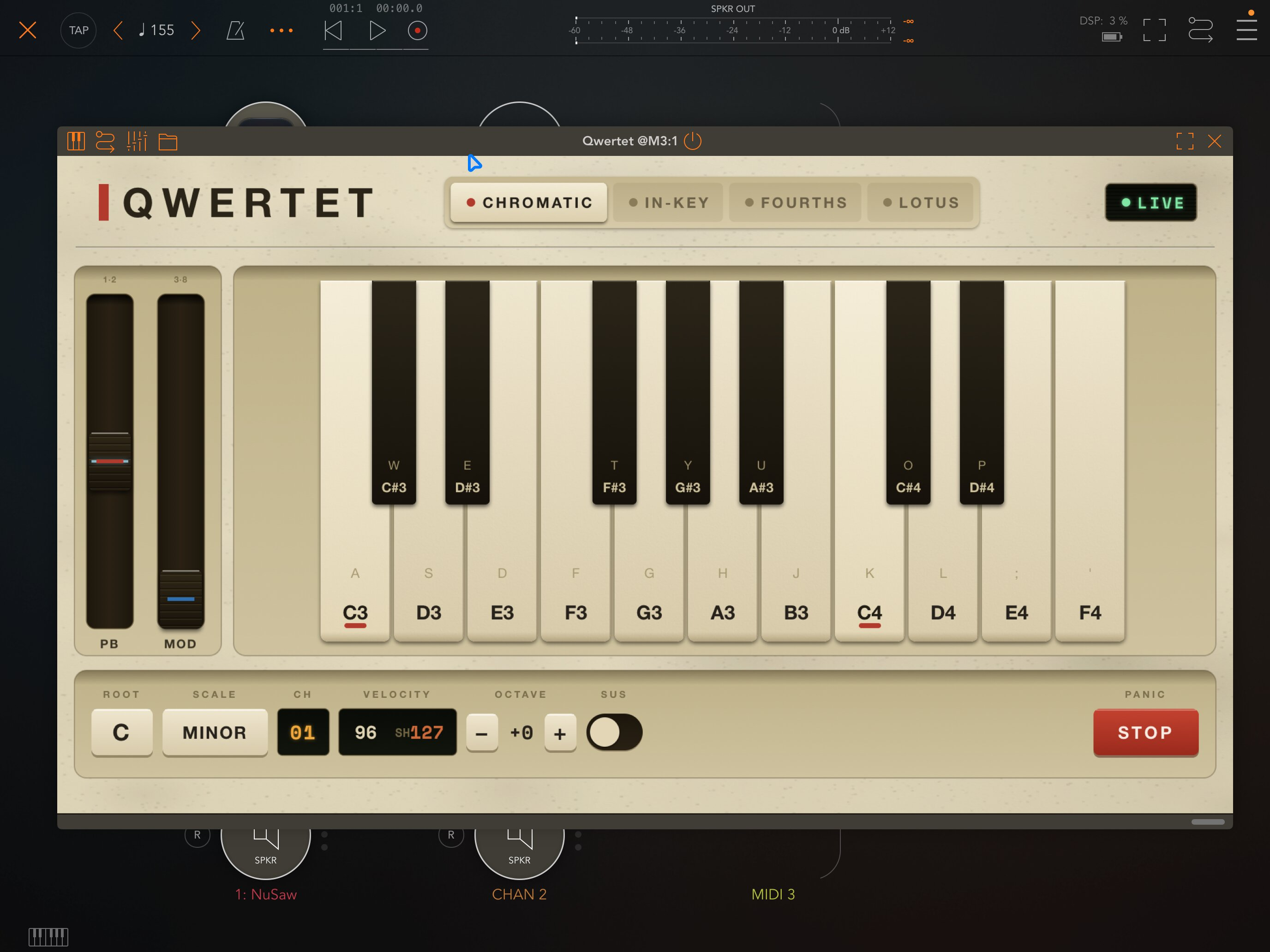
- Use your QWERTY (or QWERTZ, AZERTY, Dvorak) keyboard as a chromatic piano layout;
- 1.5 octaves
- pitchbend (keys 1-2)
- modwheel (keys 3-8)
- octave jump (-/+)
- sustain (space)
- multiple velocities (hold shift to toggle)
But there are some additional modes too (toggle through with tab), some based on my experience with the lovely Ableton Move, others from a very flowery synth released last year:
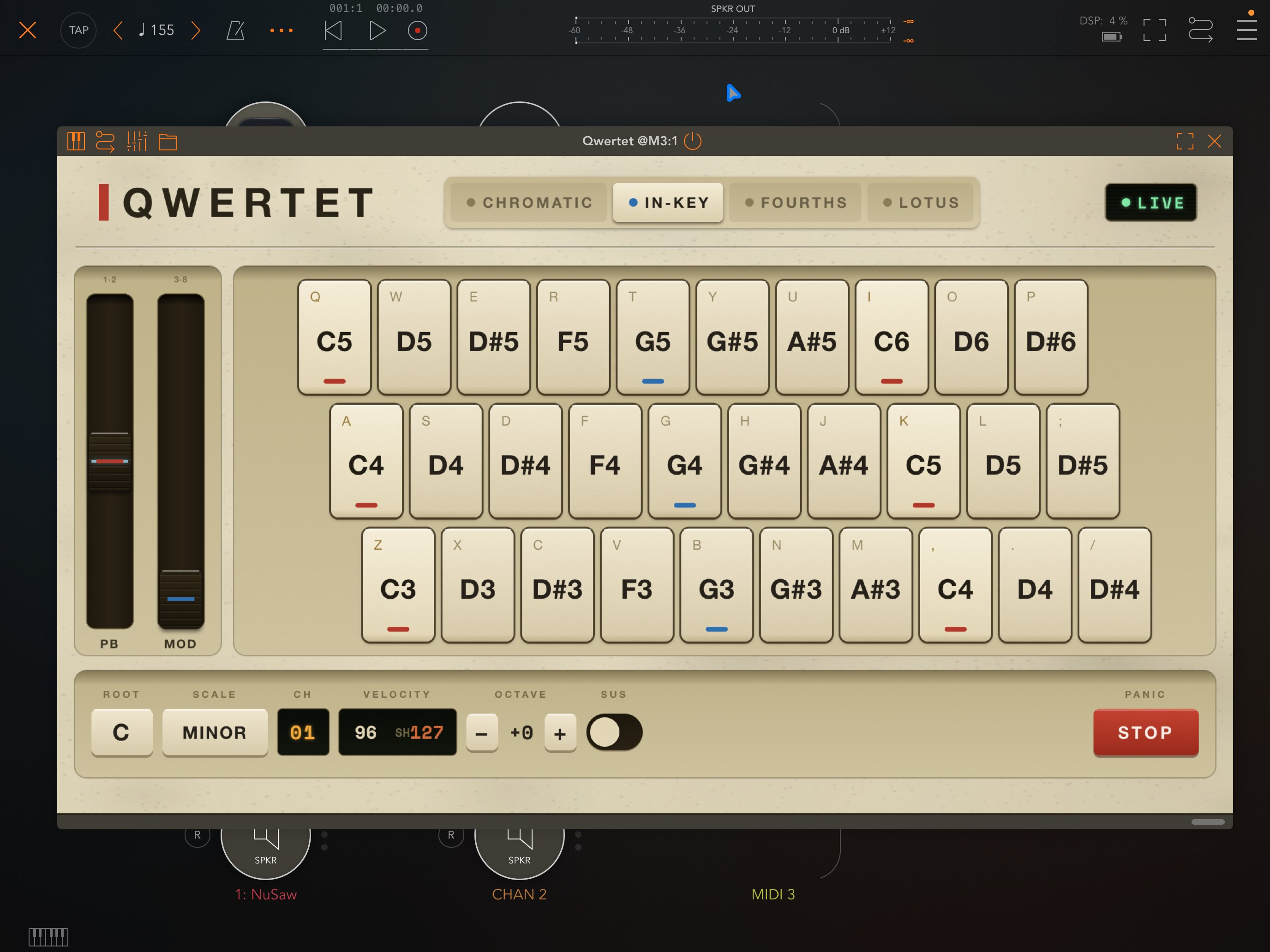
- In Key: three rows of consecutive in-key notes, making noodling always sound good
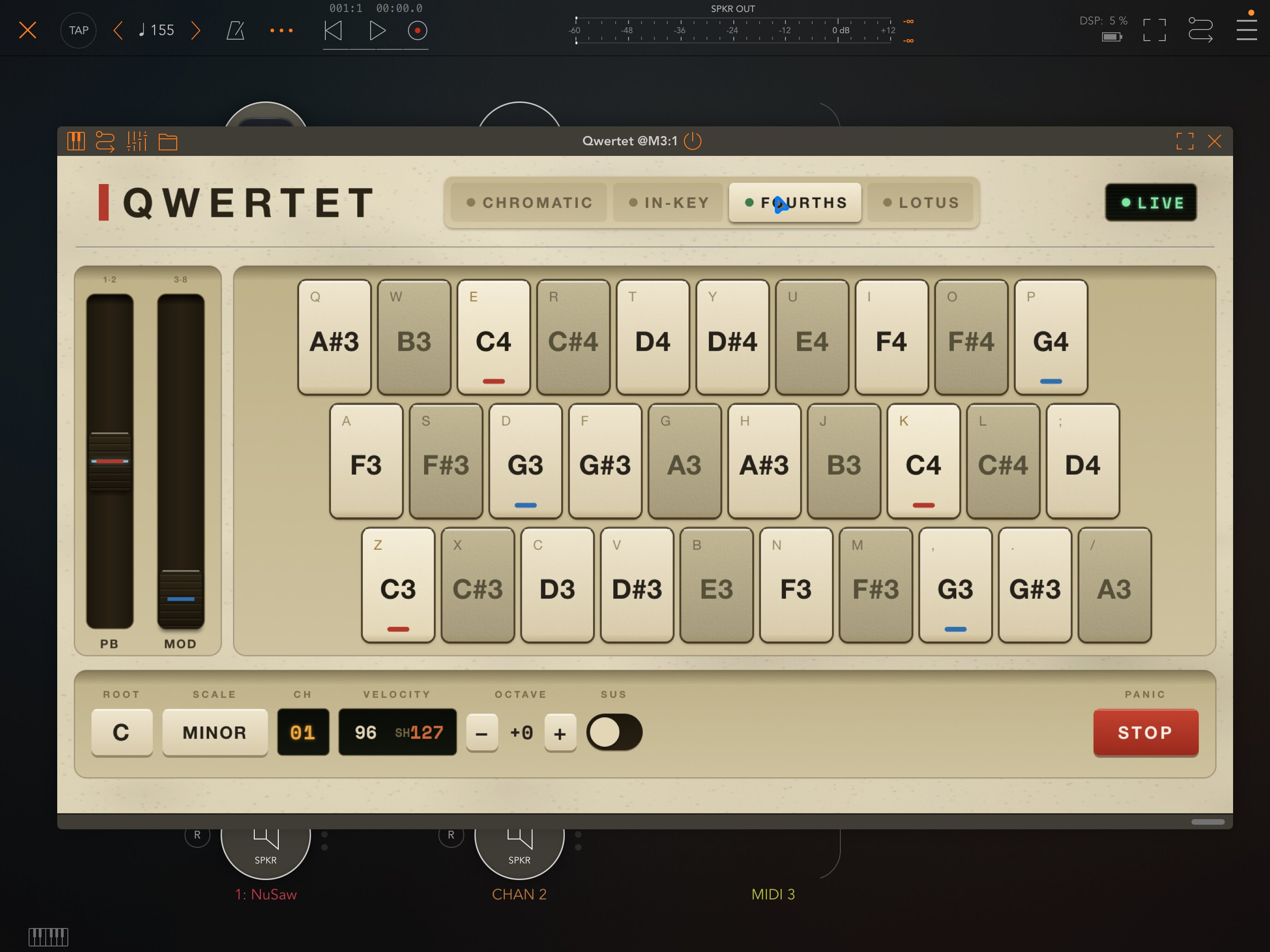
- Fourths: three rows arranged in a fourth offset grid, letting you transpose chord shapes across the musical range without changing your hands
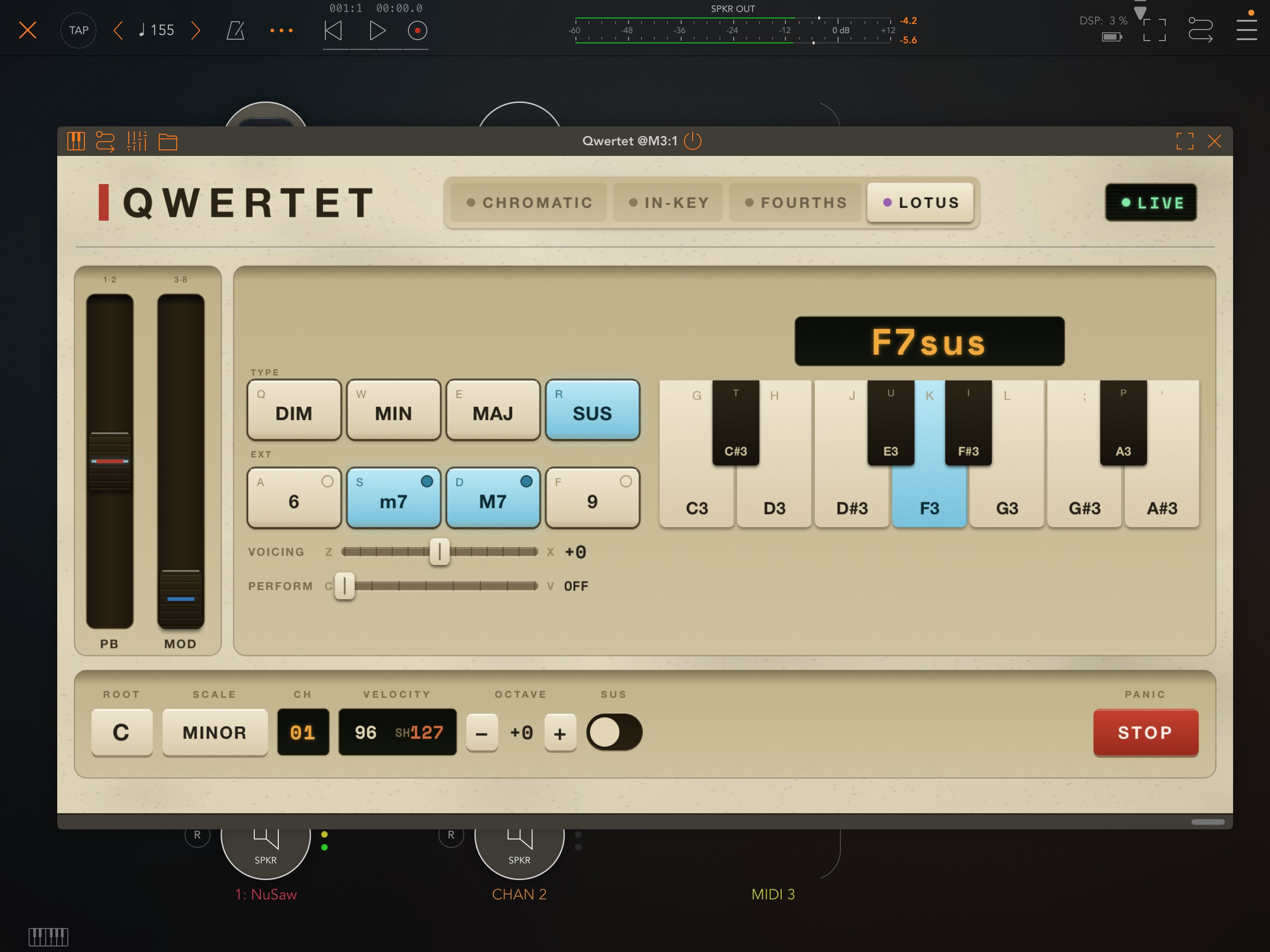
- Lotus: a chord machine letting you choose a chord shape, extension, and root note, alter voicing and add strum / performance modes for some nice chord generation
As a standalone app, it will expose a virtual midi device available for other apps.
It all goes out over a MIDI OUT destination (with a selectable channel), and each mode is touch-accessible too.
I've tested in Loopy Pro, AUM and Logic Pro for iPad, but please let me know how it fares on other hosts! And I’ve only tested with a desktop Magic Keyboard and iPad Magic Keyboard case, so if you have other keyboards or layouts, please let me know what works and doesn’t.
I’m still trying to get the best focus detection: if you multitask away from a host and back you may have to tap into the plugin to re-enable it.
Happy for feedback! This solved a pain point for me, so hope you like it!
Comments
The complexity of specific chords can be limited by any qwerty keyboard, as most have a limit on how many (and sometimes which) keys can overlap. Here’s a little site to test your keyboard if you think something isn’t working right:
https://charles.pizza/apps/qwertet/nkro
Plan to make this prominent in the app store too, so folks can validate before purchasing.
@charlesv Please do consider adding a classic 'Tracker Layout' to Your app/auv3
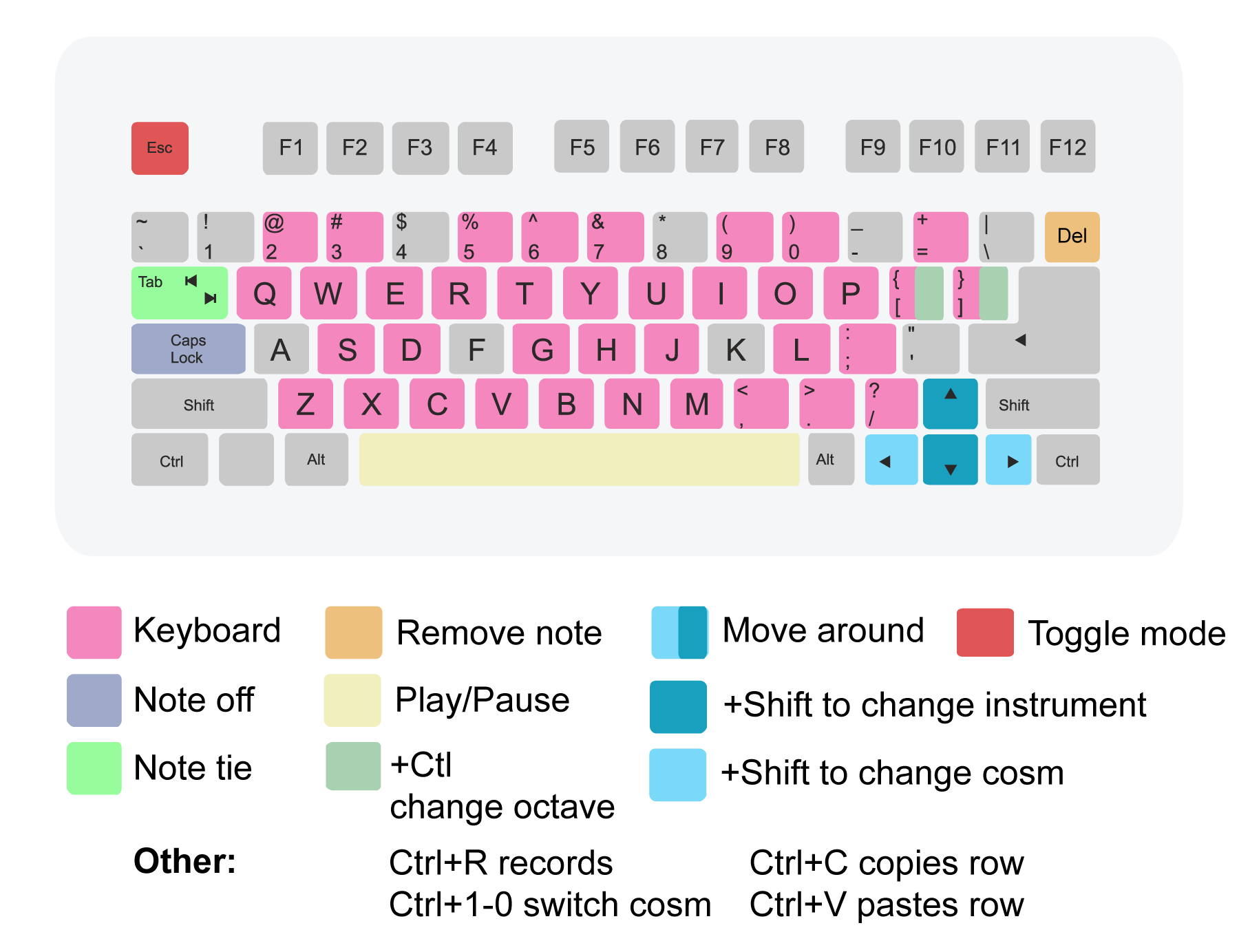
Z is ex. C2, Q is C3, S is C#2, 2 is C#3, X is D2, W is D3 etc.
@Samu I kept the num-row reserved for mods (pitch/mod), but will think about if there’s a layout to support it all / a toggle
Just pushed a build with a 3-row / 4-row option. I think it might be a little confusing, but let me know!
New build up:
Noticed 2 things:
1. Doesn’t work as an AUv3 unless its UI is open.
2. I just set it up in AUM sending to pianoteq, played from my (fake) magic keyboard. Works ok until I add an FX app. Then immediately stops working. Deleting that instance of Qwertet and loading a new one is the only way I can get it to send midi notes again.
AUv3 parameters aren’t exposed
AUv3 parameters aren’t exposed
In general, the plugin has to be focused once to get text input - some hosts like AUM seem lke they drop focus when there’s a new plugin. Not a way around that, unfortunately, but if you’re using it, tapping into it to give it focus isn’t too out of the way, I hope.
It should save state with a document; what parameters would you expect to be exposed? Chord/key, “mode”? It felt weird to automate a controller
I tried a few different ones, they all caused the same problem. If the FX app was opened before loading Quartet, there was no problem. Tapping the Qwertet UI doesn’t fix it
Chord/key, “mode”? It felt weird to automate a controller not weird to automate a controller haha, might want to use an LFO on voicing or strum for example. In general, always assume that there will be people here who want everything exposed, just expose them and let ppl figure out the use cases pls 😘
I can’t reproduce this in AUM but will keep trying
Thnx
New build with:
And even more:
• Renamed LOTUS → CHORD
• New AUG (augmented) chord shape
• Voice-leading in CHORD mode: chords glide into each other instead of jumping to root position (toggle with N or the button under the keys)
• The CHORD keyboard now shows the notes of the chord you’re playing, including ones voiced an octave up or down
• Several fixes to keep the hardware keyboard captured in more situations. Please report any case where it stops responding (especially after typing in another plugin or resizing the window)
Kinda like the NAM loader tucked away in StudioCamera: I don’t have much use for the QWERTY keyboard stuff in the collection but the LOTUS/CHORD controller is fantastic imo. Super playable, both for live performance or feeding something like Helium. Well done sir 🤙
Cool, interested in trying this.
Does it work with BT query keyboards?
Happy to see this works on macOS!
This honestly is an accident; I haven't been focused on MacOS at all since most desktop hosts already have a "key typing" mode. But do you find the alternate layouts useful on desktop? What hosts are you trying?
There an option in AUM that lets you show a plugin and put it in front. Could that be bound to a key to “solve” to focus issue.
@audiblevideo as far as I know those are parameters that take an external control for toggle, not something the plugin itself can trigger, but I'll take a look! We won't be able to get around "plugin must be open and have captured focus", though - that's just how text capture works on iOS.
Very, very cool. The Chord mode is great. Can this be used with a MIDI keyboard as well?
I would love more ARP options (down, up/down for starters). It would also be interesting to have some kind of random voicing variety. It’s great to see something like that “flowery synth” on iOS. Very playable.
For now, no, this is really designed for qwerty + touch – I haven't thought of a way to map MIDI IN with out confusing things with the keyboard mapping, I think, but maybe a dedicated chord app would do more
Edit: Chordtet???
A dedicated Chord app would be very popular, I suspect. But perhaps you could have a toggle between QWERTY and MIDI mode? And in the latter mode, the in key keyboard could be mapped to white keys, or nearest, etc.
I think not for this app! Its focus is for using QWERTY keyboards, but a dedicated chord app does sound like it might be in the future... I may dial back some of chord mode in QWERTET to let it be more focused, anyway.
Nooo, pls don't dial that back, that's the best bit
@Gavinski all the more reason to be its own app where it can have all the bells and whistles it needs?
I mean it's your app but nah, not a fan of that decision
Bug report:
In Chord mode, the Db key is on the T, when it would make more sense on the Y key. This would also free up the T key to trigger the AUGmented chord, instead of B
@mistercharlie already on it, good eye! cramming these into qwerty is an ergonomic...puzzle