Loopy Pro: Create music, your way.
What is Loopy Pro? — Loopy Pro is a powerful, flexible, and intuitive live looper, sampler, clip launcher and DAW for iPhone and iPad. At its core, it allows you to record and layer sounds in real-time to create complex musical arrangements. But it doesn’t stop there—Loopy Pro offers advanced tools to customize your workflow, build dynamic performance setups, and create a seamless connection between instruments, effects, and external gear.
Use it for live looping, sequencing, arranging, mixing, and much more. Whether you're a live performer, a producer, or just experimenting with sound, Loopy Pro helps you take control of your creative process.
Download on the App StoreLoopy Pro is your all-in-one musical toolkit. Try it for free today.
Comments
Fishtail TestFlight update — B338 is live
Kia ora everyone — thank you so much for testing Fishtail. I honestly didn’t expect the first 50 places to fill so quickly!
B338 is now available through TestFlight. This is a focused interface-stability update addressing:
sideways page movement at normal zoom;
difficulty grabbing some sliders;
occasional jumping when selecting Section Arranger cards or changing settings;
inconsistent Arrangement and Ticker time-signature menus.
One clarification: Pulse and Ticker are independent reference monitors. Pulse provides the reference pitch, while Ticker previews tempo, swing and feel in its own eight-bar meter. They aren’t part of the generated take and aren’t expected to match it bar-for-bar.
I would especially appreciate people retesting Fishtail in Loopy Pro and other compatible AUv3 hosts. If anything still jumps or a slider refuses to grab, please tell me the control, device, iOS/iPadOS version, host, orientation and zoom level if possible.
Existing testers can update to B338 in TestFlight. I’ve also opened another 50 testing places:
https://testflight.apple.com/join/sW8tq4BE
Thank you again — the feedback is genuinely helping me make Fishtail calmer and more reliable.
Ngā mihi,
Amy
Also, I had a comment - that maybe the selection menu’s could be improved? I want her to be solid and reliable, and remain accessible to all users with different needs - could I ask for a poll of opinions about this? Are there any particular menu selections that you find annoying - or difficult - or you think could be more solid? Look better? I am not sure if I need to change them or not. I would be curious to think if anyone has opinions or notices these things, or has ideas for me?
I’ve had some really good constructive feedback from Beta testers - thank you!
Also, OcularDebris wants to do a final production pass in terms of the design - setting it like porcelean - or ceramic - so it is not so apple glass looking - She read some of the feedback too and appreciated it as well thank you testers!
I am going to be working on this over the next few days I hope - 🤞
🤘👽🏴☠️
Ok... Fishtail is going into the kiln soon. I have added a don't interrupt playback when regenerating feature which I will add for testing when stabilised. Has anyone verified the CV outputs? I have not verified all the different formats of output. I think I will remove that capability - unless people really want it - or someone can say they have tested it to see if it works well. I have a Moog Sub Phatty - but I would like it tested on more analogue gear before I feel comfortable adding it into the final build - does anyone have thoughts about this?
Kia ora kia ora!
Thank you to the testers who helped me with this! Fishtail should be available for Mac OS soon - Apple have approved it. And the iOS version (I hope) will not be far away. I priced the Mac version at 15$ and the iOS version at 5$ as a starting price to try and get people on board and using it. Any testers, please email me, and I will get you a code for a Mac and iOS version you can use - as a small token — and gift to say thank you.
I really appreciate all of your feedback - fishtailmidi.com is online - Fishtail - I don’t think it is in the apple App Store yet - but the mac version is approved so should appear soon.
I hope you all can use it to make music you like.
Ngā mihi nui,
Amy
this app is finally released. looks so interesting, and a bit intimidating. $5 is worth the gamble to me. about to purchase soon.
Anybody care to stop me, or point out anything I might need to consider?
I did review the thread. It seems the development of the app went well, feedback was incorporated, massive UI redesign, Dev very present here on the forum. Seems like this app is a winner, but you never know until you actually try it for yourself.
Let us know how you get along!
I played with the beta for a bit. Seemed cryptic at first because I’m not trained in music theory, or even a musician for that matter. Yet, I was eventually able to figure most of it out and decent results.
At first I assumed it was using AI based on the use of the term “Generate” - I was going to pass because I don’t want a push button AI/LLM/ML to just create something for me based on being trained on other’s work.
however, the description says explicitly that it’s not using AI to generate and that it’s based on music theory algorithms. I find this much more acceptable and may pick this up while it’s on launch sale.
Need to take another test run to confirm my first decent results weren’t a lucky first try fluke.
Kia Ora, Amy
I imported my first FishTail MIDI file into StaffPad and assigned instruments to the treble and bass clefs that uploaded.
I hope you do enjoy it. Sorry if it seems intimidating. If you want any help with it - feel free to send me a message.
Thank you for sharing that track McD! That is really special! I think it sounds lovely!
And, not it's not AI generation - it is a collection of algorhythms
Here's a track I made - that I think turned out quite special -
that sounds really nice. finally hear some structure and restraint in the results. the demos so far seemed a bit chaotic and formless for an app that specifically focuses on form and structure in the description. i would like to hear more demos highlighting form and structure. for myself, that is the most interesting feature of the app.
also, I am really curious about the mandala-like panel with the rainbow blob orbited by smaller nodes- is it just for visual feedback, or is it a control panel? If it is a control panel, what does it do?
I don’t know if you are familiar with StaffPad but it requires an Apple Pencil to input notation…
But your apps MIDI output imports and create pages of notation to use for parts: rhythm
Patterns and harmonic structure. That can come in very handy because I can just change the note head by sliding them to a new pitch or transpose parts by any interval.
Not that your compositional ideas are off… it’s just leveraging your work to allow me to compose
With less handwriting frustration because complex notation is a bitch to render easily. Go figure…
It’s always something.
I made another one today and selected 7/8 or the time signature and the MIDI imported as 4/4. Are time signatures encoded in the middle files? It might be an issue with StaffPad NOT implementing it. I’ll try other MIDI import apps like Aria,
Dorico, Notion, etc and see if they show my 7/8 intention.
Time signatures for me imported into Logic in my testing. Some other apps did not support them. Was tempo map/lattice on or off in the settings? I am not familiar with StaffPad.
How people use Fishtail is - up to them - who knows what people can do with the MIDI or something unexpected I didn’t think of with it — people always surprise me and reality is much more curious than fiction!
Does other midi with time signatures in it import into StaffPad?
That is an orb/planet/sun that OcularDebris made - they were making the colours of the musical notes mix together like a glaze on ceramics. The planets move with intonation. Initially we tried adding screen motion to it and push effects - and it was a little distracting, we wanted to keep it more calm… The glaze keeps building as you play longer - which we quite like
Also - there are a bunch of demonstration tracks I created on fishtailmidi.com - there is a listening window — 7 tracks… I have a few more I made in testing that I quite like - there are (IMO) some nice tracks on the website demonstrating Fishtail
@amy_cin Have the app, and -as ever- am very optimistic, but would very much like to watch a video by someone cleverer etc. Even two minutes would help
Listened to the whole playlist (8 tracks) on the website. Definitely a lot of variety there and good sounding examples. Thank you for directing me to that playlist.
Just purchased, wish me luck. 🤓
Thank you for testing… it’s obviously NOT an issue for your software.
StaffPad is lovely for iPad users to render music notation. Its key value is the serving of samples per note that match the articulation indicated in the score the user generates. Unfortunately the Muse Group wanted that capability to be added to the massive Muse Score update so they purchased/merged? StaffPad and have not done any updates or maintenance in the last year or two. StaffPad I will admit has a lot of areas that frustrate new users so most recommend NOT purchasing the app. There isn’t a Muse Score version for iPads that include the ability to render
3rd party libraries and map notations (Pizz, Staccato, Legato, etc) to the correct sample.
I’m hoping one of the other notation apps improve their products to address this gap in the market for iPad music makers.
All I have done so far is:
NOTE: “Export Channels” also generates a MIDI file and does what you’d expect: 4 channels that
StaffPad labels S-A-T-B (Soprano, Alto, Tenor, Bass).
So, far I was using EXPORT TAKE and all notes are converged onto the traditional Piano score
With treble and bass clefs. So, I have not rendered anything the truly mapped parts with single note lines/melodies… that will be fun now that I understand the benefits of EXPORT CHANNELS.
I’m sure there are more discoveries and I just opened the Manual… I rarely read manual unless I’m stumped.
I hope others follow along and use your app as a very serious music generator app… unlike anything else on iPads.
I can check.
The value of an iPad app for me is the amount of interesting time I can invest in learning how to use it for interesting results. This is definately going to be a great use of time.
Y> @JohnnyGoodyear said:
Hi.
There are two videos on YouTube - YouTube.com/@fishtailmidi
I am intending to do a demonstration video explaining the settings - and am planning on that.
Thank you and go well - I hope the videos I have help in the mean time - also - please feel free to reach out to me via personal message or email if you want help with anything or have specific questions.
Thank you very much, I hope you enjoy the app. I would love to hear any music you make with it!
Thank you for investing time into this. I used to use Sibelius for notation - but that was - gosh - 20 years ago and time has moved on. I remember finding it time consuming lol!
Yes - change some buttons - make some changes to the arrangement and generate - the - worst thing that can happen is you can end up with weird noises! I think perhaps a selection that a lot of people overlook is the Cadence setting - I put 5 different types of cadence in, and the type of cadence affects generation - as the music actually writes itself backwards and forwards at the same time - then does some levels of checking to make sure it is ok. This is how I conceptualise music when I write, and how I have been taught - to write the end of a section first - so as I know where I am going.
Hopefully you find the results satisfying. Go well - and thank you for letting me know how things are going for you.
Yes - I find iPads great too - I started doing music on one a year or so ago, and was surprised at how well they work for this - and - things are - generally - not too much friction - and the things you can do with the software these days amazes me - I think people make amazing music iPad software - and I love it - that is what inspired me to want to put Fishtail into iOS somehow, I wanted to work with it and the other cool tools available on the iPad.
For those playing with the beta or have already purchased it… and you’re trying to figure out how to make it do much… there’s one screen, and one button that will open this up to you and set you off on using it effectively and easily.
I’m not at my machine right now, but I’ll point you at the button and panel I’m referring to after I get home later
Ok, go to the “selection definition” panel and hit the plus + sign to create a new one. Then make adjustments (or just leave everything default) then hit generate and then play and hit the repeat icon - and connect it to whatever you want it to play - so that I and the rest of it will probably make plenty of sense, ie. Change settings and generate again - go back to takes and/or export them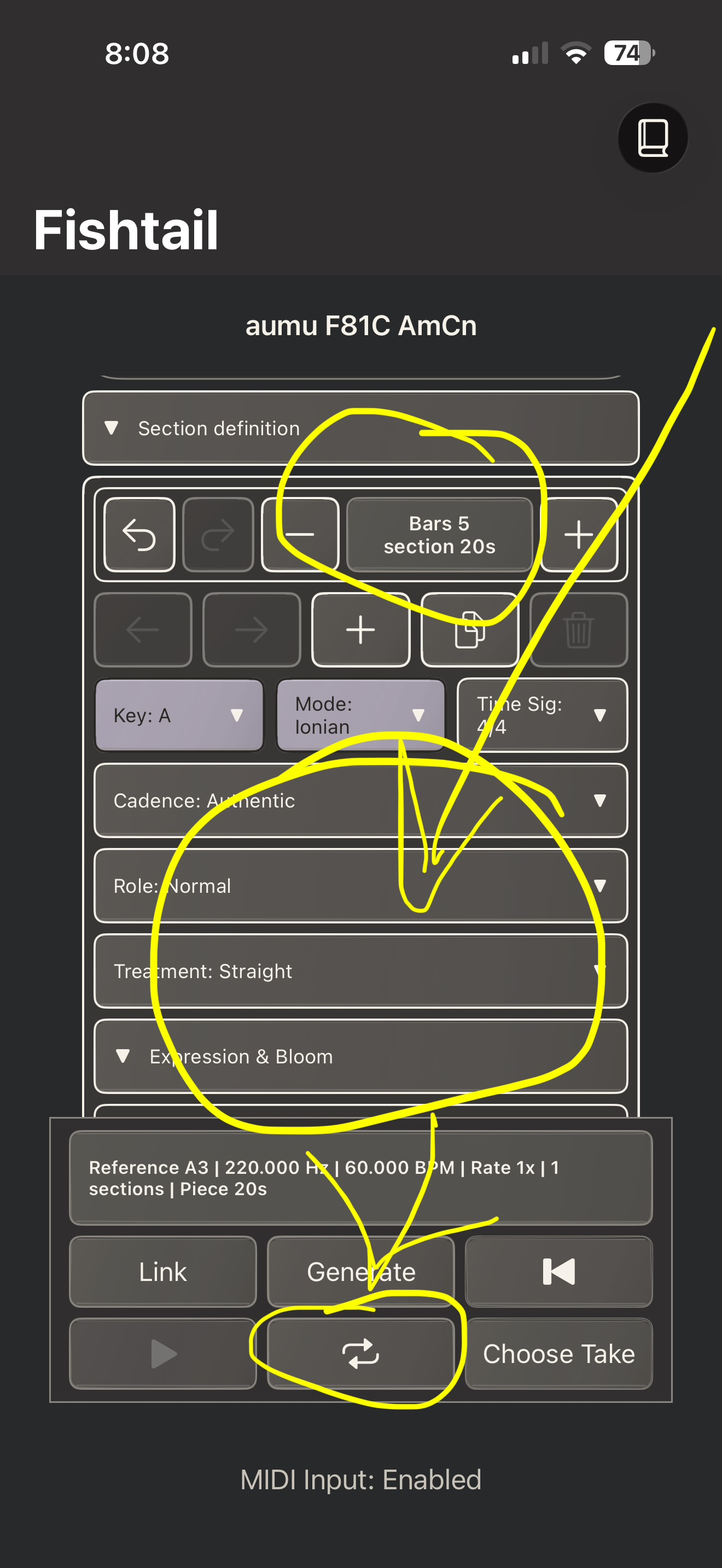
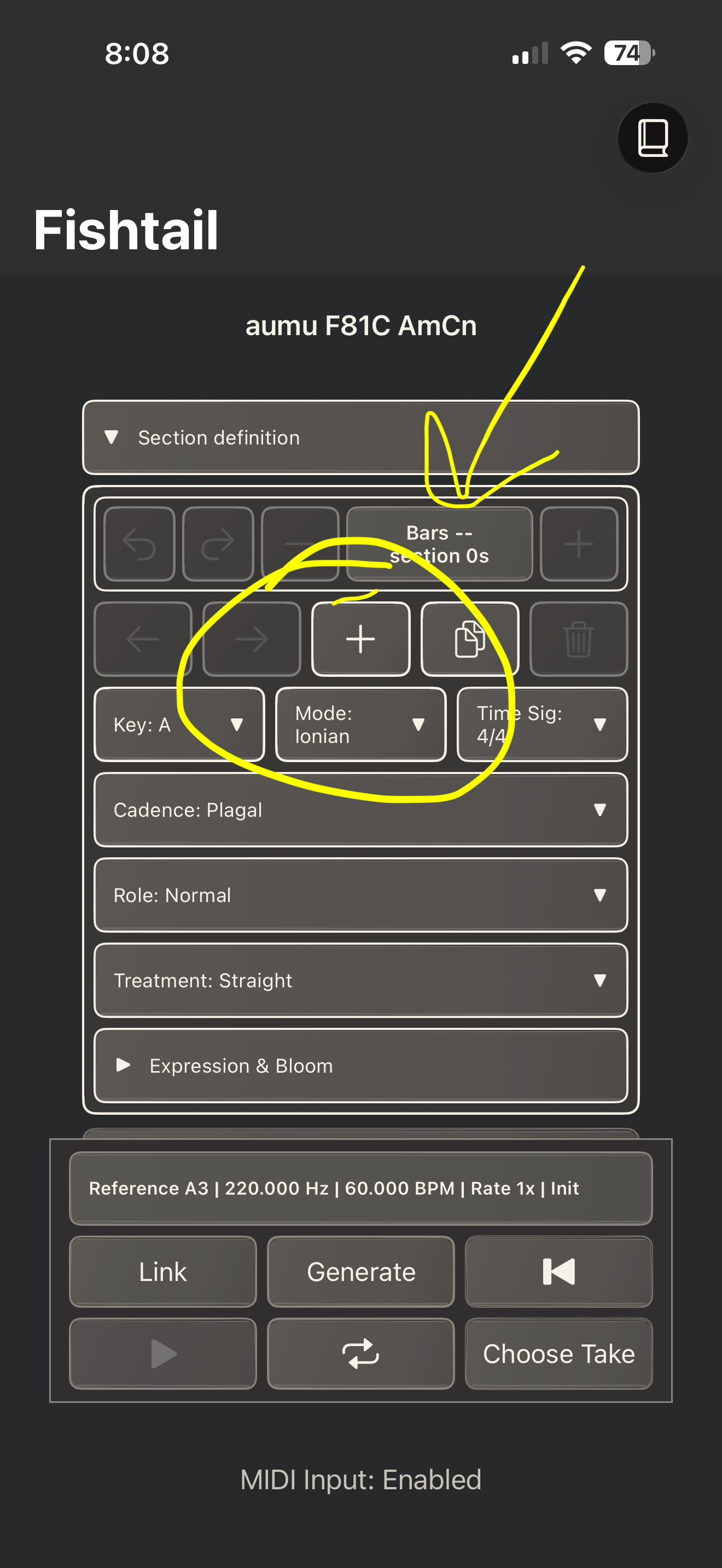
Thank you - yes - the dice are for quick and easy randomisation - they are gently weighted - and the calm/varied slider controls their variation.
The Section editor and bloom settings are for when you want to program Fishtail to follow your own plan and path - that is what I use the most - but for quick testing the dice are helpful. Thanks for your screenshots and help Skiphunt
UPDATED COMMENT: I have a bad habit of reading the thread sequentially and writing replies that are addressed a few comment down the thread. Than I go back and see my comment is out of sequence.
Can I guess? Is it “roll the dice”? Or maybe even better “plagiarize”… I like to use the “Plagal Cadence” option to get an Aaron Copland “Americana” vibe.
Carry on…
NOTE: The User Manual starts with he instructions to implement Fishtail in AUM.
I set it up with 2 instances and 8 targets and tweaked the MIDI Clock Factor of one instance. Good fun. An exceptionally powerful MIDI Generator. It will take a lot of time to master its power.
S-A-T-B Flutes targeting 4 different Flute Instruments in HALion Sonic Play which offers 2,000 instruments of Steinberg (Yamaha?) quality for $15 on sale.
Kia ora to the users who identified that Fishtail is not exporting time signatures with MIDI - I am now putting in place a fix, and as soon as apple approves it - it should update your apps. My apologies for the oversight
Thank you for posting music here - I really appreciate it!
hello @amy_cin
I have been working with Fishtail quite a bit today. Read the manual, did a lot of experimenting. I have a few questions about workflow and features.
1. You don’t actually edit a take, you always generate a new take with the edits. Is that correct?
2. You cannot get rid of specific generated takes. You can only delete them all by starting a new project. Is that correct?
3. I do not know what Bloom is, or how it is controlled or generated.
4. I do not know what Shimmer is, or how it is controlled or generated.
5. When using the ping-pong playback option, I expected the order of the sections would ping-pong, but the sections themselves would still play forward. The way it works though is when playing the sections in reverse order, the sections themselves also play their notes in reverse order. The playback does not sound smooth when in reverse. Is this the way you intended it to work?
Finally , in the manual, in the opening paragraph of Chapter 7 on Generating and Retaining Takes, It states “After a take exists, selecting Generate can open a sheet titled Regenerate” Also, in the last paragraph of this same Chapter 7, in the section titled Make a different random form, it states “After a take exists, selecting D4 or D20 can open a generation-choice sheet. I am confused as to what these two statements are referring to. No sheets open in either scenario as far as I can tell, but I’m not sure what is supposed to happen.
Picked this up this morning cool app.