Loopy Pro: Create music, your way.
What is Loopy Pro? — Loopy Pro is a powerful, flexible, and intuitive live looper, sampler, clip launcher and DAW for iPhone and iPad. At its core, it allows you to record and layer sounds in real-time to create complex musical arrangements. But it doesn’t stop there—Loopy Pro offers advanced tools to customize your workflow, build dynamic performance setups, and create a seamless connection between instruments, effects, and external gear.
Use it for live looping, sequencing, arranging, mixing, and much more. Whether you're a live performer, a producer, or just experimenting with sound, Loopy Pro helps you take control of your creative process.
Download on the App StoreLoopy Pro is your all-in-one musical toolkit. Try it for free today.
multiple instance of Gadget in Aubiobus 3

So here's what I'd like to achieve- run 3 instrument tracks in Gadget and be able to control gain on each of these via 3 side-by-side gain sliders in the Audiobus 3 app. So for example, AB slider one might be assigned to Glascow on track one, slider 2 to Salzburg on track two, etc. I know that each Gadget track can be assigned to a different Midi channel, and I think (pretty fuzzy on how this would work) that Midiflow could be used to help achieve this.
Is what I'm asking possible, and if so a walk-through on how to do it would be much appreciated!
Comments
You'll need an app that can send midi cc. You have many options:
Modstep
Lemur
Touchosc
Midi Studio
Midi designer
I recommend Modstep.
If I take what you’re saying literally “in the Audiobus 3 app”, then it sounds like you want one of two things, neither of which is possible at this time:
I can highly recommend SonicLogic for its simplicity and tight Audiobus integration. All the other apps recommended above are great and super-powerful but a bit further off from what you said you were looking for.
You’ll still need to switch screens though.
While it doesn’t fulfill the original goal I nevertheless will throw KRFT in as another cool Gadget friendly midi controller.
Oh damn! So right!
Does Gadget yet support mixer automation via CCs? Would be new to me?
Seems that maybe one of the cheap Korg physical controllers with faders would be the easiest way to control Gadget while in other apps, at least for now.
I forgot Xequence! So sorry. Each gadget has its own master volume automation. It's virtually the same.
Haha, thanks, we don't have an advertising agreement (yet!)
It's not quite the same though... you often have effects in the mixer channel whose sound depends on the input level... Compressors, Distortion... it's too bad that none of the mixer controls or the insert effect parameters are MIDI controllable
Indeed, and no master fx. Gadget for Mac does put that demand on them I think if they want to be seen as a serious competitor and therefore we should expect to see more midi implementation over time. I think.
Legitimately though look at xeqence too, might be better than Modstep depending on you're workflow preference. And Krft or SonicLogic etc.
Thanks for the responses. I have many of the add-ons available for Korg module and really like using them in a live situation. Would be nice to be able to use more than one at a time but it doesn't sound like that's currently possible.
I do have a Korg nanokontrol. I'm not wedded to audiobus, but I thought that might be the best way to achieve what I'm after.
Cool. Another thing you might want to keep in mind is the Ableton Live export feature. If you are building a live performance set Ableton on a laptop would be the most sturdy and flexible option.
Without Ableton, what's the simplest way to achieve my goal using Gadget, NanoKontrol and Midiflow? If anyone could walk me through the steps, it would be much appreciated. Trying to keep is a simple as possible so I can travel light
Maybe thi will help?
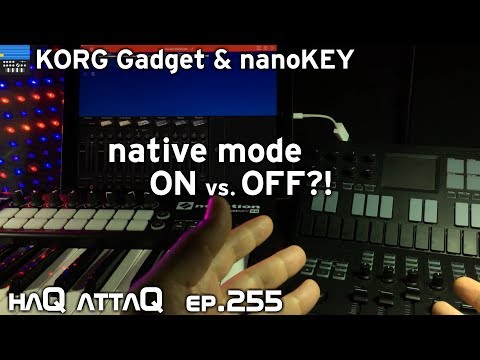
Exactly what I needed. Thanks