Loopy Pro: Create music, your way.
What is Loopy Pro? — Loopy Pro is a powerful, flexible, and intuitive live looper, sampler, clip launcher and DAW for iPhone and iPad. At its core, it allows you to record and layer sounds in real-time to create complex musical arrangements. But it doesn’t stop there—Loopy Pro offers advanced tools to customize your workflow, build dynamic performance setups, and create a seamless connection between instruments, effects, and external gear.
Use it for live looping, sequencing, arranging, mixing, and much more. Whether you're a live performer, a producer, or just experimenting with sound, Loopy Pro helps you take control of your creative process.
Download on the App StoreLoopy Pro is your all-in-one musical toolkit. Try it for free today.
OT: Suggestions? Prezi, mind-mapping or what?

Son is 16 and film-obsessed. We started working on connections between things on an old whiteboard (The Godfather ---> Lost in Translation etc), partly as an education for him (he will be applying to film school) and partly as a motivation for him to watch a wide variety of films.
Anyway, soon we had so many connections (thereby the Kevin Bacon game etc) that we ran out of room. I have a couple of mind-mapping apps that I thought I might recreate the thing in, but while there are loads out there the ones I have (Headspace, XMind) look very nuts and bolts basic (in appearance if not functionality)/ Which led me to thinking about maybe using Prezi which I've mot properly got into previously BUT sense might be a good option.
Any Prezi users with insight? Or do you use other mind-mapping apps you really like? All thoughts welcome.....thanks so much.
Comments
WikiLinks is really good:
https://itunes.apple.com/gb/app/wikilinks/id990956008?mt=8
OmniGraffle is the top of the line (and priced accordingly); I use Pro, but Standard has all the key mindmapping features, and if you want more there's always the still more feature-rich (and expensive) desktop version.
https://itunes.apple.com/gb/app/omnigraffle-3/id1164289776
Interesting (and there went an incredibly quick half an hour just bouncing from one thing to the next...:)). Not sure it's the perfect thing for the end result, but it'll be great for the research and fun and whiling the rest of my life away with. Thanks for putting me on to it. I think
You weren't kidding about being pricey (for the iOS world anyway ....BUT it looks really muscular. Going to have a serious investigate....
I've been using iThoughts for mind mapping and have been very happy with it.
Thanks for the nudge, will take a look.
I use realtimeboard.com for collaboration with my team at work. Not sure if there is a free offering though.
Will take a look. May not be justifiable for young fellow-me-lad, but with my grown-up trousers on we are just starting a new project with people in OH, NY and CA for which this might be a good fit, so a serendipitous thank you etc.
MindNode or iThoughts are great. But honestly nothing beats an 11x17 sheet of paper and some nice pens.
Here’s a noodle i did a while back...yeah i want to write a graphic novel at some point 🤪 but maybe i should finish an album first 🤫🧐

Your creative nature will strike a chord on the sheet which will manifest your inner dialogue in ways you did not know you possessed.
That's a GREAT piece of possibility/work!
But for the task at hand we would need a piece of paper the size of the Sistine Chapel ceiling.....which is why I was thinking Prezi and the ability to jump from one thing to another. WikiLinks is absolutely pretty cool, but not for the 'what can I do with this matrix now I've made it...' Maybe the perfect app is out there yet....
I would like to see your Graphic Novel delivered in Prezi style please. And soon
Here’s a quick mindnode example. I really love this app
Sorry for spelling errors 🤪
That's cool. AND TIDY. Certainly more readable than the kid's first scribbles. BUT I do love his concept which is film as seen through the lens (sic) of the fact that there are two Steve McQueens or were.
I use Prezi a lot. I dont think it would be as fast for mind mapping as some of those above.
I'm sure you're right, but I'm thinking more of the end product. Did you find Preszi a steep learning curve or not so much?
Not at all really. And okay, if you want a real polished end product, you can put things where you want and such real easy. It is pretty drag and drop. You'll fiddle with fonts, sizes, and such more than some of the others, because it is for showy presentation.
I mainly use it because I present a lot of, eh, not 101 stuff. I train other lawyers. So Ill let the group direct the time. “What subtopics do you want? I have slides for 50 and we have time for 20.” It is easier live to zoom in and out and go to where you want. So I dont follow a map, more zoom in and out.
Hmmm. Thank you. That's actually even more helpful that you might have known. I particularly like crowd-driven sessions with at least the appearance of me being led by the nose etc....Thanks again.
I like MindNode too. I use it to map out ideas, but found I use it as much for laying out the studio and home audio systems. Very helpful if you live in a self-induced construction zone. It’s also updated frequently and keeps up on latest/greatest features.
A few of these and a pigment pen could be a nice way to have a personal Sistine Chapel in his film school apartment/dorm, with a nice reminder and work in progress of why he wanted to go:
https://lifehacker.com/cover-a-wall-with-a-giant-whiteboard-for-under-15-1587162959
Post-it notes on a wall, whiteboard or sheet of glass such as a window. The post-it notes can be rearranged by any member of the group with equal ease, and the overall investment in modelling a change is very low (almost any other method such as software, or pen, involves investing effort to alter, thus the tendency is to keep things the way they are, which is the opposite force to ideation.)
Very nice. Thank you. Straight into the 'Hacks' folder.....I'm building a new office/studio for myself next year 'out back' and I'm guessing the back wall will be covered with these
Brilliant and simple (much like ourselves!)....
scapple for mac is my fave - the dev also makes scrivener which was ported to ios last year.
Love this project. You're an inspirational Dad, Mr. J. Not tried all that many mind-mapping apps in recent years but I've been using and liking https://www.mindmeister.com/ for a few years. Has some nice features but mainly I love that its UI on both iOS and desktop is very very fluid for quickly spitting out ideas and connections. Free to try.
Maybe you can find something that works well with your big boy and a pen though? I don't own one so no, er, input there.
I'd think for something like a movie map you'd want to find something with support for some amount of metadata. That way, you could start to add stuff like general style or cinematographer or score composer or "long single camera shots" or... and start to reveal those sorts of connections. Though maybe just linking each entry to IMDB or similar would suffice for the personnel connections.
And a request back to you: if in your search you come across an app that 1) allows for regular mind mapping and 2) allows for alternate views using the same collection of nodes, I'd love to hear about it. Example: once you've made a big ol' map of related movies you could flip to a new view and use the same collection of nodes to create a new connection graph. Maybe the first is just the big Bacon web of interconnections but the second might be a set of linear "X begat Y begat Z" type connections.
I guess another way that might work to cover both of those (metadata and alternate connection graphs) would be a mind mapping app that allowed for different connection types that you could toggle on and off. Along with, maybe, an automatic layout mode that responded to the currently active graph.
Damn, there should just be a simple mind-mapping style app that connected to various Internet APIs — IMDB, AllMusic, Wikipedia, Spotify, whatever. Then, when you add a connected node it would start with a little autocomplete style search box to pull up whatever. With something like that you'd get the metadata bits for free.
If it connected to Fbook you could pull an Alice
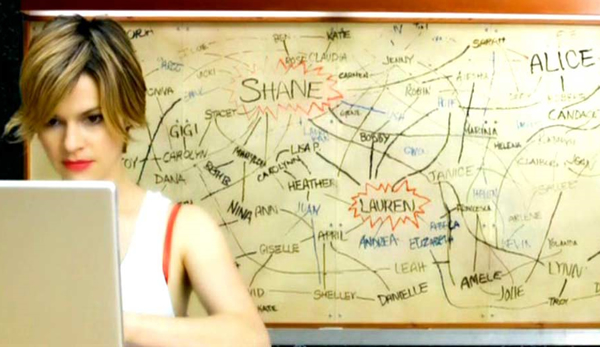
@syrupcore I really like the toggle on/off notion, there are a number of different ways to approach/filter the data (connections, politics, grosses, nationalities, themes and so on and so forth)....it's such a rich field, but then I guess there might not be that many folks interested in this approach to it.....I do like the Wikilinks app as regards throwing out spiderwebs of nodes, but it's not thereafter setup for further depth work.
I really do dig the post-it note approach, but even so there will come a time I would want to dress the beast up a little/share it/transport it....I guess what I/anyone would need next is a more definable purpose that might also be useful or transferable to other people/other projects (and thus make it worth developing). For now it's purely an old man's mechanism to shoot the cinemagraphic shit with a bright young man.
BUT then a friend sends you a link to do with something else entirely and there's this picture from October 68
and you think, but who the hell is that, and after a little more rummaging it turns out that that's Mimsy Farmer who divorced Vincenzo Cerami in 1986 a full thirteen years before he was nominated for the Best Original Screenplay Oscar for the movie Life Is Beautiful.....and you're off, Italo Calvino, Mario Monicelli, the commedia all'Italiana through to commedia dell'arte and another whole section of performance art before the kettle has even boiled for tea talking about Dario Fo and why Mistero Buffo was condemned by the Cardinal for the Diocese of Rome) as "the most blasphemous show in the history of television."
Sigh.
As dear E. M. Forster encouraged us: Only Connecticut....
So it was written in 1st Chapter Guinesses
Check out the Shortcuts app - does just that, allows you to access Web API’s. MindNode also has Shortcuts integration, but I haven’t had a chance to check it out.
https://support.apple.com/guide/shortcuts/whats-an-api-apd2e30c9d45/ios
I use a combo of some of above. SimpleMind on ios then print them out and put on a whiteboard (shower sheets from the hardware store) and use colored post its as things “to do.”
Sometimes will sketch on real paper, take a pic and use it as a node in mindmap. Having most of the map portable and also big and anologue works for me.
The Post-it note approach is good for early stage ideation, as it keeps it low-cost (in terms of revision) and therefore fluid. At a stage where agreement starts to set in you should all take a break, someone photographs it then someone moves parts or all of it over to something more formal, whatever you like, and take it from there.
I'm already elbows deep in different color post-it notes (yellow for Steve McQueen, orange for Steve McQueen), but am worried I might be in the Carrie Homeland zone before the week's out...