Loopy Pro: Create music, your way.
What is Loopy Pro? — Loopy Pro is a powerful, flexible, and intuitive live looper, sampler, clip launcher and DAW for iPhone and iPad. At its core, it allows you to record and layer sounds in real-time to create complex musical arrangements. But it doesn’t stop there—Loopy Pro offers advanced tools to customize your workflow, build dynamic performance setups, and create a seamless connection between instruments, effects, and external gear.
Use it for live looping, sequencing, arranging, mixing, and much more. Whether you're a live performer, a producer, or just experimenting with sound, Loopy Pro helps you take control of your creative process.
Download on the App StoreLoopy Pro is your all-in-one musical toolkit. Try it for free today.
Comments
Good on you, more looper types the better.
Glad to hear it- what you are doing cannot be achieved by ENSO. How is progress? I am really looking forward to this. It’s a great idea.
Cheers
From your description I suppose that you want your recording automatically split into fixed beat lengths, right? Otherwise, pressing the button after the magic moment will give you the whole recording.
Actually Cubasis does this by default if you loop record on a track. It will create a separate take for each recorded loop, and you don't even have to stop immediately, you could just focus on jamming and dive into the loops afterwards.
Note that clock synchronisation to external gear is broken in Cubasis loop recording mode since quite a while, and Steinberg don't seem too interested to fix that tiny bug. If I remember correctly it has been introduced with version 2.2. Maybe they're too busy fixing bugs in desktop Cubase 10?
thanks guys, I'm putting some time into "playing" this, will be tweaking the design and making sure it functions well before I share it.
@rs2000 yeah, I imagine a DAW can manage one use-case for this type of thing, for recording live takes. The problem is if you record in Cubasis, you could have 30 takes to sift through. With a proper instant looper playback, you can keep trying endlessly and just capture the most recent take once you get it right. It might simplify the process for some workflows.
And having some time to play with this I see it more useful in a live jam or performance. Its an entirely new way to think of live looping. Just play and have fun... if you like what turned out, then tap a button and it is instantly looping. This scenario is really what I am designing this for. Stay tuned...
The latest recorded clip is always on top, so all you have to do is drag away one or two of the clips if you want the latest or the second-latest one.
That's why I still prefer Ableton for this kind of sequential clip recording.
Or KORG Gadget v3.7.2.
Cool, knowing this I would say my setup is totally unnecessary in that specific usage. For recording takes just use Cubasis
But I don't want to use cubasis lolol please make this Looper 🙏
That makes at least two of us then. I don’t even own Cubasis and most times I go near a DAW it doesn’t end well so I stick with playing around with live stuff like this.
Me too- though I do own Cubasis. Any chance of an itsy witsy teensy weensy generalised and slightly vague hint as to when it might be coming out?
high five! that makes three of us who will use this ;-)
I'll give myself 3 more weekends to fine tune this... April 6 ?
Yet another Ableton-style goodie I've found that should run well on your old laptop and with your old, no more supported USB audio interface that you were just about to get rid of:
Luppp
It's Linux, it's open-source so that not only means it's purely paid by donations, but it also means that it's easier to either get new features added or add features for yourself.
Home: http://openavproductions.com/luppp/
GitHub: https://github.com/openAVproductions/openAV-Luppp
Video:
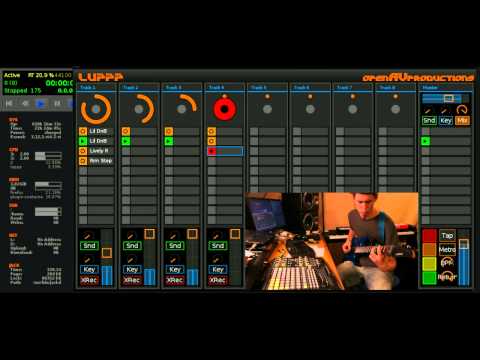
Great- I shall make sure the kettle is on. I really think you could do very well with this.
The people whose workflow involves making audio clips to launch (and there are a great many of them) are going to love this!
Cool app! A little off-topic since I don’t see if or how it does look-ahead looping... but yeah that looks like a great looper for Linux. Reminds me a bit of Mobius Looper, which I played around with on Mac before I found Loopy HD.
This is the default looping for FLUX:FX.
Play a phrase, turn on loop slice and it loops it back.
!! What! Off I go to research the YouTubez
Quick video I just made to show how it works:
There you have it! Thanks @brocoast. I have never looked into Flux:FX before now. It looks like a very playable looper. Can those “loop slice” triggers be activated by MIDI ?
Also, perusing your other posts, brocoast, I saw a thread that mentions Turnado, which has some looper effects that I’ve never really spent the time to figure out. I’ll probably put the time into that before I go out and buy Flux:FX
Yeah. It is Notes C2 to E2 to trigger.
I like this style of looping a lot more than the push a button then record style. It's more spontaneous/less thinking.
Let's contact the developer and ask him what he thinks about the idea, shall we?
Go for it. I never had the time to dive into Linux. If I do ever go back to laptop, it will probably be MacOS for me.
That was meant for people who don't want to spend much money but have some time and an old laptop lying around

Looking forward to see your own looping setup
So did you make it?
Nope.
The dusty old cat enjoys the hunt and mouse chase, but when said mouse is between his paws and he has played with it a bit, he sometimes finds it hard to actually eat it.
So... Fine tuning, making the MIDI Designer patch shareable, etc... that stuff is much harder for me to find the motivation to get it done.
I mean, would you still want this with the other options people have pointed out? (See the Flux:FX posts above).
Also, I just saw another post saying Kosmonaut has this type of effect built-in also https://forum.audiob.us/discussion/33394/you-know-that-retroactive-looper-in-endlessss-that-is-so-cool-well-mssr-bram-did-it-first. (Thanks @MonkeyDrummer !)
If Flux wasn't such a hog on resources I'd try it, but it's been relegated to the dust bin for me. Will give the Kosmonaut solution a try. If you ever find the motivation, I'm sure there's more than a few that would appreciate it. There's already so many toys and not enough time though, so no worries.
Toys and time, yeah. Just realized I haven’t touched this project since March!
One big hurdle that was holding me back was the fact that this tool would need to be loaded initially in Audiobus, then other apps could be added on to the preset. So it would not have been ideal for those who have a complex AB3 setup that they wanted to be able to loop and record.
Since then, both AB3 and AUM have been updated to be able to add on presets to existing presets. So this looper tool could be appended to absolutely any current preset... I’ll think about this and see what I can do.
It shouldn't be a resource hog. It's an old app that runs on an old iPad 2!
I was just realizing that it would be pretty simple to turn Loopy into a multi-take loop recorder (which could be run as an adjunct to AB3 and/or AUM--or any AB3 compatible host) by setting up a Mozaic or StreamByter script that once the loop length is set will start loop recording and when each loop is done mutes the loop and records the next one. You could set it up to either cycle through the full complement of slots (up to 12 in Loopy) or alternate between some. You could add an option to switch between recorded loops.
This could also be used to be able to record multiple takes (handy if you use a DAW, like Auria Pro, that doesn't have loop recording or multi-take recording.
That is not a bad way to do things. I used to use an Ableton template for looping that way.
It would be great though if Loopy could do true "look-ahead" looping like Flux does which is constantly running a recording buffer. That kind of looping gives the player the freedom to loop back a phrase if it sounds good without the stress of doing "takes."
I am honestly amazed that the concept is so rare.