Loopy Pro: Create music, your way.
What is Loopy Pro? — Loopy Pro is a powerful, flexible, and intuitive live looper, sampler, clip launcher and DAW for iPhone and iPad. At its core, it allows you to record and layer sounds in real-time to create complex musical arrangements. But it doesn’t stop there—Loopy Pro offers advanced tools to customize your workflow, build dynamic performance setups, and create a seamless connection between instruments, effects, and external gear.
Use it for live looping, sequencing, arranging, mixing, and much more. Whether you're a live performer, a producer, or just experimenting with sound, Loopy Pro helps you take control of your creative process.
Download on the App StoreLoopy Pro is your all-in-one musical toolkit. Try it for free today.
iPadOS: Share Sheet does not work anymore!
![[Deleted User]](https://secure.gravatar.com/avatar/c65f3204a06d27ec73276b6045ed7d23/?default=https%3A%2F%2Fvanillicon.com%2F91feed79a2b1ce0d17ae51ed4913d76d_200.png&rating=g&size=200)
The user and all related content has been deleted.
Comments
I have the same issue, of not being able to find Hokusai to, um, share to, directly from AudioShare as used to be the case. (Had it with a few other apps too which also seem to have vanished from the horizontal Share To strip). The workaround I have found for the moment is to open a new Hokusai project from the desktop (tablet top?) then select import inside Hokusai. You can then path to the AudioShare folder ‘On My IPad’ from the Hokusai end, and import your wavs that way. A bit of a PITA which I hope gets fixed, but not terminal, at least. Doing this on a 2018 IPad Air running the most recent IPad OS update.
Piggybacking on this. @j_liljedahl is it going to be possible to see Audioshare in the share sheet in ipadOS?
Also, the ability to copy from one app’s folder to Audioshare’s folder in the Files app? I’m trying to copy different .Wav files from different app’s folders to Audioshare’s folder in the Files app and I get a circle with a cross through it showing it’s prohibited.
It feels like AudioShare's file provider could use some love and care?!
When I try to copy a video from the camera roll (ie. Share -> Files) and select AudioShare as the destination in Files.app only a fraction of the file gets copied to AudioShare while copying to other destinations (DropBox, GoogleDrive, Documents 5, BM3 etc.) works without a hitch and the whole files is copied...
The Idea here is to extract the audio from ScreenRecordings using AudioShare but for now I have to use other apps for that.
That’s a weird one Samu. I think I’ve tried that with a screen recording before and it was working on 12... Using a clunky shortcut in the shortcut app for that now. Definitely, needs some tweaks to that file provider. Hope it’s something not too difficult to fix because as many steps forward as iPados is, this part is a big step back for my workflow anyway.
This has definitely been an issue for me this week.
A common workflow of mine is using share / airdrop to Audioshare.
Updated the phone to iOS 13, and now not having Audioshare listed in that share sheet makes everything so much more time consuming.
Any quick workarounds people have found?
Has Jonatan commented on this at all yet?
Looks like AirDropping between devices is also playing up because phone is on 13/ iPad on 12. So a solution of using Files app isn't working for me.
SAVE TO FILES, then choose AudioShare.
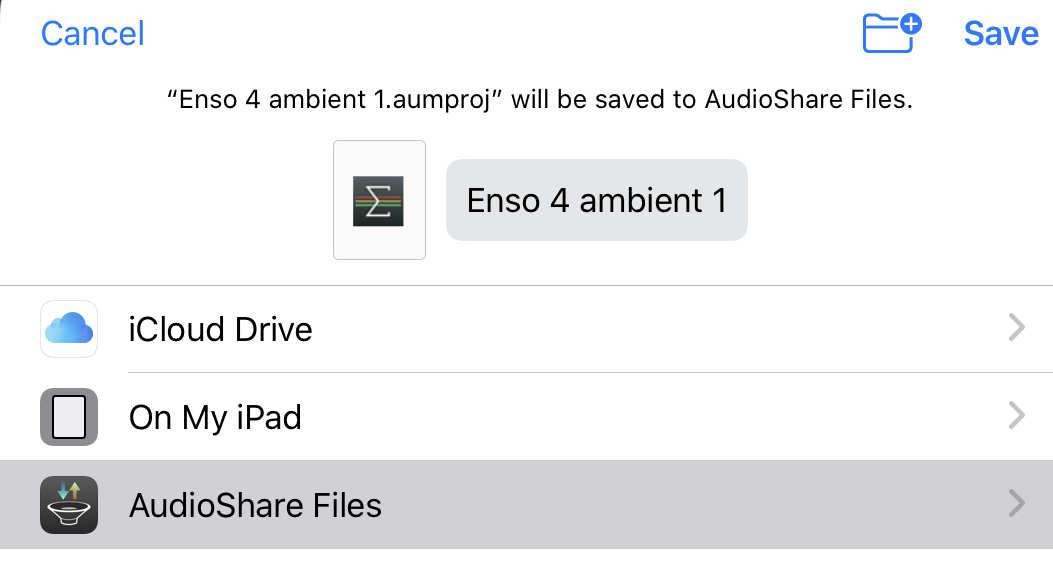
That would be my solution as well. Thing is, Files shows up on mine, but just disappears on select and nothing is sent to it . It’s the only app that doesn’t get info passed to it.