Loopy Pro: Create music, your way.
What is Loopy Pro? — Loopy Pro is a powerful, flexible, and intuitive live looper, sampler, clip launcher and DAW for iPhone and iPad. At its core, it allows you to record and layer sounds in real-time to create complex musical arrangements. But it doesn’t stop there—Loopy Pro offers advanced tools to customize your workflow, build dynamic performance setups, and create a seamless connection between instruments, effects, and external gear.
Use it for live looping, sequencing, arranging, mixing, and much more. Whether you're a live performer, a producer, or just experimenting with sound, Loopy Pro helps you take control of your creative process.
Download on the App StoreLoopy Pro is your all-in-one musical toolkit. Try it for free today.
Comments
You might check out https://patchstorage.com/rhythmic-midi-echo/. It could be used for something like this I think. It's only lacking a button to engage/bypass it, which wouldn't be a big deal to add if I could think of how to handle it in the UI.
https://patchstorage.com/velocity-midi-echo/ might be even better, and already has knobs free that could be used instead of a button. Maybe not ideal to use a knob, but I'm guessing one would probably want to map that to a controller button anyway.
Thanks Wim, that seems like it would work pretty well actually if a toggle to bypass was added
I think the second one is worth a look. The cool thing there is you can make variation in the ratchets - ramp, etc.
What might also be really cool btw would be some option to control gate length
That code is 7 years old. I'm almost afraid to take a look at it. 🫣
This is very good I think yes, I think one button to quickly toggle the whole thing on/off might be useful, what do you think?
@Gavinski - RhythmBud just came to mind. I wonder if that would be a candidate? I'm not sure the best way to engage / disengage easily, but at first glance it seems like it has what's needed for the ratcheting part.
Thnx, will take a look. Enjoying the Velocity Midi Echo script, would definitely find a global bypass useful and I think it would be killer with a knob for global gate length control.
Yeah, I think I'll take a look at doing something in a few days after family stuff settles down. If you're using AUM, Loopy Pro, or Drambo, it should be easy enough to bypass in the meantime.
I like those two delay scripts (some of my first). They could use a dusting off and some polishing.
They're really good. You can bypass using aum yes, but it sounds like that produces slightly weird results? I thought that might cause changes to the melody, not sure tho, I'd need to test it more systematically, I was sending a looping sequence into it
Actually, the thing that would be useful when bypassed (for me, at least I the current use case) is that it still keeps sending the incoming midi through. I'm using this to process a sequencer's output, but I'm also sending that sequence directly to the instrument. So I have 2 layers. When I bypass Mozaic entirely it sounds weird as there's a sudden drop in volume.
Edit: just to be clear, I know that the original script also acts that way when you bring the knobs down to zero for each echo. I just want a kind of master control for that so I don't have to take each one down to zero manually and then manually put them back to their previous settings if I want to go back to that quickly. Currently I have to adjust each one to get the percentage right, as using the Echos knob will bring them all up to 100%, not desirable in this case, for me. Might be cool if when you used the echos knob, any given echo % value went back to whatever its last value was?
You're sending the same midi twice to the same destination? That be very bad juju mon.
Even if the script is sending delays, it's still sending the original. That's likely to confuse the heck out of the target synth. Probably a recipe for stuck notes too. Maybe.
I thought it would be bad but actually it sounds great. I'm sending to pianoteq. I tried sending to 2 instances of pianoteq, doesn't sound any different. It also doesn't solve my problem related to bypassing via aum bypass causing drop in volume (see last message, you might have missed it as we sent at nearly the same time
Agreed @Gavinski - no matter what the routing, bypass would be useful. Probably a mute as well. Not gonna have much uninterrupted time over the next few days, but I'm keen to get on it after that.
Great to hear, thnx Mike
I have recently purchased four different VAPoly synth apps, all of them have their pitch bend wheel locked at + — 1 octave bend range, l would like to know if there is a script that can be used in Mozaic to change this to + — 2 semitone pitch bend range instead.
Many thanks in advance
Mike
Pitch bend effect is controlled by the app and Mozaic can't make apps do anything. It should be possible to scale the pitch bend coming through the script though. It should only be a few lines of code. I'll write something if I get a moment today, unless someone else steps in first.
Thank you, that will be great, I very much appreciate your help.
Mike 🍻
I think this should work @rapidfire. Send your controller midi through the script to the target app. It should result in a +/- 2 semitone bend range.
Thank you @wim,
You are a genius, I don’t know how you made that script but it does scale the 1 octave down to to 2 semitone bends, but there is a small problem and I don’t know if it’s the VAPoly synths or Mozaic, when I record the pitch bend movement in Cubasis 3 it is a really smooth flow of events and it plays back perfectly, but when I play and I use the pitch bend to go up or down there is a little yodel in the middle, it actually bends down 3 semitones and then jumps back to the second semitone , this happens bending up and down🤔 I guess this would be ideal if I was playing Ozric Tentacles lead solos lol
In my video below, watch the pitch bend wheel as I bend it down and then up, it moves in one direction then suddenly jumps back to the central position and quivers, this only happens during live playing.
Mike
Hmm, the video won’t upload? Here is a Dropbox link instead
https://www.dropbox.com/scl/fi/5ol37el7nu7ednkyo6vny/ScreenRecording_04-10-2026-3-27-17-pm_1.MP4?rlkey=uzu0ucs1reqsptb5du4qar1at&st=y8g2asnd&dl=0
Sorry @rapidfire , I can’t imagine what that would be caused by. I don’t think it can be the script. I don’t think it can even do anything like that. I could be wrong, but I suspect it has something to do with Cubasis itself.
Can you test live playing in another host? If it happens outside Cubasis then it has to be the script and I’ll need to take another look.
I will test it in KeyStage. One thing to note, after I have recorded the MIDI pitch bend in Cubasis 3 and then play it back, there is no irritating yodel in the middle, when I connect my Novation MIDI keyboard, the same yodeling behaviour is heard when pitch bending but the recorded MIDI data a smooth line (see screenshot). If I only bend down 1 semitone the yodel does not happen 😵💫 I will get back to you after I try using KeyStage.
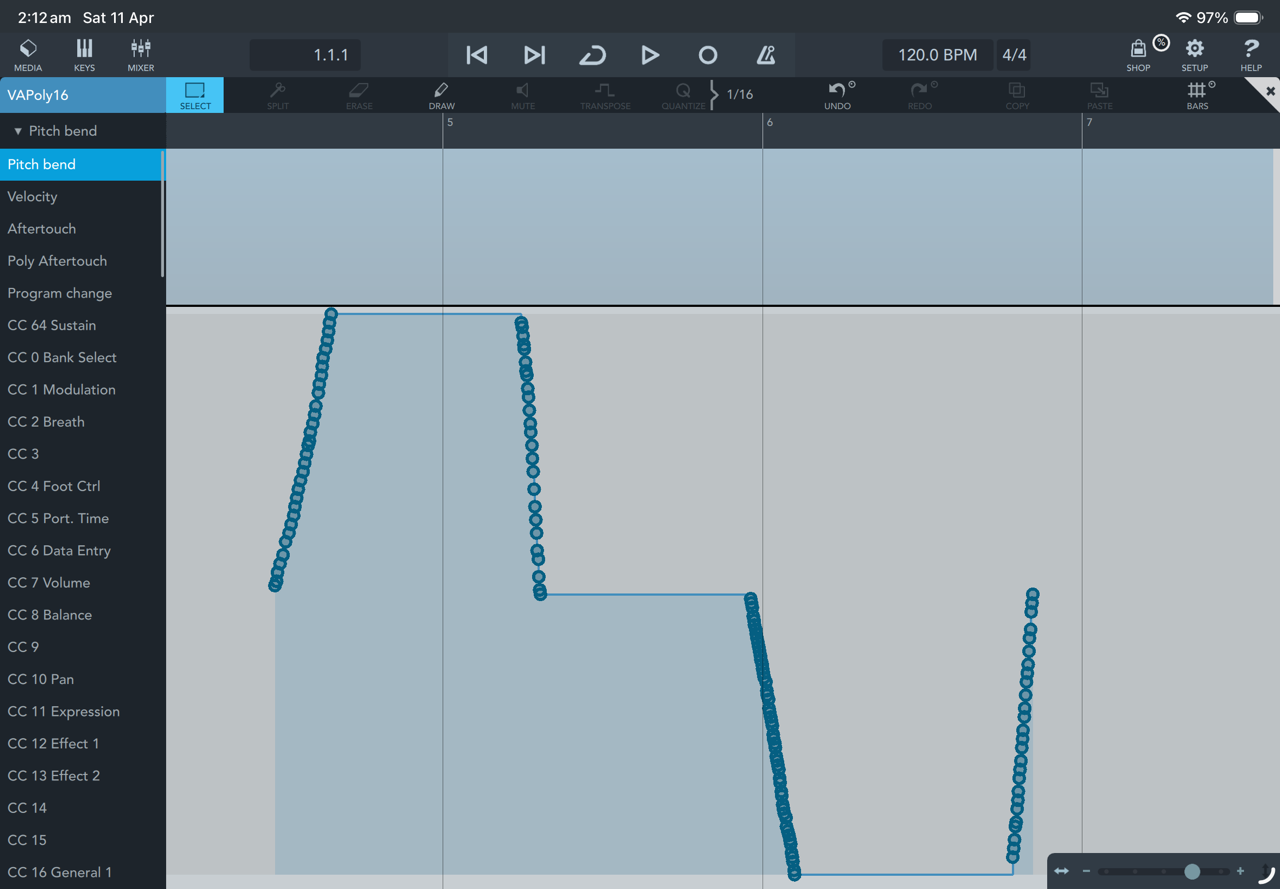
Mike
There was this other discussion here about using Mozaic inside Cubasis. The conclusion was that Cubasis did not send the midi from mosaic to the synth plugin, but the unaltered midi from midi keyboard. The solution was switching to Logic where everything worked perfectly.
The yodeling suggests that both midi streams, the keyboard and the mozaic script reach the synth.
@rapidfire - if what @Alfred is saying is applicable, then be sure to turn off MIDI THRU in the Cubasis options for the Mozaic plugin. You don't need Mozaic to send the midi thru because the plugin is doing that already. If both the plugin and Cubasis are sending the pitch bend when you play, that would explain everything you're seeing.
If it's already off then nvm.
I tested the script in AUM and Loopy Pro. There was no yodeling. The script worked as expected.
I tried with MIDI THRU both off and on in Cubasis, and I did hear what you're describing. I can only conclude it's an issue with Cubasis leaking midi through when playing live as @Alfred describes.
Thank you @Alfred and @wim,
Now I can narrow my search for fix 👍
Mike
@rapidfire, @Alfred - I can confirm, Cubasis bypasses MIDI plugins for MIDI messages other than notes. Loading up an empty Mozaic script, which should block all MIDI, notes are blocked, but CC, pitch bend, etc. pass through. Likewise, a Streambyter script written to block everything can't block non-notes messages either.
Actually, bypassing isn't quite accurate. The midi both hits the plugin and bypasses it.
The only way around this is to pre-process the midi through Mozaic in another host before it hits Cubasis.
This is a bug that should be reported to Steinberg through their normal support channel.
I have reported this bug on the Cubasis forum 👍
Mike
Is it possible in Mozaic for knobs to only output their value when the user releases the knob?
Side note: anyone know why the forum has been down so often recently? Getting pretty wild, was down for more than 5 hours just now!