Loopy Pro: Create music, your way.
What is Loopy Pro? — Loopy Pro is a powerful, flexible, and intuitive live looper, sampler, clip launcher and DAW for iPhone and iPad. At its core, it allows you to record and layer sounds in real-time to create complex musical arrangements. But it doesn’t stop there—Loopy Pro offers advanced tools to customize your workflow, build dynamic performance setups, and create a seamless connection between instruments, effects, and external gear.
Use it for live looping, sequencing, arranging, mixing, and much more. Whether you're a live performer, a producer, or just experimenting with sound, Loopy Pro helps you take control of your creative process.
Download on the App StoreLoopy Pro is your all-in-one musical toolkit. Try it for free today.
Cubasis 3 offers more than 8 slots for sends.


I just noticed that Cubasis 3 offers more than 8 sends slots as they advertised.
I’ve been able to add more than 11 effects and it seems there’s still space for more
Please don’t judge the effects I have in there, it’s just for test 🤣 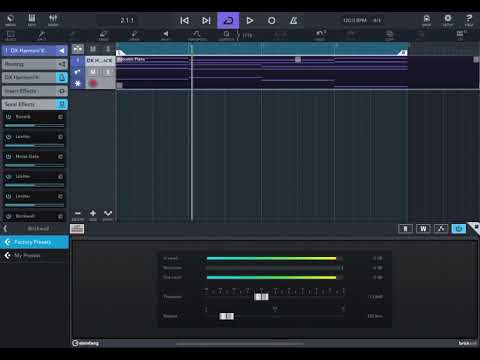
@LFS is it a bug ?🤣
Comments
A Godsend bug
Why would anyone need more than 8 sends? That's 4 different delays and 4 different reverbs (for example), in addition to any individual delays & reverbs you can use on individual channels. But maybe I'm missing how some people are using sends...
Thanks for sharing. I hope you don’t mind but would like to ask on a different topic I am tempted to buy cubasis 3 but really would like to know about the wave editor. Can you zoom in really far and Edit and cut precisely into the wave file. This was lacking in Cubasis 2 as the playhead jumped around Would appreciate it if you could share thanks
yep I get all confused using more than 3 sends on Ableton.
You can do that in Cubasis 2 also.you need to double tap on te audio, then change the project from bars to seconds.
In the audio editor, you can make precise cuts that way..don’t know why they don’t make it also possible on the timeline.but if you do as stated above, you can edit quite precisely.if you need more help with it I could show you
parallalel processing.. let's say get whole drum bus, send it to other track, apply overdrive/compression/filtering to get more dense beat - in parallel with original drums... same for bass, same for leads... pads..
send busses have lot more useability than just delay /reverb.. 8 is bare minimum for advanced sound design / mixing techniques, you can get quickly out of send buses if you are using parallel processing...
ah all that fancy stuff, reverbs and delays are my parallel processing. Good point!
@dendy oh my God, yeah I don't do any of that advanced stuff. That's probably why my stuff sounds like shit, but hey, I still love it 😂
(for that parallel processing stuff -- couldn't you use subgroups for that? i.e. you don't need to be able to send multiple channels with different levels...?)
I’m a nob when it comes to this.but I think you could different sends for different tracks.
For example
Let’s say I want to send the vocal tracks to plugins like 3 or 4 plug-ins, then I want to send the drums to other 3 or 4 different plug-ins.
I’m just guessing 😊
Would think everybody is happy about issues this...
When I can reliably run just a few effects slots in Cubasis 3 like I can in Cubasis 2 THEN it will be time to get excited by all the extra slots in Cubasis 3 (4gb iPad Pro 2 here btw)
Thanks a lot for the tip really helpful