Loopy Pro: Create music, your way.
What is Loopy Pro? — Loopy Pro is a powerful, flexible, and intuitive live looper, sampler, clip launcher and DAW for iPhone and iPad. At its core, it allows you to record and layer sounds in real-time to create complex musical arrangements. But it doesn’t stop there—Loopy Pro offers advanced tools to customize your workflow, build dynamic performance setups, and create a seamless connection between instruments, effects, and external gear.
Use it for live looping, sequencing, arranging, mixing, and much more. Whether you're a live performer, a producer, or just experimenting with sound, Loopy Pro helps you take control of your creative process.
Download on the App StoreLoopy Pro is your all-in-one musical toolkit. Try it for free today.
Comments
I need to try your gate suggestion - sounds like it might solve my issue.
In the meantime, here’s my setup:
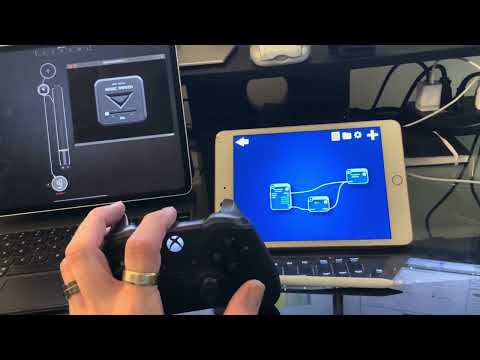
Musikraken running on iPad Mini 5
Values:
Value to MIDI Converter
Channel: 1
Type: Control Change
Target Controller: Modulation (1)
Output range: 0 - 127
Reset to 0 when signal ends: false
Game Controller
Game Controller: Xbox Wireless Controller
Retrigger already playing notes: false
Game Controller: A
This is a toggle: true
Type: Notes
Channel: 1
Velocity type: Fixed
Velocity: 100
Notes: C#6
iPad Pro running AUM
Magic Switch
I used the MIDI Learn in AUM to assign the controls for Magic Switch
What I’d like to happen was demonstrated in the video at the end. I used L2 in this case, which affected the “mix” slider in Magic Switch. What I want is to pull L2 to a specific position and press L1 (or any other button) to keep Magic Switch’s mix slider at that position.
As for the multiple green output ports - that was more for testing purposes. I knew R2 was working in that node, so I just ran everything through it to make sure they were working as expected
I finally had time to do a quick test to see if it really works with the Gate in this case, and it did.
The way I did it was to send CC1 with the R2 button, send the MIDI from that through the Gate (you could also attach the Gate before the Value-to-MIDI-converter by connecting the green ports instead, this would have the same effect) and then to the final output.
One special thing in the setup above is the two Game Controller modules that both have the same game controller selected. I could have done this with a filter as well, but this way it was easier. The reason why I separated these is that on the Game Controller module below, I only send the note that opens and closes the gate. So in this example, I assigned a note to L1 (doesn't matter which one) and set it to be a toggle. So if I press L1, it will open the gate and let the MIDI events through, and if I press it again, it will close the gate.
By separating the two game controller modules, I can assign any MIDI note to any button in the module above, and it won't influence the Gate at all (as I wrote, you could also simply use a filter to filter out all MIDI notes except the gate opener in this case, but the setup above looks cleaner in my opinion).
@Snarp works like a charm. Thanks for taking the time to help sort that out.
By chance, is there a good way you or anyone else can think of to implement MIDI guitar 3 inside of Musikraken?
The newest MusiKraken release adds a new module: The Ghost Organ.
It allows you to play an invisible keyboard in the air. You can play notes by moving your fingers in front of the camera, so the Ghost Organ is completely touchless. And it supports MIDI Polyphonic Expression (MPE), Polyphonic Aftertouch and MIDI 2.0 per-note events.
By combining it with the Hand Tracking module, you can even switch between multiple octaves.
I hope you have fun playing the all-new Ghost Organ!
Crazy. You are some kind of mad genius—there’s nothing like Musikraken out there. Not even close….
Awesome!!!!
Such a great app, and a very cool update! I need to test it out later.
I can’t remember, is there an air guitar feature?
indeed great work. Although I haven’t use Musikraken in music production yet, its potential is obvious.
Finger tracking has become precise recently. I can see that with the old Leap Motion. New software has made this device much more accurate. Finger tracking used to be quite primitive ten years ago.