Loopy Pro: Create music, your way.

What is Loopy Pro?Loopy Pro is a powerful, flexible, and intuitive live looper, sampler, clip launcher and DAW for iPhone and iPad. At its core, it allows you to record and layer sounds in real-time to create complex musical arrangements. But it doesn’t stop there—Loopy Pro offers advanced tools to customize your workflow, build dynamic performance setups, and create a seamless connection between instruments, effects, and external gear.

Use it for live looping, sequencing, arranging, mixing, and much more. Whether you're a live performer, a producer, or just experimenting with sound, Loopy Pro helps you take control of your creative process.

Download on the App Store

Loopy Pro is your all-in-one musical toolkit. Try it for free today.

Mozaic - tutorials

2»

Comments

  • @egobeats said:
    All,

    Looking for a beat mangler like Fauvre/Scatterbrain in either Mozaic or Drambo- Anyone recommend one to me?

    Thx...

    @rs2000 @wim @Poppadocrock

    What kind of feature(s) are you missing in either Fauve or Scatterbrain, that you would like to have in Drambo?

  • edited September 2025

    Yeah I meant either or... just trying to mangle for free.

    Thx @Squishy this scratched my itch.

  • I'm > @rs2000 said:

    @egobeats said:
    All,

    Looking for a beat mangler like Fauvre/Scatterbrain in either Mozaic or Drambo- Anyone recommend one to me?

    Thx...

    @rs2000 @wim @Poppadocrock

    What kind of feature(s) are you missing in either Fauve or Scatterbrain, that you would like to have in Drambo?

    I like the way Fauvre reorders vocals which I work with mostly, but don't own it.
    while Scatterbrain is great. It's just not tweakable like I would like... the controls w/errorcore was what I was looking for. It works perfectly. Appreciate ya.

  • @egobeats said:
    I'm > @rs2000 said:

    @egobeats said:
    All,

    Looking for a beat mangler like Fauvre/Scatterbrain in either Mozaic or Drambo- Anyone recommend one to me?

    Thx...

    @rs2000 @wim @Poppadocrock

    What kind of feature(s) are you missing in either Fauve or Scatterbrain, that you would like to have in Drambo?

    I like the way Fauvre reorders vocals which I work with mostly, but don't own it.
    while Scatterbrain is great. It's just not tweakable like I would like... the controls w/errorcore was what I was looking for. It works perfectly. Appreciate ya.

    Usually I’m pretty good at taking these patches and breaking it down to figure out how it works. It’s a great way of learning what Drambo can do/is capable of. But with ones like Errorcore, I wish I could sit down with the creator and have him hold my hand through every module used and why haha. It’s fascinating stuff but def over my head

  • edited September 2025

    So, I wasn’t utilizing Scatterbrain to it’s potential at all..

    @Gavinski has a really great SB video where he runs a Heinbach interview (spoken word vox) and it sounds really fun. I’m so glad Gav and @rs2000 inspired me to research further.

    Queued it up.

  • @egobeats said:
    So, I wasn’t utilizing Scatterbrain to it’s potential at all..

    @Gavinski has a really great SB video where he runs a Heinbach interview (spoken word vox) and it sounds really fun. I’m so glad Gav and @rs2000 inspired me to research further.

    It’s @ 5:33

    Would love a short vid of what you learned about using scatterbrain to its full potential. I’ve watched these tutorials and still struggle finding my own personal use case for this app and have yet to pick it up. Would love more examples of what this puppy can do! (Of course, if it’s a bother, no worries 🤙)

  • @squishy- yeah, let me upload my acapella and write up how i'm using it.

    gavs video was extremely helpful

  • @rs2000 i am so glad you questioned me about scatterbrain. i was using it all wrong. It's so much better after actually learning how to use the multiout properly. thx @Gavinski

  • @egobeats said:
    @rs2000 i am so glad you questioned me about scatterbrain. i was using it all wrong. It's so much better after actually learning how to use the multiout properly. thx @Gavinski

    I'm happy to hear that!
    You'd be surprised if I told you how often questions from other users and trying to help have taught me something useful in the end 😉

  • I have the idea of creating a 16 Levels (MPC like) setup in Koala sampler. I’m wondering if someone has created something like this in Mozaic already.

    I’ll be using a Launchpad Mini - which is fixed velocity and this is how I imagine it might work (if it’s at all possible)

    Koala Sampler pads have already been Midi Mapped (C-2 upwards / Ch 1)

    1) 4x4 grid on LP Mini
    2) each pad is using Midi CC (CC 20-35)
    3) This is how a pad sound will be triggered (CC plays the selected note/octave in Mozaic)

    In Mozaic (or if there’s another solution please share)

    16 Pads

    • Each mapped to corresponding CC number
    • Each pad has different velocity from 1-127

    E.g.
    Velocity setup in Mozaic:
    bottom left to right (8 pads) -  velocity value: 1/9/17/25/33/41/49/57
    Top left to right (8 pads) -  velocity value: 65/73/81/89/97/105/113/127

    Mozaic knobs: Affect all pads

    1 = Select Note
    2 = Select Octave
    3 = Select MIDI channel (or the Midi channel can be fixed and hard coded already - ie. Channel 3 or any other - so no need for active knob)

    Now, is something like this possible. Where the incoming 127 velocity can be changed to specific amount before triggering sound?

    Where selecting the note and octave in Mozaic will trigger the CC mapped buttons on the LP mini (or LPX).

    Anyone else, with experience with Mozaic and AUM (and way smarter than me) got a better way to achieve this?

    BTW I am a complete beginner with Mozaic - so have no idea where to even start with this, or if it’s even possible.

    Would love any feedback and (maybe someone has already created something similar)

  • @dmori said:
    I have the idea of creating a 16 Levels (MPC like) setup in Koala sampler. I’m wondering if someone has created something like this in Mozaic already.

    I’ll be using a Launchpad Mini - which is fixed velocity and this is how I imagine it might work (if it’s at all possible)

    Koala Sampler pads have already been Midi Mapped (C-2 upwards / Ch 1)

    1) 4x4 grid on LP Mini
    2) each pad is using Midi CC (CC 20-35)
    3) This is how a pad sound will be triggered (CC plays the selected note/octave in Mozaic)

    In Mozaic (or if there’s another solution please share)

    16 Pads

    • Each mapped to corresponding CC number
    • Each pad has different velocity from 1-127

    E.g.
    Velocity setup in Mozaic:
    bottom left to right (8 pads) -  velocity value: 1/9/17/25/33/41/49/57
    Top left to right (8 pads) -  velocity value: 65/73/81/89/97/105/113/127

    Mozaic knobs: Affect all pads

    1 = Select Note
    2 = Select Octave
    3 = Select MIDI channel (or the Midi channel can be fixed and hard coded already - ie. Channel 3 or any other - so no need for active knob)

    I think I sort of followed up to this point. But from here on I'm lost.

    When you say "Affect all pads", what do you mean? Affect them how? Do you mean that after you set note, octave, and channel, you will then select one of the pads, which will set the outgoing velocity for that note?

    Now, is something like this possible. Where the incoming 127 velocity can be changed to specific amount before triggering sound?

    That is possible.

    Where selecting the note and octave in Mozaic will trigger the CC mapped buttons on the LP mini (or LPX).

    I don't understand at all what you're saying there. "trigger the buttons on the LP mini"? I think what you may mean is, "When an LP mini button triggers a CC, it is turned into a specific note at a specific velocity before sending out from the script to an app." Is that what you mean?

  • edited September 2025

    @wim said:

    @dmori said:

    I think I sort of followed up to this point. But from here on I'm lost.

    When you say "Affect all pads", what do you mean? Affect them how? Do you mean that after you set note, octave, and channel, you will then select one of the pads, which will set the outgoing velocity for that note?

    What I meant here is that If you select G2 as a note - all 16 pads would be G2 at different velocities.
    So turning note knob to G and octave knob to 2

    @wim said:

    @dmori said:

    Where selecting the note and octave in Mozaic will trigger the CC mapped buttons on the LP mini (or LPX).

    I don't understand at all what you're saying there. "trigger the buttons on the LP mini"? I think what you may mean is, "When an LP mini button triggers a CC, it is turned into a specific note at a specific velocity before sending out from the script to an app." Is that what you mean?

    Yes. You've explained it better and more succinctly than me :)

    So if the selected note in G2 - then when I press a pad on LP mini (that is CC) it plays G2 (which is a pad that is MIDI mapped in koala).

  • @dmori said:

    @wim said:

    @dmori said:

    I think I sort of followed up to this point. But from here on I'm lost.

    When you say "Affect all pads", what do you mean? Affect them how? Do you mean that after you set note, octave, and channel, you will then select one of the pads, which will set the outgoing velocity for that note?

    What I meant here is that If you select G2 as a note - all 16 pads would be G2 at different velocities.
    So turning note knob to G and octave knob to 2

    @wim said:

    @dmori said:

    Where selecting the note and octave in Mozaic will trigger the CC mapped buttons on the LP mini (or LPX).

    I don't understand at all what you're saying there. "trigger the buttons on the LP mini"? I think what you may mean is, "When an LP mini button triggers a CC, it is turned into a specific note at a specific velocity before sending out from the script to an app." Is that what you mean?

    Yes. You've explained it better and more succinctly than me :)

    So if the selected note in G2 - then when I press a pad on LP mini (that is CC) it plays G2 (which is a pad that is MIDI mapped in koala).

    I don't understand. We selected G2, that means "convert CC / value 127" to note G2 and send it out. But what does the velocity on those Mozaic pads relate to? What tells the script which of the associated velocities to send the note with?

  • edited September 2025

    @wim said:

    @dmori said:

    @wim said:

    @dmori said:

    I think I sort of followed up to this point. But from here on I'm lost.

    When you say "Affect all pads", what do you mean? Affect them how? Do you mean that after you set note, octave, and channel, you will then select one of the pads, which will set the outgoing velocity for that note?

    What I meant here is that If you select G2 as a note - all 16 pads would be G2 at different velocities.
    So turning note knob to G and octave knob to 2

    @wim said:

    @dmori said:

    Where selecting the note and octave in Mozaic will trigger the CC mapped buttons on the LP mini (or LPX).

    I don't understand at all what you're saying there. "trigger the buttons on the LP mini"? I think what you may mean is, "When an LP mini button triggers a CC, it is turned into a specific note at a specific velocity before sending out from the script to an app." Is that what you mean?

    Yes. You've explained it better and more succinctly than me :)

    So if the selected note in G2 - then when I press a pad on LP mini (that is CC) it plays G2 (which is a pad that is MIDI mapped in koala).

    I don't understand. We selected G2, that means "convert CC / value 127" to note G2 and send it out. But what does the velocity on those Mozaic pads relate to? What tells the script which of the associated velocities to send the note with?

    I don't know what's possible (or if it even makes sense)

    I'll try explaining it again as simply as possible and hope it does make sense.

    I want to be able to have 16 Levels (like MPC) [I think you understand this part]

    I have koala sampler pads already MIDI mapped to notes, so I can play them on the LPX / LP mini rather than touching the screen.

    I want to be able to select one koala pad (i.e. the note that triggers the pad) and it can be turned into 16 Levels.

    I will create a custom preset on LP mini - a 4x4 grid - where each pad uses MIDI CC rather than MIDI note. This way - the mozaic script determines the note that plays, when a MIDI CC pad is pressed.

    It also means that there is one 4x4 grid that will work for all pads in koala if I wanted 16 levels for it.

    NOW in Mozaic - This is where you choose the note and octave that will play across all pads in the 4x4 grid. It will be one note (playing 1 pad in koala) on all 16 pads - each with a different velocity.

    When I want to use 16 Levels - I connect Mozaic to Koala in AUM. Press record and it records the same note at different velocities in koala.

    EDIT UPDATE
    TO answer your Questions:

    The velocity on the mozaic pads relate to the different velocities for 16 levels
    (eg. Pad 1-16 = 1/9/17/25/33/41/49/57/65/73/81/89/97/105/113/127

    I don't know anything about scripting but I was hoping the velocity amount would be in Mozaic itself.

    I would not be pressing the actual pads on the screen in Mozaic - I'd be using the LP to press the pads. That's where I thought the MIDI CC can be set to trigger the pad and velocity amount in Mozaic.

    EXAMPLE
    1)
    Press the bottom left pad on LP mini in the 4x4 grid and the velocity is 1.
    The pad is setup in Novation components to CC 20
    Pad 1 in Mozaic is set to respond to CC20 with velocity output = 1

    2)
    Press the 4th pad on row 2 on LP mini in the 4x4 grid and the velocity is 57.
    The pad is setup in Novation components to CC 27
    Pad 8 in Mozaic is set to respond to CC27 with velocity output = 57

    Then if we're able to change the note that's meant to play in Mozaic settings - then this setup can be used for any pad in koala.

    The reason why I'm using LP mini as an example - is that it's fixed velocity. So this will give it the ability to output different velocities via Mozaic.

  • wimwim
    edited September 2025

    OK, I think I understand.

    • The LPX or LP mini will send a different CC based on which pad you hit on it.
    • Mozaic will see the CC number and pick a velocity from one of the 16 pads based on the CC number.
    • The note number to send will be selected based on the three knobs.

    Correct?

    If so, follow-up questions:

    • Can you configure the LP pads each to send one CC at different values? If you can that might be a better way. Then all you need to do is pick which note to send in the Mozaic script and use the CC value as the velocity. Example: If receiving CC 20, value 32, send note at velocity 32. If receiving CC 20, value 100, send note at velocity 100 - where is the note selected by the knobs. It's OK if not, but would simplify the script. Actually, then you could use mfxConvert and wouldn't need a script at all.
    • You list a range of velocities for each pad? What purpose does the range serve? A note can only be sent at a certain velocity, not a range. Unless you were thinking of some sort of randomization within the range?
    • Does the LP send an "ON" (non zero) value when pressed and an "OFF" (zero) value when released?
  • i didn't realize several of the bleass effects have multi-out. i am finding interest in long unused filters because of the multiout! is there a spreadsheet that shows which AU effects support this?

    rn.. scatterbrain,qudarasphere, bleass comp, bleass motion have all been renewed because of this discovery... wonder how many others that i've been sleeping on.

  • edited September 2025

    @egobeats said: regarding which AU's support Multi-Bus Audio Effect (MBAE):

    is there a spreadsheet that shows which AU effects support this?

    why yes, Steve there is...

    https://abwiki.loopypro.com/au_multi_bus?f...

  • edited October 2025

    @wim said:
    OK, I think I understand.

    • The LPX or LP mini will send a different CC based on which pad you hit on it.
    • Mozaic will see the CC number and pick a velocity from one of the 16 pads based on the CC number.
    • The note number to send will be selected based on the three knobs.

    Correct?

    If so, follow-up questions:

    • Can you configure the LP pads each to send one CC at different values? If you can that might be a better way. Then all you need to do is pick which note to send in the Mozaic script and use the CC value as the velocity. Example: If receiving CC 20, value 32, send note at velocity 32. If receiving CC 20, value 100, send note at velocity 100 - where is the note selected by the knobs. It's OK if not, but would simplify the script. Actually, then you could use mfxConvert and wouldn't need a script at all.
    • You list a range of velocities for each pad? What purpose does the range serve? A note can only be sent at a certain velocity, not a range. Unless you were thinking of some sort of randomization within the range?
    • Does the LP send an "ON" (non zero) value when pressed and an "OFF" (zero) value when released?

    Yes that's right.

    Yes, you can set different CC values for each pad on LPX. Seems a much easier setup this way.

    So the range of velocities is similar/same as MPC/Maschine 16 Levels. So for example, you could play hi-hats/snare at different velocities, rather than having to manually edit. You could do a horn stab that echos/overlaps itself/disappears - by going from louder to softer. Could be used on vocal chops.

    LPX does have ON/OFF values that can be set independently.
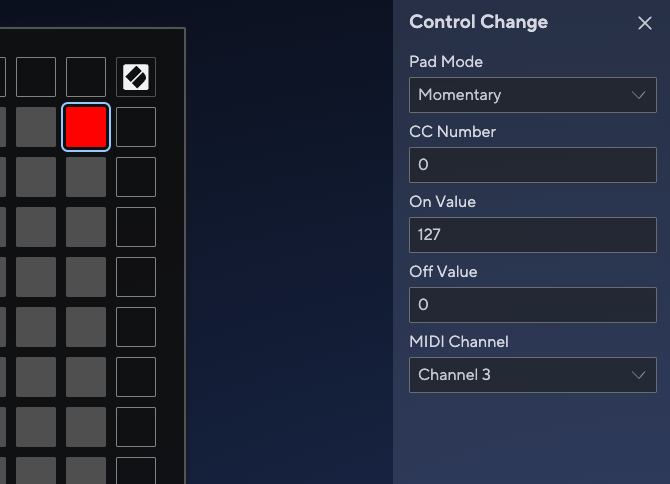
    Now randomization within the range - that sounds interesting. What ideas are you thinking around this.

    I don't have mfxConvert. I have is Mozaic / Mela / Streambyter. But if you think this is a better way of achieving this, I can get it.

  • @dmori said:

    @wim said:
    OK, I think I understand.

    • The LPX or LP mini will send a different CC based on which pad you hit on it.
    • Mozaic will see the CC number and pick a velocity from one of the 16 pads based on the CC number.
    • The note number to send will be selected based on the three knobs.

    Correct?

    If so, follow-up questions:

    • Can you configure the LP pads each to send one CC at different values? If you can that might be a better way. Then all you need to do is pick which note to send in the Mozaic script and use the CC value as the velocity. Example: If receiving CC 20, value 32, send note at velocity 32. If receiving CC 20, value 100, send note at velocity 100 - where is the note selected by the knobs. It's OK if not, but would simplify the script. Actually, then you could use mfxConvert and wouldn't need a script at all.
    • You list a range of velocities for each pad? What purpose does the range serve? A note can only be sent at a certain velocity, not a range. Unless you were thinking of some sort of randomization within the range?
    • Does the LP send an "ON" (non zero) value when pressed and an "OFF" (zero) value when released?

    Yes that's right.

    Yes, you can set different CC values for each pad on LPX. Seems a much easier setup this way.

    So the range of velocities is similar/same as MPC/Maschine 16 Levels. So for example, you could play hi-hats/snare at different velocities, rather than having to manually edit. You could do a horn stab that echos/overlaps itself/disappears - by going from louder to softer. Could be used on vocal chops.

    LPX does have ON/OFF values that can be set independently.

    Now randomization within the range - that sounds interesting. What ideas are you thinking around this.

    I don't have mfxConvert. I have is Mozaic / Mela / Streambyter. But if you think this is a better way of achieving this, I can get it.

    mfxConvert is only about $3 and is useful for many things even if not for this. Now that I think about it, it probably wouldn’t work for this.

    So what I was thinking with Mozaic if you can have the LP send a single CC at different values, all the script would need to do is use the cc value as the velocity of whatever note you select for it to send out. That’s a simple script actually. Unfortunately I’m most likely tied up for at least the next few days.

    I think you would want each pad to send out an ON value on press and an OFF (zero) value on release so that the script knows when to send the note OFF.

    That just leaves one complication - preventing stuck notes. If you happen to change the selected note while a pad is still held down, the script needs to have the smarts to not send the Note OFF for the newly selected note, but the old one. Not super difficult but not for beginners either.

    If I end up with some unexpected free time tomorrow, I might be able to bang something out. Otherwise it’ll be a few more days unless someone else gets the urge to write a script and has followed the discussion so far.

  • @wim said:

    So what I was thinking with Mozaic if you can have the LP send a single CC at different values, all the script would need to do is use the cc value as the velocity of whatever note you select for it to send out. That’s a simple script actually. Unfortunately I’m most likely tied up for at least the next few days.

    I think you would want each pad to send out an ON value on press and an OFF (zero) value on release so that the script knows when to send the note OFF.

    That just leaves one complication - preventing stuck notes. If you happen to change the selected note while a pad is still held down, the script needs to have the smarts to not send the Note OFF for the newly selected note, but the old one. Not super difficult but not for beginners either.

    If I end up with some unexpected free time tomorrow, I might be able to bang something out. Otherwise it’ll be a few more days unless someone else gets the urge to write a script and has followed the discussion so far.

    I really appreciate you helping out with this @wim . I'd be completely lost without your know how and experience. Happy to wait until you have the time. Cheers

  • @dmori said:

    @wim said:

    So what I was thinking with Mozaic if you can have the LP send a single CC at different values, all the script would need to do is use the cc value as the velocity of whatever note you select for it to send out. That’s a simple script actually. Unfortunately I’m most likely tied up for at least the next few days.

    I think you would want each pad to send out an ON value on press and an OFF (zero) value on release so that the script knows when to send the note OFF.

    That just leaves one complication - preventing stuck notes. If you happen to change the selected note while a pad is still held down, the script needs to have the smarts to not send the Note OFF for the newly selected note, but the old one. Not super difficult but not for beginners either.

    If I end up with some unexpected free time tomorrow, I might be able to bang something out. Otherwise it’ll be a few more days unless someone else gets the urge to write a script and has followed the discussion so far.

    I really appreciate you helping out with this @wim . I'd be completely lost without your know how and experience. Happy to wait until you have the time. Cheers

    There's a potential problem I need to think through. There's nothing to stop you from hitting more than one pad on the LP at a time. That would create overlapping notes. Any single note is supposed to come in pairs: a note-ON followed by a note-OFF. Synths will act unpredictably if you send more than one note-ON of the same note before the note-OFF is received.

    How are you going to use this? Do you need to be able to sustain notes? Or is it only, for instance to trigger one-shot samples. One way to simplify the script and avoid the above issue would be just to send the same length note every time, regardless of whether you hold the pad down or not.

  • @wim said:

    @dmori said:

    @wim said:

    So what I was thinking with Mozaic if you can have the LP send a single CC at different values, all the script would need to do is use the cc value as the velocity of whatever note you select for it to send out. That’s a simple script actually. Unfortunately I’m most likely tied up for at least the next few days.

    I think you would want each pad to send out an ON value on press and an OFF (zero) value on release so that the script knows when to send the note OFF.

    That just leaves one complication - preventing stuck notes. If you happen to change the selected note while a pad is still held down, the script needs to have the smarts to not send the Note OFF for the newly selected note, but the old one. Not super difficult but not for beginners either.

    If I end up with some unexpected free time tomorrow, I might be able to bang something out. Otherwise it’ll be a few more days unless someone else gets the urge to write a script and has followed the discussion so far.

    I really appreciate you helping out with this @wim . I'd be completely lost without your know how and experience. Happy to wait until you have the time. Cheers

    There's a potential problem I need to think through. There's nothing to stop you from hitting more than one pad on the LP at a time. That would create overlapping notes. Any single note is supposed to come in pairs: a note-ON followed by a note-OFF. Synths will act unpredictably if you send more than one note-ON of the same note before the note-OFF is received.

    How are you going to use this? Do you need to be able to sustain notes? Or is it only, for instance to trigger one-shot samples. One way to simplify the script and avoid the above issue would be just to send the same length note every time, regardless of whether you hold the pad down or not.

    Mainly to trigger samples. I don't always set samples to one-shot mode as I like varying the play length depending on the sample.

    I could put it in a choke group so it cuts itself off if there is any overlap. I think (but can't fully remember) that koala will truncate any overlap.

  • wimwim
    edited October 2025

    @dmori said:

    @wim said:

    @dmori said:

    @wim said:

    So what I was thinking with Mozaic if you can have the LP send a single CC at different values, all the script would need to do is use the cc value as the velocity of whatever note you select for it to send out. That’s a simple script actually. Unfortunately I’m most likely tied up for at least the next few days.

    I think you would want each pad to send out an ON value on press and an OFF (zero) value on release so that the script knows when to send the note OFF.

    That just leaves one complication - preventing stuck notes. If you happen to change the selected note while a pad is still held down, the script needs to have the smarts to not send the Note OFF for the newly selected note, but the old one. Not super difficult but not for beginners either.

    If I end up with some unexpected free time tomorrow, I might be able to bang something out. Otherwise it’ll be a few more days unless someone else gets the urge to write a script and has followed the discussion so far.

    I really appreciate you helping out with this @wim . I'd be completely lost without your know how and experience. Happy to wait until you have the time. Cheers

    There's a potential problem I need to think through. There's nothing to stop you from hitting more than one pad on the LP at a time. That would create overlapping notes. Any single note is supposed to come in pairs: a note-ON followed by a note-OFF. Synths will act unpredictably if you send more than one note-ON of the same note before the note-OFF is received.

    How are you going to use this? Do you need to be able to sustain notes? Or is it only, for instance to trigger one-shot samples. One way to simplify the script and avoid the above issue would be just to send the same length note every time, regardless of whether you hold the pad down or not.

    Mainly to trigger samples. I don't always set samples to one-shot mode as I like varying the play length depending on the sample.

    I could put it in a choke group so it cuts itself off if there is any overlap. I think (but can't fully remember) that koala will truncate any overlap.

    OK. I'll create something, but I don't think I'll publish it as a generally available script on Patchstorage. I'm sure you'll find ways to prevent the possible problems with more than one pad triggering at a time for your use case, but other's might not understand the potential problems.

  • @wim said:

    OK. I'll create something, but I don't think I'll publish it as a generally available script on Patchstorage. I'm sure you'll find ways to prevent the possible problems with more than one pad triggering at a time for your use case, but other's might not understand the potential problems.

    Great. Cheers

  • Hi @dmori - OK, I put something somewhat quickly together. Since I'm not completely confident I understand what you need and I don't have a LP to test it with, I'll post it to you via PM to save cluttering up the thread too much.

    After thinking things through, I decided the only clean way to do this is to make it monophonic, meaning that only one pad will sound at a time. For instance, if you hold down a pad with value 64, then you hit another pad with value 100 before releasing the other, the first note will be cut before the next is sent.

    Also, if you hold down a pad and then change the note selection before releasing the note, the old note will be cut before the new one is sent.

    It's the only way to prevent stuck notes that I can think of.

  • @wim said:
    Hi @dmori - OK, I put something somewhat quickly together. Since I'm not completely confident I understand what you need and I don't have a LP to test it with, I'll post it to you via PM to save cluttering up the thread too much.

    After thinking things through, I decided the only clean way to do this is to make it monophonic, meaning that only one pad will sound at a time. For instance, if you hold down a pad with value 64, then you hit another pad with value 100 before releasing the other, the first note will be cut before the next is sent.

    Also, if you hold down a pad and then change the note selection before releasing the note, the old note will be cut before the new one is sent.

    It's the only way to prevent stuck notes that I can think of.

    Thanks @wim look forward to trying this out..

  • Thanks for creating the script @wim. Works perfectly.

  • Great. I'll polish it up and post it on PatchStorage.com.

  • @egobeats said:
    is there a spreadsheet that shows which AU effects support this?

    why yes, Steve there is...

    https://abwiki.loopypro.com/au_multi_bus?f...

    @_ki seems to be the creator of this wonderful table of apps. He has made a lot of the pages in the wiki listing apps, Mozaic scripts, etc.

    @espiegel123 has made a lot of useful documents for Loopy Pro users.

  • _ki_ki
    edited October 2025

    @McD Yep, i I‘was the creator of that list. And its main maintainer. But since its a wiki my hope had been that others would contribute.

    I stopped updating in 2020, when i noticed that a big online google sheet with IOS audio software/plugins (IIRC managed by someone in Facebook) also contained that information.

    The only LPF/AB wiki page i‘m willing to keep updated is the curated Mozaic script list as this still offers added value compared to PatchStorage‘s list view

Sign In or Register to comment.