Loopy Pro: Create music, your way.

What is Loopy Pro?Loopy Pro is a powerful, flexible, and intuitive live looper, sampler, clip launcher and DAW for iPhone and iPad. At its core, it allows you to record and layer sounds in real-time to create complex musical arrangements. But it doesn’t stop there—Loopy Pro offers advanced tools to customize your workflow, build dynamic performance setups, and create a seamless connection between instruments, effects, and external gear.

Use it for live looping, sequencing, arranging, mixing, and much more. Whether you're a live performer, a producer, or just experimenting with sound, Loopy Pro helps you take control of your creative process.

Download on the App Store

Loopy Pro is your all-in-one musical toolkit. Try it for free today.

SynthMaster 2 for iPad v1.1.2 update released

12930313234

Comments

  • I've been really getting into this synth and it's amazing. Very stable too with my new iPad M5.

  • version 1.0.24 is out on the App Store:

    NEW FEATURES:

    1. Added Import/Export MIDI Mappings
    2. Added "Map CC74 to CC1" setting to Settings Dialog
    3. When user runs the AUv3 before the standalone, a warning message is displayed now

    BUG FIXES:

    1. SynthMaster2AU might crash during instantiation
    2. FavouritePresets.txt file should be moved to user documents folder
    3. MidiPrograms.txt file should be moved to user documents folder
    4. When global parameter MIDI Mapping is added/removed, all AUv3 instances should be notified
  • @kv331audio_bulent said:
    version 1.0.24 is out on the App Store:

    NEW FEATURES:

    1. Added Import/Export MIDI Mappings
    2. Added "Map CC74 to CC1" setting to Settings Dialog
    3. When user runs the AUv3 before the standalone, a warning message is displayed now

    BUG FIXES:

    1. SynthMaster2AU might crash during instantiation
    2. FavouritePresets.txt file should be moved to user documents folder
    3. MidiPrograms.txt file should be moved to user documents folder
    4. When global parameter MIDI Mapping is added/removed, all AUv3 instances should be notified

    Thanks. Grateful to have CC74 working.

    Another issue: sustain pedal doesn't work consistently with MPE notes. I can't discern a consistent pattern as to why some but not all the played midi notes are sustained after their notes are released while sustain is held. If I sustain while playing 5 notes, and release the notes, it could 1,2,3, or 4 notes that are sustained, and the very next set of notes it will be a different total that are sustained compared to notes dropped. Overall, the correct number are as far as I've experienced, are never sustained.

  • Thanks. Grateful to have CC74 working.

    Another issue: sustain pedal doesn't work consistently with MPE notes. I can't discern a consistent pattern as to why some but not all the played midi notes are sustained after their notes are released while sustain is held. If I sustain while playing 5 notes, and release the notes, it could 1,2,3, or 4 notes that are sustained, and the very next set of notes it will be a different total that are sustained compared to notes dropped. Overall, the correct number are as far as I've experienced, are never sustained.

    Would you be able to record MIDI and send me that so that I try to reproduce it? Thx!

  • @kv331audio_bulent said:

    Thanks. Grateful to have CC74 working.

    Another issue: sustain pedal doesn't work consistently with MPE notes. I can't discern a consistent pattern as to why some but not all the played midi notes are sustained after their notes are released while sustain is held. If I sustain while playing 5 notes, and release the notes, it could 1,2,3, or 4 notes that are sustained, and the very next set of notes it will be a different total that are sustained compared to notes dropped. Overall, the correct number are as far as I've experienced, are never sustained.

    Would you be able to record MIDI and send me that so that I try to reproduce it? Thx!

    I will do that tonight yes, thanks

  • @kv331audio_bulent said:
    version 1.0.24 is out on the App Store:

    NEW FEATURES:

    1. Added Import/Export MIDI Mappings
    2. Added "Map CC74 to CC1" setting to Settings Dialog
    3. When user runs the AUv3 before the standalone, a warning message is displayed now

    BUG FIXES:

    1. SynthMaster2AU might crash during instantiation
    2. FavouritePresets.txt file should be moved to user documents folder
    3. MidiPrograms.txt file should be moved to user documents folder
    4. When global parameter MIDI Mapping is added/removed, all AUv3 instances should be notified

    Hi @kv331audio_bulent,
    I have just updated SM2 and ran it in stand-alone mode, I selected IMPORT MIDI MAPPINGS and then selected the Mapping file in the Files app, after closing and relaunching SM2 the Mapping was still missing.
    Mike

  • Thanks so much!

  • @kv331audio_bulent said:
    Thanks so much!

    Sent a limewire link to your forum messages, thanks Bulent

  • @kv331audio_bulent said:

    @musikeer said:
    Also lost all favorites. Again.

    Actually, you didn't. I forgot to move the FavouritePresets.txt file from AppGroup documents folder to user documents folder. Fixing that now.

    Favorites are back, thank you! And it just shows what a great app SynthMaster 2 is, that I have so many favorites and was sorry to see them go!

  • @kv331audio_bulent said:
    Thanks so much!

    Hi @kv331audio_bulent ,
    I have just assigned the ADSR MIDI parameters ( CC73, CC76, CC77, CC72 ).
    The Filter Frequency won’t accept CC74 MIDI Learn, it doesn’t matter if the SETTINGS > AUDIO ENGINE > Map CC74 to CC1 is ON or OFF, it will accept any other CC numbers.
    Mike

  • edited May 30

    . (my post was redundant, and there's no delete feature here!)

  • edited May 30

    Hi @Fantastic,
    I have over 3 years worth of Cubasis 3 projects that use CC74 for filter cutoff in SM2, if I had to choose another CC number instead of 74, I would have to go through all my projects and……..😭
    Mike

  • edited May 30

    @rapidfire said:
    Hi @Fantastic,
    I have over 3 years worth of Cubasis 3 projects that use CC74 for filter cutoff in SM2, if I had to choose another CC number instead of 74, I would have to go through all my projects and……..😭
    Mike

    Besides which you're right anyway. I shouldn't have interrupted.

  • edited May 30

    @rapidfire said:
    The Filter Frequency won’t accept CC74 MIDI Learn, it doesn’t matter if the SETTINGS > AUDIO ENGINE > Map CC74 to CC1 is ON or OFF, it will accept any other CC numbers.
    Mike

    The following CC numbers are reserved -used by the modulation system or they are discrete- they can not be "midi learned":

    CC0
    CC1
    CC32
    CC64-69
    CC74
    CC96-101

    You can add them as modulation sources:

  • @kv331audio_bulent said:
    version 1.0.24 is out on the App Store:

    NEW FEATURES:

    1. Added Import/Export MIDI Mappings
    2. Added "Map CC74 to CC1" setting to Settings Dialog
    3. When user runs the AUv3 before the standalone, a warning message is displayed now

    BUG FIXES:

    1. SynthMaster2AU might crash during instantiation
    2. FavouritePresets.txt file should be moved to user documents folder
    3. MidiPrograms.txt file should be moved to user documents folder
    4. When global parameter MIDI Mapping is added/removed, all AUv3 instances should be notified

    Amazing turnaround! This completely fixes the logic issue. I have a few tracks with 10-15 instances and these now load perfectly.

    Small feature request (maybe?). Is it possible to add an option to switch the preset fading on or off. I find that auditioning presets is quite painful when it takes over a second to change.

    Again, thanks for the fix. As it turns out, I switched to SM3 on the track I’m working on and by starting again on some sounds, I’ve ended up with something much better :smile:

  • @timforsyth said:
    Small feature request (maybe?). Is it possible to add an option to switch the preset fading on or off. I find that auditioning presets is quite painful when it takes over a second to change.

    Yes I will add that to Audio & MIDI settings.

  • @kv331audio_bulent said:

    @rapidfire said:
    The Filter Frequency won’t accept CC74 MIDI Learn, it doesn’t matter if the SETTINGS > AUDIO ENGINE > Map CC74 to CC1 is ON or OFF, it will accept any other CC numbers.
    Mike

    The following CC numbers are reserved -used by the modulation system or they are discrete- they can not be "midi learned":

    CC0
    CC1
    CC32
    CC64-69
    CC74
    CC96-101

    You can add them as modulation sources:

    Hi @kv331audio_bulent,
    I have only updated SM2 on my iPad Air 4, my 13” iPad Air 6 still has the none updated version and it clearly shows MIDI CC74 assigned to the Filter Frequency (see screenshot below). When the mapping disappears from time to time I can successfully Import MIDI Mappings and the CC74 is restored, this is the exact same procedure for SM1, but now you are telling me that CC74 cannot be Midi Learned? my screenshot shows otherwise.
    If I have to add CC74 to modulation that means I would have to go through every single Cubasis project and change all the previously assigned Midi CC74 to a modulation source, I would then have to completely re-write a Modulation source to mirror my existing extensive MIDI CC74 tracks! My Mod Wheel is already being used for oscillator vibrato, I also use several instances of SM2 in most projects. It also means I will no longer be able to manually adjust the Frequency using the controls on my external Midi keyboard.
    When you say MIDI CC74 can’t be MIDI learned, is that from this latest new update going forward? or are you saying it was “never” able to be learned?
    Mike

  • edited May 30

    @rapidfire said:
    When you say MIDI CC74 can’t be MIDI learned, is that from this latest new update going forward? or are you saying it was “never” able to be learned?
    Mike

    I looked into the source code history, it was a recent change (last 12 months). I guess the reason was: CC74 is a multichannel controller, but MIDI Learn in SM1/SM2/SM3 is for a specific channel. I will revert my change, but can not guarantee that the MIDI learn would work for all Midi channels (in MPE mode, each separate note has its own channel)

  • edited May 30

    @Fantastic said:
    Another issue: sustain pedal doesn't work consistently with MPE notes. I can't discern a consistent pattern as to why some but not all the played midi notes are sustained after their notes are released while sustain is held. If I sustain while playing 5 notes, and release the notes, it could 1,2,3, or 4 notes that are sustained, and the very next set of notes it will be a different total that are sustained compared to notes dropped. Overall, the correct number are as far as I've experienced, are never sustained.

    Great catch, thanks for this bug report. It was a simple fix :smiley: There was definitely an issue in MPE mode when note off message is received. The fix will be in the next build.

  • @kv331audio_bulent said:

    @rapidfire said:
    When you say MIDI CC74 can’t be MIDI learned, is that from this latest new update going forward? or are you saying it was “never” able to be learned?
    Mike

    I looked into the source code history, it was a recent change (last 12 months). I guess the reason was: CC74 is a multichannel controller, but MIDI Learn in SM1/SM2/SM3 is for a specific channel. I will revert my change, but can not guarantee that the MIDI learn would work for all Midi channels (in MPE mode, each separate note has its own channel)

    I won’t be using MPE because none of my keyboards have it, so it won’t be a problem for me, but it would be devastating for me to loose CC74 control in Cubasis where there are lots of frequency sweeps at set positions within my projects.
    Mike

  • @rapidfire said:

    @kv331audio_bulent said:

    @rapidfire said:
    When you say MIDI CC74 can’t be MIDI learned, is that from this latest new update going forward? or are you saying it was “never” able to be learned?
    Mike

    I looked into the source code history, it was a recent change (last 12 months). I guess the reason was: CC74 is a multichannel controller, but MIDI Learn in SM1/SM2/SM3 is for a specific channel. I will revert my change, but can not guarantee that the MIDI learn would work for all Midi channels (in MPE mode, each separate note has its own channel)

    I won’t be using MPE because none of my keyboards have it, so it won’t be a problem for me, but it would be devastating for me to loose CC74 control in Cubasis where there are lots of frequency sweeps at set positions within my projects.
    Mike

    That probably makes sense to have the reverted change, right @kv331audio_bulent ? CC74 in single channel / midi v1 style, being defined as "brightness" and being available (and possibly recommendable?) for being mapped to filter frequency? With the advice somewhere in a future manual not to do that if you're using MPE (which most MPE users would probably be well aware of), and instead to use the SM2's available implementation of Midi Modulations which is where CC74 for MPE use can be found.

    For anyone interested here's the spec for Midi v1.
    https://midi.org/midi-1-0-control-change-messages

    Personally I would avoid midi mapping any of the defined numbers because you can't guarantee the behaviour across software, where the specified controls have been hardwired in already, don't need mapping, and shouldn't be mapped. Sure usually it isn't a problem, but it might be, and just on the day that it really matters too!.

  • edited May 30

    @Fantastic said:

    @rapidfire said:

    @kv331audio_bulent said:

    @rapidfire said:
    When you say MIDI CC74 can’t be MIDI learned, is that from this latest new update going forward? or are you saying it was “never” able to be learned?
    Mike

    I looked into the source code history, it was a recent change (last 12 months). I guess the reason was: CC74 is a multichannel controller, but MIDI Learn in SM1/SM2/SM3 is for a specific channel. I will revert my change, but can not guarantee that the MIDI learn would work for all Midi channels (in MPE mode, each separate note has its own channel)

    I won’t be using MPE because none of my keyboards have it, so it won’t be a problem for me, but it would be devastating for me to loose CC74 control in Cubasis where there are lots of frequency sweeps at set positions within my projects.
    Mike

    That probably makes sense to have the reverted change, right @kv331audio_bulent ? CC74 in single channel / midi v1 style, being defined as "brightness" and being available (and possibly recommendable?) for being mapped to filter frequency? With the advice somewhere in a future manual not to do that if you're using MPE (which most MPE users would probably be well aware of), and instead to use the SM2's available implementation of Midi Modulations which is where CC74 for MPE use can be found.

    For anyone interested here's the spec for Midi v1.
    https://midi.org/midi-1-0-control-change-messages

    Personally I would avoid midi mapping any of the defined numbers because you can't guarantee the behaviour across software, where the specified controls have been hardwired in already, don't need mapping, and shouldn't be mapped. Sure usually it isn't a problem, but it might be, and just on the day that it really matters too!.

    I have just been reading all the ins and outs of using MPE, it’s a completely different ball game if my understanding is correct, I dont think I want to go down that route, especially when it comes to note editing.
    When I play the Steel Guitar Pro into Cubasis and I use the tone bar and then make changes to the recorded note position or bend amount, it is quite troublesome compared to standard Midi editing, so Midi v1 is my preferred option, besides, I would have to buy another keyboard which I don’t have room for, I also have far too many previous projects that would take forever to convert to not having CC74 specifically for brightness control, I want to spent what time I have left creating new projects instead of nitpicking and tweaking to accommodate a different method of controlling the Filter….. and the Envelopes, I have MIDI Learn assigned to ADSR 1 & 2 as well as both Filters and Glide, that’s thirteen CC numbers that use a chunk of those reserved numbers @kv331audio_bulent has listed above.
    Thanks for the MIDI v1 chart btw, that will come in useful.
    Mike

  • @rapidfire said:

    @Fantastic said:

    @rapidfire said:

    @kv331audio_bulent said:

    @rapidfire said:
    When you say MIDI CC74 can’t be MIDI learned, is that from this latest new update going forward? or are you saying it was “never” able to be learned?
    Mike

    I looked into the source code history, it was a recent change (last 12 months). I guess the reason was: CC74 is a multichannel controller, but MIDI Learn in SM1/SM2/SM3 is for a specific channel. I will revert my change, but can not guarantee that the MIDI learn would work for all Midi channels (in MPE mode, each separate note has its own channel)

    I won’t be using MPE because none of my keyboards have it, so it won’t be a problem for me, but it would be devastating for me to loose CC74 control in Cubasis where there are lots of frequency sweeps at set positions within my projects.
    Mike

    That probably makes sense to have the reverted change, right @kv331audio_bulent ? CC74 in single channel / midi v1 style, being defined as "brightness" and being available (and possibly recommendable?) for being mapped to filter frequency? With the advice somewhere in a future manual not to do that if you're using MPE (which most MPE users would probably be well aware of), and instead to use the SM2's available implementation of Midi Modulations which is where CC74 for MPE use can be found.

    For anyone interested here's the spec for Midi v1.
    https://midi.org/midi-1-0-control-change-messages

    Personally I would avoid midi mapping any of the defined numbers because you can't guarantee the behaviour across software, where the specified controls have been hardwired in already, don't need mapping, and shouldn't be mapped. Sure usually it isn't a problem, but it might be, and just on the day that it really matters too!.

    I have just been reading all the ins and outs of using MPE, it’s a completely different ball game if my understanding is correct, I dont think I want to go down that route, especially when it comes to note editing.
    When I play the Steel Guitar Pro into Cubasis and I use the tone bar and then make changes to the recorded note position or bend amount, it is quite troublesome compared to standard Midi editing, so Midi v1 is my preferred option, besides, I would have to buy another keyboard which I don’t have room for, I also have far too many previous projects that would take forever to convert to not having CC74 specifically for brightness control, I want to spent what time I have left creating new projects instead of nitpicking and tweaking to accommodate a different method of controlling the Filter….. and the Envelopes, I have MIDI Learn assigned to ADSR 1 & 2 as well as both Filters and Glide, that’s thirteen CC numbers that use a chunk of those reserved numbers @kv331audio_bulent has listed above.
    Thanks for the MIDI v1 chart btw, that will come in useful.
    Ike

    Yours is probably a slightly simpler case, and not really about whether or not to MPE, because basically, you're not doing MPE so its fine. This might be a redundant point because bulent is implementing the rollback so there'll be a fix for you anyway, but nevertheless, I think, that if you were, with a new project, to use the MPE style add midi modulation, that wouldn't at all mean more complex editing, there'd be absolutely no difference for you except in the fact that you didn't midi map it by hand so to speak, you used the add modulation, after which, controlling it, with midi automations on just one channel with your style of midi parts and automation lanes would work exactly the same, nothing different at all. It's probably irrelevant to you for old projects, but it may be worth being aware of. Recap version: if you use add modulation CC74 rather than midi mapping it shouldn't make any difference at all to you as regards new projects, and its probably more future proof. This, will also be the case with every other MPE capable synth that includes CC74 in its modulation system (such as in Tera Pro where its called MPE Timbre, not CC74), you wouldn't need to midi map anything by hand, you probably shouldn't midimap it by hand, you'd use the modulation routing affordances, and the fact that you don't send multichannel MPE and use single channel as you currently do, really means nothing at all, and will work perfectly. Thats part of the MPE design to simultaneously support both modes.

  • @Fantastic said:

    @rapidfire said:

    @Fantastic said:

    @rapidfire said:

    @kv331audio_bulent said:

    @rapidfire said:
    When you say MIDI CC74 can’t be MIDI learned, is that from this latest new update going forward? or are you saying it was “never” able to be learned?
    Mike

    I looked into the source code history, it was a recent change (last 12 months). I guess the reason was: CC74 is a multichannel controller, but MIDI Learn in SM1/SM2/SM3 is for a specific channel. I will revert my change, but can not guarantee that the MIDI learn would work for all Midi channels (in MPE mode, each separate note has its own channel)

    I won’t be using MPE because none of my keyboards have it, so it won’t be a problem for me, but it would be devastating for me to loose CC74 control in Cubasis where there are lots of frequency sweeps at set positions within my projects.
    Mike

    That probably makes sense to have the reverted change, right @kv331audio_bulent ? CC74 in single channel / midi v1 style, being defined as "brightness" and being available (and possibly recommendable?) for being mapped to filter frequency? With the advice somewhere in a future manual not to do that if you're using MPE (which most MPE users would probably be well aware of), and instead to use the SM2's available implementation of Midi Modulations which is where CC74 for MPE use can be found.

    For anyone interested here's the spec for Midi v1.
    https://midi.org/midi-1-0-control-change-messages

    Personally I would avoid midi mapping any of the defined numbers because you can't guarantee the behaviour across software, where the specified controls have been hardwired in already, don't need mapping, and shouldn't be mapped. Sure usually it isn't a problem, but it might be, and just on the day that it really matters too!.

    I have just been reading all the ins and outs of using MPE, it’s a completely different ball game if my understanding is correct, I dont think I want to go down that route, especially when it comes to note editing.
    When I play the Steel Guitar Pro into Cubasis and I use the tone bar and then make changes to the recorded note position or bend amount, it is quite troublesome compared to standard Midi editing, so Midi v1 is my preferred option, besides, I would have to buy another keyboard which I don’t have room for, I also have far too many previous projects that would take forever to convert to not having CC74 specifically for brightness control, I want to spent what time I have left creating new projects instead of nitpicking and tweaking to accommodate a different method of controlling the Filter….. and the Envelopes, I have MIDI Learn assigned to ADSR 1 & 2 as well as both Filters and Glide, that’s thirteen CC numbers that use a chunk of those reserved numbers @kv331audio_bulent has listed above.
    Thanks for the MIDI v1 chart btw, that will come in useful.
    Ike

    Yours is probably a slightly simpler case, and not really about whether or not to MPE, because basically, you're not doing MPE so its fine. This might be a redundant point because bulent is implementing the rollback so there'll be a fix for you anyway, but nevertheless, I think, that if you were, with a new project, to use the MPE style add midi modulation, that wouldn't at all mean more complex editing, there'd be absolutely no difference for you except in the fact that you didn't midi map it by hand so to speak, you used the add modulation, after which, controlling it, with midi automations on just one channel with your style of midi parts and automation lanes would work exactly the same, nothing different at all. It's probably irrelevant to you for old projects, but it may be worth being aware of. Recap version: if you use add modulation CC74 rather than midi mapping it shouldn't make any difference at all to you as regards new projects, and its probably more future proof. This, will also be the case with every other MPE capable synth that includes CC74 in its modulation system (such as in Tera Pro where its called MPE Timbre, not CC74), you wouldn't need to midi map anything by hand, you probably shouldn't midimap it by hand, you'd use the modulation routing affordances, and the fact that you don't send multichannel MPE and use single channel as you currently do, really means nothing at all, and will work perfectly. Thats part of the MPE design to simultaneously support both modes.

    Hmm, you’ve got me thinking now, I have been using MIDI CC74 since 1990 and it is burned into my brain along with many other CC numbers that I frequently used on my Kawai Q80 Sequencer.
    I will attempt to ask you a question/s in the shortest term that I can and perhaps you can point me in the right direction:
    At the moment I have MIDI tracks in Cubasis that have CC74 events either sweeping the frequency or simply increasing the brightness in places and then either stepping or decreasing to a normal or lower brightness scattered throughout my different projects, how can I change this to using modulation ? Can it be controlled using the same MIDI events in Cubasis? Also, to save using multiple instances of SM2, I use a lot of Program Changes to save on DSP, if I use Automation to control the Frequency and then a different preset is called up using Program Change, the Automated frequency level is still active and will influence the new preset as it is not possible to “stop” the Automation. How can I control the frequency using my rotary controls on my external keyboard if I can’t use MIDI Learn CC74?
    Many questions there and I don’t expect a quick answer, but any help with this matter would be greatly appreciated, perhaps I can then take a different approach and try and keep up with technology.
    Mike🍻

  • @rapidfire said:

    @Fantastic said:

    @rapidfire said:

    @Fantastic said:

    @rapidfire said:

    @kv331audio_bulent said:

    @rapidfire said:
    When you say MIDI CC74 can’t be MIDI learned, is that from this latest new update going forward? or are you saying it was “never” able to be learned?
    Mike

    I looked into the source code history, it was a recent change (last 12 months). I guess the reason was: CC74 is a multichannel controller, but MIDI Learn in SM1/SM2/SM3 is for a specific channel. I will revert my change, but can not guarantee that the MIDI learn would work for all Midi channels (in MPE mode, each separate note has its own channel)

    I won’t be using MPE because none of my keyboards have it, so it won’t be a problem for me, but it would be devastating for me to loose CC74 control in Cubasis where there are lots of frequency sweeps at set positions within my projects.
    Mike

    That probably makes sense to have the reverted change, right @kv331audio_bulent ? CC74 in single channel / midi v1 style, being defined as "brightness" and being available (and possibly recommendable?) for being mapped to filter frequency? With the advice somewhere in a future manual not to do that if you're using MPE (which most MPE users would probably be well aware of), and instead to use the SM2's available implementation of Midi Modulations which is where CC74 for MPE use can be found.

    For anyone interested here's the spec for Midi v1.
    https://midi.org/midi-1-0-control-change-messages

    Personally I would avoid midi mapping any of the defined numbers because you can't guarantee the behaviour across software, where the specified controls have been hardwired in already, don't need mapping, and shouldn't be mapped. Sure usually it isn't a problem, but it might be, and just on the day that it really matters too!.

    I have just been reading all the ins and outs of using MPE, it’s a completely different ball game if my understanding is correct, I dont think I want to go down that route, especially when it comes to note editing.
    When I play the Steel Guitar Pro into Cubasis and I use the tone bar and then make changes to the recorded note position or bend amount, it is quite troublesome compared to standard Midi editing, so Midi v1 is my preferred option, besides, I would have to buy another keyboard which I don’t have room for, I also have far too many previous projects that would take forever to convert to not having CC74 specifically for brightness control, I want to spent what time I have left creating new projects instead of nitpicking and tweaking to accommodate a different method of controlling the Filter….. and the Envelopes, I have MIDI Learn assigned to ADSR 1 & 2 as well as both Filters and Glide, that’s thirteen CC numbers that use a chunk of those reserved numbers @kv331audio_bulent has listed above.
    Thanks for the MIDI v1 chart btw, that will come in useful.
    Ike

    Yours is probably a slightly simpler case, and not really about whether or not to MPE, because basically, you're not doing MPE so its fine. This might be a redundant point because bulent is implementing the rollback so there'll be a fix for you anyway, but nevertheless, I think, that if you were, with a new project, to use the MPE style add midi modulation, that wouldn't at all mean more complex editing, there'd be absolutely no difference for you except in the fact that you didn't midi map it by hand so to speak, you used the add modulation, after which, controlling it, with midi automations on just one channel with your style of midi parts and automation lanes would work exactly the same, nothing different at all. It's probably irrelevant to you for old projects, but it may be worth being aware of. Recap version: if you use add modulation CC74 rather than midi mapping it shouldn't make any difference at all to you as regards new projects, and its probably more future proof. This, will also be the case with every other MPE capable synth that includes CC74 in its modulation system (such as in Tera Pro where its called MPE Timbre, not CC74), you wouldn't need to midi map anything by hand, you probably shouldn't midimap it by hand, you'd use the modulation routing affordances, and the fact that you don't send multichannel MPE and use single channel as you currently do, really means nothing at all, and will work perfectly. Thats part of the MPE design to simultaneously support both modes.

    Hmm, you’ve got me thinking now, I have been using MIDI CC74 since 1990 and it is burned into my brain along with many other CC numbers that I frequently used on my Kawai Q80 Sequencer.
    I will attempt to ask you a question/s in the shortest term that I can and perhaps you can point me in the right direction:
    At the moment I have MIDI tracks in Cubasis that have CC74 events either sweeping the frequency or simply increasing the brightness in places and then either stepping or decreasing to a normal or lower brightness scattered throughout my different projects, how can I change this to using modulation ? Can it be controlled using the same MIDI events in Cubasis?

    So, so far in that case explanation, there's nothing that needs to change and everything works the same way it always has.
    1 You have hardware that sends CC74
    2 You also have software midi sequencing that sends CC74
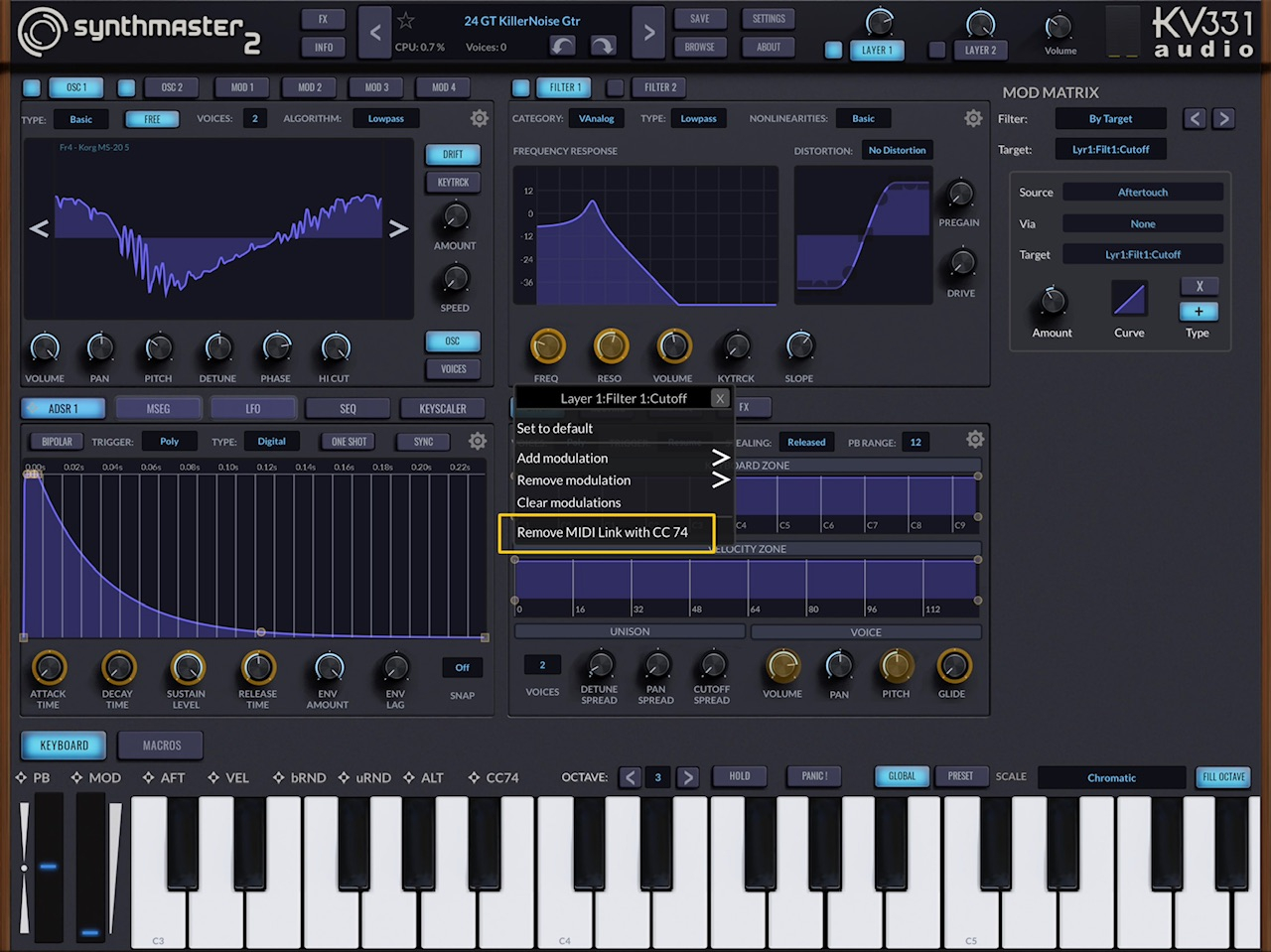
    3 If instead of midi mapping you make use of the internal modulation routing that a synth offers, its the same, its equivalent anyway. Its sort of like going back in time even rather than forward, to when in the mid 90s you don't map the CC74 on a particular hardware synth, you knew from its documentation that the filter responded to CC74. The difference in almost all software synths now, such as in the case of SM2 here, is that everything is vanilla, waiting for assignments, not so hardwired. So, when you press on the filter frequency on SM2 and it pops up with add or remove modulations, and you menu dive through >add > midi > CC74 then adjust depth etc, its exactly equivalent to your previous midi mapping, with the hopefulness/confidence :) that its robust and future proof because its part of its modulation routing design.

    So nothing at all changes in all the layers of your set up, and the only difference is that in the MPE capable synths you make use of their making available of CC74 as a modulation option is used directly which bypasses/is equivalent to the midi mapping step.

    Have a look in Oscidia at the Matrix, and note CC74 being one of the last of the top-right row items of modulation sources which can be set to control then the left hand column of destinations, find the Filter and set the depth of CC74, route your existing project to it, and you should get the same results you've been having with the other synths. Same thing, just not midi mapped, because its part of the internal "plumbing". Same in Tera Pro, where with the filter frequency, set the modulation source in the bottom pill box to MPE timbre and turn up the depth (and set everything else how you need it IE the filter fairly cut off by default?)

    Also, to save using multiple instances of SM2, I use a lot of Program Changes to save on DSP, if I use Automation to control the Frequency and then a different preset is called up using Program Change, the Automated frequency level is still active and will influence the new preset as it is not possible to “stop” the Automation. How can I control the frequency using my rotary controls on my external keyboard if I can’t use MIDI Learn CC74?

    Same as the above, your rotary controls are transmitting CC74. Instead of needing to be midi mapped the equivalent will have been set up in any loaded presets using the synths internal "plumbing", which is to say its matrix or equivalent (obv Tera doesn't have a matrix as such, but you know what I mean by now).

    The only difference in my case is that CC74 is being transmitted per-note and each of those notes has its own midi channel, so MPE. The confusion I guess is that, as you've pointed out, 74 being Brightness or Timbre or Filter Cutoff, has been a standard of Midi 1 for decades now, so now when say in Tera Pro that gets labelled as MPE Timbre, it seems like something else, but its the same thing, just also able to be used per-note multi-channel, or not if you only transmit on 1 channel. I suppose its not intuitive that if an MPE synth makes CC74 part of its internal modulation routing for MPE controlling, that that replaces the need to midi map CC74. It's the only CC number that is specifically part of the MPE specification because poly and channel aftertouch messages and pitch bend messages are not CC number messages. Thus I imagine none of your other CC controls appear in any of these matrices, well maybe a couple, like CC1, but nearly all don't. It's more so that CC74 is an option that appears alongside the envelopes and the LFOs. This is all a very long winded way to say nothing changes other than the method of using the "internal plumbing" as the absolute equivalent of midi mapping", and the rest of your assemblage works as it always did.

    Many questions there and I don’t expect a quick answer, but any help with this matter would be greatly appreciated, perhaps I can then take a different approach and try and keep up with technology.
    Mike🍻

  • @Fantastic said:

    @rapidfire said:

    @Fantastic said:

    @rapidfire said:

    @Fantastic said:

    @rapidfire said:

    @kv331audio_bulent said:

    @rapidfire said:
    When you say MIDI CC74 can’t be MIDI learned, is that from this latest new update going forward? or are you saying it was “never” able to be learned?
    Mike

    I looked into the source code history, it was a recent change (last 12 months). I guess the reason was: CC74 is a multichannel controller, but MIDI Learn in SM1/SM2/SM3 is for a specific channel. I will revert my change, but can not guarantee that the MIDI learn would work for all Midi channels (in MPE mode, each separate note has its own channel)

    I won’t be using MPE because none of my keyboards have it, so it won’t be a problem for me, but it would be devastating for me to loose CC74 control in Cubasis where there are lots of frequency sweeps at set positions within my projects.
    Mike

    That probably makes sense to have the reverted change, right @kv331audio_bulent ? CC74 in single channel / midi v1 style, being defined as "brightness" and being available (and possibly recommendable?) for being mapped to filter frequency? With the advice somewhere in a future manual not to do that if you're using MPE (which most MPE users would probably be well aware of), and instead to use the SM2's available implementation of Midi Modulations which is where CC74 for MPE use can be found.

    For anyone interested here's the spec for Midi v1.
    https://midi.org/midi-1-0-control-change-messages

    Personally I would avoid midi mapping any of the defined numbers because you can't guarantee the behaviour across software, where the specified controls have been hardwired in already, don't need mapping, and shouldn't be mapped. Sure usually it isn't a problem, but it might be, and just on the day that it really matters too!.

    I have just been reading all the ins and outs of using MPE, it’s a completely different ball game if my understanding is correct, I dont think I want to go down that route, especially when it comes to note editing.
    When I play the Steel Guitar Pro into Cubasis and I use the tone bar and then make changes to the recorded note position or bend amount, it is quite troublesome compared to standard Midi editing, so Midi v1 is my preferred option, besides, I would have to buy another keyboard which I don’t have room for, I also have far too many previous projects that would take forever to convert to not having CC74 specifically for brightness control, I want to spent what time I have left creating new projects instead of nitpicking and tweaking to accommodate a different method of controlling the Filter….. and the Envelopes, I have MIDI Learn assigned to ADSR 1 & 2 as well as both Filters and Glide, that’s thirteen CC numbers that use a chunk of those reserved numbers @kv331audio_bulent has listed above.
    Thanks for the MIDI v1 chart btw, that will come in useful.
    Ike

    Yours is probably a slightly simpler case, and not really about whether or not to MPE, because basically, you're not doing MPE so its fine. This might be a redundant point because bulent is implementing the rollback so there'll be a fix for you anyway, but nevertheless, I think, that if you were, with a new project, to use the MPE style add midi modulation, that wouldn't at all mean more complex editing, there'd be absolutely no difference for you except in the fact that you didn't midi map it by hand so to speak, you used the add modulation, after which, controlling it, with midi automations on just one channel with your style of midi parts and automation lanes would work exactly the same, nothing different at all. It's probably irrelevant to you for old projects, but it may be worth being aware of. Recap version: if you use add modulation CC74 rather than midi mapping it shouldn't make any difference at all to you as regards new projects, and its probably more future proof. This, will also be the case with every other MPE capable synth that includes CC74 in its modulation system (such as in Tera Pro where its called MPE Timbre, not CC74), you wouldn't need to midi map anything by hand, you probably shouldn't midimap it by hand, you'd use the modulation routing affordances, and the fact that you don't send multichannel MPE and use single channel as you currently do, really means nothing at all, and will work perfectly. Thats part of the MPE design to simultaneously support both modes.

    Hmm, you’ve got me thinking now, I have been using MIDI CC74 since 1990 and it is burned into my brain along with many other CC numbers that I frequently used on my Kawai Q80 Sequencer.
    I will attempt to ask you a question/s in the shortest term that I can and perhaps you can point me in the right direction:
    At the moment I have MIDI tracks in Cubasis that have CC74 events either sweeping the frequency or simply increasing the brightness in places and then either stepping or decreasing to a normal or lower brightness scattered throughout my different projects, how can I change this to using modulation ? Can it be controlled using the same MIDI events in Cubasis?

    So, so far in that case explanation, there's nothing that needs to change and everything works the same way it always has.
    1 You have hardware that sends CC74
    2 You also have software midi sequencing that sends CC74
    3 If instead of midi mapping you make use of the internal modulation routing that a synth offers, its the same, its equivalent anyway. Its sort of like going back in time even rather than forward, to when in the mid 90s you don't map the CC74 on a particular hardware synth, you knew from its documentation that the filter responded to CC74. The difference in almost all software synths now, such as in the case of SM2 here, is that everything is vanilla, waiting for assignments, not so hardwired. So, when you press on the filter frequency on SM2 and it pops up with add or remove modulations, and you menu dive through >add > midi > CC74 then adjust depth etc, its exactly equivalent to your previous midi mapping, with the hopefulness/confidence :) that its robust and future proof because its part of its modulation routing design.

    So nothing at all changes in all the layers of your set up, and the only difference is that in the MPE capable synths you make use of their making available of CC74 as a modulation option is used directly which bypasses/is equivalent to the midi mapping step.

    Have a look in Oscidia at the Matrix, and note CC74 being one of the last of the top-right row items of modulation sources which can be set to control then the left hand column of destinations, find the Filter and set the depth of CC74, route your existing project to it, and you should get the same results you've been having with the other synths. Same thing, just not midi mapped, because its part of the internal "plumbing". Same in Tera Pro, where with the filter frequency, set the modulation source in the bottom pill box to MPE timbre and turn up the depth (and set everything else how you need it IE the filter fairly cut off by default?)

    Also, to save using multiple instances of SM2, I use a lot of Program Changes to save on DSP, if I use Automation to control the Frequency and then a different preset is called up using Program Change, the Automated frequency level is still active and will influence the new preset as it is not possible to “stop” the Automation. How can I control the frequency using my rotary controls on my external keyboard if I can’t use MIDI Learn CC74?

    Same as the above, your rotary controls are transmitting CC74. Instead of needing to be midi mapped the equivalent will have been set up in any loaded presets using the synths internal "plumbing", which is to say its matrix or equivalent (obv Tera doesn't have a matrix as such, but you know what I mean by now).

    The only difference in my case is that CC74 is being transmitted per-note and each of those notes has its own midi channel, so MPE. The confusion I guess is that, as you've pointed out, 74 being Brightness or Timbre or Filter Cutoff, has been a standard of Midi 1 for decades now, so now when say in Tera Pro that gets labelled as MPE Timbre, it seems like something else, but its the same thing, just also able to be used per-note multi-channel, or not if you only transmit on 1 channel. I suppose its not intuitive that if an MPE synth makes CC74 part of its internal modulation routing for MPE controlling, that that replaces the need to midi map CC74. It's the only CC number that is specifically part of the MPE specification because poly and channel aftertouch messages and pitch bend messages are not CC number messages. Thus I imagine none of your other CC controls appear in any of these matrices, well maybe a couple, like CC1, but nearly all don't. It's more so that CC74 is an option that appears alongside the envelopes and the LFOs. This is all a very long winded way to say nothing changes other than the method of using the "internal plumbing" as the absolute equivalent of midi mapping", and the rest of your assemblage works as it always did.

    Many questions there and I don’t expect a quick answer, but any help with this matter would be greatly appreciated, perhaps I can then take a different approach and try and keep up with technology.
    Mike🍻

    Wow, thank you for that fast response, I am going to digest everything you have just written and experiment, I want to now use this new method instead of relying on MIDI Learn….which has not been stable since SM1 &w release tbh, but thank you again
    Mike🍻🍻

  • @Fantastic, I am trying to find the highest roof top to shout out a big Thank You, I can’t believe it’s that simple to allocate Frequency Modulation to CC74, and that’s it, it works with Cubasis control and my external Keyboard, you have been a great help and I really really appreciate it, I no longer have to rely on disappearing MIDI Learn assignments.
    Have a great weekend my friend, I certainly will now thanks to you.
    Mike🍻🍻🍻🍻🍻🍻🍻🍻🍻🍻🍻🍻🍻🍻🍻🍻

  • Hi @kv331audio_bulent,
    I have managed to use Frequency > Add Modulation > MIDI > CC74 thanks to the guided help by @Fantastic, everything is running great, no need to revert back to MIDI v1, but the MIDI Mapping will still be useful for other MIDI Learn assignments.
    Mike

  • edited May 31

    @timforsyth said:
    Small feature request (maybe?). Is it possible to add an option to switch the preset fading on or off. I find that auditioning presets is quite painful when it takes over a second to change.

    Here you go:

    When the setting value is off, there's still fade in/fade out, but for a very short duration (0.1 seconds). When it is on, the duration increases to 0.5 seconds.

  • edited May 31

    Guys, about CC1 and CC74 midi mapping, I enabled that again. But the better way is to use the modulation system inside SM2 to assign them to parameters.

    New update coming on Monday for both SM2 and SM3 Player:

    v1.0.25 Build 17234

    NEW FEATURES:

    1. Added "Fadeout audio when loading presets" setting to Settings Dialog

    BUG FIXES:

    1. CC1 and CC74 can not be Midi Learned
    2. Note Off messages don't work correctly for multichannel (MPE) MIDI input
Sign In or Register to comment.