Loopy Pro: Create music, your way.
What is Loopy Pro? — Loopy Pro is a powerful, flexible, and intuitive live looper, sampler, clip launcher and DAW for iPhone and iPad. At its core, it allows you to record and layer sounds in real-time to create complex musical arrangements. But it doesn’t stop there—Loopy Pro offers advanced tools to customize your workflow, build dynamic performance setups, and create a seamless connection between instruments, effects, and external gear.
Use it for live looping, sequencing, arranging, mixing, and much more. Whether you're a live performer, a producer, or just experimenting with sound, Loopy Pro helps you take control of your creative process.
Download on the App StoreLoopy Pro is your all-in-one musical toolkit. Try it for free today.
Midi Keyboard for Animoog Z?

Hello. Help answer the question, I purchased Animoog Z, but when playing from the midi keyboard, the sound does not sound as bright as from the keyboard on the ipad. What model do you need to cover the full range of sound like a tablet keyboard? Need a keyboard with polyphonic aftertouch? I just found only one CME Xkeys model (+Arturia Micro Freak) . What advice do you have for playing with a physical keyboard and embracing the beauty of Animoog sound?
Comments
You'll need an “MPE controller” to take full advantage of Animoog Z. One example is the ROLI Seaboard.
Any keyboard with aftertouch is a step in the right direction, although most will likely send aftertouch as channel pressure, so it affects all notes at once (i.e. isn't polyphonic). Even if you don't have a keyboard with aftertouch you might be able to map a knob or slider to send the channel pressure MIDI message, so you play a key/keys and twist the knob to get the aftertouch effect. My BCR2000 will allow this to be programmed directly. If your keyboard doesn't, you can most likely program a knob to send an unused CC message, then make a simple filter with Mozaic to intercept that CC and send channel pressure instead.
One affordable option is the QuNexus, which has aftertouch and luckily for me has just released a new MPE firmware 2.0 update. (Not tried the update yet but just about to). I say affordable but they are still quite expensive, but good value for MPE.
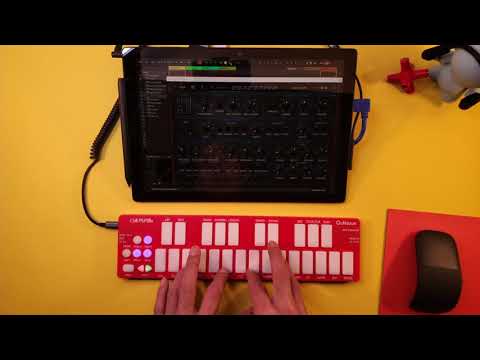
I can confirm the QuNexus 2 is awesome with Animoog
Thanks🙌
Thanks🙌
Thanks🙌
Keystep 37 has aftertouch, and a built in sequencer and arpeggiator.
Can I has some tips for setting up my Roli Seaboard?
Pressure: OK
Slide: Hm.. (For now I have it set to Delay Feedback)
Is there someting I should try, set it to orbit range or maybe?
I never understood the MPE and Single channel functions on the Roli, it seems to do the same stuff, only Glide does not carry chords(usually) in MPE mode, or it jitters more when trying that. Can I has explenation on the difference, can I do different things in Animoog Z switching between the modes?
Do I potentially have access to more parameter binding using it in MPE mode?
Patric is rock
Thanks
@solncekreeze Not fully MPE , but you may be interested that Novation Launchpad Pro3 & X transmit Polyphonic Aftertouch as well as velocity in their Note modes - different to a keyboard but still playable expressive instruments with practice,
& the additional functionality as programmable matrix of buttons , faders etc may be worth the expense if you already have a keyboard.
(edit also then the more expensive but fully MPE Linnstrument to mention)
Someone should mention that if you can find any QuNexus keyboards secondhand, they can all have their firmware updated to become MPE capable. The older ones are black, and their old rubbery coatings have gone sticky, but if you don't mind giving them a buff with a rag and some alcohol, you might be able to get one for a song. I got a great deal on my house because the previous owners painted the whole interior salmon pink, so things work out for the best sometimes.
Maybe this will be the year that the Expressive E Osmose ships. That should be pretty sweet with Animoog Z…
You probably already know this, but MPE should send Note On/Off, PitchBend, Channel Aftertouch, and CC74 on a separate MIDI channel for each note. This should be recognized by an MPE synth. Single channel will send everything on one channel, so there can only be one Pitch Bend and CC74. It might use Polyphonic Aftertouch, which an app may or may not recognize. (Poly Aftertouch is a different MIDI message from Channel Aftertouch.) So, you don't have access to more parameter bindings in MPE mode, just the ability to alter individual notes.
You could check what Roli sends in each mode by using a MIDI monitor.
Thanks so much @uncledave
Aha! It’s in the pudding, so when you press with different strength while you hold a note(that’s aftertouch?) it only works with one note at a time in Single channel?
If I plonk a chord and keep pressing with different preassure on each finger, will it only be one note at a time that registers it? Is tha right?
I have not noticed yet if that is the case.
Thank you so much for the reply! I kinda grocked MPE just meening all channels in my earky experiments but couldent tell the difference in playability, Gliding chords though is twice as hard to pull off in MPE and I guess I should not be surprised about that? It’s nice enough to glide chords somewhat precisely and be able to Fade in or wabble the Cutoff from middle position using single channel.
I was thinking, I could Re- bind the CC 74 (MPE mode) in different channels to send a different signal so that way I could use it as a controller?or control maybe multiple parameters on the higher octave or something. Or enable some synths just on one of the channels.
Have you heard other people doing that?
Hope you can confirm/disconfirm my grocking of MPE at the top here,
Have a nice day
Yes, that's how it's supposed to work
In an MPE synth, you cannot rebind CC74 in different channels, because you don't really have access to the MPE channels in the synth. The ability to add expression to individual notes is just hidden "magic". I suppose you could connect different synths to different individual MIDI channels. Each would receive common controls on channel 1 and notes+expression on one other channel. You would have no control over which note goes to which synth. A connected MPE synth would still see everything. Now, MPE goes through some negotiation at start to determine which channels will be used. So I don't know if Roli will be configured for MPE if it's not connected to an MPE synth. Could StreamByter pretend to do this? Maybe.
I mean I could use a re-mapping app to change only CC 74 on channel 16 lets say, right uncle Dave?
I think I can change what mode the synth on channel 16 is using but maybe it won’t be able to use single channel while Roli is in Multi.
I’ll report back.
Streambyter for now is to high mathematicsal consept, but maybe I’ll get that too?
This might help: "Why MPE?"
I want a QuNexus but only for Animoog. I’m not sure I wanna spend the money though because I want to mostly play, not do sequences (although all that stuff is nice and I would use it). I want something for Animoog with a little give, so tired of my fingers being numb from playing on the iPad screen. I just can’t see any way I’d ever be happy with 24 keys. Yet decent sized MPEs are so damned expensive. I’ve got a $200 Sweetwater Christmas gift card burning a hole in my pocket (what do you know? Just the right amount), but I’m torn.
Anyone know if it’s possible to split the keyboard, i.e. first octave on the McMillen is C1-B1, then the second 12 keys on the McMillen skip an octave and cover C3-B3.
Do you know if “Strike” and “Lift” (Roli) can apply to Animoog Z? Are those mostly for it’s native Noise app? I like to use it with my favorite apps before I go crawling home. I’ve tried alot of striking and lifting in Moog Model 15 but so far I’m not sure I’ve heard anything.
If it applies insome patches, what do they do, how would I look for that, or make a patch respond to lift and strike?
A little web searching will provide you info about those:
https://support.roli.com/support/solutions/articles/36000019157-what-is-5d-touch-
Strike is note on velocity and lift is note off velocity.
Strike and lift are just note on velocity and note off velocity rebranding so that ROLI could claim 5 dimensions of control.
Alright I get it now Thanks for ending the mystery of the Seaboard for me (:
I suppose “Lift” is a thing (but could be filed under Press), would “strike” be any different on a ‘Key’Board?
Strike is just note velocity -- that any velocity-sensitive keyboard sends out. Of course, with a synth you often have to map that to something. As note velocity is often not used.
I was just reading about the issues that MPE+ helps to solve.
https://www.hakenaudio.com/mpe
Does Animoog Z support MPE+? If so, perhaps a related question for @GeertBevin is whether MIDI Tape Recorder automatically supports MPE+ features.
Lift, or release velocity is real. My iRig Keys Pro sends a non-zero velocity with note off. It's essentially zero if you lift them gently, quite large if you snap them up. Never seen a use for it, but I suppose a piano or harpsichord synth could add a little bang for the action falling.
MPE+ is not a standard and was unilaterally created by Haken Audio without taking the effort of going through the MIDI Association to allow the rest of the industry to weigh in. There are a number of things I personally have an issue with related to MPE+ and I would have objected to if that would have gone through the MPE Expert Group. Animoog Z doesn't support MPE+, MIDI Tape Recorder supports any MIDI messages you send, so it implicitly supports what they call MPE+.
That’s good to hear about MIDI Tape Recorder implicit support.
Agreed, MPE+ seems over-engineered in some ways, and quirky and idiosyncratic in other ways. Still, it seems the problems they’re trying to address are real, such as data smoothing, attack trajectory, intermediate glitch values due to async 14-bit, etc. In your opinion, are these issues overblown, or still worth solving with better more standardized solutions than MPE+?
MPE serves a very specific purpose, to bridge the gap with MIDI 1.0 for expressive electronic instruments with a minimum amount of work. MIDI 2.0 supports everything MPE+ tries to address and a lot more without trying to bolt it onto MIDI 1.0. Continuing to add onto MPE is giving it too much importance and generates confusion (especially by reusing the name with a +), instead MIDI 2.0 should be what everyone moves towards now.
Thanks, I’m diving down the MIDI 2.0 rabbit hole now. 😊 It does seem like the right solution. It’s best if “MPE+” just quietly goes away now. It looks like we’re coming up on the 2-year anniversary of the release of MIDI 2.0, and most hardware manufacturers are still in wait-and-see mode. Expressive E says they’ll consider adding MIDI 2.0 to Osmose if there’s sufficient customer demand for it, which likely means when there’s a compelling soft synth or desktop synth with 2.0 support. So a bit of a chicken-and-egg problem. I’m guessing Moog will be among the first to add MIDI 2.0 support to their soft synths.
I would guess that we’ll start personally experiencing the benefits of MIDI 2.0 in the next 2 to 5 years, but who knows, maybe it will be sooner than that. It will likely be fairly painful for the early adopters, but I think the benefits will be worth it.
@GeertBevin as someone who's pretty deeply involved with Moog as well as the Linnstrument (and MTR, and possibly other projects), are you personally aware of any concrete work going on to implement MIDI 2.0 support at the moment?
Not asking you to divulge any specifics or trade secrets - just curious as to whether any MIDI 2.0 implementations are actually underway as of the start of 2022.