Loopy Pro: Create music, your way.
What is Loopy Pro? — Loopy Pro is a powerful, flexible, and intuitive live looper, sampler, clip launcher and DAW for iPhone and iPad. At its core, it allows you to record and layer sounds in real-time to create complex musical arrangements. But it doesn’t stop there—Loopy Pro offers advanced tools to customize your workflow, build dynamic performance setups, and create a seamless connection between instruments, effects, and external gear.
Use it for live looping, sequencing, arranging, mixing, and much more. Whether you're a live performer, a producer, or just experimenting with sound, Loopy Pro helps you take control of your creative process.
Download on the App StoreLoopy Pro is your all-in-one musical toolkit. Try it for free today.
Comments
PD Space Guitar also has a NAM loader.
I hear that's a great one. I'll be honest, I'm purposely crippling myself by not getting that one. I have this weird ocd where I can't get past the fact that it's not purely a nam loader.
I can't really see why anyone would need or want more than one NAM loader, unless there's some special differentiation. I doubt there is much room for that until there's support for this A2 or whatever.
(Admittedly, I'm not a big fan of NAM in the first place, but that's been discussed to death elsewhere.)
Greetings, we have been pretty busy with some exciting stuff that I cannot disclose right now but there will definitely be a A2 supporting loaders in a short period for iOS.
My goal was to try if other NAM loaders are less CPU heavy than NAMXT from Artera. So I bought $2 StudioCamera. The CPU consumption is pretty the same there so no big deal. From this perspective, the ToneX and TH-U apps are the clear winners.
Nice. I hope you’ll also find time to fix the bugs and unfinished features in GigFast Lite. You should have plenty of suggestions for this, both from this forum and from user feedback. I’ve sent you two myself.
Great news.
Thanks.
Flo
Thanks for chiming in! I’m definitely excited for NAM A2 and new features / bug fixes!
I gave A2 a try on desktop today. It’s a very noticeable difference. It all sounded a bit clearer with a better defined high and low end. To my surprise there also was less white noise. Very cool!
It’s hard to believe that despite the better sound it uses less CPU.
NAM A2 is a winner.
I had no idea. Thanks for the heads up.
Oh hello there!
And the Oscar goes to Studio Camera 🙌
Well done @rafabertholdo
Thanks for the reminder about the Studio Camera 1.14 update! I can confirm that A2 profile is less CPU hungry than standard NAM profile. (6% vs 10% on iPad Pro M5, LoopyPro DSP Statistics)
Sure no problem 🙂
I also saw a decrease in CPU use on my M1 iPad. Looking forward to the next live situation.
Before A2 I already thought it couldn’t get much better. Well now I know better 😄 call me excited.
Running the new A2 with studio camera last night, saw a noticeable decrease in cpu. It may be confirmation bias, but I felt it was a touch clearer as well.
Yeah I also feel a different kind of smoothness in the top end. It kind of sounds like a higher resolution format.
I went back and forth between the same profile in A1 and A2 and could definitely tell a difference.
I wonder why he(?) hasn't updated to the new name: Gateway and version number 1.01.
On the back of the iOS version it states Neural Amp Modeler and Version 07.13 which I'm fairly sure was the old one.
Maybe he(?) just forgot.
For which app?
Studio Camera, it's discussed on previous posts before mine (A1 -> A2) and NAM on desktop is renamed to Gateway.
Yeah that is a bit weird, but apparently it seems to work. By the way, are there any settings that I should change? First time user. I left the EQ on, not calibrating, left the EQ at noon.
When you select an A2 NAM in Studio Camera you get this little blue slider icon (to select the A2 quality) next to the NAM name.
The same happens in Gateway but not in the old NAM player.
So everything seems to work just fine.
I turn the noise gate and eq off, but that’s just me. If I need any eq, I use the built in one in loopy pro.
There’s so many captures to choose from, I try to find something that sounds good out of the box.
So it's a range and not just a polar A2 vs A2 lite switch?
Would you say that the captures sound more "true" with the EQ off? That's just the bass, mid and treble knobs right? I have those at noon and don't mess with them.
I think, but don’t know, that the eq at noon on the player is equivalent to turning it off. But I turn it off to avoid accidentally touching it. I can’t say I notice a difference, but I also haven’t tested it much.
Tonehunt has an API that lets people create a Tonex-like experience (searching, downloading, etc from within the app), but I dont think anyone has done this. This would be the nail in the coffin or the kick in the butt for IK multimedia on ios.
edit: ill add to the suggestions below Soundshed for desktop which has tonehunt integration.
It is a range.
I know one guy (desktop):
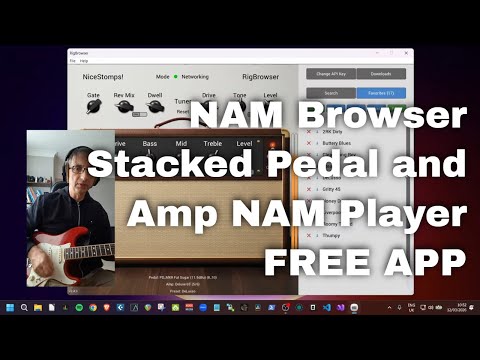
Studio camera integrates the Tone3000 library into the standalone. Once you have downloaded the models, they are available from the AUv3
The Blackstar captures are amazing, even better as A2.
Agreed! Those Artisan ones are niiiiice
Indeed! Thanks to Studio Camera, I’ve been playing through a couple of A2 profiles and they sound terrific. @rafabertholdo in Logic Pro, the plugin doesn’t scale properly. I hate to ask, given how affordable your pricing is, but is this something you could correct? Thanks!