Loopy Pro: Create music, your way.
What is Loopy Pro? — Loopy Pro is a powerful, flexible, and intuitive live looper, sampler, clip launcher and DAW for iPhone and iPad. At its core, it allows you to record and layer sounds in real-time to create complex musical arrangements. But it doesn’t stop there—Loopy Pro offers advanced tools to customize your workflow, build dynamic performance setups, and create a seamless connection between instruments, effects, and external gear.
Use it for live looping, sequencing, arranging, mixing, and much more. Whether you're a live performer, a producer, or just experimenting with sound, Loopy Pro helps you take control of your creative process.
Download on the App StoreLoopy Pro is your all-in-one musical toolkit. Try it for free today.
Stuck on Tonestack: How to Use Loopy Pro with Guitar Effects?

Hi all,
Happy New Year. I hope you’re all doing great!
I’m new to Loopy Pro and thrilled with how awesome looping is. However the possibilities seem endless, but I’m feeling a bit overwhelmed by all the options. This is my first experience with anything like this and I will be honest, I am a little overwhelmed
I’m trying to use it for looping with my guitar and have managed to connect it using an M-Valve Chocolate MIDI Controller and a Scarlett Focusrite audio interface. It’s all working pretty well, but I’m stuck on connecting Tonestack for effects.
I’ve created a video explaining the problem I’m facing (Show don‘t tell). Could anyone explain how to set this up properly? I’d be super grateful for any advice!
Thanks so much!
Best,
Mark
Comments
Use ToneStack Pro as an AuV3 effect plugin in Loopy Pro rather than as a standalone app.
In Loopy’s mixer, expand the mixer to show the effects slots.
Tap on the + sign of the pre-fader effects slot for your guitar input. Choose ToneStack Pro MIDI
Thanks so much @espiegel123, that got it working!
Would you happen to know how to create buttons for different Guitar effects?
In Tonestack, there are 4 different options (A, B, C & D) for guitar sounds.
I was trying to figure out how to make buttons for each of these different settings.
Any ideas?
Look at Tonestack’s MIDI mapping system to see if those are midi mappable in ToneStack.ToneStack does not expose its parameters to the host app. If the controls are midi mappable in ToneStack, you can send midi messages to it from buttons in Loopy.
@MarkEJ - It appears that you can't control the A B C & D buttons from outside the app. You can control some basic app settings, switch through presets, and you can control every knob and switch on every FX unit, but you can't control those four darn buttons.
My suggestion is to save presets using Loopy Pro's own preset system, then select those using Loopy Pro buttons. Get everything set up the way you like, then press the folder icon in the window title and save a preset. Next create a button and set it's press action to Select Effect Preset and point it to that preset.
What I did was to set up my A B C & D buttons in the app the way I wanted, then created presets named A B C & D. Then buttons to select those presets. But you could do it any way that works for you.
Alternatively you can use ToneStack's MIDI learn system if you load the ToneStack MIDI FX version. Once that's done go to ToneStack Settings and select either
MIDI Learn (Units)orMIDI Learn (App Controls).Unitslets you control individual knobs and switches for each FX unit.App Controlslets you manage certain global app controls.(ToneStack's midi control has recently improved, but it used to be pretty flakey, but I also find using Loopy's preset selection to be more straightforward than going through ToneStack's process.)
I'm also new to Loopy Pro, so there'll almost certainly be better ways to achieve this, but this worked for me.
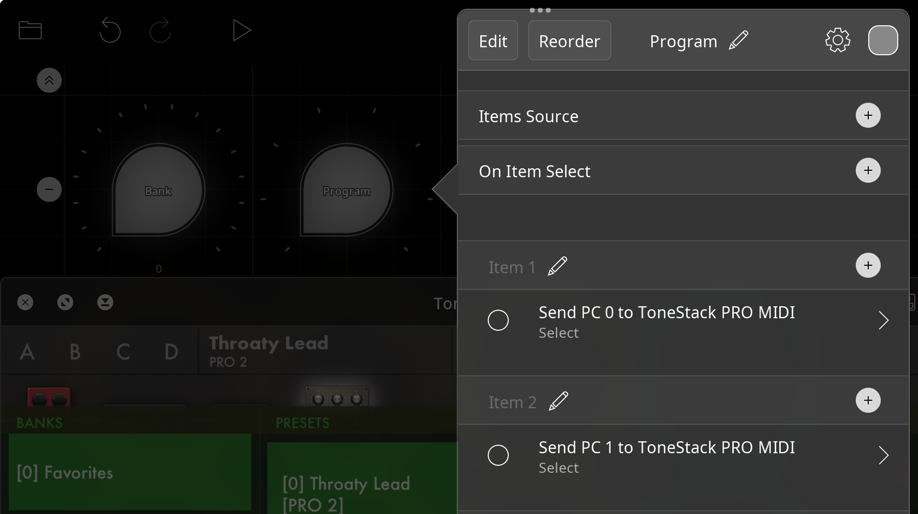
You need to add a widget (I used a dial) and get it to send midi Program Change (PC) messages with an associated value to ToneStack to select a preset in a pre-selected bank.
Best of luck
Hi,
I've had success creating Loopy Pro presets with ToneStack Midi AUv3 w/in LP2 and activating/recalling those presets via a LP widget. But I've not been able to recall/change ToneStack presets by sending PC messages from a LP widget, which I'd like to be able to do as well. Anyone successfully done this who can share what channel you're sending on (I've tried sending on multiple channels with no luck at this point) and/or a simple example of what message to send in order to recall, say Bank 4, Number 40 in ToneStack. Thanks
I'll do some fooling around with that out of curiosity. But you know you won't get any feedback indicating which preset you're on that way, right? You'll also have to do some behind the scenes stuff to preserve the state of the widget that's sending midi between sessions.
Thanks @wim . I wasn't aware of those caveats, so thanks for pointing that out.
I'd probably just use this approach (if we can get it working) for some quick experimentation ... ie: have a button with a swipe action and swiping through all the presets to see if anything strikes my fancy while working on a new idea...so, not my primary use of accessing presets (I'll use the preferred method of accessing via LP presets), but a secondary approach which may prove useful for some experimentation. Thanks again
@danm : are you using the midi version of the plugin?
Post screenshots of the widgets and their action details you are using to change tonestack presets.
@danm : a dial like this will change the presets in tonestack’s current bank. It will only work if you are using the midi version of the AUv3
Hey, @danm - so it seems pretty straightforward to me.
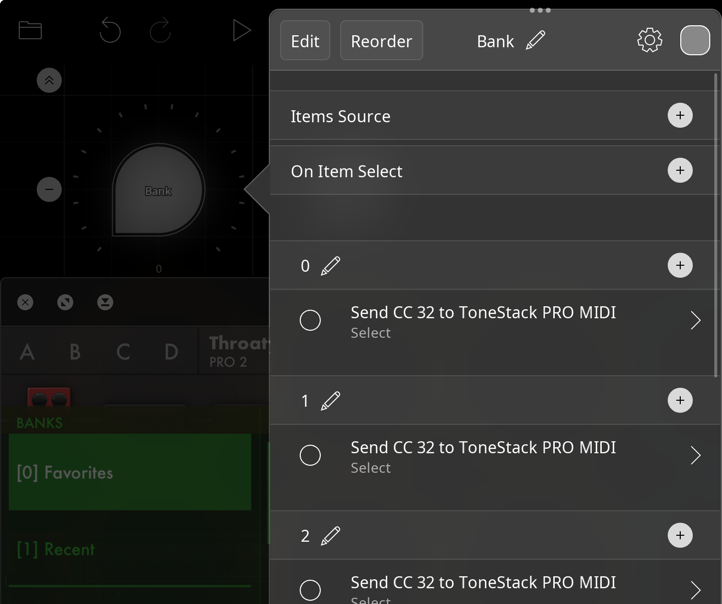
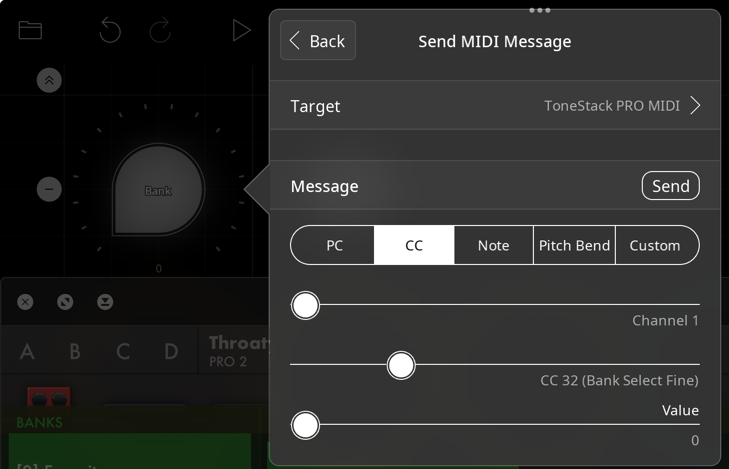
To do a bank select, send midi cc0 / value 0 followed by midi cc 32 / value . The bank numbers follow the bank list order in the ToneStack preset browser. They're also listed in brackets to the left of the bank names. It seems to not require the CC0 / value 0, so you can probably leave that out. Then send a PC message with the value of the preset which is in brackets next to the name within the bank to select it.
This worked fine in all my tests so far. However, note that if you send a PC message greater than the number of presets in the bank, it does nothing.
@espiegel123, I set mine up as you have shown, but not seeing any change in the presets as I rotate the dial all the way either way. Can you share more details of your setup? Thanks
How about you show your setup for the dial, as well as your mixer, showing the routing? I'd give you screenshots from my tests, but I already tore the setup down
It was working fine for me.
Bank: Change the cc32 value for each to select the bank.
Program: Change the PC value for each to select the preset.
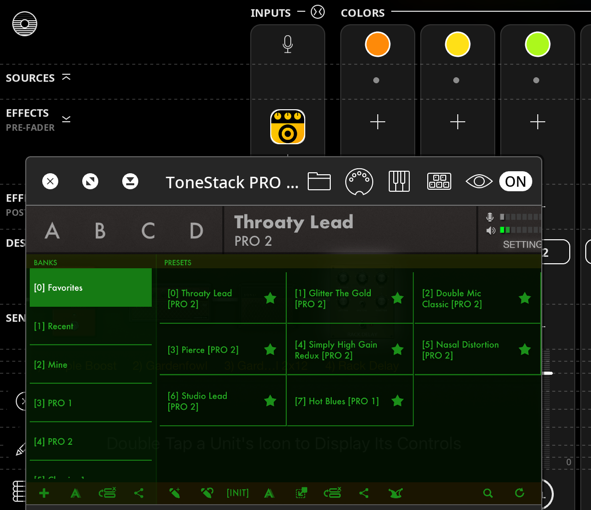
Mixer: Be sure you're using ToneStack Pro MIDI, and that Tonestack is not idled.
There aren't any details to share really other than that. Can you post screenshots of your actions? Are you sure that you have the MIDI version loaded and are using the latest version of ToneStack?
Idle-ing was the problem...Ensuring it's not idle-ing gives me same results as you are getting, thanks!
Perhaps I should turn off idle mode
It kind of makes sense to turn off IDLE mode for ToneStack, unless you really need to conserve CPU.
Yup, @wim, I plan to do that from now on, thanks.
While this is top-of-mind, have you found any way to automatically have the stepped dials be aware of the max number of items in the banks and/or presets so it can 'wrap around' after it runs through all of them, or do you have to manually set that up (the latter is what I'm doing). Also, have you discovered any automatic way to have the bank/preset names shared with/visualized by LP widgets or are you just entering the names manually per item. Just wondering if there were any other tips/tricks worth knowing, otherwise I'll just set up manually...Thanks
Loopy Pro has no way to know the internals of ToneStack Pro. There isn’t a way for loopy to know how many presets are in the current ToneStack bank or what the names are of tonestack’s internal presets and banks or how many banks there are.
If you save the presets in loopy pro, loopy knows the names.
Thanks @espiegel123, that's what I thought, thanks for confirming. I'm also going to try (again) to have a LP widget gesture open/close ToneStack's UI, but wasn't successful doing this previously, but that's the next thing I plan to try as part of my template...Thanks
In what way didn’t the gesture work?
It was a no-op. Couldn't get the UI to show, but I'm guessing it was also related to the AU having gone into Idle mode w/o my realizing it, so perhaps now that I've turned Idle'ing off it'll work as expected, will try again and see
Idling wouldn’t effect showing the window as Loopy performs that not the AU.
If you get a situation where something does work, I suggest posting screenshots showing the relevant details.
I'd like to toggle showing/hiding the ToneStack UI via widget long press.
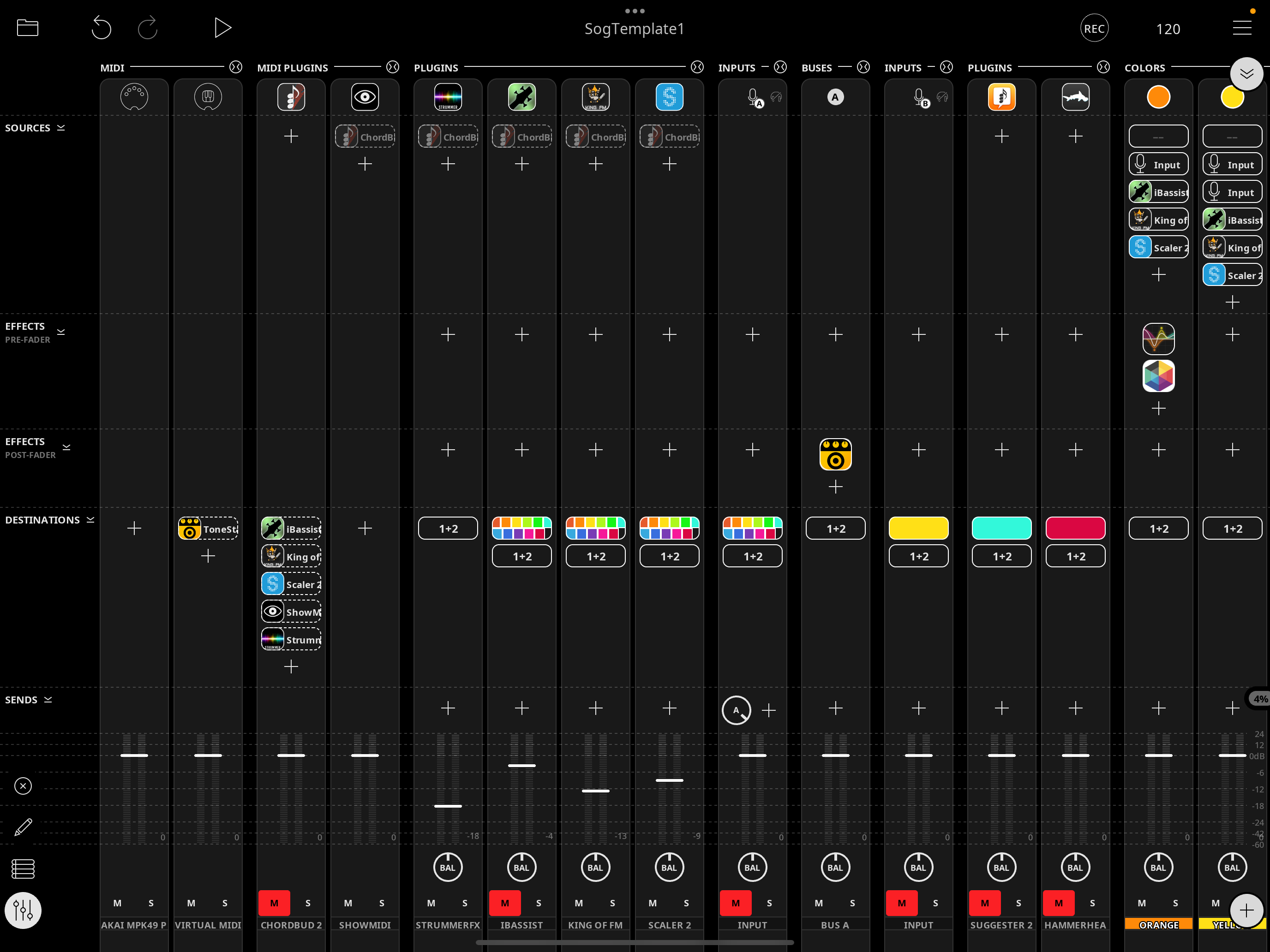
But when I try to set it up, I'm not seeing ToneStack as an option in "target" in either midi or audio unit. Here's the mixer:
I don’t know what you mean you don’t see it as an option? It is an effect. The action is Toggle Effect Interface.
I had tried "Toggle Audio Unit Interface" and "Toggle MIDI AU Interface", hadn't noticed "Toggle Effect Interface"
Follow up to the above...
@wim, mentioned that the midi learn system for Tone Stack has been flakey in the past but has improved.
I'm trying to set midi learn for the wah pedal "Sweep" value in the "Clean Wah" preset, while using TS Pro Midi as Auv3 effect w/in Loopy Pro 2.
I have my MC6 Pro midi foot pedal set up to send ascending values on cc0, chan 1 on long press.
I can see, via ShowMIDI (as Auv3 in LP2) that the messages are making it to LP.
I have gone into the AUv3 TS UI and turned on Midi Learn and selected the wah pedal in the Clean Wah preset and double clicked it to get the "Sweep" Modal and set the cc to 0 (it was orig not set) and left channel at 1 and min at 0 and max at 127 and hit the SET button.
After exiting Midi learn and long pressing the foot pedal (and confirming the midi is getting sent, ie: ch1, cc0, 1 then ch1, cc0, 2 then ch1, cc0, 3 and so on) I'm not seeing any visual change to the wah pedal in that preset and am expecting to see it move if these values were being received.
Anyone tried this or have any pointers?
Thanks
@danm : have you routed the midi into tonestack?
I had indeed tried to do so, here’s a screenshot