Loopy Pro: Create music, your way.
What is Loopy Pro? — Loopy Pro is a powerful, flexible, and intuitive live looper, sampler, clip launcher and DAW for iPhone and iPad. At its core, it allows you to record and layer sounds in real-time to create complex musical arrangements. But it doesn’t stop there—Loopy Pro offers advanced tools to customize your workflow, build dynamic performance setups, and create a seamless connection between instruments, effects, and external gear.
Use it for live looping, sequencing, arranging, mixing, and much more. Whether you're a live performer, a producer, or just experimenting with sound, Loopy Pro helps you take control of your creative process.
Download on the App StoreLoopy Pro is your all-in-one musical toolkit. Try it for free today.
controlling widgets via midi - checking a strategy

the way I thought about using widgets is to get the possibility to recalling an action via the app screen and assigning a midi command to the same widget so to activate it.
This way the widget has a function which can be activated both manually and via midi.
While I have no issues activating it manually, I have many getting the actions midi controllers to the widget.
As an example, I have a widget for reverse.
It's set so that it performs reverse on the selected clip, reverse the first time I press it and straight the second time and so on. When I press it on the app screen it does exactly what it's supposed to do.
I assigned a midi command to it via midi learn, it's a cc with initial value 127 and second value 0. This results in switching the widget and the relative action just the first time I press it.
Another weird behavior is on another widget I created, which I called "sustain overdub", performing an overdub on the selected clip just at the moment the widget is pressed. Manually there's no issue at all, while assigning it to a midi control leads me nowhere. I mean, if I get into MIDI LEARN > press the widget to select it > TRIGGER WIDGET > press the midi controller to make it recognized, which it gets > CLOSE MIDI LEARN > the widget and relative action are not getting recalled.
Comments
@lucal : it helps if you post screenshots of your binding details.
What does your controller send on press and release?
What does “I assigned a midi command to it via midi learn, it's a cc with initial value 127 and second value 0”
For your second problem, post screenshots of the widget’s actions and the binding details.
@espiegel123 : here you find a video and two pictures of the active control settings for the current project
pardon for the blurry images...
Let us tackle one issue at a time.
It is a bit hard for me to follow the video. A couple of things would make it easier to follow. I probably only need screenshots which you can take on your iPad itself and upload into your post.do a quick search to see how to generate a scteenshot.
Use a midi monitor such as Show MIDi in your iPad inside loopy pro
Let’s start with the reverse issue. Open the button’s editor. Take a screenshot of its action/s .
Route your controller to the midi monitor in loopy pro.
press the button on your controller but don’t release . What cc is sent.
Release the button. What cc is sent.
Repeat press and release. What ccs are sent
Take a screenshot of the bindings and post in this thread
here you go:
you see just one screenshot of the controller as I've set up just a single midi command
Your reverse button has a press action. But you set up your binding to trigger the button’s toggle behavior. Your binding should be to the press behavior.
I highly recommend that you set your controller to send value 127 (on) when pressed and 0 on release.
If that solves the reverse issue. Let’s move to your next issue.
@Lucal
sorry @espiegel123 you're very kind and I feel I'm very slow
I've changed the reverse button to toggle so that it changes the clip direction each time I press it, which is what I want.
Can you please tell me how my binding is supposed to be set to make it all work?
thank you!
Your button is correct.
Edit your midi binding so that the trigger is On and the action is to press the button not toggle it.
Out of curiosity, how did you set that up? Ic you midi learn the button it should do the right thing (though you might have to change the trigger from Hold to On since your pedal doesn’t send off on release)
Button action on press
The midi binding.
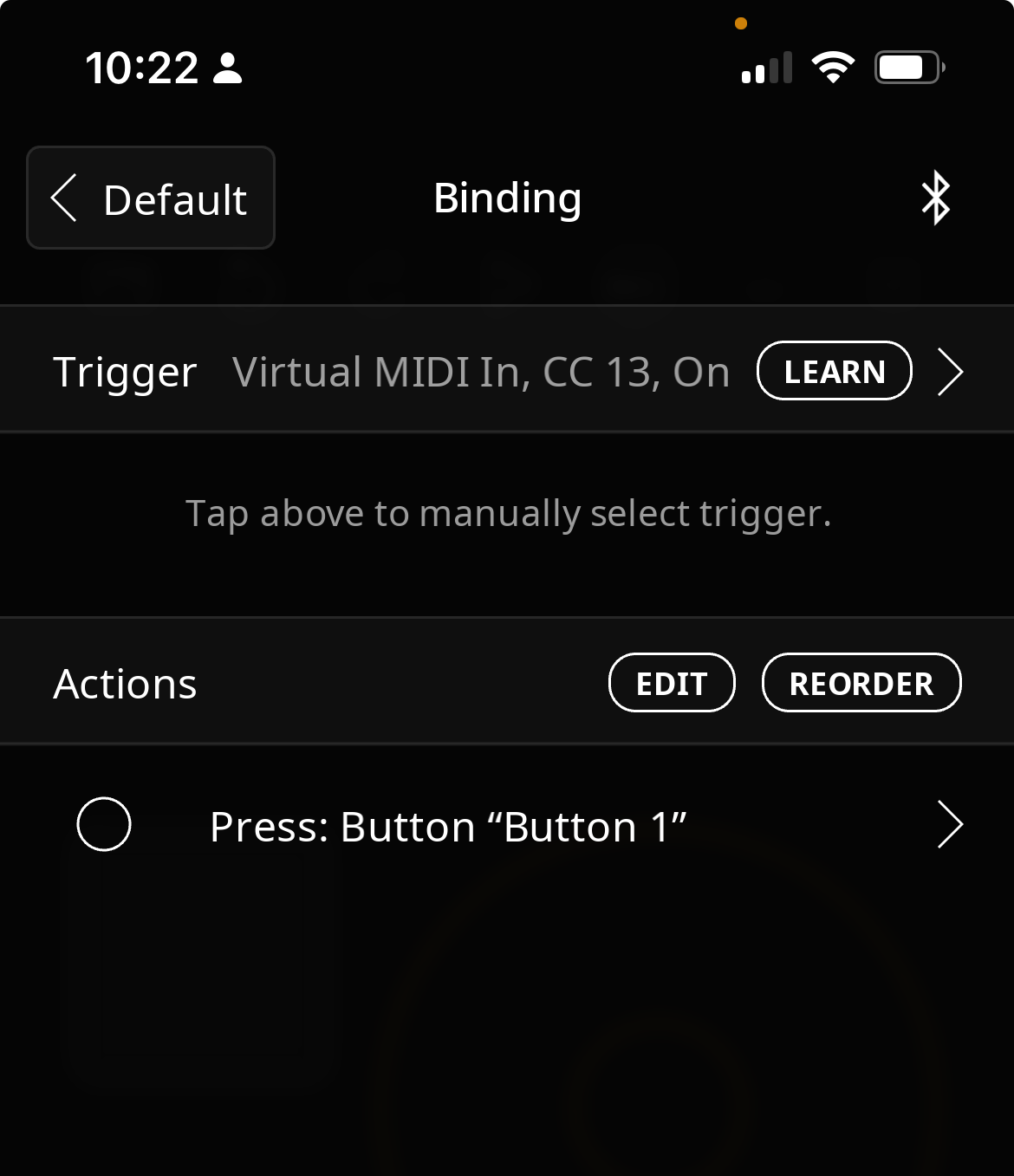
@Lucal : edit your profiles to remove duplicate cc's. For example, cc13 appears in two profiles. if both profiles are active that will cause problems
ok, I'm there!
thank you so much
Great. Both problems solved?
yes, the issue with overdub was solved by canceling the duplicate midi order in one of the two control profiles.
thank you so much for your patient help, but I'm sure we're going to meet with some new questions one day :-)