Loopy Pro: Create music, your way.
What is Loopy Pro? — Loopy Pro is a powerful, flexible, and intuitive live looper, sampler, clip launcher and DAW for iPhone and iPad. At its core, it allows you to record and layer sounds in real-time to create complex musical arrangements. But it doesn’t stop there—Loopy Pro offers advanced tools to customize your workflow, build dynamic performance setups, and create a seamless connection between instruments, effects, and external gear.
Use it for live looping, sequencing, arranging, mixing, and much more. Whether you're a live performer, a producer, or just experimenting with sound, Loopy Pro helps you take control of your creative process.
Download on the App StoreLoopy Pro is your all-in-one musical toolkit. Try it for free today.
Smallest Mobile Studio ever - Share you ideas and critics and some results
I have realized that music making in "big" studios is not that innovative anymore - have done some with my 40years of musician life. But while having the setup with you as you move to any place and in 5 secs you can start to create.. Thats the Ipad musician world..
Please share your thoughts and setup in with Minimalist theme ;-)
This is just one example to get started
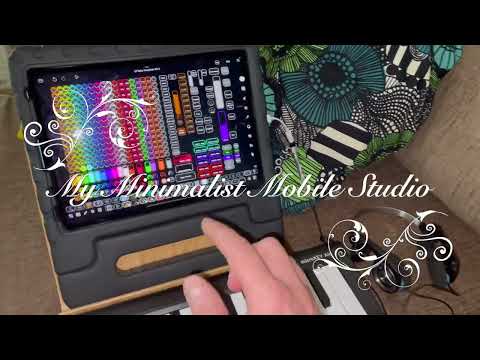
Smallest mobile studio, but so capable (and easy to extend with e.g. audio interface and launchpad):
Ipad M1
Loopy Pro
AUV3 instruments and effects
Korg Air 25 MIDI keyboard
Koss Porta Pro headphones
Usb-c to audio "dongle"
Plusses:
Straight forward workflow to produce, because have tons of samples and tens of auv3 instruments and effects.
Takes 5 secs to start playing in anywhere
Surprises all the time with the potential
Minuses:
Feels a bit limited with playing
Rather use my 13" ipad - but then studio is more heavier
No mic or input connection in this setup - only to create background music or with ready made material some remixes
Comments
iPhone is all you need, it won't get much smaller than that I guess - except if you're relying on your imaginary band completely 😊
Have to admit that's true 👌.. Thinking already to build LP templates to iphone, but need to check my glasses first ;-) But generally I'm surprised about the bluetooth midi, it's at least mostly playable - maybe drumming is a challenge.. But honestly you need to also evaluate the potential - compared e.g. to this template and bigger screen?
Oh yes, good templates make a big difference.
The faster you can start composing with all instruments ready to go, the better.
And yes, BT MIDI works very well for me too, except maybe in monster arrangements with BT MIDI dongles that are powered by 5-pin hardware MIDI ports.
I really like making music on my iPhone I plan on popping a new battery in my iPhone at some point. Hey- I was mucking about on Dagger and noticed some presets that have your username in them. Do you have any Dagger presets you're sharing?
Mine at the moment is an ipad mini and a set of cheap usb-c IEMs. I can fit it in a bum bag and still have space for my phone, powerbank, reader and heroic amounts of drugs ( the last part is optional, I haven't done anything like that for decades, there is the space though).
iPhone is the smallest but for a “studio” I’d like to have a physical mixer and keyboard.
For that, the smallest studio set up for me would be an iPhone plus a Korg nanoKontrol and Korg nanoKeys. And these controllers are made pretty much specifically for Korg Gadget. And they both fit very nicely in a small backpack. Both support BT which makes ideal for travel. No wires to haul around.
So I’d say the smallest portable studio is an iPhone with those controllers running Gadget plus a good headphone. Of course you can map those controllers to other apps too.
Cool setup, @AkiVilla.
I use an iPod touch on gigs sometimes. Really small and useful. It’s my pocket studio, but not as powerful, mostly just play backing tracks or capturing midi from my keyboard playing.
Yes I've made a few factory presets. I don't have more to share, since I usually tweak the sounds when I need them.
Thanks - Your approach is new for me, appreciate that you shared
Thanks for sharing - Interesting to hear from all of you @rs2000, @egobeats @sevenape @reezygle and @Dav .
Ipad Mini I need to consider iPhone16 I currently have. But in my age I'm more and more using 13" Ipad Air M3, because of the screen. Has anyone used iPhone so that you use it with external monitor or TV - to connect on place. Or some other ways to improve visuality. Thinking already about LP template, I probably just need to have tens of pages to cover all things needed..
OK so "smallest studio ever" is not exactly what you want 😉
If you're happy with your 13" iPad then that's it.
One tip from my experience: If you need tens of pages to cover everything you need, you might want to consider separate pages with different depths. When composing and recording an idea, it's usually a lot more fun to keep it simple and accessible, while later refinements can be done in more complex UIs.
Always good to keep your options open.
Yeah I have to agree with you @rs2000 - I kind of started the minimal set, I can produce
If I use Arturia Minifuse I can use the usb port in it to connect the launchpad.. also able to record vocals and so on..
This will be probably the second and a step up incarnation of mini studios in my bedroom studio.. Got so many auv3's that now it's the time to find use for them and ios setup(s) and most importantly trying to create a straight forward workflow to create music.. Also got macbook and PC with DAW's and MPC standalone with so much material in it - but feel them not to innovate me recently
Hi! Had to add the updated version when building up - a little bit more quality and flexibility, but so much more cords. You can still fit this all into your case, but .. Anyways will soon publish some variations also with some surprises.
Added following in this:
USB c hub
Powerbank to even charge the iPad
Arturia Minifuse (now I have extra usb for midi)
Stand for iPad
Rode M2 mic (Phantom powered) - quite good quality
Shure 840 Headphones
and needed cords
Setup for my live ambient rig:
Irig keys 25 with iphone 5s,
Irig voice mic with ipad mini1,
cheap 4 channel mixer with usb out connected to iphone 5c, thats all.
Everything running on batteries.
Wow !!!! 🎶😎 I like the spirit 👌
Thinking about the next upgrades - mostly about audiointerface, when playing and recording with my daughter. I need two headphones out and also would like to have stereo in - Does anyone have ideas if budget is about 200 euros.. I suppose not so much options, so may dropped of with those specs
Whoa, wasn't expecting such an anxiety spike from what should be a calming image 😳
@PapaBPoppin hahahah
You could just sing.
I find adding one of these Anker Hubs to the “studio” solves a couple of issues:
It gives you a way to keep the iPad powered and adds an essential headphone jack.
The additional expansion helps add audio inputs.
NOTE: Adding the Hub will require a significant Power Adapter to power everything possible (40-60Watts, I went for a 100W Anker adapter). I would need to research Battery units for the power specs to be sure I could go completely mobile.
I have velcro’ed mine to the back of the Smart Keyboard so I never forget it. I tried one of the HUB’s that
also have an NVMe stroke slot with 1 1TB card but the damn thing started to drop support for the
SD card which I was going to use to move folders of project, samples and videos around… then the
headphone port on this other vendor’s product stopped working. So, I recommend Anker… it’s worth the premium price to get a solid design.
I use a Zoom AMS24, two headphones out and two combo mic/instrument in. I paid 109€ and it is very mobile running with two AA batteries or buspowered (newer USB-C iOS devices) or with a powerbank on the second USB-C – perhaps a solution for you and your daughter?
I can't get it much smaller than an iPad, guitar, iRig (or other interface) and if needed I have a Zoom field recorder which does a great job. Not sure how I'd get the audio into the iPad though.
Hi @McD. Yes Anker provides nice hubs. I have half a dozen cheaper ones, some with PD and some not. I think hub needs to have PD and also powerbanks should be able to provide 20-40W. To be able to use them with multidevices 🤔 Even if I use Arturia Minifuse which has built-in usbhub, its draws soon the power out of iPad unless i have another hub with pd..
Apart from my iPad 9, my synth of choice for a portable setup is the Arturia MicroFreak. This is not only a very versatile USB powered synth that provides a lot of "freaky" sounds, but it makes an excellent MIDI controller as well: Disable local mode in the settings, and keyboard and knobs are separated from the synth engine. They send MIDI control messages and notes but make no sound. Incoming MIDI on the other hand goes to the synth. If you feed the MIDI coming from the synth back into it, it works as if local mode is enabled.
Absolute minimum light weight setup: . It receives audio from the synth for effects processing and the output goes to the headphones, PA or whatever. A single power supply or power bank can power everything.
iPad with the MicroFreak directly connected (and powered) via the camera adapter. A simple passive iRig adapter is plugged into the iPads headphone jack
Extended setup:
Atolla 5 port USB hub with 4 full USB3 ports and one charge only USB port. The charge only port connects to the lightning input of the camera adapter and thus powers and charges the iPad. The hubs main cable connects to the camera adapters USB port.
Now the entire setup including connected USB devices and iPad is powered from the USB hub - still only a single power source is required.
I usually have a Behringer UMC204HD audio interface, a Novation Launchpad Mini MK3 and the MicroFreak plugged into the hub. Still a fairly small setup.
Hi All. Thanks to all for participating discussion ;-) @yellow_eyez just started so maybe it's good to also share what you have produced with you "smallest ever" studio..
These ones are just examples done in less than 30 mins with Loopy pro and my template.. No audio interfaces or recording from anywhere just bluetooth midi and ipad and LP and bunch of auv3's..
https://www.youtube.com/channel/UCauM5pGaayiUbKO8LzQAEQg
Thanks for sharing.. Has been lately thinking about buying some hardware, but then I add the end cancel the order, waking up to understand that I got hundreds of plugins.. Why not to investigate an try to produce them more. Everything in anyways ending up to be digital and polished in studio or alike. Even while saying this I’m probably still buying more hardware soon, they are nicer to touch and adjust.. At the end, what is important - to appreaciate the opportunity to be creative and enjoy the moments of musical exploration (not coming from AI - even sounded like that)
Have to mention that I ordered one 1tb Ipad more to have all the best of the samples and all the AUV3’s with inapp purchases fitting locally.. And also Focusrite Scarlett 4i4, gen 3 though.. to have sp404 or even MPC routed in.. So some more videos pending about studio combinations☺️