Loopy Pro: Create music, your way.
What is Loopy Pro? — Loopy Pro is a powerful, flexible, and intuitive live looper, sampler, clip launcher and DAW for iPhone and iPad. At its core, it allows you to record and layer sounds in real-time to create complex musical arrangements. But it doesn’t stop there—Loopy Pro offers advanced tools to customize your workflow, build dynamic performance setups, and create a seamless connection between instruments, effects, and external gear.
Use it for live looping, sequencing, arranging, mixing, and much more. Whether you're a live performer, a producer, or just experimenting with sound, Loopy Pro helps you take control of your creative process.
Download on the App StoreLoopy Pro is your all-in-one musical toolkit. Try it for free today.
representative Loop of another Loop - Automat a copy of a Loop

First of all - The waiting was worth it, biiiiiiig congratulations to the devs for the new version 2.0 this is a master upgrade and a dream for looping artists.
Now my question:
As example, if I have 6 loops on 2 song parts (lets say Part A - Loop1,2,3 and Part B Loop4,5,6)
Is it possible if y record Loop1 on Part A that Loop 4 of Part B is automatically with the content of loop1 as as soon as Loop1 is recorded.
Sounds complicated, but could be a very good tool for rhythmic elements or variations (ex. Loop 4 / Part B is shifted by +5 Semitones)
Thank you for your help and thx for this jewel of software 
Comments
Just a quick mention that you'd probably be better off posting this in the Loopy Pro topic category. The tips and tricks category you've chosen is a general one, for all apps. Some of the most active helpers regarding Loopy specific issues are less likely to check this category
Oh sorry, i will do that, i assume i cant change the post to another categories, so I will check where I have to post this. thx for the hint
Unfortunately i can delete or move the thread (or I don't see the options because I am to dumb)
Yeah i don't think that's possible in the forum, maybe just something to remember for next time. In the meantime, I'll tag @espiegel123, he's very knowledgeable regarding Loopy Pro
Sure, all that can be done. A good place to start to build knowledge is to look at "Actions" in the Loopy Pro Manual. Actions are core to combining things you want to happen. They can be triggered by widgets, or such things as starting or ending recording, playback, the clock, loading a project ...
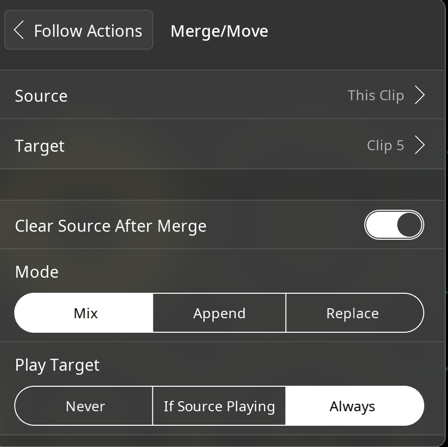
In your case, you would want to set a Move/Merge clip action on the
Finish RecordorFinish Initial Recordfollow action of Loop 1/Part A to copy it to Loop 4 / Part B.Here are the options you have in the merge/move action: