Loopy Pro: Create music, your way.
What is Loopy Pro? — Loopy Pro is a powerful, flexible, and intuitive live looper, sampler, clip launcher and DAW for iPhone and iPad. At its core, it allows you to record and layer sounds in real-time to create complex musical arrangements. But it doesn’t stop there—Loopy Pro offers advanced tools to customize your workflow, build dynamic performance setups, and create a seamless connection between instruments, effects, and external gear.
Use it for live looping, sequencing, arranging, mixing, and much more. Whether you're a live performer, a producer, or just experimenting with sound, Loopy Pro helps you take control of your creative process.
Download on the App StoreLoopy Pro is your all-in-one musical toolkit. Try it for free today.
Sync issues between Digitakt Minifreak and logic (using audiobus)

Hi guys, so I've been trying to get Logic pro to be a sync and transport slave to Digitakt via Audiobus using Ableton Link and I can't get the sync to behave properly.
First of all a bit about how things are set up. Digitakt is sending transport and clock via both midi and USB. It's sending midi clock and transport to minifreak via 5 pin din. And sending it to audiobus via USB, audiobus then sends transport and clock to logic via Ableton link. So in effect Digitakt is the master clock and transport device for everything. Audio from all the gear is going into logic via an audio interface with multiple inputs (ultralight mk5)
In logic Digitakt and minifreak each have their own "external instrument track"
The problem is when I press the play button on Digitakt, both the digitakt and minifreak transport start playing immediately but logic pro lags behind by 1 bar. During that 1 bar lag, the sequnce I have on minifreak is silent and then I can hear it start playing on bar 2. Then for some reason sometimes logic does start playing at the start of bar 1 but the minifreak still stays silent this time for a fraction of 1 bar... Then if it plays for long enough it seems to randomly resync and skip notes in the sequnce occasionally.
Also for some reason occasionally tracks 1-8 on digitakt become extremely quiet even though it's sending out audio not via USB but via the physical audio outs
I've been at this for 3 hours now, is it pretty much hopeless trying to get this to work properly? Or is there some way to fix it? Mostly what I would like to fix the most is the first few notes of minifreak not playing.
Here is a video of the sync issue:
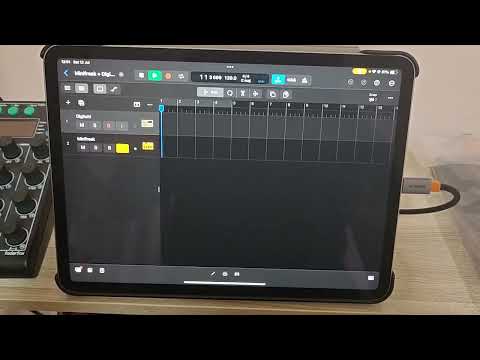
This is a video of digitakts tracks 1-8 randomly becoming very quiet (and sometimes delayed) while using it with logic. Tested with other daws and it seems only logic does this
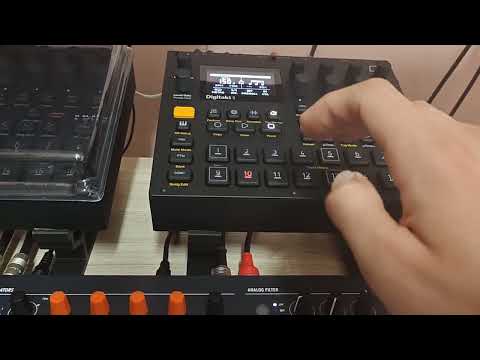
How I have the settings configured
Sorry that they aren't screenshots, it's easier to make forum posts on my phone.
https://ibb.co/hxD53rnQ
https://ibb.co/6Jcd1v59
https://ibb.co/VYxDxTz9
https://ibb.co/LDhJY1p0
https://ibb.co/sd6fbCj7
https://ibb.co/5hQzbT3s
https://ibb.co/WWzc9hFR
https://ibb.co/VWyk82Fv
https://ibb.co/39xTNC7d
Comments
Also, another observation that the low Digitakt track volumes remained after disconnecting the ipad and reloading the project while using Digitakt standalone.
Edit: figured out that for some reason logic’s transport play button causes the velocities on the trig pages of track 1-8 to drop very low
I've been trying to do the same with cubasis 3 and the audio from my hardware either doesn't come through or comes through distorted with wierd dropouts. So if anyone alternatively knows how to make this work in cubasis I wouldn't mind using it instead of logic
Logic wants to be the MIDI clock master, not the slave unless you’re on the Mac and are syncing to SMPTE.
When I use it with hardware such as a drum machine I set the drum machine to follow clock sync and it all works fine, including using the drum machine to start playback.
There’s no point fighting it; just let the DAW be the master. As the DAW records audio it really should be the master. Hence why logic on desktop syncs to SMPTE; it’s slaving to the master audio recording device (such as a movie or multitrack tape).
It makes no sense to have an audio recorder slaving to MIDI as MIDI clock is not accurate enough.
The Digitakt will happily sync to an external clock and Logic won’t. So no point fighting it.
Thanks for the advice, yeah I figured the same. The only thing is it's super annoying having to reach for the tiny play button on logic's transport bar, that's pretty much the only reason I wanted to do this. I guess I'll buy some kind of dedicated midi controller to control logic's transport. Non of the elektron boxes can be used to do it and my only other midi keyboard with transport buttons won't fit on my table
So the next issue is digitakt's tracks 1-8 going super quiet when pressing play in logic. Apparently this also happens in Logic pro for Mac. I've searched around and people having this issue narrowed it down to logic sending some kind of breath control message which drops all the tracks trigger velocities to 1 on digitakt. Easy enough to turn off on Mac but I can't find the same setting on ipad.
You might have to resort to something like MidiFire to be the routing piece and to filter out the offending message.
.
Agreed. Many times, hardware is much better at following MIDI clock than software.
I understand that when using hardware transport buttons, making hardware the master sounds logical at first...
Thanks for the advice guys
If anyone knows how to make logic on ipad stop sending breath control messages to Digitakt when pressing play that would really help 😄
Just saw this, thanks for the tip!