Loopy Pro: Create music, your way.
What is Loopy Pro? — Loopy Pro is a powerful, flexible, and intuitive live looper, sampler, clip launcher and DAW for iPhone and iPad. At its core, it allows you to record and layer sounds in real-time to create complex musical arrangements. But it doesn’t stop there—Loopy Pro offers advanced tools to customize your workflow, build dynamic performance setups, and create a seamless connection between instruments, effects, and external gear.
Use it for live looping, sequencing, arranging, mixing, and much more. Whether you're a live performer, a producer, or just experimenting with sound, Loopy Pro helps you take control of your creative process.
Download on the App StoreLoopy Pro is your all-in-one musical toolkit. Try it for free today.
Send Midi CC to Chase Bliss pedal with Widi Jack

I am using Loopy Pro to send MIDI CC messages to the Chase Bliss Mood MK2 pedal via Bluetooth with the WIDI Jack.
I need to verify whether the correct MIDI messages are being transmitted, since the pedal is not responding as expected.
Can you help?
Comments
If it's enough to monitor what's being sent to the Widi jack then all you need to do is add a midi monitor plugin and parallel route to it. Add the monitor as a midi plugin, then tap the destinations of the mixer strip of the plugin that's sending the midi to add the monitor. ShowMidi and Streambyter are good free midi monitors.
If you need to monitor that the Widi Jack is sending what it should, you'll need to pair it with another device on which you can load a midi monitor.
@wim Thank you for your explanation.
I was able to successfully monitor MIDI activity using MIDI Wrench in standalone mode, as it appears as a MIDI destination in Loopy Pro—and everything is working as expected within Loopy Pro.
However, since I don't have an audio interface with a MIDI In port, I’m unable to directly verify whether the Widi Jack is transmitting the correct messages to my pedal. I'll continue troubleshooting as I work on finding a solution.
What kind of messages? Some Bluetooth devices don't send Sysex.
Could you pair another device, such as an iPhone to the Widi Jack, and do your monitoring on that device?
@wim Thanks for your help.
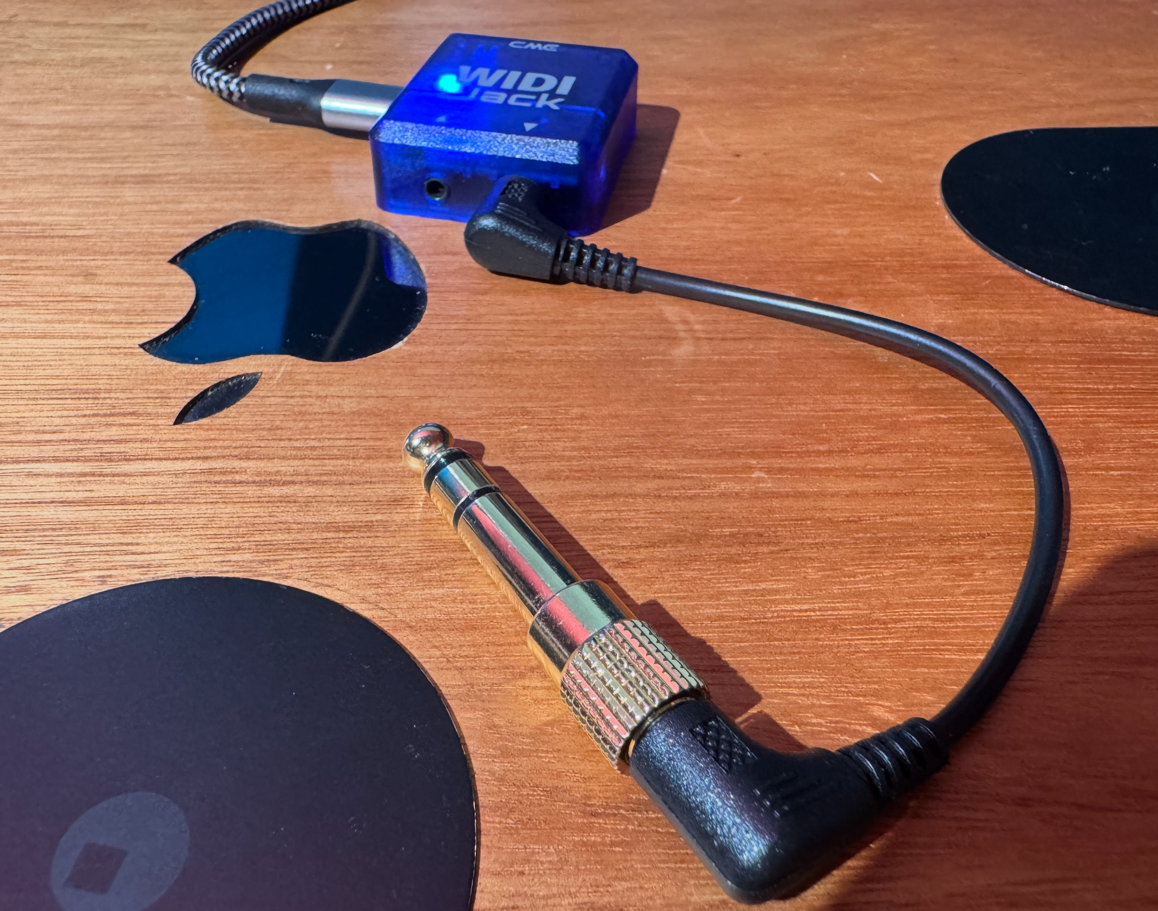
I'm trying to send CC messages to both the Chase Bliss Mood mk II and the Strymon Cloudburst using a 2.5mm to 3.5mm mini jack cable from CME, plus an adapter to 6.3mm. This cabling might be causing the issue, as neither pedal is responding properly.
I'll ask CME about it.
I’ve tried switching the A/B toggle on the Widi Jack, but neither setting works.
For comparison, when I connect the Widi Jack via 5-pin DIN to my Microcosm Hologram pedal, it works flawlessly—so the Widi Jack itself seems functional.
I’m also unsure how to pair the Widi Jack with my iPhone, since it only has mini jack and 5-pin DIN connections.
When I use my Widi Uhost: connecting it via USB-C to my iPhone 15 and launching ShowMIDI doesn’t let me monitor MIDI sent from my iPad, and Loopy Pro 2 doesn’t recognize the Uhost when plugged into my iPhone.
You can use the WIDI App from the AppStore to connect to, pair, configure and update WIDI devices. All via BT with no USB connection required. I recommend this app because I had situations where the connection to a WIDI device didn’t work properly when the connection wasn’t established through the app.
@catherder
Thank you for your help.
My Widi Jack is updated and works with other devices.
It seems that there are TRS MIDI TYPE A (BOSS, JACKSON, EAE) and TRS MIDI TYPE B (LEHLE, DARKGLASS) cables, but also TIP ACTIVE (STRYMON V2, MERIS, EMPRESS RED PANDA, ALEXANDER) and RING ACTIVE (CHASE BLISS AUDIO.)
Referring to this website I might need a midi box that's Tip and Sleeve are switchable to work with Chase Bliss pedals (Ring active)
https://mididesigner.com/qa/9615/layout-chase-bliss-mood-mkii?show=9615#q9615
Something like this
https://www.perfectcircuit.com/disaster-area-midi-box-4.html?srsltid=AfmBOoqxzMXwereUBASv-IJj-zZeA52CM9WUN6zYicTPvOsBiomyvgSO