Loopy Pro: Create music, your way.
What is Loopy Pro? — Loopy Pro is a powerful, flexible, and intuitive live looper, sampler, clip launcher and DAW for iPhone and iPad. At its core, it allows you to record and layer sounds in real-time to create complex musical arrangements. But it doesn’t stop there—Loopy Pro offers advanced tools to customize your workflow, build dynamic performance setups, and create a seamless connection between instruments, effects, and external gear.
Use it for live looping, sequencing, arranging, mixing, and much more. Whether you're a live performer, a producer, or just experimenting with sound, Loopy Pro helps you take control of your creative process.
Download on the App StoreLoopy Pro is your all-in-one musical toolkit. Try it for free today.
Midi mute all/none

Working on my 8x8 AUM master controller.
Row of individual buttons. Each is set to toggle, sending CC 80 on successive channels. So pressing button 1 "sets" it, and mutes the target channel strip.
What I would like is to have two buttons at the end of the row, one to "mute all", the other to "mute none". It can't just execute Toggle on all the other buttons, because if some are on and others off, they just switch polarity, so to speak.
Do-able?
Comments
Your mute none and all buttons should have mute or unmute actions rather than triggering the other buttons. The other buttons will update their state from the mute states.
@espiegel123 What would be the target of the action? I'm just using this as a midi control panel, basically, so... not clip, color, source... ?
Edit: Interesting. It doesn't have to have a specific target at all. If I select Midi Message and set it to send the same message as another button, even without specifying Midi Out, it sends. Though the other button doesn't light up.
Edit 2: Oh. I think I may understand. If I set the original mute buttons to also target actions (it doesn't matter which one), then have the "mute all" button target those same actions, it seems to work. Messages get sent, toggles light up, and so on.
I must have misunderstood. What actions are in the individual mute buttons?
@espiegel123 Sorry, I didn't mean to ambiguous. I'll attach a screenshot to help illustrate.
The colored buttons above the faders are the intended mute buttons. I've activated the first one so you can see the result. It toggles CC 80, which I've mapped to AUM channel mute.
To the right of that row are two buttons I'm fiddling with to get the mute/unmute all thing working. Ideally, when I press that first one, all the colored buttons should light up, and all their target AUM channels get the message to mute. This should happen whatever the current state is, of each individual colored button.
The second button would turn them all off, and unmute all the AUM tracks,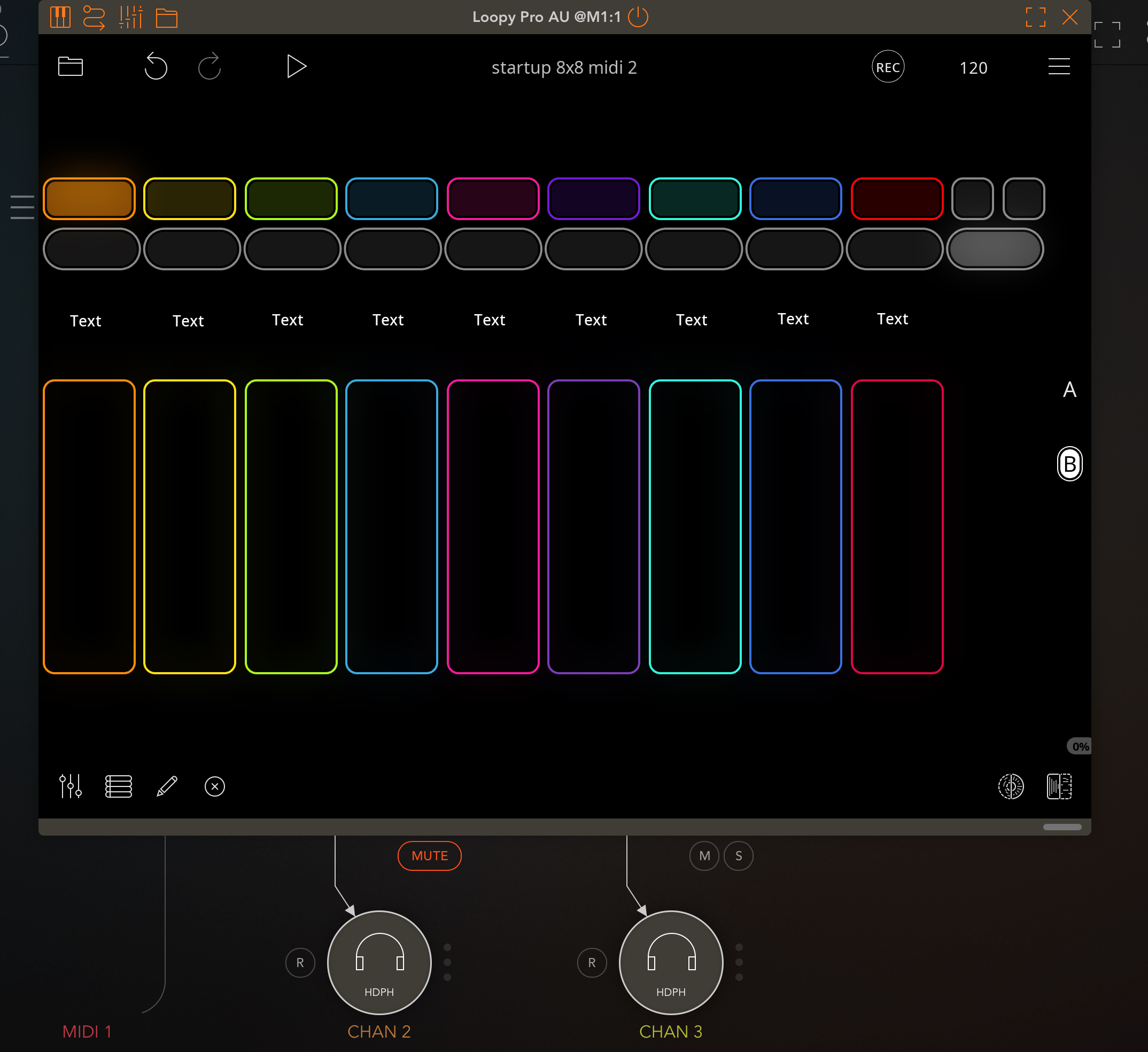
Your all and none buttons will have to send the desired midi messages if you use buttons for the channel mutes.. they also won’t be able to reliably reflect the mute state of AUM.
If you use 2-step stepped dials instead, then your all/none buttons could set the step of the dial widgets.
Hm. So that would make muting a single channel a swipe gesture, to turn the dial?
You can set a dial to advance on press. If you turn on wrap-around, a two-step dial becomes a toggle. I'll update the wiki shortly with instructions about that.
@garden : see https://wiki.loopypro.com/Stepped_Dials#Using_Dials_As_Toggles
Iiiiinteresting. Thank you. I'll give this a twirl.
Heheheeee... I hid the dials on another page, so now I've got my buttons exactly the way I wanted. It's a little odd, but it works fine. Thank you again.