Loopy Pro: Create music, your way.
What is Loopy Pro? — Loopy Pro is a powerful, flexible, and intuitive live looper, sampler, clip launcher and DAW for iPhone and iPad. At its core, it allows you to record and layer sounds in real-time to create complex musical arrangements. But it doesn’t stop there—Loopy Pro offers advanced tools to customize your workflow, build dynamic performance setups, and create a seamless connection between instruments, effects, and external gear.
Use it for live looping, sequencing, arranging, mixing, and much more. Whether you're a live performer, a producer, or just experimenting with sound, Loopy Pro helps you take control of your creative process.
Download on the App StoreLoopy Pro is your all-in-one musical toolkit. Try it for free today.
"SOLVED" MIDI Triggering One-Shot Samples in Loopy Pro: Workflow Tips
Hello,
I would like to record one-shot samples similar to those Drum patterns Kristof7s demonstrated in his video with Michael Tyson.
However, instead of recording the audio directly into an audio clip, my goal is to record MIDI data that triggers the one-shot samples.
This approach would allow me to edit, quantize, and adjust different grooves afterward.
Specifically, I want to create buttons that trigger MIDI notes, where each MIDI note triggers a specific audio one-shot.
Then, I would record the MIDI data of the kick and snare on separate MIDI clips, and so forth.
Thank you for any guidance or tips you can provide on achieving this workflow.
Comments
Set up a midi color that you will use to trigger your one-shots.
Create buttons that send midi notes to that color.
Set up bindings to play the one-shots. The trigger will be the notes you set up from the color you set up.
For example, create a button that sends midi note 60 to blue. Create a one-shot and set up a midi binding so that midi note 60 from blue triggers the one shot.
@espiegel123
Thank you so much, you saved me again!
I set up a button / Press/Release / select Send Midi Message / Choose a Midi note C4 (Note 60)
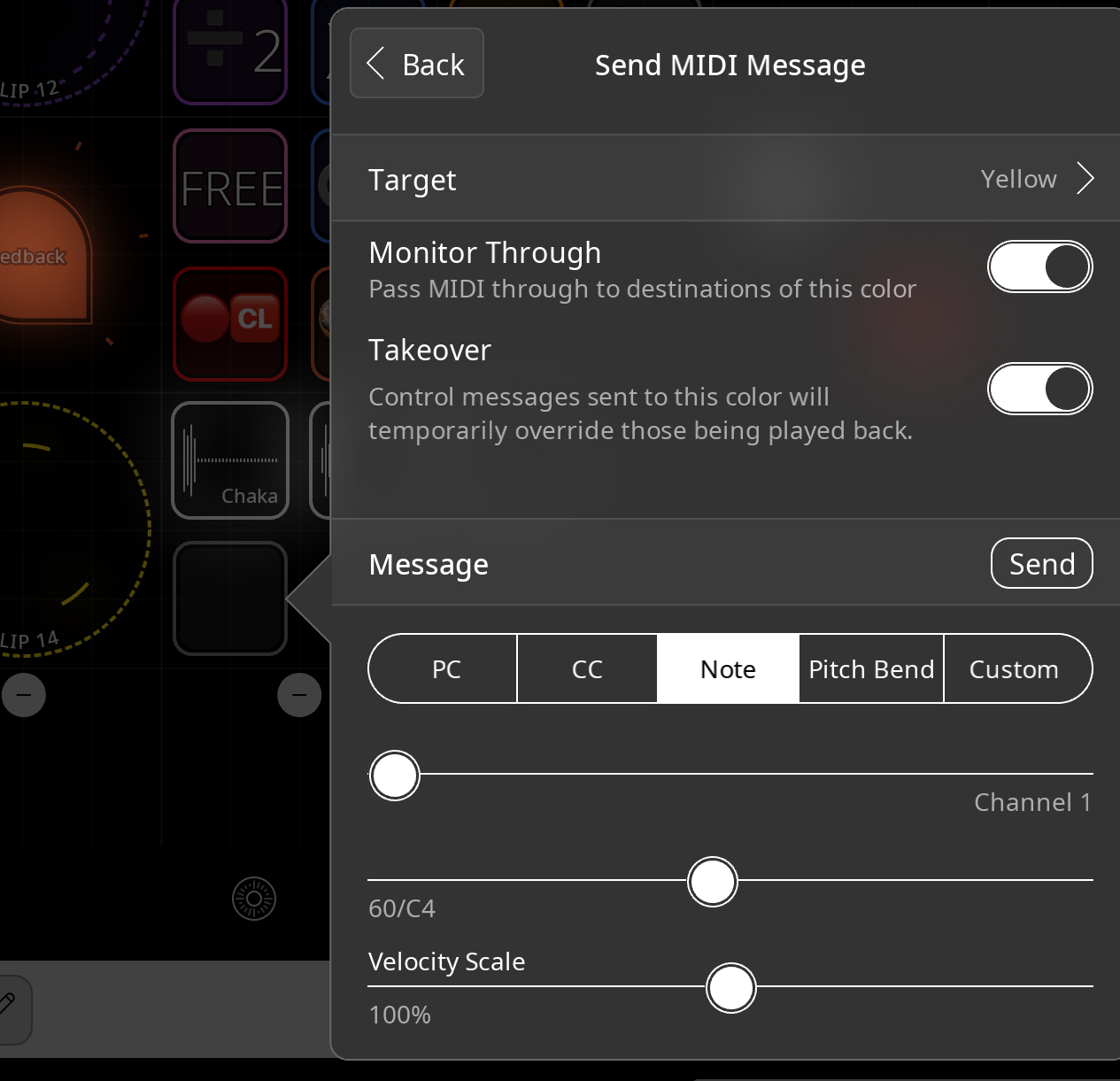
/ Target to a MIDI color (yellow).
However, instead of sending it to a color, I would like to send it to a specific MIDI clip.
Is assigning a different color for each MIDI clip the only way to do this?
Then, I went to the mixer Yellow channel, pressed + in the destination, and chose the One Shot.
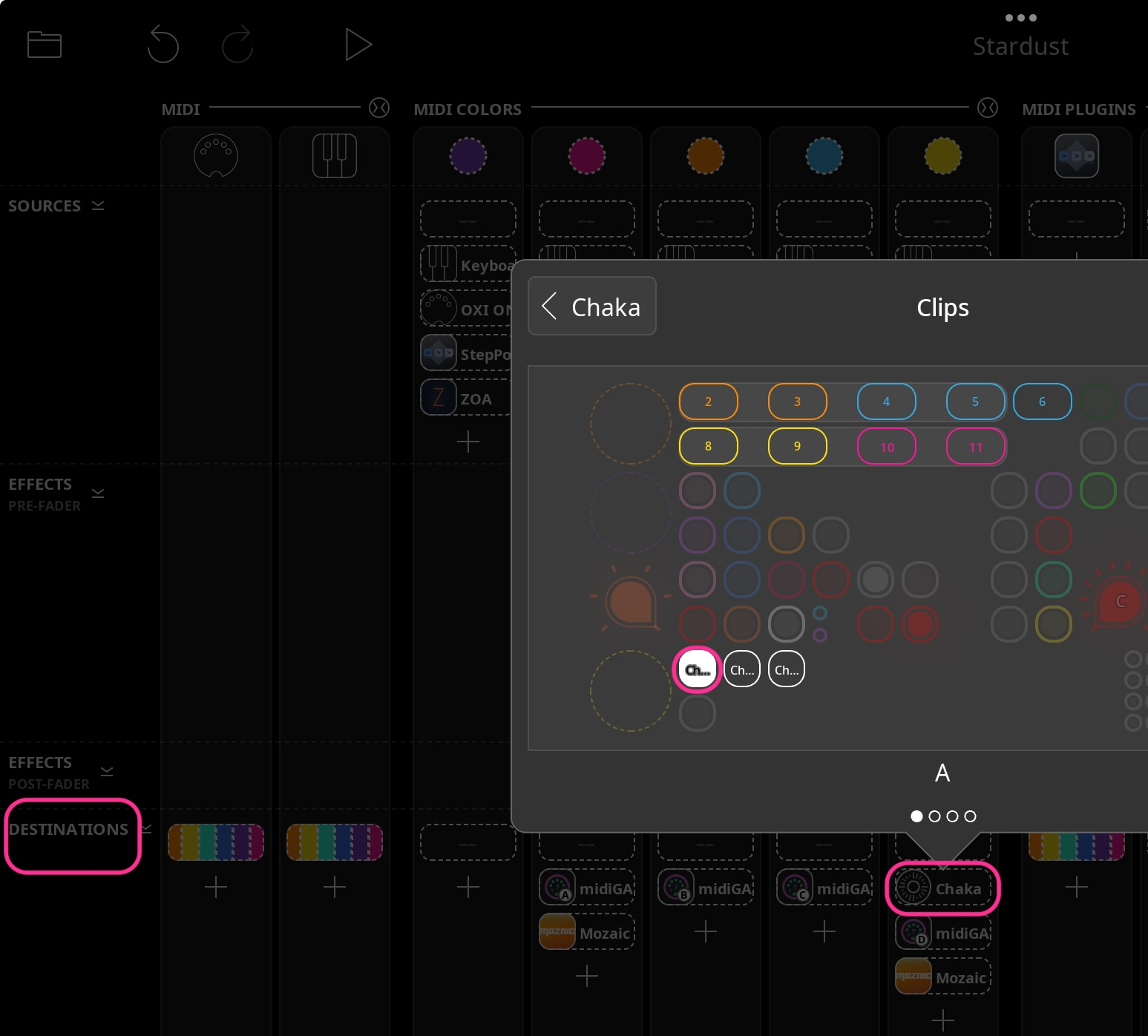
It would be great if, in edit mode (pencil mode),
I could select where I want to send the MIDI and directly add actions on MIDI clip, similar to how it works for buttons.
Are you wanting to trigger the one-shot or play the one-shot as a sampler instrument?
They are different.
What I described was triggering a one-shot by setting up a binding between a particular note and the one shot.
You can not send midi to a particular clip. You send midi to a color.
@cellicello . Here is a quick video demonstrating the setup I mentioned.
https://youtube.com/shorts/vrx7SWtPomU?si=mxuhp-pxUheQaj5_
@espiegel123
Thank you very much for your reply.
I want to trigger one-shots with MIDI.
Your example in the video is exactly what I’m looking for, except I would like to assign a different MIDI clip for each one-shot.
This would give me more flexibility in mixing and could edit each layer independently.
That’s why I wish Loopy Pro would allow selecting a specific MIDI clip, not just colors.
I also noticed that when using MIDI Learn with Trigger On/Off, Loopy Pro triggers short one-shots twice.
Switching off a MIDI plugin didn't solve it.
Setting the trigger to “On” fixed this for me.
Here is a video demonstrating that.
https://dropover.cloud/604439
The previous setup I used worked as well, but I also wish it were possible to route MIDI directly when editing a button or clip, rather than only through the mixer.
Just set your buttons up so that each targets its own loop.
@wim
You are right.
By selecting the MIDI clip I want to record to, adding more clips within the same color allows me to choose which specific MIDI clip to record on.
Initially, I was looking to bind each button to one specific MIDI clip and one-shot, but this method works well.
My technique of using the mixer destination doesn’t work when more than one button shares the same color, as the MIDI clip triggers all one-shots even if each one is set with a different MIDI note.
The technique shown by espiegel123 in his video is definitely the way to go.
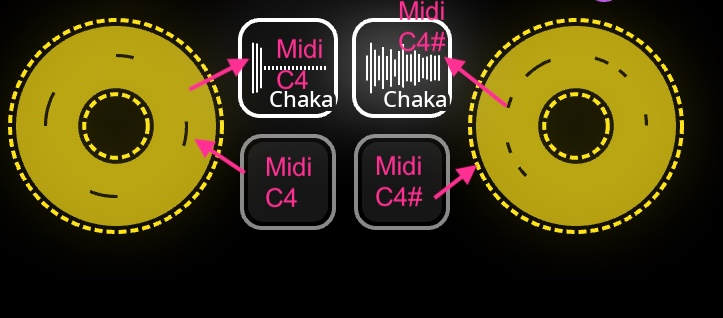
Do you think it’s possible to use one-shot clips to record MIDI directly, without using the buttons?
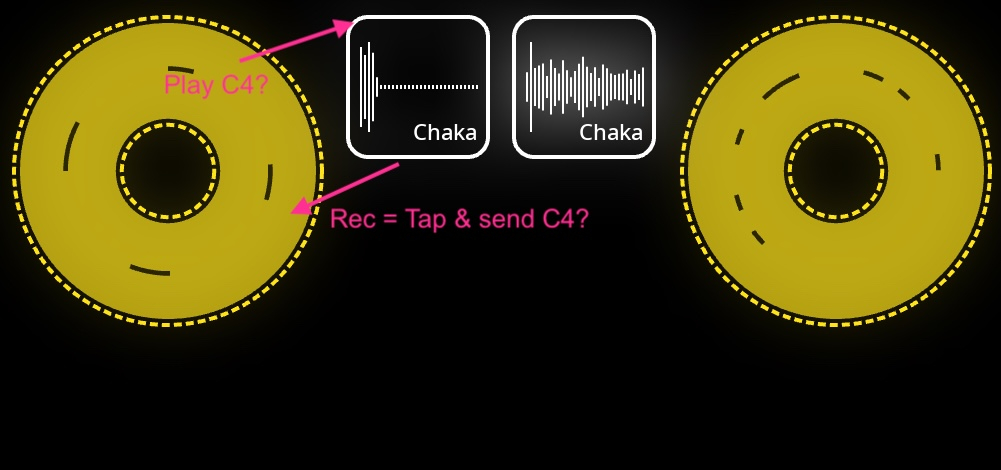
MIDI doesn’t always record or play one-shots regularly when MIDI quantization is set to 16 beats.
I guess this issue will be fixed in a future update.
https://dropover.cloud/cf4578
I am unable to reproduce that. Can you zip and upload a project that demonstrates the double-hits and provide instructions on the steps needed to see/hear it?
Please upload a project that has midi loops that don’t quantize correctly. Are you using recording quantization or playback (beat) quantization.
@cellicello : if you don’t want the buttons, add a press/release gesture to each one-shot to send the desired note to the color AND turn monitor through OFF
@espiegel123
Thanks, everything is working fine now.
Controlling the MIDI clip directly with One Shot works perfectly in a new project.
I just noticed that when doing MIDI Learn and bending a MIDI note, the Action resets back to Toggle.
I need to set it again to Play/Stop.
I’m sending you my old project with the MIDI playback issue for reference.
Sometimes, MIDI notes are not played, and there is a lot of latency on Yello Midi Clips.
https://dropover.cloud/6a4452
Can you give specific step-by-step instructions to see the issue?
Can you possibly create a simplified version of the project with a minimal set of plugins to see the problem?
One thing I notice not the bat is that you have both beat quantize and play quantize on for the one-shots. For single audio hits, beat quantize isn’t likely to do anything helpful and will take extra processing..particularly with the play quantization also turned on. Beat quantize is for cases where you are trying to quantize audio within a clip such as a drum loop. Not for single hits.
To fix your one-shot bindings to be on/off, find the binding. Tap to edit it, switch the trigger to on/off. Then edit the play action and switch the option from Toggle to play/stop,
I am not quite understanding what you meant about the binding changing when bending a note. When you create a binding with midi learn, you can see what it chose as a trigger and edit that if something goes wrong.
@espiegel123 about the double trigger is seems to be when using short one Shot, and starting between transient.
I send you a video and the progect
https://dropover.cloud/29a0b9
https://dropover.cloud/ff6e4d
@espiegel123 Here a video showing the problem when bending with Midi Learn and Play/Stop going back to Toggle
https://dropover.cloud/d8521d
When I download and play that project, I am not experiencing double hits. I have not been able to get them to happen by moving the start marker.
If you download, open and play it, do you experience them?
If you experience double hits while adjusting, what happens if you stop the transport and restart?
At the beginning of the video, you tap on the yellow clip and say “I don’t know why it choose itself” or something like that. It brought up the midi learn panel for what you tapped on. To bring up the midi learn panel for the one-shot, you normally would tap on the one-shot.
The reason play/stop did not stay selected was because On was the trigger at that point.
Play/Stop requires On/Off as the trigger to be set first.
@espiegel123
Thank you for explaining why the play/stop wouldn’t hold when bending MIDI.
I’m sending you a video demonstrating the double trigger of the sample, alongside the video I uploaded earlier.
Overall, it works well. However, sometimes when Fade In & Out is set to Hard, this issue occurs with short samples.
I also noticed the sample sounds softer in edit mode.
But those are minor details.
https://dropover.cloud/a0fd37
Do you have a project where the double-hits happen? Please save a project where it happens for you and reopen to see if it is still happening then upload if it is.
@espiegel123
I downloaded the project Stardust 2 from the server I posted yesterday and got the same double-trigger issue.
So, when you download and play just the leftmost yellow clip without making any changes, you get double-hits?
You’ve uploaded two projects called Stardust 2. Does it only happen in the first (the bigger project)?
@cellicello : this is my result. This is a screen recording of my launching and playing that clip and then turning off the quantization and beat quantization on the one-shot.
I turned off the metronome and the other clip so that we can hear the one-shot without anything else:
https://www.dropbox.com/scl/fi/wz72a7kuypy2hsukrtz9v/RPReplay_Final1757562937.mp4?rlkey=u5mikf3fyec2alaj7pskdjt9a&st=kxb5ngy9&dl=0
@cellicello said:
@espiegel123
» » I downloaded the project Stardust 2 from the server I posted yesterday and got the same double-trigger issue.
» So, when you download and play just the leftmost yellow clip without making any changes, you get double-hits?
No, it makes double-hits when moving the starting point.
@espiegel123 said:
» show previous quotes
» So, when you download and play just the leftmost yellow clip without making any changes, you get double-» » hits?
» You’ve uploaded two projects called Stardust 2. Does it only happen in the first (the bigger project)?
It happends on all the projects I sent you.
I send you a project and the video of Stardust 3 without One Shot quantization (with double trigger or non trigger issue)
Project Stardust 3
https://dropover.cloud/8c2274
video of Stardust 3
https://dropover.cloud/d3cc75
deleted
@cellicello : I was finally able to get the double-hit thing to happen in a way that persists after re-opening. It seems to be related to the midi clip beat quantization and the one-shot having quantization. Turning off the one-shot quantization and reopening solves the problem.
We will investigate
@espiegel123
Thank you for your support.
While you turned off beat quantization, you left the one-shot’s play quantization on. I think you will find that if you turn off the one-shot’s play quantization, save and reopen the file that the double-hit doesn’t happen.
You are right. I forgot the play quantization. Sorry about that.
It seems to work perfectly now.