Loopy Pro: Create music, your way.
What is Loopy Pro? — Loopy Pro is a powerful, flexible, and intuitive live looper, sampler, clip launcher and DAW for iPhone and iPad. At its core, it allows you to record and layer sounds in real-time to create complex musical arrangements. But it doesn’t stop there—Loopy Pro offers advanced tools to customize your workflow, build dynamic performance setups, and create a seamless connection between instruments, effects, and external gear.
Use it for live looping, sequencing, arranging, mixing, and much more. Whether you're a live performer, a producer, or just experimenting with sound, Loopy Pro helps you take control of your creative process.
Download on the App StoreLoopy Pro is your all-in-one musical toolkit. Try it for free today.
Comments
@_smund: I am going to recommend that you stick to one issue at a time and thoroughly understand why it is happening and how to solve it before moving on.
The settings that wim suggested (and which I suggested also) are a waypoint before getting to the ultimate settings you want.
The idea with the one-bar recording count-in is for you to queue the recording in the bar before you want recording to start. If you want the current clip to get to its end, trigger the clip to record during the last bar of the playing loop.
This is just a step on the path to your final goal.
Since your play quantization is set to loop, which is what you will want for regular playback, you are going to need for the playback quantization to change while a clip is recording if you want to go directly from recording a clip to playing a different clip.
What you are going to need is a follow action that sets the play quantization during initial recording and another follow action that sets it back on play.
For the time-being, I am going to suggest that you use play quantization of master AND a master cycle of 1 for now. Eventually, this will change. But for now we are keeping it simple so that everything is fully understood.
To do this, create a global begin initial record follow action that has
Set the timing of the Assign Clip Settings action to delay 1/8th note. This is needed to avoid a collision with the Play follow action you are going to set up.
Create a global play follow action that has:
In global clip settings (assuming that for now all clips will use these settings) set record count-in/out to custom 1bar. Auto count-out OFF
How this will work is that you queue recording by tapping an empty clip in the measure before you want recording to start. You can end recording by tapping the recorded clip in the measure before you want it to stop OR by tapping a clip you want to play in the last measure.
For now, you won’t have the automatic behavior you want. That will come later. We will get to the behavior you want after a few steps.
I am going to suggest that to experiment with the settings, that you do what I am suggesting in a new project with just two or three loops. Put them in a one-loop-at-time group.
After you have set this up, let me know if you have any w
Actually, it was Edward who suggested it, I just tried to help explain it later on. 😉
@wim
I decided to make a new template without the Widgets I was getting quant advice on from ed, maybe you guys missed that part?
Anyway those Widgets complicate things, and I think I would have ended up with different quantz then what Im asking for here.
It’s just uncle Edeard is a little stricter in his curriculum with me sometimes. But there is alot to learn and I’m back to work
A word of thanks to ye both!
Ah hey man @espiegel123 this is too cool! It sounds a little silly maybe, but Im stoked to now be able to
-Stop recording a clip with count out of 1 by triggering the playback of another!
Do I understand it right If,, I have to be careful not to queue the switch to playback another clip (while recording) within an 1/8 note of starting recording? I don’t know how manic I want to be with queuing, I suspect a little, is it possible to set it lower than 1/8?
It’s also so cool to be able to end a clip by tapping it and staying withinthe scene… A relief!
Lets work on adding
-Queuing of ‘end record’ within one bar—> when switching to the playing back of another clip.
I uploaded what I made so far, I hope the title is acceptable
https://patchstorage.com/the-school-of-espiegel/
I was wondering about what we made.
To put the clips in a «one loop at at time, PLAYGROUP» and still use scenes I had to switch the scene action to play the specific clip in that scene instead of triggering a future horizontal play group/scene with two clips. I wont use more than two btw.
I just want to ask make sure if the setup we’re working on will work with that too?
Thanx es
@_smund : how about zipping and uploading the projects here in your post rather than putting them on patchstorage?
You asked questions about whether the delay assigning the clip settings can be shorter. I suggest that you investigate that.
Spend time testing and using this setup and making sure you understand each aspect of it.
Once you understand the project we are building, you will be able to apply the principles to any project.
@_smund : I just noticed that there was a typo in my instructions. The Play follow action needs to set the Play quantization to Loop, not 1. Apologies. I need to be more careful.
I notice that the project is not working as desired. If you record a four bar clip in clip 1 and start recording a new clip in clip 2, tap back in clip 2 during bar 2. Clip 1 doesn’t start playing at the end of that bar as it should.
The problem is that your assign clip settings action isn’t taking effect because some clips and colors override the globals.
For this project, remove all overrides in individual clips and colors.use the global clip settings for everything here.
If you look in global play settings, there is a list of places where there are overrides. For this project, remove them
It will make experimentation easier.
Also remove the recording overrides
Hey, Thanks for coming back!
Instead of resetting my bindings I went through Clip/Group/Color/global “clip settings” and made sure they are the same(some were not!), to the degree I have the same options available. I’m able to change my clip settings from global now, even if it says it deviates in some rec setting in there…it must be something benign.
With the original Follow action settion “Play quatization - 1 Bar», it now works to
-Rec 4 bars
-Rec 2 bars
-Switch back to Play the 4 bars
(I searched AI for a «4 Bears enter a bar» joke at this stage but they were not good:/ ..so back to tech)
Should I still change the play follow action from ‘1 bar’ to ‘loop’ now that it works?
I’m happy you found that bug in my setup, Thank You @Espiegel.
I’ll try to add another color tomorrow, then I will have 2 clips per playgroup instead of them being unified. Anything I should consider there?
@espiegel123
The above works, but I forgot part two: How to Queue Record for after a clip has finished Playing Back.
What happens now is record starts within the bar of pressing the new clip, even if the playing back has lots more to play through.
How do I set up that follow action?
Yes, you should change the play follow action to loop -- and spend some time to exploring to understand why. If after you explore, you aren't sure, let me know. The reason is critical to the settings you are going to need to for your project.
@espiegel123
I get the same behavior with the action so far.
BTW Should I add a timing for the loop Play action, like I added the 1/8th delay for the record?
Can we move on?
Is the Play Follow set right?
For the play follow action, the delay is not needed.
As you have it, tapping a loop while another loop is playing, will result in the loops switching after one bar.
What would be different if the play quantization were set to loop?
To see why you want the play quantization to go back to loop do the following in your current project. Record four bars in the first two loops. While one loop is playing, tap the other loop early in the play cycle.
When do they switch?
Now, adjust the play follow action to use loop quantization. Turn off both loops and see what happens when you queue one loop while another is playing.
Yea I did that once or twice. I think I had a unconchious conflicting setting that made having ‘Play count in’ set to 1 not work.. Like I mention, That worked with the problem scenario you described earlier after I debugged my setup. I just wanted to give you extra star and tell you not to be careful (:
Please ES, lets move on from this one, on to how the heck do we set up how to Queue recording to start after a clip has played through. No matter if the playing clip is 1-2-3-4-5 or 15 bars long.. and I can queue the pressed clip for recording any time during the playthrough of the previous.
Does a rec count in set to «Loop» mean it respects playing though the currently playing clip before switching to Recording the new?
I bet the setting involves temporarily setting rec count in Quantization to Loop, instead of one bar, but where to place it? wheeeen…. Err..when .. after you have pressed Play on a clip?
What is the correct follow action (there are a few to choose)?
Please bro lets speed through this last part, I must also get to Peel/Redo config with pedal.
@espiegel123
Thanx
@_smund : the meaning of Loop for record count-in/out is explained in the settings text and in the manual. Please take a look at them.
Let’s say we are going to create a button to handle the recording. Describe (simply) what should happen if a clip is already playing.
@espiegel123
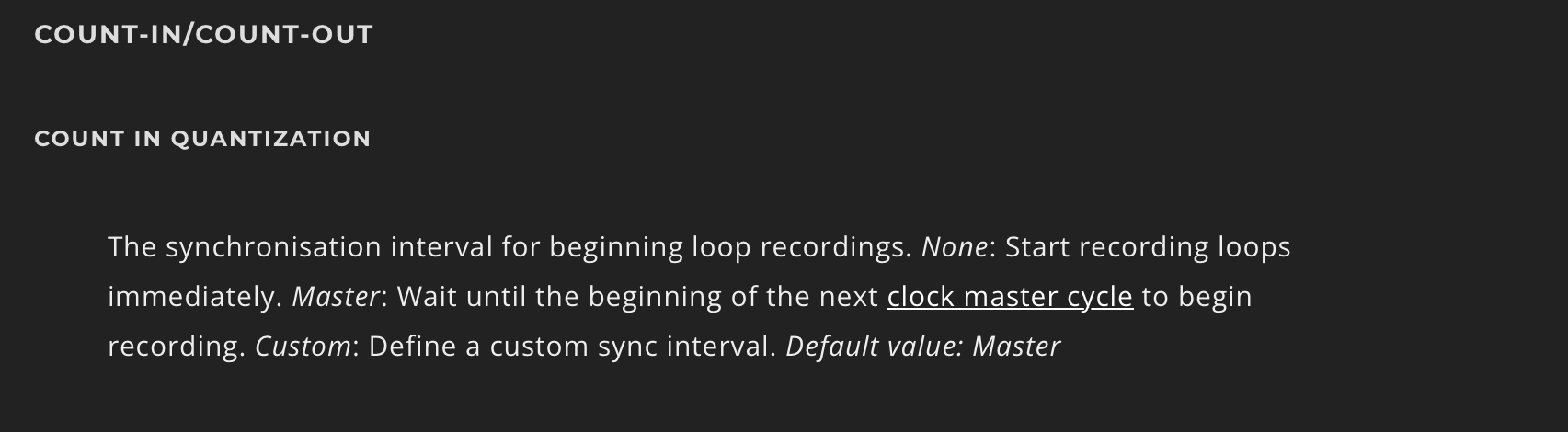
1.It actually doesn't mention the ‘Loop’ setting for ‘Rec count in’ in the manual. Does it work like I suggested?
As of now the recording starts after 1 bar, as rec count in is set to 1 bar. Does it need to be a button(in loopy) or can we make it a global follow action? Ideally I don’t want to do anything more than tap the next clip as I will be standing playing.
Are you asking what the next thing to bind to a button in Loopy is?
The Recording Settings panel Help text describes what Loop count-in/out does. I have added that to the manual -- it may take a few hours before that text appears.
We are going to use a button for a while as we implement things as they are easier to work with. When you have it all figured it out, you can look at how to integrate the behavior more directly.
What I am asking you to describe for the next stage is: if you have a clip playing and you were to press a button to start the recording what are the precise behaviors that should happen. Describe as simply (but completely) as possible. This should make it clear what actions are needed.
Sec
@espiegel123
LOOP RECORDING:
Said
“Start Record in sync with Loop/Master if empty”
What is ambiguous above is what “start recording in sync with Loop” means..?-
-Witch loop?
The length set from the current selected for record?
Or, what I asked, is it the previous loop length before the “record” is toggled?
It is totally ambiguous. You might cut your leg off before you learn it by yourself, already bundling up settings trying to get where you want to go.
At least now my settings are skimmed down..I suggest you guys implement a tool for copying settings (all love ).
).
On point:
Ok, ok lol. OK
To start I need the action to “sidestep” the current setting: “rec count in 1”.
-The follow action on the button could be ,“start recording in sync with Loop[…]” if that means following the last clip?
This I also have suggested already.
Other ideas:
“Change master Tempo to correspond with the playing clip, to the progression that clip is in its cycle”
And
Follow action: 1/8th note delayed “change record setting to follow master on initial record”, but that would conflict with the one we made.
I don't know all the actions.
Itself. This only appiies when the loop isn't empty (i.e. when you are overdubbing).
When the loop is empty, master cycle is used because there is no loop yet to sync to. Once the loop has been recorded, the count-in is based on the loop itself. This makes starting an overdub at the beginning of the loop simpler.
I am not asking now about what Loopy Pro actions to use. Let me put my question a different way -- I am trying to get you to think about the particular things that you want to have happen in a specific and simple way.
Let's say we have a button called 'record next clip' and that the button already knows which clip we want to record into.
Let's say that clip 1 is currently playing.
What do you want to happen (not in Loopy action terms) after you press the button. Describe it in simple language. It is probably just one to three short sentences.
@espiegel123 I wrote this 4 days ago
That is where we are going. See my previous post for the question to answer. Answer it and I’ll show how to convert it to the actions you need. For the time being we will use a button.
@espiegel123
Ok. With
LOOP REC = Respect pressed loop
I want the button to change loop rec count in of the toggled for rec clip to something like ‘Change rec count in’ to an amount similar to the playing clip
@espiegel123
So from “1’,as it is set, to temporarily be something else when Playing a clip is toggled. But what if I want to do something else?
I am blind here.
If you know point it out please
@_smund : with a project like this, it is useful to break things down into simple non-technical steps. This is the same process I do. I ask myself when I trigger this action series what do I want playing clips to do? what do I want recording clips to do. Here is how I would proceed with the situation we are talking about.
Goal: button that will record into a clip when the playing loops get to their end.
When the button is triggered I want:
By putting it that way, I can see that I need a stop clip action and record action. And I can see the quantization and target settings.
For this stage, I would probably use Selected Clip as the record target. And select the clip before triggering the button. Or you might have Select 'Next Empty Clip' as the first action of the button.
Ultimately, you will probably end up changing how the target is chosen, but the focus right now is getting the quantization and count-in/count-out working.
I generally use a button for experimenting and implementing rather than follow actions or gestures as troubleshooting is so much easier. Sometimes, I end up moving the actions into gestures or follow actions -- but more often than not I will have the gestures or follow actions trigger the widget because editing is so much more convenient.
I am keeping in mind your ultimate goal which involves play groups that may have loops of unrelated lengths. Otherwise, I'd approach it differently. For instance if we knew that a scene's clips were the same length or had a particular clip that set the scene length, we'd approach things differently.
Sec
@espiegel123
For the first action
>
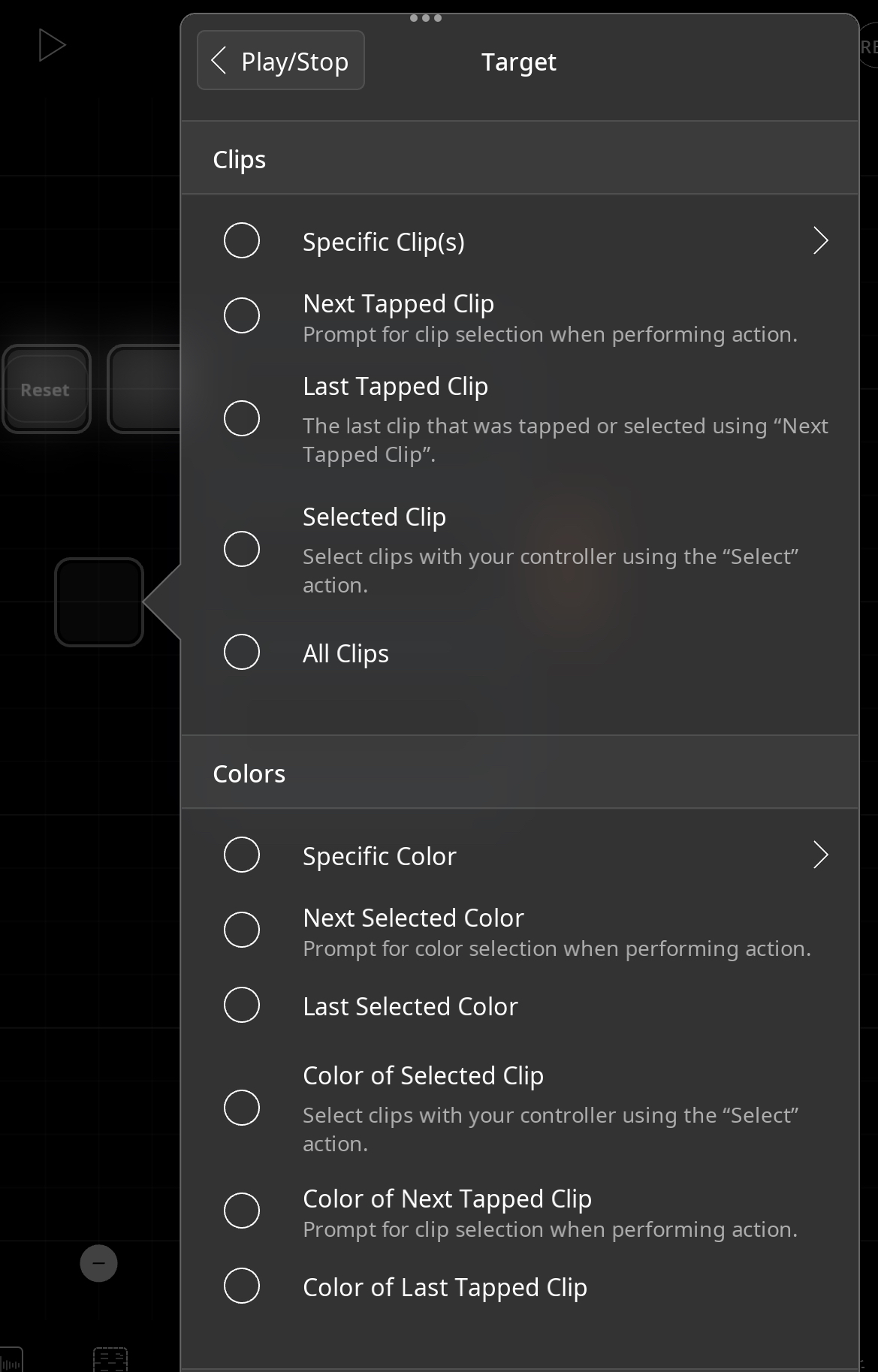
I can’t find: Target-> “playing clips” as an option for the ‘Stop action’ (picture)
For the second action
What do you mean with Target —>«Whatever clip you want to record»? Should I put «All the clips»?
okay I will put selected clip, We can do it as an intermediary step if you prefer it to going straight to follow actions.
Does use selected clip mean I have to double tap? I don’t know how to make clips selecable instead of pressing them triggering rec or play.
Please come back to me on the above as I am unable to set up the button, if you can describe every step.
——————————————————————————————————-
SETUP STUFF:
I will be using a foot controller with two free button to touch each clip.
Double tap and Hold on the hardware will be reserved for Peel/Replace overdubs. The scene button will be the play button, tapping a clip will overdub.
This I have to figure out later.
Yes
I don’t want extra presses to select clips before tapping them while I am playing!
In the end the only free buttons on my controller for touching clips is 1-2, Tap clip 1, Tap clip 2 (Button 3-4 is scene scrolling.)
Thank you for bringing up that It will be two playgroups per scene (only 2 clips per scene though, one blue one yellow), and that they can run at un related lengths, it’s good for me to know (:
@_smund : what version of Loopy Pro are you using? Have you purchased the upgrade IAP?
Your target list should look like this:
I’m back bby!
The trial ran out, I’m back working it out on the latest version now. Thank you @espiegel123
—————————
Stop Action
The Main Settings for the project are the same as the action you wrote for STOP, but I set them as its own quantization in case you plan to change something else :
PLAY=Loop, STOP=Loop, One Shot=None.
Other than that like you said.
Record Action
Same as with the stop action, -count in quantization in the project is already 1 bar. I can’t edit an over ride here.
TARGET: Selected clip.
Here is the file,
How do I test? I’m not used to ‘select’ + I don’t know how to use the button
@_smund : you could create a global gesture like swipe-right to select the swiped clip or you might add select next empty clip as the first action in the button.
I’ll wait till you have tested your project and made any needed adjustments before looking at the project.