Loopy Pro: Create music, your way.
What is Loopy Pro? — Loopy Pro is a powerful, flexible, and intuitive live looper, sampler, clip launcher and DAW for iPhone and iPad. At its core, it allows you to record and layer sounds in real-time to create complex musical arrangements. But it doesn’t stop there—Loopy Pro offers advanced tools to customize your workflow, build dynamic performance setups, and create a seamless connection between instruments, effects, and external gear.
Use it for live looping, sequencing, arranging, mixing, and much more. Whether you're a live performer, a producer, or just experimenting with sound, Loopy Pro helps you take control of your creative process.
Download on the App StoreLoopy Pro is your all-in-one musical toolkit. Try it for free today.
Comments
the QuNeo is not bad for this task. It is discontinued, but may be found used. I still have mine, and won’t sell it. It even has an MPE mode, but before MPE was there, I already programmed QuNeo in a similar way.
https://www.keithmcmillen.com/products/quneo/
I did thorough research so you don’t have to 🙂
First of all, Maschine is the gold standard among finger-drumming pros. The problem is, it’s not USB-compliant — which is ridiculous. Even if you use windows, NI at some point will stop updating the driver and your lovely device will stop working in Windows 12.
Then there’s the PreSonus Atom and the ESI Xjam. The latter seems to have the best response, rivaling that of the Maschine. It allows advanced techniques like ghost notes with a very light tap. It’s made of aluminum, has six endless encoders, and is simply great.
If you decide to get it, update the firmware right away — it improves responsiveness even further.
Unfortunately, the cheap AKAI units are a joke. Just look at how many videos there are of people “modding” them with tape. They’re simply too stiff for any nuanced performance.
Everything else, in my opinion, is meh.
To sum it up — I don’t think you’ll find a better option than the Xjam. You can thank me later.
Is this AI or do you really talk like that and actually use em dashes? 😂
No smarty ass, I run it through spell checker.
And that is an instant no for me. I’ve got quite picky about my interfaces these days. USB C or nothing.
Still. Looks like a great unit.
Due to the Amazon sale and some gift card buildup, I'll have an SMC-Pad Pocket showing up tomorrow 😅
Quite excited for a physical size comparison and to see how the pads feel compared to its big brother
(My setup is fully mobile as I havent a permanent recording space for a minute. So portability and wireless are HUGE boons currently - least time possible for setup and teardown is vital for my creative swings)
Well here we go! SMC-Pad Pocket just arrived - size comparison pics (haven't used it yet)
Launchpad X size buttons (hmm... Do I want to get 3 more and make a suitable frame? Future project idea!)
SMC-Pad prime also shown for reference
Hand heldabilty is tight
And VERY pocketable
Will be playing around with it to get a feel, but I wasn't ready for how small it actually is! This is a GOOD thing for me. I had really wanted to get an OffGrid for koala purposes (still check on used prices from time to time)... This might fill the need! The lack of other controls is a slight drawback, but all those can be handled on screen... And for 1/3rd the price [and my being used to LPX size pads] - this could be a real winner
More on this news story as it develops I fk around with it!
Anyone got feedback about using an xjam?
@PapaBPoppin thay looks great. Curious to get your thoughts once you’ve played it.
To add what I said about it previously, it has usb c, midi out, pads react with light depending on velocity, green, orange and red, it can be powered by iPhone, no need for power bank. It is awesome. And like I said, it is considered to be one of the best when it comes to pads sensitivity.
First impressions-
Weird padbank design. There are 4 banks available, but OOTB, the ONLY way to select a bank is by holding a pad, 13 thru 16 (top pads, they say preset 1-4 on each one) WHILE YOU TURN IT ON - so there's no way to change banks without powering off and back on. Via testing in loopy, it does reconnect immediately with no need to tap anything... Just a weird caviat for not having any additional controls other than 16 pads
HOWEVER - When plugged into a PC for the Midi Suite app to configure the Pocket, as you change Preset Pages on the PC, it changes live on the pad
So I'm gonna look into potential SysEx msg sending for control from loopy (or whatever sends sysex messages)
[Edit] SECOND IOS APP FOR NEWER HARDWARE
Midisuite is available for everything
Here's iOS: https://apps.apple.com/us/app/midi-suite/id6737530581
(Removing next bit due to my oversite)
MAJOR DOWNSIDE (currently) - There is NO way to configure the Pocket on iOS. The Cubesuite App doesn't support it, tho I suspect it's on the way. I was one of the first to have the og smc-pad (before it was AliExpress I stumbled across ONE sus seller on Amazon that turned out to be legit, had it a month before it appeared anywhere else), and was talking with M-Vave on Facebook to troubleshoot connection issues while waiting for Cubesuite to incorporate it, much like this
There are CC Control Options in the Pocket as well. The 4 default presets are:
1- "Ableton Drum Rack" (c2-d3)
2- "Flash Studio PC Drums" - a decent close-to-dragonfingerdrums isolated finger method
3- "Garage Band Drums" - a mirrored layout
4- "Control"
Control is interesting. Bottom 8 buttons are mappable cc controls
Top 8 control swing, latch, etc... but pads 11 and 12 control bank selection for the bottom 8 pads! And there are like 6 of those nested pages available! But I don't see how to replicate it at ALL (like how to associate a Bank Change Pad to those specific pads)
So I'm not editing THAT preset until I learn more
Also, the Midi Suite PC app is TINY (window size), NOT resizeable, even SMALLER text and zero batch changes... Everything is one pad at a time
CURRENT SYNOPSIS - Setup is an absolute biotch, however play feels EXACTLY as the mix between the SMC-Pad big brother and the Launchpad X
That is to say, mediocre pads that are a little smaller than comfortable BUT I'm quite excited to get it setup as my brain has planned for pocketablilty with Koala on Android, and to use it as supplementary controls for sEGments (lazy chopping bay-bee) on Loopy. And for a constant drum pad I can throw around/into a bag/pocket without worry of damage* and taking up almost no additional space (again, my desire for an OffGrid is completely gone after holding this thing. A great compliment to Koala on a phone)
*I have ALWAYS bought a hardcase for my controllers. This is the first one that hits a price point that I'm not worried about it (I DID get the 3yr amazon plan for damage as well, but that was like $6. There's my Hard Case 🤣🤣)... Ok, the cheapass chocolate foot controllers I own didn't get their own cases, but the nestle nicely into other protective environments
Does anybody here use a Yamaha DTX-M12 pad controller?
It works quite well for finger drumming IMO, when I need more sensitive pads than the typical 4x4 or 8x2 velocity pads.
Roland's Handsonic could be another option.
Thanks @PapaBPoppin great summary and info.
Was going to contact M-Vave about potential SysEx messages for external bank changing and found
MidiSuite for iOS & Android
(Apparently new software for newer hardware)
iOS: https://apps.apple.com/us/app/midi-suite/id6737530581
So I was wrong and corrected my initial post about iOS configuration availability (edited relevant info in post)
NOTE - must be in portrait mode to use MidiSuite. I stay locked in landscape for personal preferencial reasons, and while the app did load, I could only see a LARGE pic of the top half of my Pocket on screen. Bottom 8 could not be accessed at all. Unlocked, rotated, and boom all good. Not a HUGE note, but may be helpful
Still no bulk pad changes, but easier on the eyes than the super limited PC size, and I don't need to wait for PC availability to change anything
Win win!
(Also, can be configured wirelessly, which leads me closer to expecting SysEx being involved since same Instant Bank Change happens from iOS MidiSuite like it does from wired PC MidiSuite)
Still doesn't change my assessment so far - great throw around travel companion, or worth-it impulse buy for extra pads/gadgety type purchase
Smc-pad full-size is much better for anything PROPER finger drumming-wise. This thing is too small for lap or hoping to get any beginner play without it moving weird
But for aux gear not a bad ~$40 item
(Custom setup takes a lil elbow grease tho. But sometimes thats part of the charm. Not here, tho. Just noting)
Boppad is great but you need to midi program it to get more that 4 pads
@poppaBpoppin,
For the SMC-Pad vs SMC-pad plus? They appear to be the same? Amazon shop marketing gimmick i think?
Either way, to clarify, unlike the pocket, i would be able to change banks at anytime, correct? I do see a pad bank button. Thanks.
My daughter gave me this for xmas (she knows me so well…)
1€ coin for measure cause I didn’t have any bananas and also what she prolly payed at the flee market for it
But this thing is not only playable but tunable! (Just need a very little plier, some microscopic one)
My only complaint is it’s not AUv3. I mean it can’t even be used as a midi controller. And to add insult to injury doesn’t have audio multi out
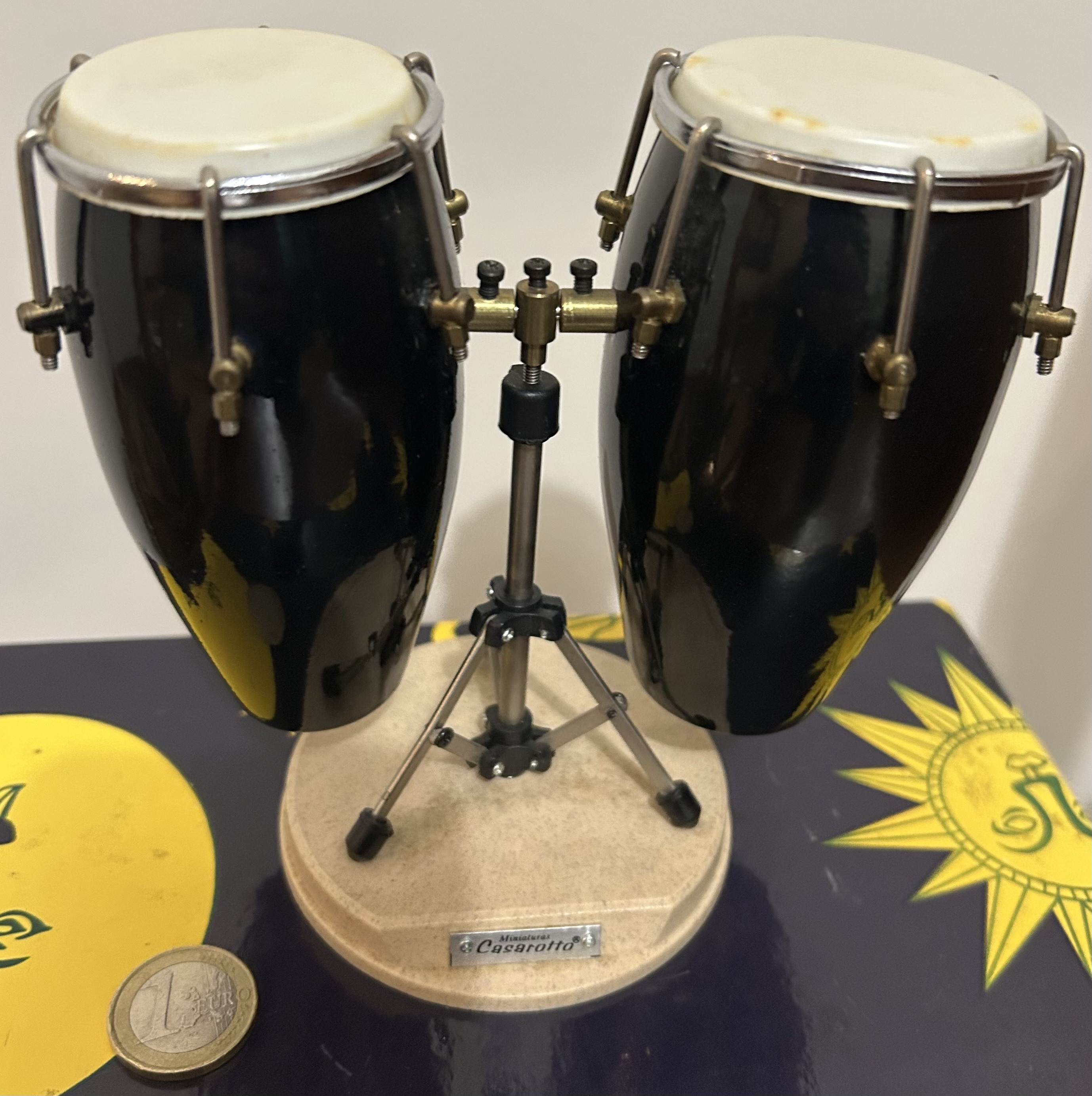
Actually with a couple of piezo mics, a little breadboard, a raspi, and knowing what I’m doing, this could be workable
Wow, how do they sound? Could you record a few different hits please?
Not to state the obvious, but have people tried using the "Logic Remote" app here? I've used it connected to my desktop for drums on occasion, but find the lag off-putting.