Loopy Pro: Create music, your way.
What is Loopy Pro? — Loopy Pro is a powerful, flexible, and intuitive live looper, sampler, clip launcher and DAW for iPhone and iPad. At its core, it allows you to record and layer sounds in real-time to create complex musical arrangements. But it doesn’t stop there—Loopy Pro offers advanced tools to customize your workflow, build dynamic performance setups, and create a seamless connection between instruments, effects, and external gear.
Use it for live looping, sequencing, arranging, mixing, and much more. Whether you're a live performer, a producer, or just experimenting with sound, Loopy Pro helps you take control of your creative process.
Download on the App StoreLoopy Pro is your all-in-one musical toolkit. Try it for free today.
Loopy Pro Liveset templates - easy to overdo with a lots of effects and bus routings

Hi All.
Will share in this chain, how the Liveset template is proceeding in time (Already have been mainly focusing on song creation template for auv3 plugins and audio inputs - there is a separate thread on it)
Wanted to show how this upcoming version of the template is looking like. Also demoing the added features, but tens of things happens in the background. It's really fun to use with Akai APC Mini Mk2 and it's sliders.. I have shared some shorts - presented by my daughter Miisa.
Sorry still using this 120 A Minor loops and samples.. need to repopulate the template so you would really see the benefits ;-)
Will make a proper video, with more explanation in upcoming weeks..
Small explanation though:
Liveset contains pages with similar controls for Drums,Percussion,Bass,Keys,Guitar,Traditional,Brass&Woodwinds,Strings&Pads,Vocals (this is the "grouping I generally like). They are grouped like 4 groups per page except bass is only one.
XY effects and all the sliders are adjusted according to my taste
Have added some bus to bus routings to hear some tales, also I find it interesting to have this new Lofi effect (Lo-Fi-AF plugin) - dunno if the adjustments with xy makes sense and normally have sliders for mix level (also have some functions for press, release and double tap - maybe hold also when it comes available to controls)
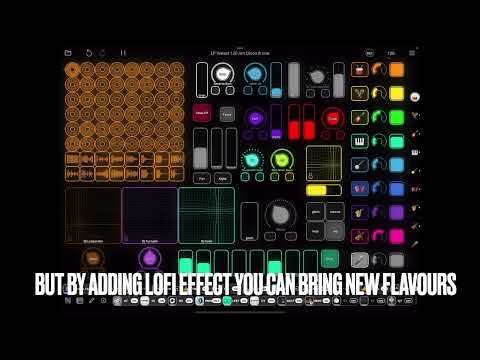
Please feel free to share some more livesets and check my channel https://www.youtube.com/@TheTemplateDude
Comments
Should I split this so that it would be for dual iPads and Dual players. Maybe also the controls could be on separate page..
While tested this, there are not enough hands, and also in some effects it could bring some benefits to full performance.
Would be happy to discuss on the topic ;-) Ableton sync makes two iPads sync nicely, but some challenges with drumbreaks and solos, while they are as oneshots, and if I use one iPad as a master for sync.. let see. But this will be huge, when I get missing features covered.. Already thinking how huge it would be to integrate e.g. with MPC Live 3 😎