Loopy Pro: Create music, your way.
What is Loopy Pro? — Loopy Pro is a powerful, flexible, and intuitive live looper, sampler, clip launcher and DAW for iPhone and iPad. At its core, it allows you to record and layer sounds in real-time to create complex musical arrangements. But it doesn’t stop there—Loopy Pro offers advanced tools to customize your workflow, build dynamic performance setups, and create a seamless connection between instruments, effects, and external gear.
Use it for live looping, sequencing, arranging, mixing, and much more. Whether you're a live performer, a producer, or just experimenting with sound, Loopy Pro helps you take control of your creative process.
Download on the App StoreLoopy Pro is your all-in-one musical toolkit. Try it for free today.
Secondary iOS device as synced midi controller

Hey yall, I’ve been trying to get this to work for longer than I care to admit.
My goal is to have an iPod touch running loopy pro velcroed to my guitar as a mixer and preset control device that controls my main ipad set. I would like to have this set up so that whenever I change the settings on one device it is reflected with the other.
I have it working perfectly as a one way system. I followed the wiki page that talks about persistent midi control. I’ve tried to set this up with state feedback and without state feedback. With direct control and midi learn… no matter how I set it up, once I try to get two way sync working it starts feeding back and all the controls spin endlessly until I break the midi connection.
Right now I’m using Bluetooth to connect the devices. I’ve tried disabling device feedback in control settings. I’ve tried so many ways. Does anyone have direct experience with getting this to work?
Any advice would be gratefully appreciated:)
Comments
iPod touch session
Unfortunately, state feedback doesn’t work for this scenario.
OSC could work. But not over Bluetooth. It would require a direct USB connection, or an Ethernet network using USB ethernet adapters or (not recommended!) Wifi.
[edit] er ... wait ... now that I think about it, my only tests of that were using TouchOSC on the controlling device. Don't take me at my word that Loopy could do this. I'll fool with it and see if it's possible to get something going. I have a feeling it's not now that I think about it.
[edit 2] yeah, no. That won't work. Loopy doesn't have any send OSC actions. It can receive them and provide feedback, but it can't send them on their own. It was with TouchOSC only that I successfully tested control from another iPad.
@SparkleBear @wim I just remembered something sneaky you can do…but not sure how far you can take this. Maybe @wim told me about this in the past.
Let’s say you have a slider widget on the phone. Don’t give it an action at all. In the midi learn panel, assign the fader to be triggered by cc0 from the iPad. On the iPad , set up something —let’s say the orange fader— to be controlled by cc0 from the iPhone.
The iPhone fader will now control the orange fader on the iPad AND moving the orange fader will adjust the iPhone fader.
I needed some shenanigans to get a clip tied to a widget. I’ll try to find time tomorrow to upload a crude sample
Huh! Wasn't me, but it works! Even over Bluetooth.
I basically just went to midi learn for the slider widget on the controlling iPad and manually set it to listen to CC0/continuous from the other iPad. Then I went to midi learn for the orange fader and manually set it to listen for CC0/Continuous on the controlling iPad.
The two stay in sync. They even re-sync when the project is reloaded on the other iPad.
It seems to work well for continuous controllers… but a little dodgy controlling clips…but I ran out of steam. Maybe there’s a clever way to make that work
WHUt??
It even works with things like mixer faders.
I set the Orange faders on both devices to listen for CC0/Continuous from the other device. They stay in sync. No widget needed. 😳
Yeh, that's all the time I have to mess with that too right now. How interesting though.
Thanks for chiming in guys… Yeah i did some more work with this after posting. I got it to work with state feedback to keep two stepped dials in sync across both devices. Seems the Bluetooth controller (iTouch) works best if they are just empty widgets (no midi actions). I would make the stepped widget that does the actions in the iPad main set, make an identical stepped dial on the iPod, manually set the midi learn for the iPad widget to a CC of the Bluetooth device, exit learn and enter learn on the widget of Bluetooth device, move iPad widget, exit learn… both widgets now stay lock step and there are no feedback loop issues. This is working great for the exclusive preset states/input management and fx management.
I’ll have to try some of the things y’all explored in the above replies. I want to next make sure to be able to sync faders so I can control levels and sends from the iPod. Wires are a no go for this implementation as this will be stuck to the top of my wireless acoustic guitar… for faders In the past i tried to get the widget to talk to StreamByter and StreamByter to send midi back into loopy pro with a learned fader. It was inconsistent and glitchy… so Im excited to try the above.
Ideally Bluetooth is not used for reliability in RF rich environments. I also have Bome network and a dedicated router on my bigger rig but I don’t want to always have to lug that stuff around. Maybe Bluetooth will be OK.. but have to road test it a bit.
It would be amazing if there was a loopy mode that was like a “follow/shadow host loopy set” feature so i could load identical instances of loopy pro, one connected to the interface and the whole rig and a second device that was just running the same set but only connected via control data… That’s not here yet but its fun to imagine.
Ill do some tests right now and report back.. Looking forward to see what you come up with @espiegel123
That is planned, but it probably will be a while before Michael can get to it. He mentions it in the video where he was interviewed by Inby.
I have limited time to explore more right now. A couple of things I found was that using this trick to initiate recording is a little tricky and required a radio button or dial on the main wired to just recording. I also found it useful to set up some midi sending from the remote to initiate some actions without triggering a feedback loop. I used different midi for those messages than the bindings for the feedback.
I'll try to find time to post an example of what i mean later.
Here is where its at so far: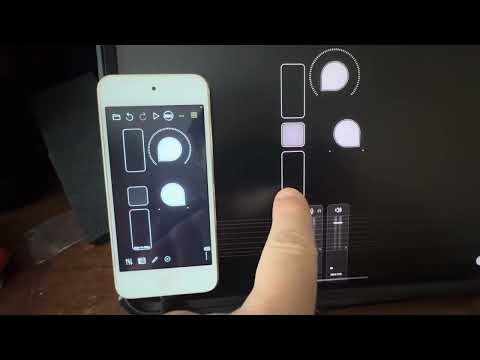
@SparkleBear: did you try reversing the order of the actions in the stepped dial? I don't quite follow what you are using the fader/stepped dial for in this context.