Loopy Pro: Create music, your way.
What is Loopy Pro? — Loopy Pro is a powerful, flexible, and intuitive live looper, sampler, clip launcher and DAW for iPhone and iPad. At its core, it allows you to record and layer sounds in real-time to create complex musical arrangements. But it doesn’t stop there—Loopy Pro offers advanced tools to customize your workflow, build dynamic performance setups, and create a seamless connection between instruments, effects, and external gear.
Use it for live looping, sequencing, arranging, mixing, and much more. Whether you're a live performer, a producer, or just experimenting with sound, Loopy Pro helps you take control of your creative process.
Download on the App StoreLoopy Pro is your all-in-one musical toolkit. Try it for free today.
AMBIENT LAB, a template for Loopy Pro 2.0
Hey everybody, I’ve got a new Loopy template on patchstorage. I’ve built this for ambient music, drones, soundscapes, but I’m sure it has other uses as well. It’s easy to use and really fun. You do need the LP 2.0 update because it uses MIDI loops.
https://patchstorage.com/ambient-lab/
In addition to Loopy Pro you’ll need some kind of sound source, and ideally a big fat reverb or two.
I put up a video walkthrough on the patchstorage page, so if you’re not inclined to figuring things out on your own, check it out. But with this template you’ll be turning out ambient soundscapes in a matter of minutes. Or hours… or days… there’s really no time limit for ambient music 
In this quick demo below I’ve recorded my acoustic guitar using Velvet Machine to create a nice textural envelope.
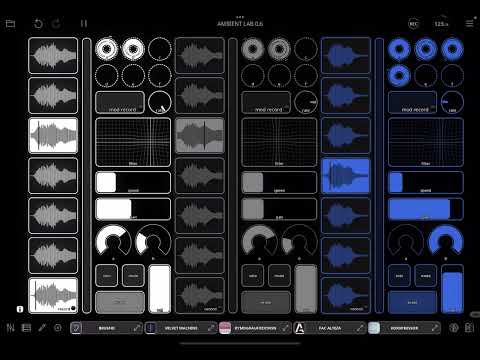
Check it out, I hope you get some enjoyment from it, and I’d love to hear your thoughts as well as any creations that come of it.
Comments
Looks really cool Tim, I shared this on my YouTube community posts section.
Watched the tutorial and downloaded, now to the scary part: me and Loopy.
Right of the bat I'm going to try to change the effects to the fresh XenoVerb for Alteza and Walls for Cascade, see how that goes
Anyway, huge thanks!
This is very very cool, thanks for this and thanks again to LP to offer such a creative environment
I thought it would have Aparillo and the effects as the tutorial shows. I would like that now I'm dumbfounded, again. I hate loopy with all the love of my heart.
Just downloaded it. Fantastic patch. Thanks for sharing this!
Forget what I said earlier about panning not working. All fine. The problem is that the standard Loopy Pro reverb is mono only. Going to chuck some big fat Eventide Blackhole in.
Just a little bug with the grey midi movement capture. The Y axis is recorded but doesn't work when playing
@timfromtheborder
Thanks man looks great, can’t wait to get lost in it
Instead of Aparillo, just add any Audio Unit instrument. It will slot it automatically. Put any effects you want into the Bus channels, or on the color channels, or the master channels---they all work.
Cheers, I'll take a look.
Fixed, just had the mapping swapped around. New file uploaded.
Thanks, I’ll check this out.
Can we help you understand how to add the instruments and effects you want to the project?
OMG! Can't wait to try it! Thanks
Thanks ! This is a fantastic patch, I strongly encourage anyone to test it. Simple to use but powerful in what you can do with it. And you can easily convert it to use it in AUM as an AU
[edit] ahem sorry but the issue is not solved. Only the X axes is moving, not the Y…
@cuscolima 😱
Okay, I think it’s really fixed now. Sometimes weird things happen with old bindings.
Solved, thanks !
Lovely! Thanks for sharing. Tested it and I think a wet/dry control for the Fx would be useful
What could be uaed instead of Cascade?
My top ambient reverbs:
I expect some or all of these will be on sale in November.
This is a bit tricky to implement natively. One option is to use bus A as your wet channel and bus B as your dry. But I usually use the wet/dry on the effect itself (and you could easily add some controls for that to the template). You could also route the Color channel to the output, and use the busses strictly for parallel processing.
Awesome! FAC Alteza is totally awesome!
Don't have the others but added them to my wishlist.
https://patchstorage.com/ambient-lab-pro/
I’ve put together a new template, based on the same principles as Ambient Lab. I haven’t had time to make a video yet, but it works almost exactly the same as the original. The main difference is the buttons for keys which record the way clips did before.
Do be careful, you can easily max out your DSP if you record into a lot of clips. But you can also create some great layers and evolving sounds.
I’m working on something new as well which I think is pretty interesting, here’s a peek: