Loopy Pro: Create music, your way.
What is Loopy Pro? — Loopy Pro is a powerful, flexible, and intuitive live looper, sampler, clip launcher and DAW for iPhone and iPad. At its core, it allows you to record and layer sounds in real-time to create complex musical arrangements. But it doesn’t stop there—Loopy Pro offers advanced tools to customize your workflow, build dynamic performance setups, and create a seamless connection between instruments, effects, and external gear.
Use it for live looping, sequencing, arranging, mixing, and much more. Whether you're a live performer, a producer, or just experimenting with sound, Loopy Pro helps you take control of your creative process.
Download on the App StoreLoopy Pro is your all-in-one musical toolkit. Try it for free today.
Possible to "monitor" live audio through "Colors"/Channels?

Hey all, is this possible...
I have audio coming in from interface. I want to be able to have that live audio's monitoring turned off, but have that audio flow through the connected color channel...
So:
Input: Monitor off : routed to "Red"
red has a bunch of FX etc.... I'd like the live audio to go through those, as well as any loops that may be there on the "Red" channel...
I can't figure out how to do that...
Comments
See the monitoring options in the manual. You can monitor an input through a color channel rather than directly.
See also: https://wiki.loopypro.com/Monitoring_Through_A_Color
Also: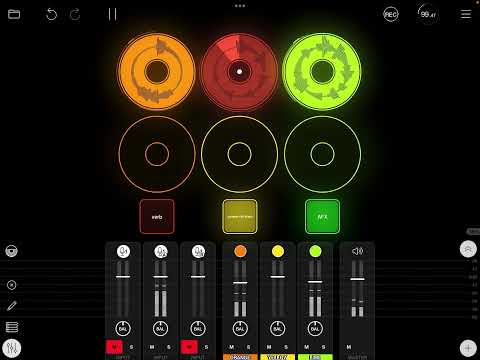
Dang... I was looking right at it, but didn't realize what was "clickable" in that area to set the output channels and to turn off the interface channels...
I'm finding that's the hardest part of learning LP... It's not always obvious what a display part of the UI vs a touchable "button"...
Back to JP's videos! Thanks!