Loopy Pro: Create music, your way.
What is Loopy Pro? — Loopy Pro is a powerful, flexible, and intuitive live looper, sampler, clip launcher and DAW for iPhone and iPad. At its core, it allows you to record and layer sounds in real-time to create complex musical arrangements. But it doesn’t stop there—Loopy Pro offers advanced tools to customize your workflow, build dynamic performance setups, and create a seamless connection between instruments, effects, and external gear.
Use it for live looping, sequencing, arranging, mixing, and much more. Whether you're a live performer, a producer, or just experimenting with sound, Loopy Pro helps you take control of your creative process.
Download on the App StoreLoopy Pro is your all-in-one musical toolkit. Try it for free today.
Shoom and saving sequences with the preset?

I have made a few cool sequences with Shoom. I put these balls around the screen and it sounds interesting, but when I save the preset and reopen it, the pattern is not saved. Is there a way to save it with the last state? As such a cool app, I would hope it does this.
Comments
I remember encountering this all the time when I first picked up shoom and used it via IAA in AUM projects. I used to take screenshots of my circle placements for when I came back to the project haha. Guess I slowly got tired of doing that because I rarely use it anymore, which is a shame cause it’s a great tool. So I’m in the same boat as you. Will wait for other possible solutions but will email the dev if nothing surfaces 👍
It's quite odd that it doesn't seem to save the visual state.
Worth the annoyance. Still one of the greatest touchscreen experiences in iOs synthesis
Yes, it sounds like a Buchla system on IOS.
What a fantastic weapon it is to have in ones arsenal, after seeing your post I opened it for the first time in a long while and immediately got hooked for a long session.
Anyway, I understand what you mean BUT there are no sequencer but hold positions* on a keyboard and no synth lets you save your finger-positions (well, I'm sure there is some but I can't think of one). You have 3 synths with individual presets and the Session preset let you save them together and that's that. Even if it was an AuV3 with state saving I doubt those would be saved without an actual sequencer and play feature.
*with a constant sustain.
Anyone else getting crash in standalone or IAA if you drag a note off the edge of the screen?
On iPad Pro M1 iOS 18.7.1 if I go over either left or right sides I get instant crash.
no crash here yet. ipad Pro M4, recent iPadOS.
Thanks for checking!
After a hard reboot, now I only get a crash if I go over the right screen edge.. so progress of a sort
I guess a reinstall might be worth a try.
This is on a 12.9” iPad fwiw.
While having circle placement carry over from saved presets would be convenient, I think what you said is spot on and makes total sense with regards SHOOM.
I had emailed yuri last week about it, and will be sure to post his take on it all if I ever get a response. Happy SHOOMing 🤙
No such crashes for me - 12.9 iPad Air w/M3 iOS 18.7.1
Thanks ^
Tried again and now it crashes at both sides of the screen again (fml)
(fml)
Hopefully just something weird going on with my install then.
I’ll try a reinstall…
edit : (hooray) deleting and reinstalling seems to have fixed things!
Still crashing lots…
A "snapshot" would work great, so it remembers the states and sequence.
I’m finding that the finger positions for all three synths are in fact saved in ApeMatrix when it’s saved as a preset. [edit: also in AUM and as standalone.]
Are you toggling the latch button at lower left of interface?
(I made a screen video on the iPad, but not sure how to upload it. If anyone can provide tips, that would be appreciated, but attaching it as a file doesn’t seem to be the answer.)
Also, hope the ^crashing issue resolves. This is a great app even for those allergic to IAA
Neat, just another reason for me to pick up apematrix! Thanks
Certainly — AxMx is essential! But I’m not sure it’s the fix for the aforementioned saving issue.
__
Normally people do it thia way: upload to YouTube (as an unlisted video) and then share the link here
Thanks, Gav. I’ll try that.
Well you at least had me spendings some time on something I can't get to work. Very curious to see that video.
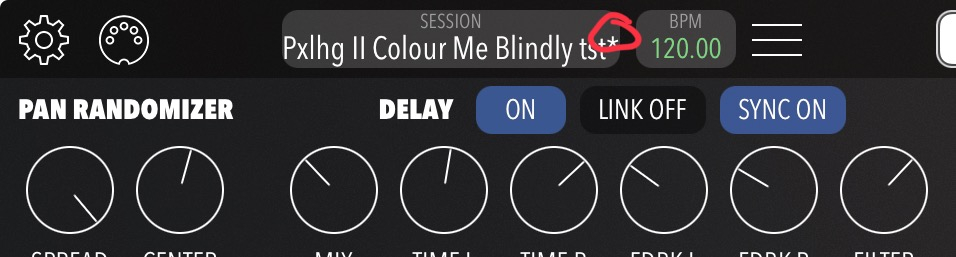
Now, I got it to change when I saved the AUM project, the Shoom session also got saved, had me exited till I reopened with no finger positions saved. However and this is odd, I got a star in Session without doing anything.
My claim is withdrawn — notes are not preserved w/ preset. I was too tired to be conducting such inquiries yesterday with precision. Carry on.
I will have to try this..Thanks.. Please upload the video if you can:)
As I said, the video would only demonstrate my ineptitude in testing note persistence/saving , but I’ll see what I can do. I can reconfirm, however, no Shoom crashing for me.
Shoom and Xynthesizer (same dev) are 2 must-have IAA-only apps, btw.
Can the the Shoom fingers be played by MIDI? If so, the MIDI notes would save it as an alternative.
Yes.
That's maybe a solution for now.