Loopy Pro: Create music, your way.
What is Loopy Pro? — Loopy Pro is a powerful, flexible, and intuitive live looper, sampler, clip launcher and DAW for iPhone and iPad. At its core, it allows you to record and layer sounds in real-time to create complex musical arrangements. But it doesn’t stop there—Loopy Pro offers advanced tools to customize your workflow, build dynamic performance setups, and create a seamless connection between instruments, effects, and external gear.
Use it for live looping, sequencing, arranging, mixing, and much more. Whether you're a live performer, a producer, or just experimenting with sound, Loopy Pro helps you take control of your creative process.
Download on the App StoreLoopy Pro is your all-in-one musical toolkit. Try it for free today.
Fourier transform app?

Hey, anybody know if there’s an iphone app that enables:
- audio (ideally wav) file import
- clip selection (not critical as can perform in other apps)
- Fourier transform (ie power spectrum) calculation from selected clip sample 0 to sample N
I’m finding ‘Vibration Analysis’ - (https://apps.apple.com/gb/app/vibration-analysis/id817385888) very good, but precise selection of time domain (even if I had to do that in another app) for power spectrum calculation would be very desirable on the phone.
Thanks!
Comments
So I found this: https://apps.apple.com/gb/app/audio-analyzer/id681184981
Seems to be able to import files for analysis…
Has anybody here tried this app? Does it work on ios18?
What’s your end goal?
I think Wavepad has what you want, but not sure, @Kewe_Esse
Auditor has similar functionality on iPadOS.
I tend to use Reaper on the Mac when I need to do more in-depth audio editing...
@mjcouche: To visualise power at frequency for imported audio files (transients) of varying lengths for report creation.
Analysing impulse responses of struck objects.
I can already do this, just trying to do everything on iphone.
@Blipsford_Baubie: ah, I have wavepad! Will check. Thank you!
@Samu: yes, I have done this stuff on the desktop previously. However, at-work computers are next to useless. At-work phone use is permitted. At-work ipad use would not be so convenient.
Thanks all!
Your use case looks like something quite specific.
If you don't mind a bit of Python programming, OMZ Pythonista on iOS (including iPhone) would be my choice. You can have it read wave files, pick portions for analysis, do windowing and FFTs with any desired parameters (for short analysis windows, you might want the Gabor multi-resolution FFT approach), show spectra the way you need them, process all files in a batch, calculate EQ settings from short impulse responses etc. and finally make a nice UI for all that.
It has come to new life on my iDevices after I found that LLMs can nowadays write typically 90% of the code in Pythonista, and many of my attempts even worked without any further editing/fixing required.
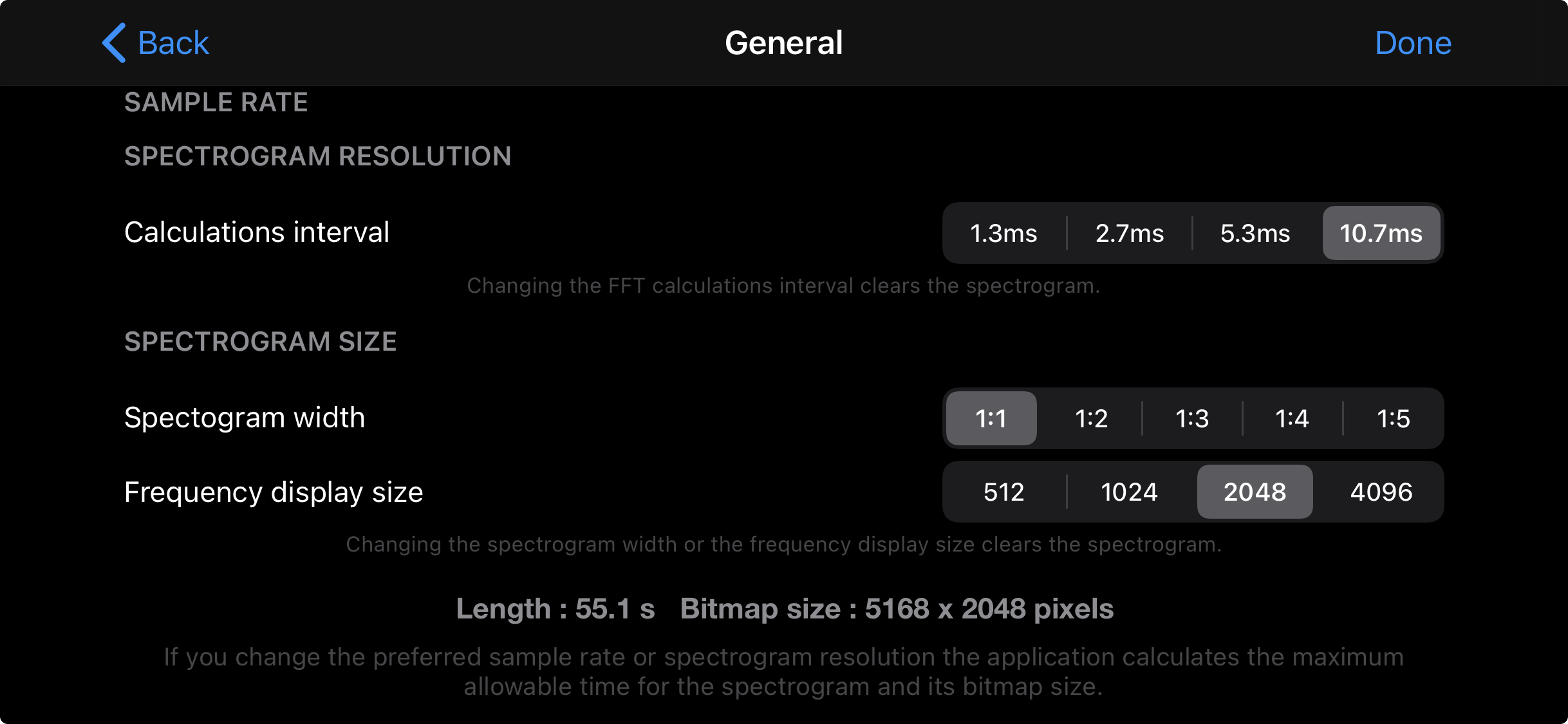
I have this app, it's good and works on the latest iOS, although it hasn't been updated in a while. It doesn't do clip selection. The thing to be aware of when loading files is the length can be truncated if it doesn't fit the spectrogram resolution and size - see picture.
Hm, I have only just begun Eric Matthes Python crash course. I was struggling through the exercises somewhat with Cloudbit’s Python IDE on the phone.
OMZ Pythonista is a good call, for a tenner.
The visual display in Wavepad was badly lacking (unlabelled axes, single point values at touch prompt only, no display of on-screen touch contact point, etc) and because I’m on the free version, all I get is prompts to subscribe now.
Appreciate the recommendation of OMZ sw. Precisely the timesuck I’m after.
Ah thanks for that. That limitation is what I’d like to work around.
As someone who was really into pythonista some years ago, having built a few apps I used daily back then, I can tell you it’s a very capable python IDE, but you’re really better off first learning python on desktop, if you’re just learning it.
Can be done in pythonista, and it’s very suited for simple trials, but the editing on ios/ipados is such a pain. I did the heavy lifting in desktop, then transferred to device and tweaked it if needed. Lots of back and forth
I knew how to program in python before, and I think it is one of most fun languages to use, but editing on ipad/iphone? Nah. Can be done though, specially with a cheap BT keyboard.
Pythonista has access to device APIs, that’s something that I made use of, even midi. I haven’t followed the development for a while (it’s kind of slow) but I imagine it could only have gotten better
Noted. I have a laptop for the purpose. I like the idea of using my phone more deliberately as a computing device. I’m in an environment where potential projects pop up frequently enough. It’s happening.
But yeah. The python IDE/ iphone keypad combo is not relaxing.