Loopy Pro: Create music, your way.
What is Loopy Pro? — Loopy Pro is a powerful, flexible, and intuitive live looper, sampler, clip launcher and DAW for iPhone and iPad. At its core, it allows you to record and layer sounds in real-time to create complex musical arrangements. But it doesn’t stop there—Loopy Pro offers advanced tools to customize your workflow, build dynamic performance setups, and create a seamless connection between instruments, effects, and external gear.
Use it for live looping, sequencing, arranging, mixing, and much more. Whether you're a live performer, a producer, or just experimenting with sound, Loopy Pro helps you take control of your creative process.
Download on the App StoreLoopy Pro is your all-in-one musical toolkit. Try it for free today.
iOS apps on Silicon macs

Someone on another forum reminded me earlier that quite a lot of iOS apps will run on the newer M chip macs, which I knew, but had forgotten. This has got me all excited!
Nambu, for example, is something I'll be using a lot, and Fugue Machine Rubato.
Interested to hear any positive/negative feedback from people. Apps that pair well with Ableton's in-house midi fx, or with m4l devices in particular..
I noticed this list says that Midistep and Euclidean by 4pockets are not compatible, but they are in your list on another thread @Coloobar (?)
Cheers!
P.s should've mentioned; I'm about to buy a new (refurb) laptop
Comments
I think there are some limitations to midi fx in Ableton.
Do you mean limitations using iOS apps in conjunction with Ableton's midi fx specifically?
All I mean is I'm pretty sure I read that iOS midi fx aren't supported in Ableton Live. I could be wrong. I don't haven any further details.
Yep, Live doesn’t support AUv3 MIDI apps.
However you can trigger it by running AUv3 apps standalone, and creating a virtual MIDI port in the built-in Audio MIDI Setup app on macOS, then routing it to a Live channel. However not all apps support this (4Pockets, for example).
It’s for this reason I keep Logic on my Mac, which does provide native support.
Yeah, Reaper doesn't support AUv3 Midi FX either. I soooo wish it did...
Have you tried enabling the IAC Driver in MIDI setup? That's how I was able to get Koala standalone to work with midi to/from other apps.
There's also iDAM, if simply running the apps on an iPad/phone and sending the midi to Live over USB would fit your use case.
IDAM is the way. That or two interfaces communicating between the two.
That’s my usual go-to workaround, and it works for a few apps (though some have removed the output option in updates, I won’t say which ones!), but I could never get it to work for 4p Euclidean (one of my favourites on the iPad), I tried many times.
However, I just tried again, and again it didn’t work. But as I as switching between the Live and Euclidean screens a few times, checking settings, it suddenly kicked in. I notice there’s been a recent update, so maybe that’s unlocked something somewhere, or the connection just needs to be ‘woken up’ by switching windows a few times? The settings for MIDI looked slightly different from what I remember, with an option to select the virtual bus, so maybe that’s a new addition.
Yeah I know that one, but I prefer just having the laptop going without a bunch of other stuff connected - though I’m eyeing up a Push 3 so that will change soon, off the couch and back to a desk again.
For non-IAC-able MIDI AUv3’s, I tend to record the MIDI in Logic, and copy it across to Live. Now I’ve got a decent laptop I can run both concurrently, and it’s relatively quick and easy.
Anyway, dead chuffed I can use Euclidean, hopefully it’ll work again next time I try! I’ll have to give some of his other apps a go later.
Edit: yep, I reckon Euclidean was fixed in the last update - just tried Progressions, and the settings are different, there’s no option to connect to the virtual bus.
When I run Euclidian/MidiStep on Mac I get this message:
This is an AUv3 plugin intended to be loaded into a host application such as AUM.
It can however be run in standalone mode in order to backup your presets. See the HELP manual for more information.
Hey @Coloobar - yes, I remember now about the standalone thing. I'm ok with that.
So do you open those 4pockets sequencers standalone and then just route them into your DAW? Are you using Ableton?
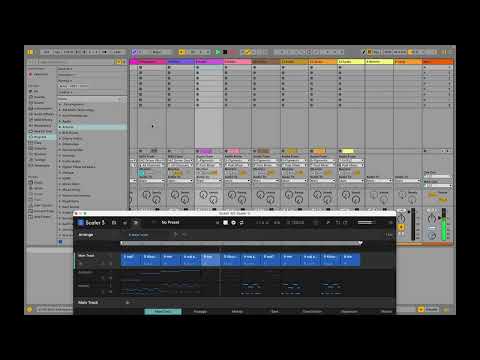
I’m doing everything in Scaler 3.2 in conjunction with Ableton now… it’s a total game changer and finally found a workflow that does it all easily without being cumbersome. You can write and arrange up to 8 separate midi parts running Scaler inside Ableton, and then route each of them to a separate track in Ableton. Ableton is just running the plugins/effects on those tracks.
It’s not AUv3 on the Mac, but if you own patterning 3 on iOS, the Mac version is free. Well worth having on both platforms!
How do you route the different Scaler tracks to different tracks in Ableton?
It depends on whether you’re on Mac or PC.
For Mac:
For PC: