Loopy Pro: Create music, your way.

What is Loopy Pro?Loopy Pro is a powerful, flexible, and intuitive live looper, sampler, clip launcher and DAW for iPhone and iPad. At its core, it allows you to record and layer sounds in real-time to create complex musical arrangements. But it doesn’t stop there—Loopy Pro offers advanced tools to customize your workflow, build dynamic performance setups, and create a seamless connection between instruments, effects, and external gear.

Use it for live looping, sequencing, arranging, mixing, and much more. Whether you're a live performer, a producer, or just experimenting with sound, Loopy Pro helps you take control of your creative process.

Download on the App Store

Loopy Pro is your all-in-one musical toolkit. Try it for free today.

B00ga importing own samples

If you follow the manual you get nowhere.
It reads: go to global settings and then choose “bankspath”
Only there is no bankspath under global settings.

When I tap import bank/file it goes to the files app and I can choose only .zipfiles.
If I do that the screen just goes back to b00ga en the files disapear.

Comments

  • Also it crashed two times in a few minutes.

  • If you watch @Gavinski tutorial on YouTube he does it in the video, maybe that will help.

  • Tutorials always go way to fast for me.
    Anyone know what steps to take since the manual isn’t right

  • edited November 2025

    @Meek3 said:
    If you follow the manual you get nowhere.
    It reads: go to global settings and then choose “bankspath”
    Only there is no bankspath under global settings.

    When I tap import bank/file it goes to the files app and I can choose only .zipfiles.
    If I do that the screen just goes back to b00ga en the files disapear.

    You're confusing 2 things - importing banks and importing samples. It's all explained correctly in the manual, but you need to avoid confusing the 2 things, banks and samples are different. In general, most issues you'll run into it, it's best to give the benefit of doubt to the app, as it's nearly always user error

  • "...as it's nearly always user error"

    I can confirm that this is the case :)

  • @Kashi said:
    "...as it's nearly always user error"

    I can confirm that this is the case :)

    We've all been there, and will be there again. And again. Admittedly, some of us are more that way inclined than others 😀

  • @Gavinski said:

    @Meek3 said:
    If you follow the manual you get nowhere.
    It reads: go to global settings and then choose “bankspath”
    Only there is no bankspath under global settings.

    When I tap import bank/file it goes to the files app and I can choose only .zipfiles.
    If I do that the screen just goes back to b00ga en the files disapear.

    You're confusing 2 things - importing banks and importing samples. It's all explained correctly in the manual, but you need to avoid confusing the 2 things, banks and samples are different. In general, most issues you'll run into it, it's best to give the benefit of doubt to the app, as it's nearly always user error

    Yea i will say i agree with that, I learned that the hard way, lol.

  • @Kashi said:
    "...as it's nearly always user error"

    I can confirm that this is the case :)

    Happens to the best of them.

  • @Gavinski said:

    @Meek3 said:
    If you follow the manual you get nowhere.
    It reads: go to global settings and then choose “bankspath”
    Only there is no bankspath under global settings.

    When I tap import bank/file it goes to the files app and I can choose only .zipfiles.
    If I do that the screen just goes back to b00ga en the files disapear.

    You're confusing 2 things - importing banks and importing samples. It's all explained correctly in the manual, but you need to avoid confusing the 2 things, banks and samples are different. In general, most issues you'll run into it, it's best to give the benefit of doubt to the app, as it's nearly always user error

    Really not sure why you have to be an ass about it but, you like to go there sometimes and so do I so, I guess I get it.

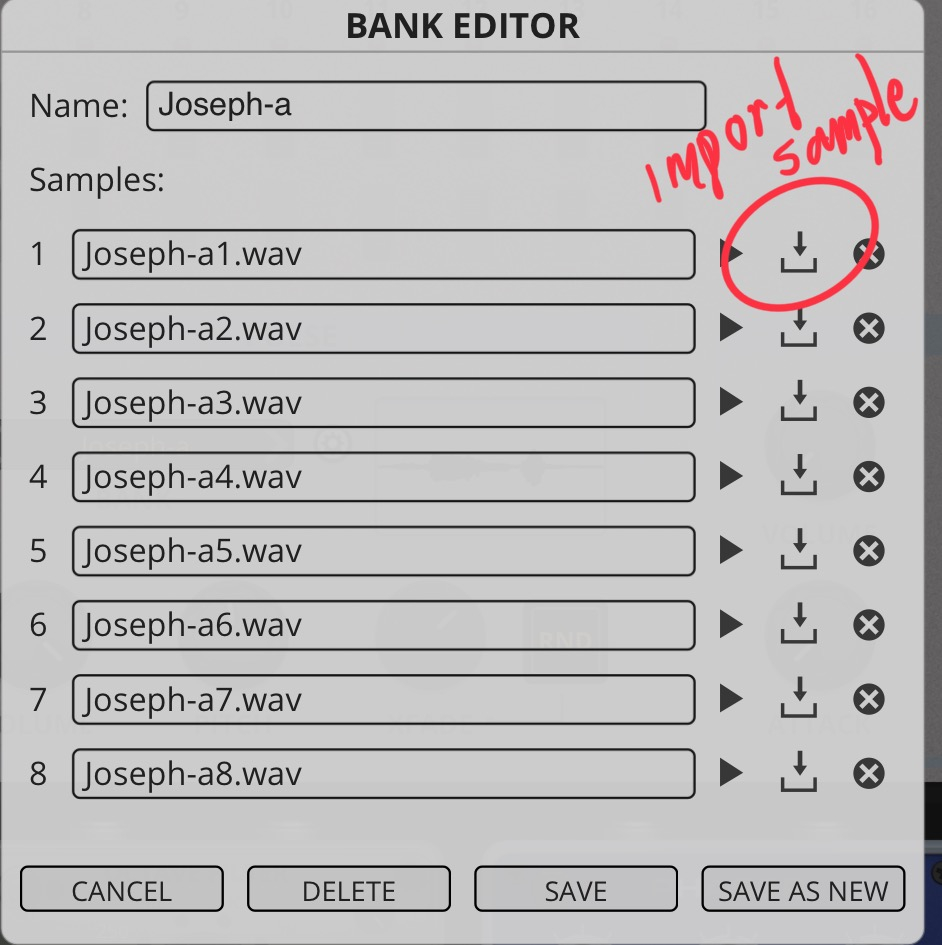
    Anyway @Meek3 when you import an .zip with audiofiles using 'import bank' it is like nothing happens but if you look in the banks menu you'll see it's there. Simple as that. The app Noise does it like this too so it's an AudioThing thing. Below you can see how some of my banks imported just mix up with the factory ones (i.e no user folder).

    In this menu, below, which you get by pressing the little cog wheel beside the banks you see what samples a particular bank consist of, you can switch them out, delete or whatever and then save as new, good luck!
  • @Pxlhg said:

    @Gavinski said:

    @Meek3 said:
    If you follow the manual you get nowhere.
    It reads: go to global settings and then choose “bankspath”
    Only there is no bankspath under global settings.

    When I tap import bank/file it goes to the files app and I can choose only .zipfiles.
    If I do that the screen just goes back to b00ga en the files disapear.

    You're confusing 2 things - importing banks and importing samples. It's all explained correctly in the manual, but you need to avoid confusing the 2 things, banks and samples are different. In general, most issues you'll run into it, it's best to give the benefit of doubt to the app, as it's nearly always user error

    Really not sure why you have to be an ass about it but, you like to go there sometimes and so do I so, I guess I get it.

    Anyway @Meek3 when you import an .zip with audiofiles using 'import bank' it is like nothing happens but if you look in the banks menu you'll see it's there. Simple as that. The app Noise does it like this too so it's an AudioThing thing. Below you can see how some of my banks imported just mix up with the factory ones (i.e no user folder).

    In this menu, below, which you get by pressing the little cog wheel beside the banks you see what samples a particular bank consist of, you can switch them out, delete or whatever and then save as new, good luck!

    Thank you a lot. That is a clear answer.

  • @Gavinski said:

    @Meek3 said:
    If you follow the manual you get nowhere.
    It reads: go to global settings and then choose “bankspath”
    Only there is no bankspath under global settings.

    When I tap import bank/file it goes to the files app and I can choose only .zipfiles.
    If I do that the screen just goes back to b00ga en the files disapear.

    You're confusing 2 things - importing banks and importing samples. It's all explained correctly in the manual, but you need to avoid confusing the 2 things, banks and samples are different. In general, most issues you'll run into it, it's best to give the benefit of doubt to the app, as it's nearly always user error

    But in this case there really was a manual error. It says; “go to global settings and choose bankpath”
    But there is nothing named bank path to choose under global settings

  • @Meek3 said:

    @Gavinski said:

    @Meek3 said:
    If you follow the manual you get nowhere.
    It reads: go to global settings and then choose “bankspath”
    Only there is no bankspath under global settings.

    When I tap import bank/file it goes to the files app and I can choose only .zipfiles.
    If I do that the screen just goes back to b00ga en the files disapear.

    You're confusing 2 things - importing banks and importing samples. It's all explained correctly in the manual, but you need to avoid confusing the 2 things, banks and samples are different. In general, most issues you'll run into it, it's best to give the benefit of doubt to the app, as it's nearly always user error

    But in this case there really was a manual error. It says; “go to global settings and choose bankpath”
    But there is nothing named bank path to choose under global settings

    Probably just translation differences and a small typo. "Go to global settings and choose the bank path." Meaning - browse to the folder where the bank is.

    German is prone to making compound words such as that.

    just a guess.

  • @Pxlhg said:

    @Gavinski said:

    @Meek3 said:
    If you follow the manual you get nowhere.
    It reads: go to global settings and then choose “bankspath”
    Only there is no bankspath under global settings.

    When I tap import bank/file it goes to the files app and I can choose only .zipfiles.
    If I do that the screen just goes back to b00ga en the files disapear.

    You're confusing 2 things - importing banks and importing samples. It's all explained correctly in the manual, but you need to avoid confusing the 2 things, banks and samples are different. In general, most issues you'll run into it, it's best to give the benefit of doubt to the app, as it's nearly always user error

    Really not sure why you have to be an ass about it but, you like to go there sometimes and so do I so, I guess I get it.

    Anyway @Meek3 when you import an .zip with audiofiles using 'import bank' it is like nothing happens but if you look in the banks menu you'll see it's there. Simple as that. The app Noise does it like this too so it's an AudioThing thing. Below you can see how some of my banks imported just mix up with the factory ones (i.e no user folder).

    In this menu, below, which you get by pressing the little cog wheel beside the banks you see what samples a particular bank consist of, you can switch them out, delete or whatever and then save as new, good luck!

    I tried the exact same way but the userbank or files dont show up in the presets ( or user)
    I tried a zip with wav files
    Just to be sure I tried another one
    But nothing

  • edited November 2025

    I click the three stripes in the upper right corner.
    Then i choose “bank import”
    And then the zip file
    But nothing in the banks or user files

    (I tried to upload a photo screenshot but that also doesn’t work)

  • @Meek3 said:
    I click the three stripes in the upper right corner.
    Then i choose “bank import”
    And then the zip file
    But nothing in the banks or user files

    (I tried to upload a photo screenshot but that also doesn’t work)

    Whats in the zip file exactly? It should contain 8 wav files ideally, just zipped, the files should not be in a folder of any kind before zipping.

  • @Gavinski said:

    @Meek3 said:
    I click the three stripes in the upper right corner.
    Then i choose “bank import”
    And then the zip file
    But nothing in the banks or user files

    (I tried to upload a photo screenshot but that also doesn’t work)

    Whats in the zip file exactly? It should contain 8 wav files ideally, just zipped, the files should not be in a folder of any kind before zipping.

    About screenshots - yes it seems a bit more hassle on the forum than it used to be, unfortunately. I often end up having to crop my iPad screenshots to get them an acceptable size for the forum to allow an upload. You could also use some kind of website like this to compress them:

    https://compressjpeg.com/

  • @Meek3 said:
    I tried the exact same way but the userbank or files dont show up in the presets ( or user)
    I tried a zip with wav files
    Just to be sure I tried another one
    But nothing

    It has nothing to do with presets, it's a bank so in banks is where they should end up.

  • @Gavinski said:

    @Meek3 said:
    I click the three stripes in the upper right corner.
    Then i choose “bank import”
    And then the zip file
    But nothing in the banks or user files

    (I tried to upload a photo screenshot but that also doesn’t work)

    Whats in the zip file exactly? It should contain 8 wav files ideally, just zipped, the files should not be in a folder of any kind before zipping.

    Yes now it worked!
    I just made a new zipfile (the third) but dis one did work.
    No idea what I did differently but it worked.

  • @Meek3 said:

    @Gavinski said:

    @Meek3 said:
    I click the three stripes in the upper right corner.
    Then i choose “bank import”
    And then the zip file
    But nothing in the banks or user files

    (I tried to upload a photo screenshot but that also doesn’t work)

    Whats in the zip file exactly? It should contain 8 wav files ideally, just zipped, the files should not be in a folder of any kind before zipping.

    Yes now it worked!
    I just made a new zipfile (the third) but dis one did work.
    No idea what I did differently but it worked.

    I guess the other one had a folder in it. Anyway, good it's solved

  • Everybody thanks for the help.

  • Probably not the best place to FR, but I'd love to see B00GA step through the 8 samples in a bank sequentially.

  • @Ailerom said:
    Probably not the best place to FR, but I'd love to see B00GA step through the 8 samples in a bank sequentially.

    Yeah, the inbuilt modulation is super basic, as often the case with Audiothing and Hainbach collabs. Only option is to use an LFO or similar to modulate it the way you want.

  • @Gavinski said:

    @Ailerom said:
    Probably not the best place to FR, but I'd love to see B00GA step through the 8 samples in a bank sequentially.

    Yeah, the inbuilt modulation is super basic, as often the case with Audiothing and Hainbach collabs. Only option is to use an LFO or similar to modulate it the way you want.

    As it is, it works great for percussive elements. Super cool to hear hihats, shakers etc playing back randomly.

  • @Gavinski said:

    @Ailerom said:
    Probably not the best place to FR, but I'd love to see B00GA step through the 8 samples in a bank sequentially.

    Yeah, the inbuilt modulation is super basic, as often the case with Audiothing and Hainbach collabs. Only option is to use an LFO or similar to modulate it the way you want.

    Considering that the rate/pitch can already be controlled by midi notes I suggested (during beta) to have the note velocity to control the X-Fade value which would allow one to play a 'crossfaded' sample based on note-velocity but that never materialized but never say never...

    Naturally extra sequencer lanes (routed to user-selectable parameters) for modulation would have been the icing on the cake :sunglasses:

  • @Samu said:

    @Gavinski said:

    @Ailerom said:
    Probably not the best place to FR, but I'd love to see B00GA step through the 8 samples in a bank sequentially.

    Yeah, the inbuilt modulation is super basic, as often the case with Audiothing and Hainbach collabs. Only option is to use an LFO or similar to modulate it the way you want.

    Considering that the rate/pitch can already be controlled by midi notes I suggested (during beta) to have the note velocity to control the X-Fade value which would allow one to play a 'crossfaded' sample based on note-velocity but that never materialized but never say never...

    Naturally extra sequencer lanes (routed to user-selectable parameters) for modulation would have been the icing on the cake :sunglasses:

    That pitch to xfade idea is super nice, pity it didn't get added

  • @Ailerom said:

    @Gavinski said:

    @Ailerom said:
    Probably not the best place to FR, but I'd love to see B00GA step through the 8 samples in a bank sequentially.

    Yeah, the inbuilt modulation is super basic, as often the case with Audiothing and Hainbach collabs. Only option is to use an LFO or similar to modulate it the way you want.

    As it is, it works great for percussive elements. Super cool to hear hihats, shakers etc playing back randomly.

    Great to know.

    How much of a sample does it get in. I know it’s just a very small amount, but are you all able to get most short drum/percussion one shots to play?

  • To be honest I didn't really think about it on playback, so it must be ok. I got my son to play a bunch of hihats, selected 8, imported them and it sounds great.

  • @Ailerom said:
    To be honest I didn't really think about it on playback, so it must be ok. I got my son to play a bunch of hihats, selected 8, imported them and it sounds great.

    Cool. Good to know. Cause the website says it only is able to add a small first part of a sample but doesn’t really say a maximum amount. I wanted to make sure i could get one drum shots working. Thanks.

Sign In or Register to comment.