Loopy Pro: Create music, your way.
What is Loopy Pro? — Loopy Pro is a powerful, flexible, and intuitive live looper, sampler, clip launcher and DAW for iPhone and iPad. At its core, it allows you to record and layer sounds in real-time to create complex musical arrangements. But it doesn’t stop there—Loopy Pro offers advanced tools to customize your workflow, build dynamic performance setups, and create a seamless connection between instruments, effects, and external gear.
Use it for live looping, sequencing, arranging, mixing, and much more. Whether you're a live performer, a producer, or just experimenting with sound, Loopy Pro helps you take control of your creative process.
Download on the App StoreLoopy Pro is your all-in-one musical toolkit. Try it for free today.
Comments
@relpot. Very nice additions in latest beta. Since I didn’t have it installed before taking a look, I went through the tutorial again - presumably because of new objects added, the tutorial is sometimes highlighting the wrong objects referred to by the text instructions. This could be very, very confusing for new users!
Yes indeed, I will fix that! Many thanks for the helpful feedback!
Fingerlab is bringing back the fun to iPad music creation and mixing it up with art and physics. Musyc2, and Polagone are so much fun, and have been updated several times. When I feel a need for a creative boost, I often pop open one of those. And then, if I want to play around with some vintage or lofi drums, DM10 is my goto. Thanks, Fingerlab!
Thank you very much EdZAB, I'm glad our apps brings you some fun and creativity, and your message give me a lot of strength for the future update and new apps!
By the way, a new app, a synth with physics engine modulation is coming on the AppStore in two weeks, you will heard about it soon!!
I didn't care for it when it first came out, but now it's extremely fun to play with. I think the house and skull presets ( crunching) was crucial to peak my interest. Now , I pretty much use it like a hi -iq game or a nervous fidget
Very fun app
@relpot could the feature be added to set a MIDI channel for each shape? So you could assign Circle to Channel 1, Square Channel 2, Square 11, etc. That would make it easier to use sending MIDI out from a host like AUM.
I'm not sure to understand your request. You mean for the standalone app ?
Because this feature is already available in the Musyc2 AUv3.
Indeed, in Musyc 2AUv3, The Circle, Square, Triangle and Rectangle are available as separate MIDI send channel, you can see that in AUM for example.
Yeah just load it as midi app
I’m talking about setting a MIDI channel per shape.
KingB has an upper and lower registry that can be independently controlled using different MIDI channels.
However, KingB has only one MIDI input exposed, as shown here in AUM:
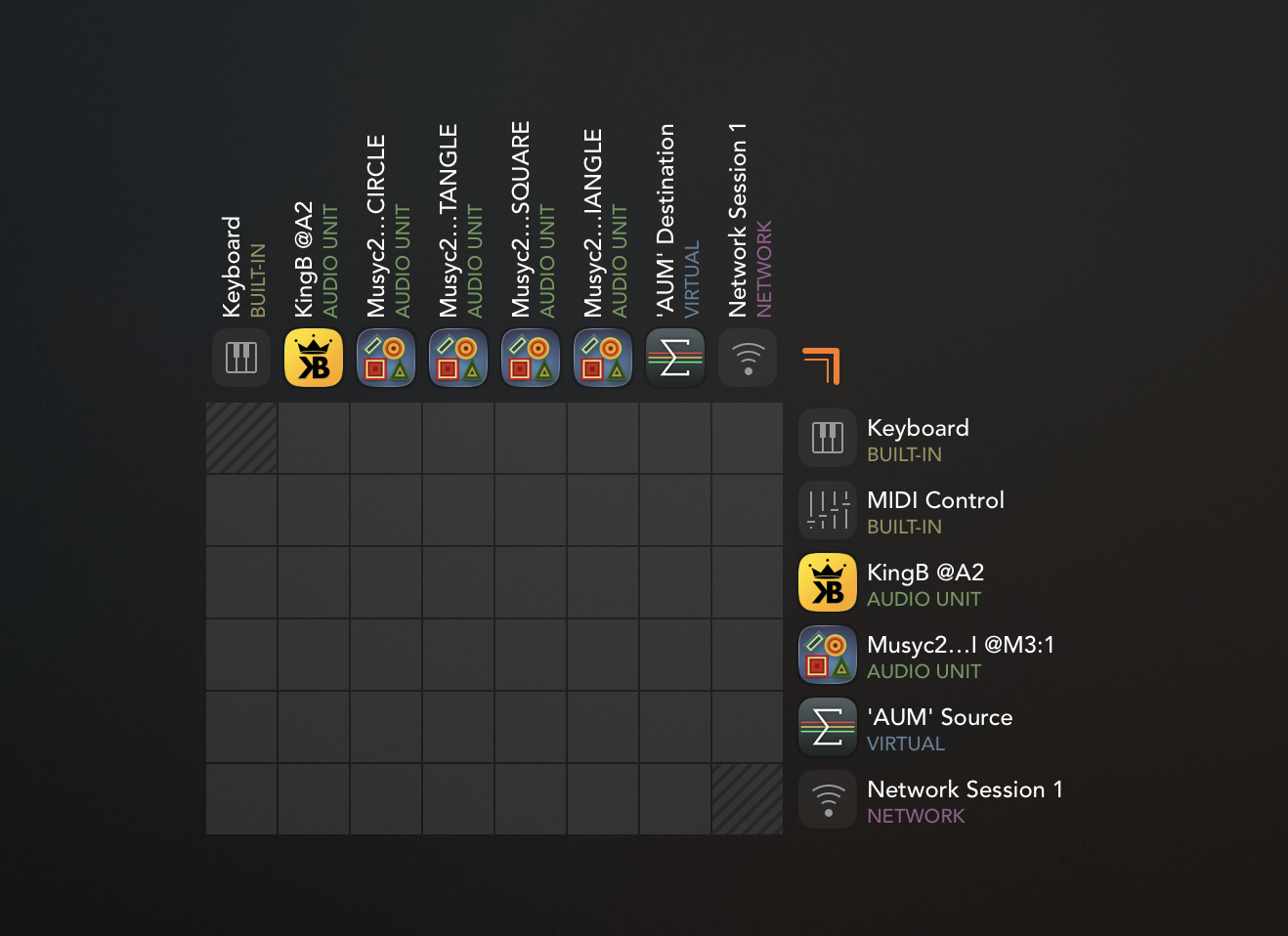
So if I route the circle and triangle channels into KingB, they’ll both be going to the upper channel. I can’t seem to find a way in AUM to set channel per output, and if I could that would likely resolve this. Maybe I could use some Mosaic script on each shape’s MIDI output to reassign the channels. But it would be better to have an option to set Circle to MIDI channel 1 and Triangle to MIDI Channel 2 directly from Musyc2.
The scenario I was talking about earlier was a similar setup, but I was using IDAM to send MIDI to desktop and had similar issues. Different instruments in Logic Pro desktop each assigned to listen to a set MIDI channel, but no way to set which channel is sent by which shape.
Does that make more sense, or am I missing something obvious?
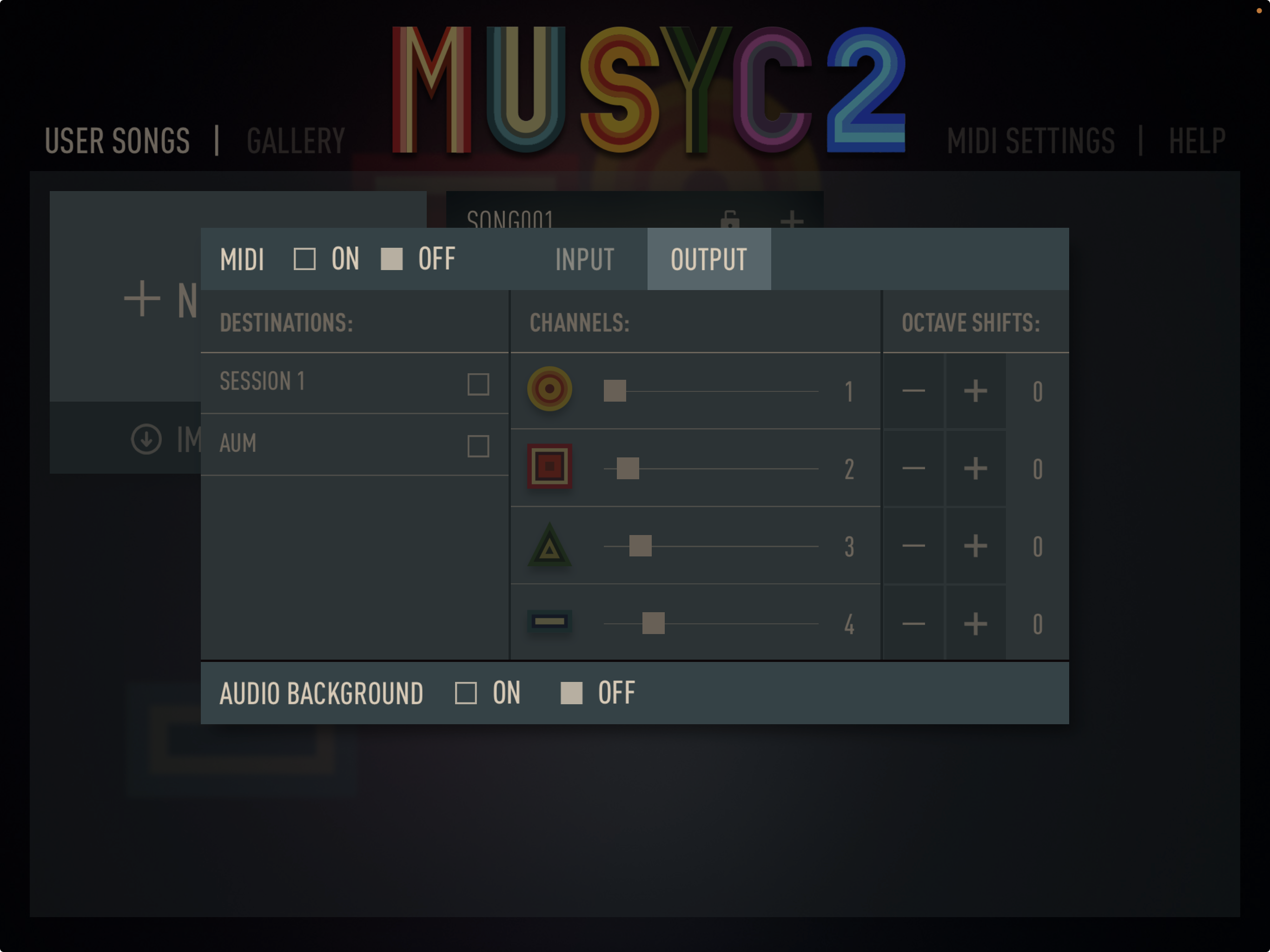
@relpot Looks like there is an option in standalone to set channels, but I can’t seem to find it in the AUv3.
Standalone:
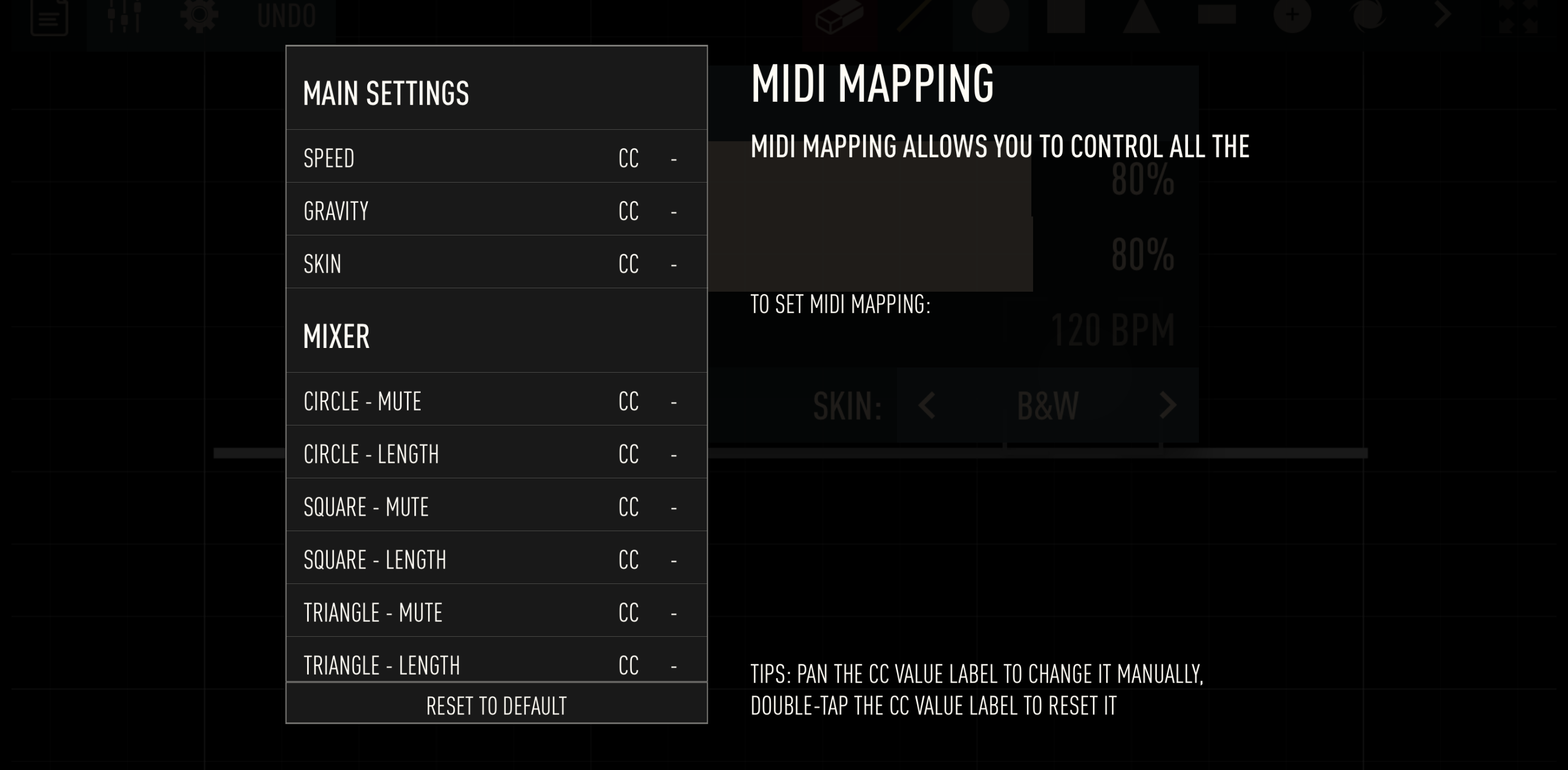
AUv3 MIDI options, which I think also has a glitch. I think there’s supposed to be text under “to set MIDI mapping:”
Ok thanks for the screenshots and the explanation, now I understand what you mean.
I have fixed the issue with MIDI Mapping texts in the Musyc2 AUv3 MIDI.
And I will add the MIDI Channel in the AUv3, an update will be available soon.
A new Musyc2 update v5.1 is available on the AppStore, this update adds midi channel for auv3.
Here is the update details:
Nice you keep'em coming. Looking forward to more.
I've been playing around a bit with note length and default is the longest and the shortest sound horrible to be honest. Could we get that current default is set to 50% and thus the option to do a bit longer notes and please have a check on the gate for shortest (maybe it's just me but it sounds odd).
All the best,
Ok thanks for your feedback.
Just to be sure I understand well what you say:
-You want to be able to make longer notes
-You want the default value to be shorter
What do you mean when you say "please have a check on the gate for shortest", I'm not sure I understand what you want to mean..
Yes that's all correct. The shorter note when it's close to zero(0) it starts to sound really bad. I understand it depends on the sound you using at the moment but, I dunno maybe not being able to shorten it to off would help. Hope that's more clear, it's difficult to explain this especially on ones second language.
Anyway, I just submitted a whole arsenal of songs (sorry!). Many are not very musical as I find it hard to come up with something original without spending days.
Keep up the good work!
All the best,
Ulfie
Thanks for the submitted songs, there are some very good songs! I will add some of them in the next update!
A new Musyc2 update v6.0 is available on TestFlight.
This major update adds a new physical object, Portal, 2 new effects (Decimator and Ring Modulator), 7 new sound kits, and 14 new demo songs created by Musyc2 users.
Here's the list of changes:
• New physical object: Portal
• 2 new effects: Decimator & Ring Modulator
• 7 new sound kits by YosheyX2
• 14 new demo songs made by YosheyX2, Vincent & PXLHG
• Fixed various bugs
Mine says tester removed, lol
What do you mean ? Can you be more precise ?
I'm also completely gone from Testflight. I did overwrite it when I bought the app but I'm fairly certain it's been there anyway. Now it's not.
Ok weird, here is the TestFlight link, if you click on it you should be able to install the TestFlight: https://testflight.apple.com/join/WMFZpjVG
You can also just wait for the update to be released, it should be released in 10 days I think.
I just want to let you know that Musyc2 v6.0 update is now available in the AppStore.
Also, I will stop the beta-testing for now, I will restart it for the next update coming in september.