Loopy Pro: Create music, your way.
What is Loopy Pro? — Loopy Pro is a powerful, flexible, and intuitive live looper, sampler, clip launcher and DAW for iPhone and iPad. At its core, it allows you to record and layer sounds in real-time to create complex musical arrangements. But it doesn’t stop there—Loopy Pro offers advanced tools to customize your workflow, build dynamic performance setups, and create a seamless connection between instruments, effects, and external gear.
Use it for live looping, sequencing, arranging, mixing, and much more. Whether you're a live performer, a producer, or just experimenting with sound, Loopy Pro helps you take control of your creative process.
Download on the App StoreLoopy Pro is your all-in-one musical toolkit. Try it for free today.
Wondering how to setup knob on Akai Mini Plus keyboard to control preset selection in Transit 2

Hi,
I'm trying to use a rotary knob on my Akai mini plus keyboard controller to step through all the presets on Transit 2.
Doing Midi learn from LP, I select Effect Preset in Transit 2, action is Scroll, leave List as the default of All Presets.
While listening for events, I turn the knob on the midi controller and it sets the value to CC 71.
(It toggles back and forth between CC 71 on the MPK mini Plus Port 1 and "Burgandy", so I stop when it's on the MPK)
But when I attempt to use it, as soon as I start to turn the dial, the presets in Transit 2 cycle through quickly without stopping at a preset pace, independent of how I'm turning (or not turning ) the dial, seemingly until Transit 2 crashes or LP stops it
Any thoughts on what I'm doing wrong?
Thanks
Comments
Please post screenshots of the midi binding details.
Check with a midi monitor to see if the knob is sending absolute or relative midi.
Okay. ShowMIDI shows that the akai is sending absolute midi.
One odd behavior (which may or may not be related) that I’m noticing and have never seen before is when i open ShowMIDI UI it shows me the midi value of the knob as i turn it ( normal ) but the rest of the UI is unresponsive….cant resize or select other items in the window header….have to close LP and reopen to get back to LP mixer
You can run ShowMIDI as a standalone app. Perhaps you had ShowMIDI in a midi loop. Please screenshot the rest of that binding’s setup by tapping where it says trigger .
Also post a screenshot of your expanded mixer. Maybe you have a midi feedback loop.
@danm : cc71 is working fine for me scrolling Transit 2 presets. I am sending from a fader thru ShowMidi but that should be no different than using an external controller.
Screenshot of binding:
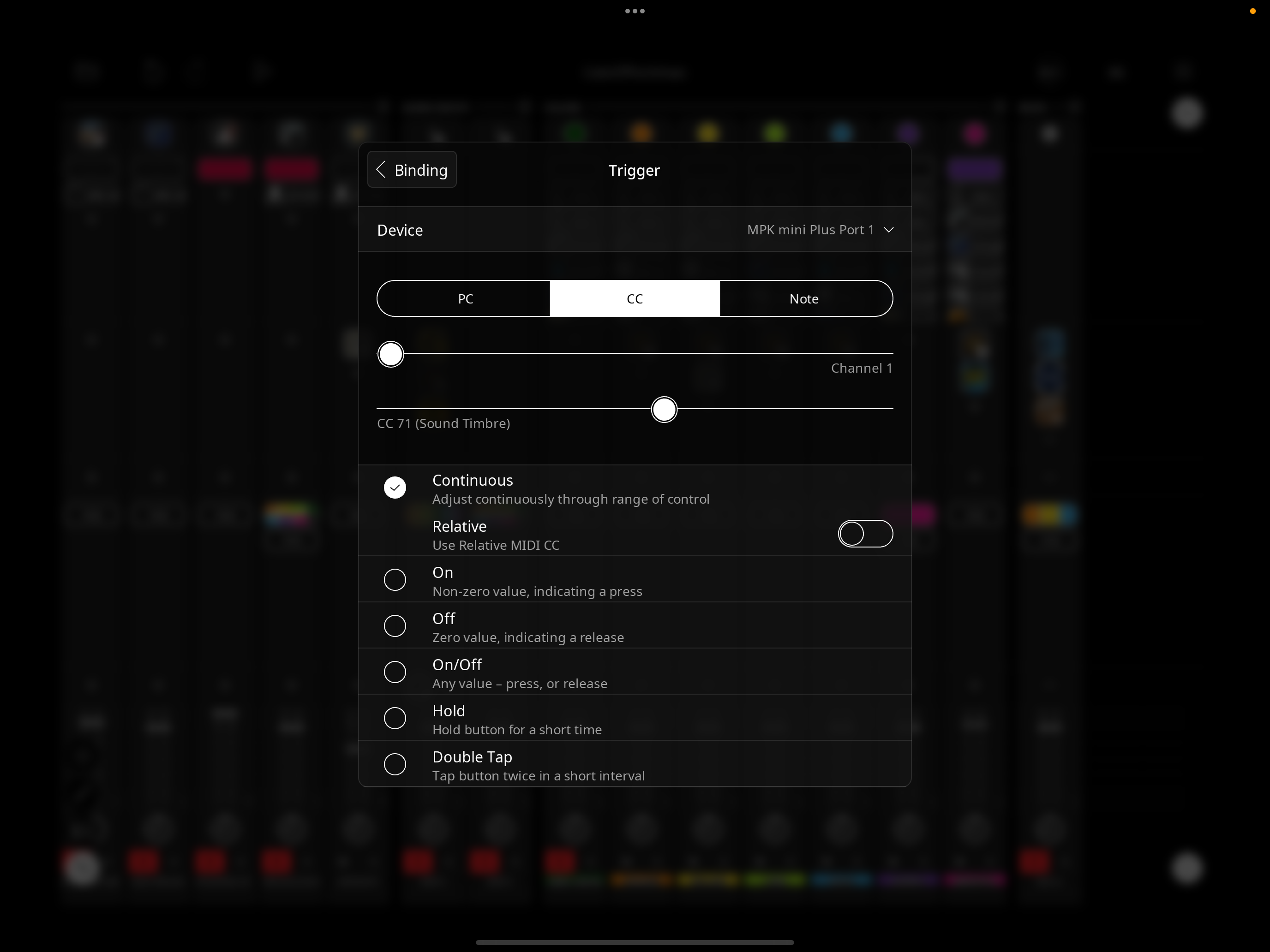
I tried running ShowMIDI standalone but not sure how to see LP traffic that way…
I sent you the project via support email bc it likely has a feedback loop as it is a busy project but I can’t figure it out and thought that might be more efficient than my providing you small bits and pieces of details here, but let me know what you prefer and appreciate your help
Thanks for any insight
Can you post a screenshot or screenshots of your expanded mixer ? (You might have mentioned my asking about that earlier so we can see the routing)?
@danm : also create a new simple project from Loopy’s default add transit 2. Set up a midi binding to change presets with the same cc. What happens?
Sure, I will try the above, but wondering if you got the email with the project, so you can see the mixer layout yourself and see more clearly if you think there is a feedback loop...Or do you prefer not to try that and have me send the screenshots?
Tried creating midi binding with default project. It works but still cycling through quickly, but I think it's allowing me to see that the problem may be related to the sensitivity of the knob, as when I turn the knob even slightly, it's trying to cycle through a bunch of presets vs just one. Trying to figure a better way to set this up so I can more easily cycle through things...perhaps cycling through a specific set of auv3 presets that I set up ahead of time...not sure.
Still not sure why showMIDI was acting so funky though, would appreciate any insight you have there...again, let me know if you'd prefer to open the project I sent you or for me to post screenshots. Thanks
It is more convenient if you post the screenshots here.
Also, try setting up the binding in a new project as I mentioned.
Okay, I'll send screenshots...Please see my prior post for results of setting up binding in new project as you mentioned
With nothing else launched, launch ShowMidi in standalone mode and observe the speed with which the values change.
Thanks. I'm asking for your insight into why showMIDI UI is unresponsive, which I assume is related to some sort of midi feedback loop, as you suggested
Here are the mixer screenshots
@danm : take a look at the number of presets. I think the issue is that midi cc's have 128 potential values. Transit2 has more presets than that. Reduce the number of presets in the selection and things will work better.
Thanks, will do.
Are you also able to provide any thoughts on how I might diagnose why the showMIDI UI is locking up?
To troubleshoot:
First run it as a standalone and see if it happens.
Then in Loopy Pro, create a new project from Loopy's default.
Add your controller as to the mixer.
Then make ShowMidi an AU a destination of the controller.
Open the Show MIDI window and turn the knob.
I went through your requested steps, above.
The UI hang doesn't happen when running showMIDI standalone.
(Related Q: Is there any way to see any misc midi traffic happening in LP while running showMIDI in standalone? I see LP as a column in showMIDI when running it standalone but not sure if there's a way to have any stray/unexpected midi happening in LP show up in showMIDI while running it standalone)
No issues in default project with showmidi UI locking up when using the controller.
To be clear, I don't think the knob issue is related to the showMIDI UI hang/potential midi feedback loop, I believe it's related to something else in the project, but not sure how to diagnose that, can you help with that, please?
Thanks
There isn't a way for showmidi to see midi that is internal to Loopy Pro. As an AUv3, it can see the midi you route to it.
One thing that I see in your screenshots is that you have a lot of double-routing of your midi.
For example, you have MIDI routed directly from the AKAI to instruments AND to colors that send the same MIDI to the instruments. If you are routing to a color that has monitor through on (the default) don't also route directly to the instruments. There might be cases where there is a legitimate reason to do that, but generally you want to avoid that.
In your screenshots, nothing is routed to showmidi. So, if you open show midi, it shouldnt see anything.
I have no idea why you would see a lockup if that is how it was setup. It shouldnt see anything.
re: showMIDI, I removed the akai as a source to showMIDI once it started acting up, that's why you don't see it there in the screenshot.
re: double routing, I'll consider that
Thanks
Without seeing the routing that is causing the problem, I cant advise. Check that the only source for ShowMidi is the Akai and make sure ShowMidi has no destination. ShowMIDI passes any MIDI it receives to the destinations.
@danm - I only skimmed the thread so far but will mention something that has tripped me up with ShowMidi before. It can also pass midi through. I have had sessions where I've routed midi both to ShowMidi and to a destination - and have had ShowMidi default to being a source for the destination as well, thus double routing. An easy thing to check is to be sure that only one source is sending to ShowMidi and that ShowMidi isn't the source for anything else.
Also, you may want to consider setting your dial's
Perform Actions OntoRelease. That way you won't get a bunch of preset changes as you scroll the dial. The preset change midi will only be sent when you lift your finger. If you do want to step through presets, buttons or labels to nudge the dial up and down are useful.Ignore if these comments are off track. They were just thoughts that occurred to me as I skimmed the thread.
Thanks @wim, this info is really helpful and some if it is beyond what had already been provided, so thanks.
I do have a question for you and/or @espiegel123...when I'm midi learn'ing the akai knob, the learn info shows the cc number and also shows the controller info, as I turn the knob it cycles through showing the name of the akai controller (who's knob I'm turning) and also cycling through 2 of the midi clip colors (burgandy and pink). Is this expected?
Yes that is expected. The Akai is sending
to those midi colors and the have monitoring on. So, midi learn is receiving midi from them to.
Note that the dial setting to act on release only applies when using touch to turn the dial. It doesn’t apply when scrolling via midi.