Loopy Pro: Create music, your way.

What is Loopy Pro?Loopy Pro is a powerful, flexible, and intuitive live looper, sampler, clip launcher and DAW for iPhone and iPad. At its core, it allows you to record and layer sounds in real-time to create complex musical arrangements. But it doesn’t stop there—Loopy Pro offers advanced tools to customize your workflow, build dynamic performance setups, and create a seamless connection between instruments, effects, and external gear.

Use it for live looping, sequencing, arranging, mixing, and much more. Whether you're a live performer, a producer, or just experimenting with sound, Loopy Pro helps you take control of your creative process.

Download on the App Store

Loopy Pro is your all-in-one musical toolkit. Try it for free today.

Battlestation: the 1-minute groovebox

1235712

Comments

  • edited December 2025

    This is a great app. I enjoy playing with it. @brambos because the app is designed for quick and intuitive playing I would like to make some suggestions:

    • Drum sequencer: It would be great if the buttons would toggle by swiping over them. This would allow for example to quickly lay a line of hihats with one swipe instead of hammering them in. And by swiping over a drum sequence it would be inverted. My Volca Sample behaves that way and it's great to quickly create and modify drum sequences.
    • Scale selection: As others already said, it is not intuitive to only display the "C" scale. Specially as the scale selector highlights the selected root note, but not the selected scale.
    • Scrolling: I do struggle with these arrows and I constantly catch myself trying to put the finger on some empty space between the modules and swipe. Would it be possible to implement "real" scrolling ?
  • @catherder said:

    • Scrolling: I do struggle with these arrows and I constantly catch myself trying to put the finger on some empty space between the modules and swipe. Would it be possible to implement "real" scrolling ?

    I’d like that too, especially since there are currently cases when the “page scrolling” gets thrown off and you can’t get to certain controls in the middle.

    There isn’t a lot of empty space to grab to scroll without hitting a control by accident - often a problem with that approach. There isn’t scroll buttons are a decent compromise if the kinks can be worked out.

  • Should have gotten this over Spacewalk

  • @Edward_Alexander said:
    @Gavinski I have the same iPad and no issues here. The left/right arrows are fine. Maybe you just need a restart?

    He knows he needs to wipe it and restart but refused to face it. :D

  • edited December 2025

    @brambos said:

    @Gavinski said:
    I find on my 12.9 5th Gen Pro, at many AUv3 window sizes, the right side is chopped off but there is no way to scroll, the little arrow thing is missing, Bram

    @brambos

    Interesting. We have tested the shit out of all the resizing variations (and haven’t seen it trip in a while).

    Thanks for posting examples. Let’s see if I can reproduce that.

    *note, links are images stored on dropbox as they were too large to upload directly here

    I've also had this occur on the Mac in standalone + fullscreen mode. When running standalone in fullscreen the 2 panels don't scale nicely so that they are both accessible simultaneously, they need to be selected separately and brought into focus before editing each panels settings. After tinkering in the mixer panel for a while, the scroll tabs in the synth panel had disappeared when I refocussed that panel. A restart of the app resolved it. I'd been using the app for about 3 hours before that happened though and it has only occurred once (in 3 launches).

    That session was only supposed to be a quick 15 min play to check out Battlestation for the first time before continuing with my 'responsible adult' duties, but that plan went south and a 15 min overview swiftly turned into a 3 hour Deep Acid Techno party for one :D no regrets!! (Well, apart from the fact that I didn't record that session...I'm absolutely gutted about that! :( )

    I hereby certify the claim that Battlestation is FUN as 100% accurate and true! :D

    ...That said, after a few hours of use a few things stood out to me that really could be improved on the desktop version.

    Highly Desired:

    • Either a 'wide' view mode for desktop users which allows the entire top panel to be visible on screen without the need for the aforementioned scroll tabs at all (there's plenty of available screen width on desktop for this), or at least an improvement to the panel scaling on desktop so that both panels are fully visible and don't overlap in fullscreen mode (linked file is .gif - if it doesn't play on dropbox site, download to view the demo)
    • The AU3 plugin UI is actually too small (for me, at least) and non-resizable. Some plugin % scaling options would be great.

    Nice to have:

    • Ability to sort user banks manually instead of strictly alphabetical, this is mainly for set lists. It can be worked around by numbering presets for now, but manual drag & drop ordering would be preferable and less faff.
    • Start / Stop the sequencer with spacebar in standalone mode, or have the Play button on a small panel which is always on top (this is only annoying if panels need to be selected prior to interacting with them, as mentioned in 1st paragraph).
    • The ability to use the computer keyboard to mute/solo channels in Standalone would be nifty (momentary & toggle options). Even more 'fun' without firing up a DAW!
  • So in AUM you get have multiple Battlestations all running a different divisions of the master clock. Very nice indeed.

  • @cyberheater said:

    @Edward_Alexander said:
    @Gavinski I have the same iPad and no issues here. The left/right arrows are fine. Maybe you just need a restart?

    He knows he needs to wipe it and restart but refused to face it. :D

    Lol, I get the joke but nah, other people have mentioned having the same issue

  • @Gavinski said:

    @cyberheater said:

    @Edward_Alexander said:
    @Gavinski I have the same iPad and no issues here. The left/right arrows are fine. Maybe you just need a restart?

    He knows he needs to wipe it and restart but refused to face it. :D

    Lol, I get the joke but nah, other people have mentioned having the same issue

    @Gavinski said:

    @cyberheater said:

    @Edward_Alexander said:
    @Gavinski I have the same iPad and no issues here. The left/right arrows are fine. Maybe you just need a restart?

    He knows he needs to wipe it and restart but refused to face it. :D

    Lol, I get the joke but nah, other people have mentioned having the same issue

    Hope you get it sorted Gavinski.

  • @wim said:

    @catherder said:

    • Scrolling: I do struggle with these arrows and I constantly catch myself trying to put the finger on some empty space between the modules and swipe. Would it be possible to implement "real" scrolling ?

    I’d like that too, especially since there are currently cases when the “page scrolling” gets thrown off and you can’t get to certain controls in the middle.

    There isn’t a lot of empty space to grab to scroll without hitting a control by accident - often a problem with that approach. There isn’t scroll buttons are a decent compromise if the kinks can be worked out.

    Yes, this was my original implementation. I tried using it for two months during initial development and it was just a very unpleasant experience (which didn't improve over time).

    Far too many accidental nudges happened which made the entire UI feel very unstable and broke the illusion of touching a sold piece of hardware.

    I would have preferred it over adding explicit UI elements, but this was simply the most robust solution given how densely packed the UI panel is.

  • @cyberheater said:

    @Gavinski said:

    @cyberheater said:

    @Edward_Alexander said:
    @Gavinski I have the same iPad and no issues here. The left/right arrows are fine. Maybe you just need a restart?

    He knows he needs to wipe it and restart but refused to face it. :D

    Lol, I get the joke but nah, other people have mentioned having the same issue

    @Gavinski said:

    @cyberheater said:

    @Edward_Alexander said:
    @Gavinski I have the same iPad and no issues here. The left/right arrows are fine. Maybe you just need a restart?

    He knows he needs to wipe it and restart but refused to face it. :D

    Lol, I get the joke but nah, other people have mentioned having the same issue

    Hope you get it sorted Gavinski.

    Yes, it's on the list to be fixed obviously.

  • @brambos said:

    @wim said:

    @catherder said:

    • Scrolling: I do struggle with these arrows and I constantly catch myself trying to put the finger on some empty space between the modules and swipe. Would it be possible to implement "real" scrolling ?

    I’d like that too, especially since there are currently cases when the “page scrolling” gets thrown off and you can’t get to certain controls in the middle.

    There isn’t a lot of empty space to grab to scroll without hitting a control by accident - often a problem with that approach. There isn’t scroll buttons are a decent compromise if the kinks can be worked out.

    Yes, this was my original implementation. I tried using it for two months during initial development and it was just a very unpleasant experience (which didn't improve over time).

    Far too many accidental nudges happened which made the entire UI feel very unstable and broke the illusion of touching a sold piece of hardware.

    I would have preferred it over adding explicit UI elements, but this was simply the most robust solution given how densely packed the UI panel is.

    How about putting the scrolling arrows or buttons at the sides of the mixer panel? There is space there (at least on my iPad). This might feel unintuitive to scroll the top with elements at the bottom but at least they wouldn’t cover UI elements.

  • edited December 2025

    I tested Battlestation a bit in my Loopy Pro template for 8 auv3's. This is just a scratch of the surface, how powerfull auv3 instuments can be when combining them
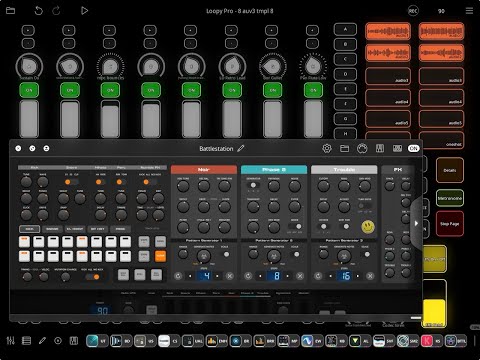
  • @brambos Thank you for this app, easily the most fun app I've ever tried. As mentioned earlier, midi out in Ableton Live doesn't seem work. The only options I get for midi is pre/post fx; there are no channels available. Since you have a picture of Ableton Live in your post, is this going to be addressed? Thanks again.

  • @intracoastal said:
    @brambos Thank you for this app, easily the most fun app I've ever tried. As mentioned earlier, midi out in Ableton Live doesn't seem work. The only options I get for midi is pre/post fx; there are no channels available. Since you have a picture of Ableton Live in your post, is this going to be addressed?

    MIDI output is done via the standardized Audio Unit protocol. There are no alternative ways for me to get MIDI output from a plugin into a host.

    So if Ableton Live doesn't support this part of the AUv3 protocol, there is very little I can do about it on my end, they will have to implement the feature :)

  • edited December 2025

    @AkiVilla said:
    I tested Battlestation a bit in my Loopy Pro template for 8 auv3's. This is just a scratch of the surface, how powerfull auv3 instuments can be when combining them

    I absolutely adore that oriental soprano /wind instrument sound @ 38 seconds in. Is this one of your shared koala samples? Would love to use it.

  • @brambos said:

    @intracoastal said:
    @brambos Thank you for this app, easily the most fun app I've ever tried. As mentioned earlier, midi out in Ableton Live doesn't seem work. The only options I get for midi is pre/post fx; there are no channels available. Since you have a picture of Ableton Live in your post, is this going to be addressed?

    MIDI output is done via the standardized Audio Unit protocol. There are no alternative ways for me to get MIDI output from a plugin into a host.

    So if Ableton Live doesn't support this part of the AUv3 protocol, there is very little I can do about it on my end, they will have to implement the feature :)

    Got it - thanks for your reply; i will look for workarounds.

  • edited December 2025

    @intracoastal said:

    @brambos said:

    @intracoastal said:
    @brambos Thank you for this app, easily the most fun app I've ever tried. As mentioned earlier, midi out in Ableton Live doesn't seem work. The only options I get for midi is pre/post fx; there are no channels available. Since you have a picture of Ableton Live in your post, is this going to be addressed?

    MIDI output is done via the standardized Audio Unit protocol. There are no alternative ways for me to get MIDI output from a plugin into a host.

    So if Ableton Live doesn't support this part of the AUv3 protocol, there is very little I can do about it on my end, they will have to implement the feature :)

    Got it - thanks for your reply; i will look for workarounds.

    Mind you, I'm no Live expert at all. Perhaps someone who is more Live-savvy can chime in if MIDI output from AU plugins in general works (and perhaps hidden in an obscure place) or if it's not yet implemented.

    I know AU plugin support in Live is still a relatively new thing.

  • @brambos said:

    @intracoastal said:
    @brambos Thank you for this app, easily the most fun app I've ever tried. As mentioned earlier, midi out in Ableton Live doesn't seem work. The only options I get for midi is pre/post fx; there are no channels available. Since you have a picture of Ableton Live in your post, is this going to be addressed?

    MIDI output is done via the standardized Audio Unit protocol. There are no alternative ways for me to get MIDI output from a plugin into a host.

    So if Ableton Live doesn't support this part of the AUv3 protocol, there is very little I can do about it on my end, they will have to implement the feature :)

    Yeah, Live doesn’t support AUv3 MIDI, my one gripe about using Ableton. A workaround is to record it in via the iPad using IDAM, or I tend to copy and paste the recorded MIDI from Mac Logic, which does support it.

    A lot of developers providing sequencers for Ableton tend to use Max 4 Live, which does send the MIDI data.

    I would love to have a Max 4 Live device based on the Battlestation sequencer, I can’t recall anything as good currently. Possible the closest is Sting 3.

  • @oldsynthguy said:

    @brambos said:

    @intracoastal said:
    @brambos Thank you for this app, easily the most fun app I've ever tried. As mentioned earlier, midi out in Ableton Live doesn't seem work. The only options I get for midi is pre/post fx; there are no channels available. Since you have a picture of Ableton Live in your post, is this going to be addressed?

    MIDI output is done via the standardized Audio Unit protocol. There are no alternative ways for me to get MIDI output from a plugin into a host.

    So if Ableton Live doesn't support this part of the AUv3 protocol, there is very little I can do about it on my end, they will have to implement the feature :)

    Yeah, Live doesn’t support AUv3 MIDI, my one gripe about using Ableton. A workaround is to record it in via the iPad using IDAM, or I tend to copy and paste the recorded MIDI from Mac Logic, which does support it.

    A lot of developers providing sequencers for Ableton tend to use Max 4 Live, which does send the MIDI data.

    I would love to have a Max 4 Live device based on the Battlestation sequencer, I can’t recall anything as good currently. Possible the closest is Sting 3.

    Thanks for the context, but FWIW, I just downloaded StepPolyArp and ChordPolyPad Auv3 and they send midi similar to a VST inside Live. Are they doing anything different?

  • edited December 2025

    @brambos said:

    @intracoastal said:
    @brambos Thank you for this app, easily the most fun app I've ever tried. As mentioned earlier, midi out in Ableton Live doesn't seem work. The only options I get for midi is pre/post fx; there are no channels available. Since you have a picture of Ableton Live in your post, is this going to be addressed?

    MIDI output is done via the standardized Audio Unit protocol. There are no alternative ways for me to get MIDI output from a plugin into a host.

    So if Ableton Live doesn't support this part of the AUv3 protocol, there is very little I can do about it on my end, they will have to implement the feature :)

    Any chance of implementing midi export?
    If so, this app could be the ultimate “sketchbook” on the go.

    Please 🙌

  • Is the appstore on hollidays already? Just when was going to buy this thing… I use a portuguese system of virtual ViSA cards (since forever) but current one doesn’t have enough funds, so I was trying to update my payment info except it says appstore is taking a nap

  • See you guys in 2026

  • edited December 2025

    @intracoastal said:

    @oldsynthguy said:

    @brambos said:

    @intracoastal said:
    @brambos Thank you for this app, easily the most fun app I've ever tried. As mentioned earlier, midi out in Ableton Live doesn't seem work. The only options I get for midi is pre/post fx; there are no channels available. Since you have a picture of Ableton Live in your post, is this going to be addressed?

    MIDI output is done via the standardized Audio Unit protocol. There are no alternative ways for me to get MIDI output from a plugin into a host.

    So if Ableton Live doesn't support this part of the AUv3 protocol, there is very little I can do about it on my end, they will have to implement the feature :)

    Yeah, Live doesn’t support AUv3 MIDI, my one gripe about using Ableton. A workaround is to record it in via the iPad using IDAM, or I tend to copy and paste the recorded MIDI from Mac Logic, which does support it.

    A lot of developers providing sequencers for Ableton tend to use Max 4 Live, which does send the MIDI data.

    I would love to have a Max 4 Live device based on the Battlestation sequencer, I can’t recall anything as good currently. Possible the closest is Sting 3.

    Thanks for the context, but FWIW, I just downloaded StepPolyArp and ChordPolyPad Auv3 and they send midi similar to a VST inside Live. Are they doing anything different?

    Those are probably MIDI Generator plugins, rather than instrument plugins with MIDI output functionality (just guessing).

  • edited December 2025

    after few hour+ sessions with this thing i have to say i still love it but i see drum module as sonically weakest part of entire app .. love all other elements (3 synth tracks) - they are designed perfectly, also like overall app structure, simple FX send chain, mixer,etc - but the drums part i found sonically boring, or oldschool .. it screams for more diverse kick/snare/hihat/perc sounds .. either ability to load own samples or at least ability of choose different sounds from some built in list ..

    maybe idea for in-app purchase :-) I would easily pay for more modern sounding sound packs :-)

  • edited December 2025

    False alarm, I managed to buy it on iphone, for some reason ipad was giving me error.
    Anyway @brambos I’m sure this will prove as much fun as hilda. I just need a magnifying glass for iphone but I’m sure I‘ll develop muscle memory soon enough to not even need labels, and when in doubt just turn knobs at random and use my ears 😅
    Another lovely fun app from you and I’m pretty sure I have them all (your exclusive ones at least, although some of the others too)

  • edited December 2025

    Also another idea for furure IAP -> make posibility to change synth in slot (i mean posibity to select if i want to have Noir, Phase2 or Trouble in each of 3 synth slots, and in future possibly add another synth types to choose from)
    Maybe this approach would be interesting also for drum machine - multiple kick / snare / hihats / percs models, selectable ..

    I'll pay easily same price as entire app costs for such update !

  • edited December 2025

    @intracoastal said:

    @oldsynthguy said:

    @brambos said:

    @intracoastal said:
    @brambos Thank you for this app, easily the most fun app I've ever tried. As mentioned earlier, midi out in Ableton Live doesn't seem work. The only options I get for midi is pre/post fx; there are no channels available. Since you have a picture of Ableton Live in your post, is this going to be addressed?

    MIDI output is done via the standardized Audio Unit protocol. There are no alternative ways for me to get MIDI output from a plugin into a host.

    So if Ableton Live doesn't support this part of the AUv3 protocol, there is very little I can do about it on my end, they will have to implement the feature :)

    Yeah, Live doesn’t support AUv3 MIDI, my one gripe about using Ableton. A workaround is to record it in via the iPad using IDAM, or I tend to copy and paste the recorded MIDI from Mac Logic, which does support it.

    A lot of developers providing sequencers for Ableton tend to use Max 4 Live, which does send the MIDI data.

    I would love to have a Max 4 Live device based on the Battlestation sequencer, I can’t recall anything as good currently. Possible the closest is Sting 3.

    Thanks for the context, but FWIW, I just downloaded StepPolyArp and ChordPolyPad Auv3 and they send midi similar to a VST inside Live. Are they doing anything different?

    That's weird...I've got (and just updated) StepPolyArp, but it's never shown up inside Live (though it picks up straight away in Logic). Are you using using it in standalone mode, and then transmitting the MIDI to Live that way?

    @brambos - some iOS apps have MIDI out options for standalone mode (e.g. StepPolyArp, some 4Pockets), so sometimes these can be picked up in Live using the MIDI From/channel settings. Works, but a bit clunky. I can test it if you want to give it a try.

  • edited December 2025

    Thank you for this, Bram Bos. It's not my usual thing, but it's fun -- which I believe is the point. Allow me to second some suggestions that have been made already:

    1. Make the drum sequencer swipable, so that it fills in a row or inverts what's there.

    2. In landscape mode, it's hard to read on an iPhone (which you did warn us about). But in portrait mode, it's legible! The scrolling just needs some work. I'm not mentioning this to complain. But the idea of this app (start having fun in under 1 minute) goes along very well with the idea of an iPhone: a capable computer in your pocket, wherever you are.

    3. Let users exchange a Phase synth for a second Trouble synth.

    Again, thank you for fun.

  • @oldsynthguy said:

    @intracoastal said:

    @oldsynthguy said:

    @brambos said:

    @intracoastal said:
    @brambos Thank you for this app, easily the most fun app I've ever tried. As mentioned earlier, midi out in Ableton Live doesn't seem work. The only options I get for midi is pre/post fx; there are no channels available. Since you have a picture of Ableton Live in your post, is this going to be addressed?

    MIDI output is done via the standardized Audio Unit protocol. There are no alternative ways for me to get MIDI output from a plugin into a host.

    So if Ableton Live doesn't support this part of the AUv3 protocol, there is very little I can do about it on my end, they will have to implement the feature :)

    Yeah, Live doesn’t support AUv3 MIDI, my one gripe about using Ableton. A workaround is to record it in via the iPad using IDAM, or I tend to copy and paste the recorded MIDI from Mac Logic, which does support it.

    A lot of developers providing sequencers for Ableton tend to use Max 4 Live, which does send the MIDI data.

    I would love to have a Max 4 Live device based on the Battlestation sequencer, I can’t recall anything as good currently. Possible the closest is Sting 3.

    Thanks for the context, but FWIW, I just downloaded StepPolyArp and ChordPolyPad Auv3 and they send midi similar to a VST inside Live. Are they doing anything different?

    That's weird...I've got (and just updated) StepPolyArp, but it's never shown up inside Live (though it picks up straight away in Logic). Are you using using it in standalone mode, and then transmitting the MIDI to Live that way?

    @brambos - some iOS apps have MIDI out options for standalone mode (e.g. StepPolyArp, some 4Pockets), so sometimes these can be picked up in Live using the MIDI From/channel settings. Works, but a bit clunky. I can test it if you want to give it a try.

    Thanks, but I have rather bad experiences implementing strange hacks to workaround the flaws of DAWs. Ableton need to fix this one B)

  • Better wait sitting down…
    (live is my fave desktop daw, though, don’t have much experience with bitwig since I moved out of desktop a decade ago)
    But if I need to do elastic audio, sliced timestreched or pitchshifted vocal phrases, that kind of thing, I always do it on desktop, not being a masochist! and the free 8 track version does just fine, I then just export the phrases to icloud and use on ipad

Sign In or Register to comment.