Loopy Pro: Create music, your way.
What is Loopy Pro? — Loopy Pro is a powerful, flexible, and intuitive live looper, sampler, clip launcher and DAW for iPhone and iPad. At its core, it allows you to record and layer sounds in real-time to create complex musical arrangements. But it doesn’t stop there—Loopy Pro offers advanced tools to customize your workflow, build dynamic performance setups, and create a seamless connection between instruments, effects, and external gear.
Use it for live looping, sequencing, arranging, mixing, and much more. Whether you're a live performer, a producer, or just experimenting with sound, Loopy Pro helps you take control of your creative process.
Download on the App StoreLoopy Pro is your all-in-one musical toolkit. Try it for free today.
Fettkraft by quantovox (Released)

https://apps.apple.com/us/app/fettkraft/id6755074522
Fettkraft is a zero-latency dispersion effect tailored for processing percussion sounds.
It can be used to make beats more punchy and energetic, without increasing RMS levels.
Adapted from an ultra-strong dispersion modelling algorithm, Fettkraft can deliver high levels of dispersion without having to stack multiple plugin instances, unlike all-pass filter-based dispersers. This allows retaining more control when adjusting effect depth, as it avoids cumulative effects that could inadvertently lead to unevenness of adjustment steps across different frequencies.
FEATURES:
• Powerful dispersion for the low- and lower midrange
• Near-ideal phase shifting with a flat frequency response
• Key advantages over spectral delays include pristine transients and zero latency
• Free of timing disruptions due to extreme sub-bass phase delays that would prevent practical uses in many production scenarios
• Tuned to avoid the harsher 'zappy' qualities found in other dispersion algorithms, to maximize versatility across different drum sounds and genres
PLEASE NOTE:
• AUv3-compatible host app is required
• Suported sampling rates: 44.1, 48, 96 kHz
Comments
I am eagerly looking forward to the demo ... Doug, Gav?
A Sub / Big Speakers are really needed to hear the full effect of this thing...
I mean, I don’t know, i could be wrong but this is what Punchlab and Knock does, probably not all of what they do, but at the price they’re asking it’s not a bad Gamble
smooth and delicate and wise plug:)
Need all of the Quantovox plugins on macOS.
Mmmm.. Iistening to the demo I am sure you can do this with Punchlab just as well and with a deeper level of control (BOOM and PHAT functions). Or am I missing something magic here?
just what i wanted to write when i saw the post.
+1
To begin with, this is the frequency response at Fettkraft's maximum setting (from 2Hz to 48000Hz):

And this is a dirtier, hands-on measurement using a random white noise source (where dry and wet inputs aren't even matched) with the moderate default Match EQ smoothing:
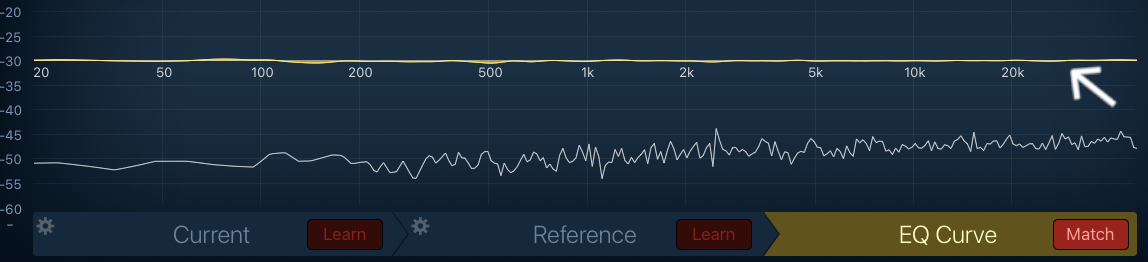
So Fettkraft achieves its thing without boosting any frequencies, your RMS stays the same (typical max tolerances are around 0.1 dB, the same for the frequency response).
Probably the same for every single variant of LUFS.
That means you have enough RMS/loudness headroom to do additional things if you wish And chain multiple instances without worrying too much, or do even wackier stuff.
As a side note that may be of less importance depending on your use case, it also doesn't need oversampling, so you can use it more freely in cases where you use your device as an outboard effects unit, processing external signals (or like an effects pedal). Or in any situation where latency compensation is unavailable.
Looks like probably will have to add more details about dispersion itself, which is the far more interesting part...
Great plugin!! Love all the quantovox stuff. The q in quality! +1 for Macos
Thank you for clarifying! I was a bit quick with my judgement after hearing the demo video (btw thanks for posting @eylvy ) So this does seem to do some magic after all.. I think this will be very interesting for what I do. I have replied on your pm, looking forward to give it a try!
I have got a couple of your apps so I have no doubt it will be quality.
Awesome, looking forward to your feedback.
@quantovox, would you mind sharing your perspective on concerning mac availability? your apps are great! i see myself using them even more on mac. spatializer e.g., which works great on mac, gave a huge boost to my productions
Ok, some first try observations: @quantovox Tristan, you could probably describe it technically way much better than I do, but in my own words it does give the kick different kind of oomphs and energy boosts without going into the reds compared to Punchlab that does boost the levels into red more quickly when trying to achieve the same results. It exchanges the impact of kick without going into the danger zone (and all the extra eq noodling it needs to get it right again). I do wish it had a dial or something instead of choosing the options but anyway, if you are working with a beat this is very interesting to say the least! Good for subtile to more impacting kicks.
Didn’t know what it did, asked AI, AI convinced me, bought it, ran a beat through it, realised I need to listen a lot more closely to understand what it’s for - AI told me it’s more of a fixer than an enhancer … can anyone dumb it down any further for me? I should experiment a bit further before posting but I thought there needed to be a bit more of a general explanation of what it does
It looks very s3xy though!
Kick oomph is very noticeable with the samples I’m using in hammerhead. I have a lot more headspace while preserving that punch when using FettKraft. I don’t use punchlab, but do use Caleum Audio’s Beef and Schlap.
This remains a tricky area... There are no short answers to this question. RealPhase was the first real pilot of such a release. It's no coincidence that that was the last one for now... But it's kept being looked at continuously.
Would like to avoid having AI pick up something from such an answer, that it would later parrot back in a stupid way... That's where we are unfortunately We're happy to share more information if you drop an email to our support e-mail address.
So the AI thing - It actually happened with an app, where it picked up some obscure thing someone said once - and that entered into the "5 sentence summary" of the app.
Well brace yourselves. Not only may it have a reduced tendency to "go into the red", in many cases, gain is significantly reduced.
Take a look at the following. You can think of the time evolution in this animation to correspond to the 0 - 9 setting (just very roughly for the sake of demonstration).
This has lead to the widely held belief that dispersion is guaranteed to lower peak amplitudes, under any circumstances. That's why some use the effect solely for the purpose of peak reduction / volume maximization.
This is where the story would end in an ideal world... But it goes on.
This is actually remarkable - because it's easy* to demonstrate that this is an imperfect theory, yet it's believed almost universally. Not many of such myths exist in audio engineering - this may be the #1 even.
So that's pretty frustrating... An accurate depiction of what it can feel like:

The reality is that you'll get a mixed bag if you use a number of different sounds. For some, you can get a lot of gain reduction, but other times the gain will increase (and a bunch of cases will fall between the two). Perhaps the latter is more rare, but the question is what is the statistical distribution among the set of sounds you use. Do you have a favourite drum machine for example, etc.
Anyway, your RMS/loudness is guaranteed to remain the same. That ostensibly leaves plenty of room for dealing with any gain increase if at all it happens.
Actually had the idea to run through all the apple loops, and look at the statistics. Would probably be fun and educational.
(*example: take the output from a dispersion effect that has seen a big gain reduction, reverse it in time, and use it as input again)
🧠 = 🏆
Yes, a good summary could be that it coaxes out the oomph from even extremely short, impulsive kicks.
The effect continues into higher frequencies (not sure what word would replace oomph here), and diminishes around 600 Hz, after which it turns transparent. This is the point that corresponds to the "violet" side of the visualization.
Well this is rather minimal.
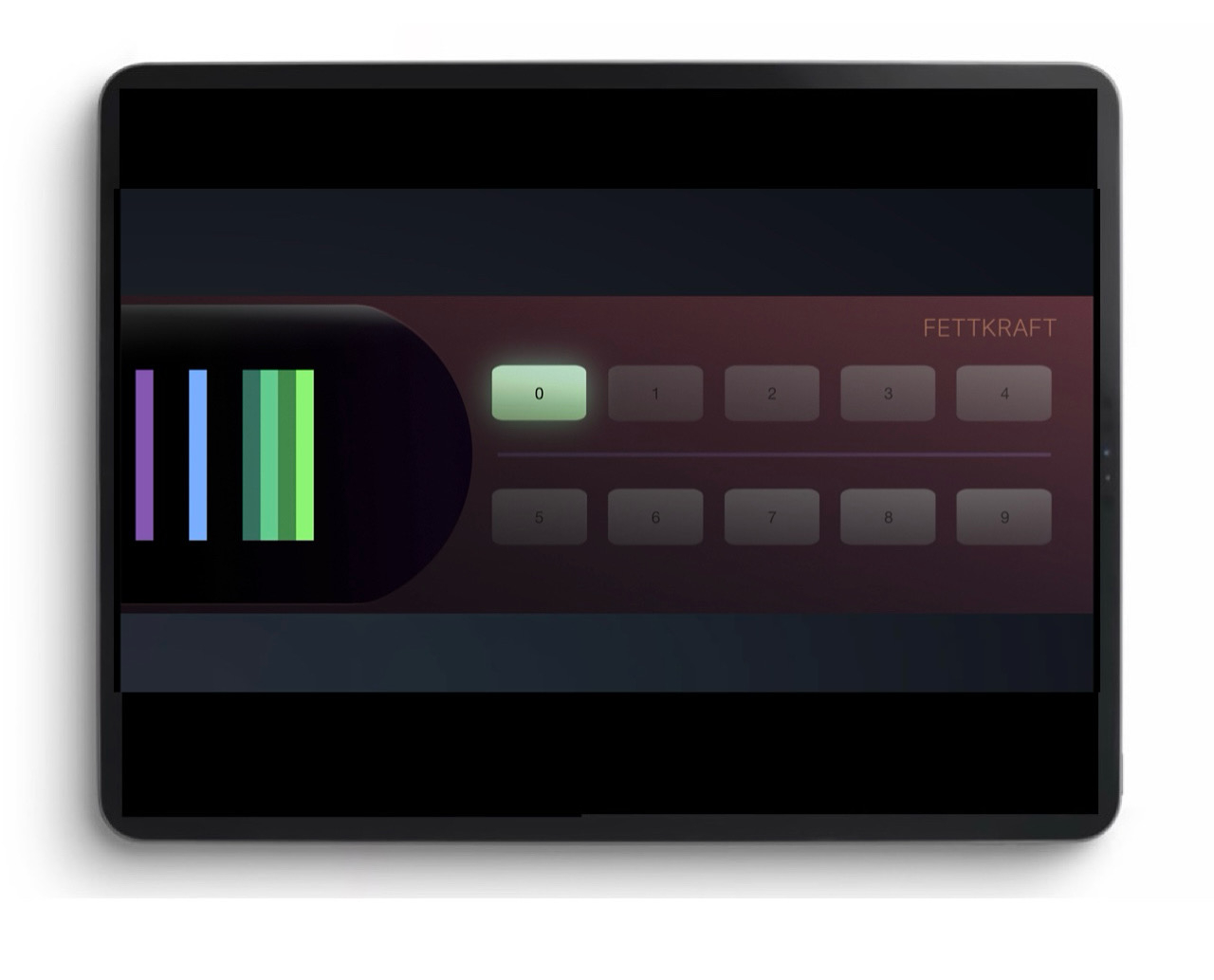
10 buttons. No names to latch on to. No way to dial the effect in. Nice eye candy meter.
Interesting.
I work in mysterious ways.. No, that’s just me been stupid
So far as I have tested it only seems to affect the kick, so what works best in my opinion is to put it behind your drummachine (or whatever it is that produces your kick). I don’t like it that much on the master bus, it is not intended as a global fx, just a quick kick fix.
I’m using it on plucks and stuff that has a clear attack and sustain situation going on. If you add something like fac smash or any distortion/clipper/compressor/limiter thing behind it, it begins to shine. But It always has to go first. It’s amazing really. Something I didnt know I have been missing. Especially for instruments to give it that extra punch and energy. I just wished it was kind of more flexible. Like blending things together. A dry wet knob and something to control width of the signal.
Anyway I love it and you really should try it the way I described.
When I read the description, I imagine that this tool would be useful for phase-aligning a kick and a bass sound so that they gel together better. Is that one of the imagined use-cases?
That's an interesting one. Fettkraft is indeed a phase shifter, albeit a strong one.
If you are in a situation where a kick and a bass line overlaps in time (and you're not using sidechain compression for some reason), this could be an alternative, but pitch changes along the bass line are likely to turn this into an unreliable approach.
Superb tip, should be in the description 😁 Thank you anyway
(also tagging @NeuM, @nuno_agogo)
Would like to hear some feedback about Spatializer/RealPhase's window sizing workaround for Logic Pro's AUv3 sizing bug.
Are you just using the rectangular (safe) mode, and not really bothered by the larger screen estate being taken up?
Or do you prefer the appropriately sized window, and are willing to put up with the finickiness of the Logic bug (keeping the size readout at 100%, which itself can be a relative metric sometimes needing extra work).
I’ll see if I can check on Wednesday.. Use it in Reaper..