Loopy Pro: Create music, your way.
What is Loopy Pro? — Loopy Pro is a powerful, flexible, and intuitive live looper, sampler, clip launcher and DAW for iPhone and iPad. At its core, it allows you to record and layer sounds in real-time to create complex musical arrangements. But it doesn’t stop there—Loopy Pro offers advanced tools to customize your workflow, build dynamic performance setups, and create a seamless connection between instruments, effects, and external gear.
Use it for live looping, sequencing, arranging, mixing, and much more. Whether you're a live performer, a producer, or just experimenting with sound, Loopy Pro helps you take control of your creative process.
Download on the App StoreLoopy Pro is your all-in-one musical toolkit. Try it for free today.
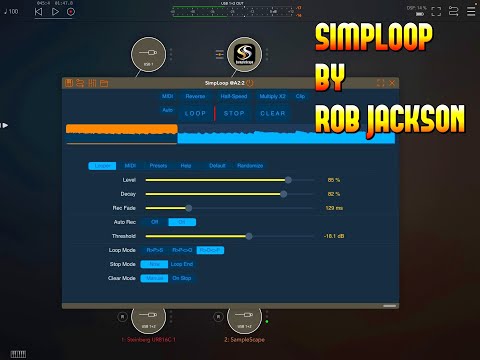
SimpLoop by Rob Jackson

Here is my video demo for the new Rob Jackson App called Simploop.
Which Rob calls "A fairly simple looper."
Comments
Thanks Doug @thesoundtestroom
Thanks Doug. By the way, how are you doing?
Howdy Folks,
Just to let you know there's an update to SimpLoop (v1.1.0) which adds support for loop export as a .wav file. Here's a little demo:
https://youtu.be/FrWC3gMdeOM
Hope some of you find that of interest / to be useful.
Cheers, -Rob
@Rob_Jackson_Music Thank you for this excellent little looper. It's been a lot of fun to play with. I do have a question and possible request. Is there anyway to disable monitoring in AUM? I see there is a settings tab in the stand alone and monitoring is checked off, but I can't find the settings when using SimpLoop in AUM and monitoring seems on in that context. I ask because I am trying to set up several instances of simpLoop in AUM all fed by the same send bus. Each simpLoop channel is passing through the source sound that I wish to capture and it is undesirably stacking up in volume.
Thanks for any insight or help you could provide! (And congrats on the release of your new flanger effect!)
Are you recording on more than one of the loopers in the bus at the same time? If not, and you're only using one instance at a time, then you should be able to simply bypass them by swiping left on the icon to disable it.
Hi @stow, many thanks for the feedback and great to hear you're enjoying SimpLoop!
First of all the input monitoring feature is in the standalone version to avoid feedback if the built-in microphone is the only available input source. You'll actually see this a lot in pretty much any plugin built with the JUCE framework.
I don't know if this is practical, but I would have each SimpLoop on its own bus channel, and they'd all go into a mix bus. Your main audio sources would go into another bus that goes into all the SimpLoop channels. Now all you have to do is control the gain going into each SimpLoop channel. Shameless plug, but I'd use GainX2 to do that.
So basically for each of your SimpLoop channels, you'd have a GainX2 before it acting as an optional mute. So A = 0dB, B = -96dB. You could even assign each GainX2 A/B gain selector to a MIDI CC.
Hope that makes sense. If it doesn't, I can try and create an example AUM session for you.
Cheers, -Rob
So basically, something like this example, where I've got ANALOGySAW going into three independent looping channels. If you've got more than one source, you'd need another bus of course to collate them, and pass on to the loopers bus (A). If you imagine that GainX2 channel B is basically muted (i.e. -96dB), then in the screenshot, only the 2nd (middle) looper is getting audio.
The nice thing about GainX2 (if I may be so bold...) in this example, is that you can set a transition time between the two gain settings for seamless changes. So you won't get sudden changes or clicks as you would manually muting the track or disabling SimpLoop from the effects slot in AUM. And, as previously mentioned, you could assign the GainX2 channel switch to a MIDI CC#.
Hi and thanks a bunch @Rob_Jackson_Music and @wim for your replies. Yes this is my basic setup above, minus the gain apps. I'm trying to configure a This.Is.Noise NM2's buttons to control SimpLoop. Having to "arm" the gain will require me to use up another button for each gain control. Hmmmmm... Which actually brings me to a request. The midi control on your plug-in all require cc's. Would it be possible to add the ability for the buttons to be mapped to notes? That seems a more natural parallel for a button action and would also greatly reduce the hassle of mapping some controllers. If not it's ok... I just need to find a good way to remap the NM2's midi to cc events. Maybe there is some feature in AUM that lets me do that. I'll have to investigate. Yes.... much investigation... Thanks again!
actually the more I think about it... what you all propose above is better. Monitoring through the plugin will allow me to also hear the effect of any downstream fx and "play" to them when I record the loops.
@stown - it's a bit of a kludge, but a Streambyter or Mozaic script could be used to convert notes to CC’s to do this. The note/off messages need to be stripped out.
Here's a quick Streambyter script that appears to work. Route notes to the script and the script to SimpLoop. Set the each CC number to match the note numbers you want to use.
[edit] changed incorrect FF above to 7F
AUM doesn't have anything native that can do this because of the way that Rob has implemented the AUv3 parameters. Rather than controlling the parameters that they name, midi messages set the CC to use for that parameter. If you try to map notes, you get CC 127 for every parameter.
Thanks @wim.... Uh... honestly my head can't make heads or tails of that code. I can't see anything resembling a note, nor can I spot anything resembling a cc value (in my mind a 3 digit value). I'm sorry this stuff is outside my field of expertise. I feel stupid and yet I know I'm not. :P I don't have Streambyter (that I know of) but believe I have Mozaic (maybe). Thank you very much for all of your help though.... I really appreciate it.
This.is.Noise. has some sort of app that lets me reassign stuff on the NM2, but I need to look at it. I want to be able to save the current settings before customizing them to use with SimpLoop. Not sure if I can do that, which would definitely impact my desire to try it.
Hi @stow, I had assumed that MIDI CC# would be the norm, but of course there are always exceptions!
I think a cleaner way to do what you want, is something along the lines of what @wim suggests. Be nice if there was a simple MIDI utility that could re-map messages. Maybe there is? It would be easy to do, but I don't think I'd sell many...
There is also some confusion, admittedly, of my own making around SimpLoop MIDI control and the Loop parameter vs. the LOOP command (as I call it).
The Loop parameter, is not the same as the LOOP command.
@Rob_Jackson_Music I guess I still don't understand the distinction of the loop stuff. But I do think my request for notes wouldn't be that hard to implement, but I am just guessing here. Add a toggle for cc vs note.... set to CC by default so no existing setups would be harmed by this update. And then if a user choose note you can easily code it to send the appropriate CC for the note chosen. Wouldn't that work and not be too tough? Value added to your app for sure.
And with regards to cc, if I do attempt to remap my controller... are these buttons looking for a cc value of 127? or just non-zero?
@stown - well, with software (pretty much) any thing is possible.
But... and please bear in mind, I'm only just starting to think about this request, but right now, it feels like to add that feature to SimpLoop is fixing the problem in the wrong place.
The problem being, you don't have enough buttons so you want to use notes instead, right?
Like I say though, still thinking about it. In the meantime, to answer your question, the value of the CC is ignored, so you just need to send the message, ideally on button / switch down, otherwise it'll be hard to get the timing right.
From the User Guide:
Note also that with the exception of Level and Decay, the value sent with the message is ignored, i.e. they do not work as toggles. So for example, assigning Loop to CC #20 means that anytime CC #20 is received on any channel, the behaviour is the same as if you tapped the LOOP button. In contrast, with Level and Decay, values of 0-127 are converted to 0-100% for each parameter, and the Looper parameters view will be updated to reflect any changes.
@stown : streambyter is free. If @wim has tested that code and it works, you can type it in and tap Install Rules and you are good to go.
What that streambyter snippet says is
If a note on message (9X) comes in , send out a midi cc message with the same number as the note with a value 127. Block note off messages.
There are some, such as mfxConvert and Midi Messanger, but it's a bit tricky the way you've implemented the control for things like Loop. You react on any received value, so receiving a value 0 is the same as receiving a value 127. That means one can't simply convert a Note ON/OFF sequence as that just triggers Loop ON when the note is pressed and immediately OFF again if the note is released. It acts like a momentary switch rather than a toggle.
So, the note OFF / note velocity 0 message has to be discarded unless one wants to hold down the note the entire time of recording, then release it to stop looping. Of course that's a valid way that some people like to work, but it's not typical, and in this case requires scripting over just using mfxConvert. I think MIDI Messanger might be able to handle it though.
Potentially, I could make a change so that only data2 byte values > 63 would fire the command. On reflection, it does perhaps make more sense to do that. But...
Potentially that's a breaking change out there in user-land, which I really don't like doing. Also, I think making it some kind of option is klunky - let's not go there please.
That said, I'd wager most folks are sending 127 anyway. Hmm... So potentially a breaking change, but only for a few folks perhaps.
This would also fix any problems with some implementations faking a "note off" by sending a note on message with velocity zero. I've seen it.
Sorry, I should have explained that you don't need to know how the code works in order to use the script. As @espiegel123 mentioned, just get those two lines of code into Streambyter, and press the "Install Rules" button, then route the controller output through the script.
Streambyter code can seem obtuse for sure. You have to not only understand all about the different types of MIDI messages, in hexadecimal no less, as well as know Streambyter's rather unique syntax. A Mozaic script would have been easier to understand, but I like Streambyter for these really quick things. There's something about using only one or two lines of code that feels more elegant in some cases.
Note, I made a goof in the script. I corrected it above.
In case you're interested ...
The first line changes the message type from Note ON (9 hexadecimal) to message type CC (B hexadecimal), keeping the channel (the first X wildcard) the same. It uses the Note number (the second byte wildcard 'XX') as the CC number, and always sends value 127 (hex 7F). Note: I made a typo in the original script. The first line should be
9X XX = BX XX 7F.The second line looks for any Note Off (8 hexadecimal) messages on any channel and discards them (+B).
Note ON at zero velocity is the same as note off, but Streambyter handles this conversion automatically so we don't need to handle it in code, though we could.
PS. Also starting to think a MIDI NoteToCC utility might be quite a handy little thing...
Thoughts?
There’s nothing fake about that. It’s perfectly legal MIDI for note off. 👍🏼
@Rob_Jackson_Music : as wim says, note on with velocity 0 is part of the MIDI Spec as a note off and quite commonly used.
Thanks guys, I know.
My comment was based on a personal view, that you can also send a note off message, by sending a note on message with velocity zero is kinda odd. I mean, try and explain that to a MIDI newbie. It also completely bypasses the usefulness of release velocity.
But as you say, it's part of the spec so you have to support it, as I do in all my MIDI instruments.
Yep. It’s odd and does occasionally get missed in apps.
In StreamByter you used to have to handle it separately and it tripped up a lot of people. At some point StreamByter made the conversion automatically, as did Mozaic out of the gate.
https://patchstorage.com/key-to-cc/
https://patchstorage.com/channel-wide-note-to-cc/
https://patchstorage.com/tracckeys/
😉
https://abwiki.loopypro.com/mozaic_scripts_list#cc_scripts
Wow.... thanks everyone for your time and consideration. I guess what I was hoping was that note-on would be recognized by the app and note-off ignored. I definitely wouldn't want to hold down the key for the whole time I was trying to record a loop since I want my hands free to make the sound for the loop. But of course once I open this pandora's box someone else will want it to work with note-off. :P I think there have been a lot of suggestions here and I guess I just need to dive in and learn more apps. I haven't played with any of the midi apps like mosaic, streambyter, etc. I'm a very infrequent and casual user so the hurdle of doing extra external steps sort of immediately routes me towards trying something else. That said.... if one is going to prep tools for a live situation, then they should be willing to put in what ever extra work to get that setup working. So... again... I should learn some of those!
And @wim elegance in code is definitely rewarding
Nice work @wim.
Just a heads-up, that there's an update (1.1.1) rolling out soon that will only respond to command messages with values > 63.
This helps with some other issues reported by users. Sorry it's not a solution for mapping note messages to CCs / looper commands, but this is more of an alignment with what folks are expecting / have requested wrt MIDI CC control.
Sadly, it's a breaking change, but I've tried to highlight that in the "what's new" notes.
Updated section from the user guide:
Note also that with the exception of Level and Decay, the value sent with the message should be greater than 63 to fire the command. So for example, assigning Loop to CC #20 means that anytime CC #20 is received with a value > 63 on any channel, the behaviour is the same as if you tapped the LOOP button. Please note that these messages don't work as toggles - it's more a case of providing a little flexibility as to when the command gets fired. Most of the time, you'd just send a value of 127.
In contrast, with Level and Decay, values of 0-127 are converted to 0-100% for each parameter, and the Looper parameters view will be updated to reflect any changes.
You don't need to learn much at all to use pre-made scripts in Mozaic or Streambyter. In most cases all you need to do is load a preset, or at worst, cut and paste a script in and press a button. And, route the midi through the plugin by sending the midi to the plugin, and the plugin output to whatever it's going to.
btw, that two line script I posted, and the Midi Messanger example, don't require you to hold down the note to keep the loop running. They act just as though you tapped the Loop button.
awesome.... thank you @wim!
hey @stown - the recent update to SimpLoop makes it possible to use mfxConvert, a handy little utility, to convert the notes to CCs for use in SimpLoop.
As long as you hit the note with velocity > 63, it'll trigger the parameter.
... or just use the script. That'll still work.
(btw, mfxConvert is simply a front end for a subset of StreamByter's script functions)