Loopy Pro: Create music, your way.
What is Loopy Pro? — Loopy Pro is a powerful, flexible, and intuitive live looper, sampler, clip launcher and DAW for iPhone and iPad. At its core, it allows you to record and layer sounds in real-time to create complex musical arrangements. But it doesn’t stop there—Loopy Pro offers advanced tools to customize your workflow, build dynamic performance setups, and create a seamless connection between instruments, effects, and external gear.
Use it for live looping, sequencing, arranging, mixing, and much more. Whether you're a live performer, a producer, or just experimenting with sound, Loopy Pro helps you take control of your creative process.
Download on the App StoreLoopy Pro is your all-in-one musical toolkit. Try it for free today.
Giant vertical fader AUv3 capable of sending MIDI CC's ?

- That's available in the EU store
- Works pre-iOS 18
- Not looking for a huge wall of faders, or an expensive app
Could Mozaic be used for this? The predefined layouts seem a bit counter to the premise.
Thanks!
Comments
Does this work?
https://apps.apple.com/us/app/midimixer-for-aum-auv3-plugin/id1542209150
Thanks - this one's a bit of an overkill. Just need 1 CC, and the UI does have to be decluttered, like a single large fader. Or something similar
If stand-alone is ok (no AUv3), then Touch OSC is great (min. iOS 12).
Otherwise Surface Builder from 4-Pockets (min. iOS 13) allows you to create customised faders:
https://apps.apple.com/gb/app/surface-builder/id6449735778
If you have loopy pro, it could be used for that.
JAX MidiPad is just an xy pad and was free when I downloaded it today.
It won’t stretch vertically.
This sounds like a great prompt for a Swift Playgrounds app. Maybe one of the AI tools can hack some swift playgrounds code that does the trick.
Nope. Mozaic's faders are a fixed size within its interface.
Loopy Pro would be great, but I assume you're not interested in something at that cost and with so much other functionality.
Surface builder has the most zoomable layout. Again more than you're looking for, but could do the job.
TouchOSC as well, though it has to run as a standalone app. Depending on what you want to do you could probably run in in split screen or slide over mode.
I guess TouchOSC is the best fit I can think of without more details of what you're actually hoping to use it for.
Interesting thought. Can Playgrounds do midi now?
That got me thinking about Audulus now that it's free. I wonder how hard it would be to build something there.
Thanks for the suggestions. I had been quite baffled by this... no apps matching the criteria seem to exist... some possible apps are discontinued or not available in the app store, some have eye-watering pricetags that I suspect don't serve any other purpose than to be a non-marketable baseline from which prices can drop at sale time
I'll check out the JAX thing, because I might need to do 2 parameters, and the strong requirement here is not to have a bunch of mini widgets, and at least it fulfils that. Will take a look at TouchOSC too.
But now the day's almost over... "My disappointment is immeasurable, and my day is ruined" as they say.
Rozeta (Bram bros) XY pad. Use one param on the xy pad. Scales to very narrow like a slider.
Audulus is free and could easily provide one giant CC fader, but requires iOS 18…
Easy for you maybe. I puzzled for more than an hour and only got part-way there with a fader that can't exactly be called giant, and can't exactly send CC values (yet).
Is this good or bad? I’m looking at the hexcode and the param values, but I’m not sure what you’re saying 🤷♂️
I moved the leftmost slider and it (by default) sends pitch bend messages on Channel 1.
Moving the right slider sends CC 1 values on Channel 1.
I configured Streambyter to accept the XY Pad output and set it to the display/monitor mode.
UPDATE: I checked the Rozeta Suite manual and do not see any option to change these defaults.
I admit it’s not immediately intuitive, if you just start with the CC Send node. (‘trigger’ inputs take some getting used to- they only trigger on rise from 0 -> 1)
Take a look at this patch, I just tested it in AUM (open in standalone Audulus, then copy/paste to an Audulus AUV3 instance). Included are two approaches- a module which only sends CC messages when the monitored value changes- and a module which repeatedly sends a value. They both take a CC number as a parameter. The channel can be changed inside the modules.
As for making it giant- one can simply zoom in, and enable ‘performance mode’. For truly giant faders, one would likely use canvas/touch pad nodes.
I think buried somewhere on the Discord are some pretty faders that Jerry Smith posted a couple of years ago.
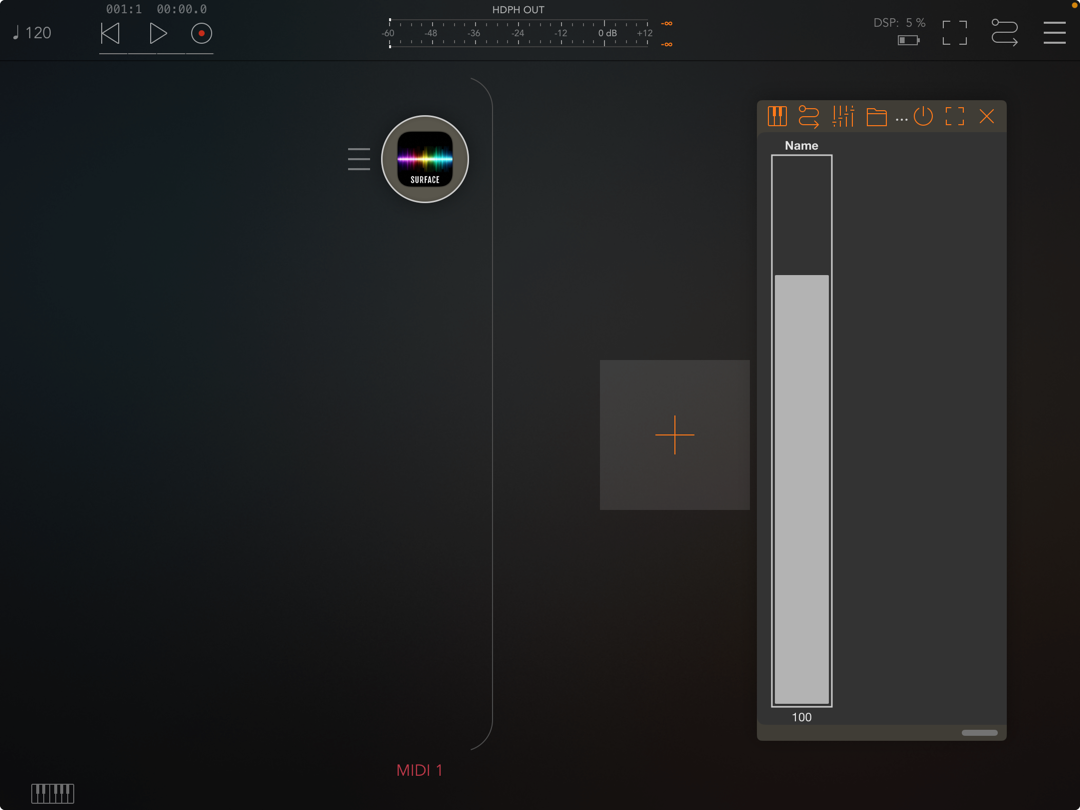
It’s been mentioned before here in the thread but why not surface builder by 4pockets?
https://apps.apple.com/dk/app/surface-builder/id6449735778
Might fit the requirements if the tall skinny presentation is allowed.
Thanks. Yes, figuring out the trigger was where I left off. I’ll look forward to learning from those examples.
Not perfect, but it’s ok.
If you have GeoShred already 😊
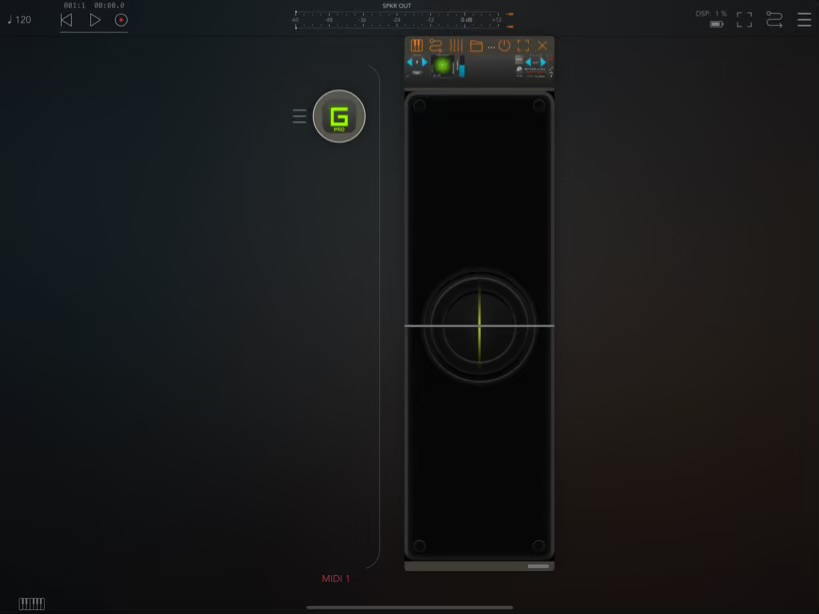
Polybud?
If you have LK and the Controller IAP, it features a fully customizable control surface builder.
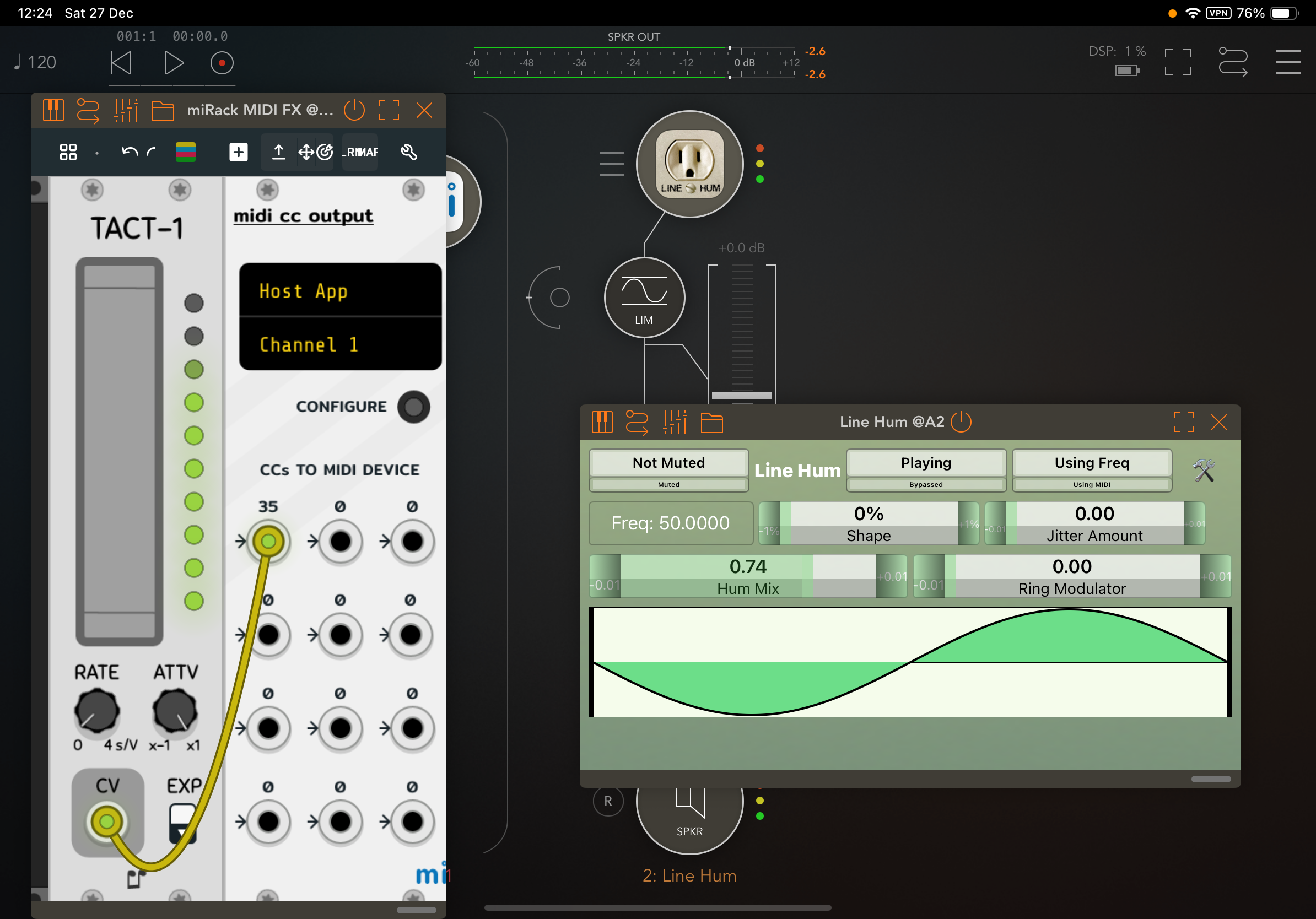
You can do something like this with MiRack, using a Tact and the CC output module (controlling Hum mix here):
Edited for the bit I forgot!