Loopy Pro: Create music, your way.
What is Loopy Pro? — Loopy Pro is a powerful, flexible, and intuitive live looper, sampler, clip launcher and DAW for iPhone and iPad. At its core, it allows you to record and layer sounds in real-time to create complex musical arrangements. But it doesn’t stop there—Loopy Pro offers advanced tools to customize your workflow, build dynamic performance setups, and create a seamless connection between instruments, effects, and external gear.
Use it for live looping, sequencing, arranging, mixing, and much more. Whether you're a live performer, a producer, or just experimenting with sound, Loopy Pro helps you take control of your creative process.
Download on the App StoreLoopy Pro is your all-in-one musical toolkit. Try it for free today.
Drambo - Push 2 Standalone Mapping

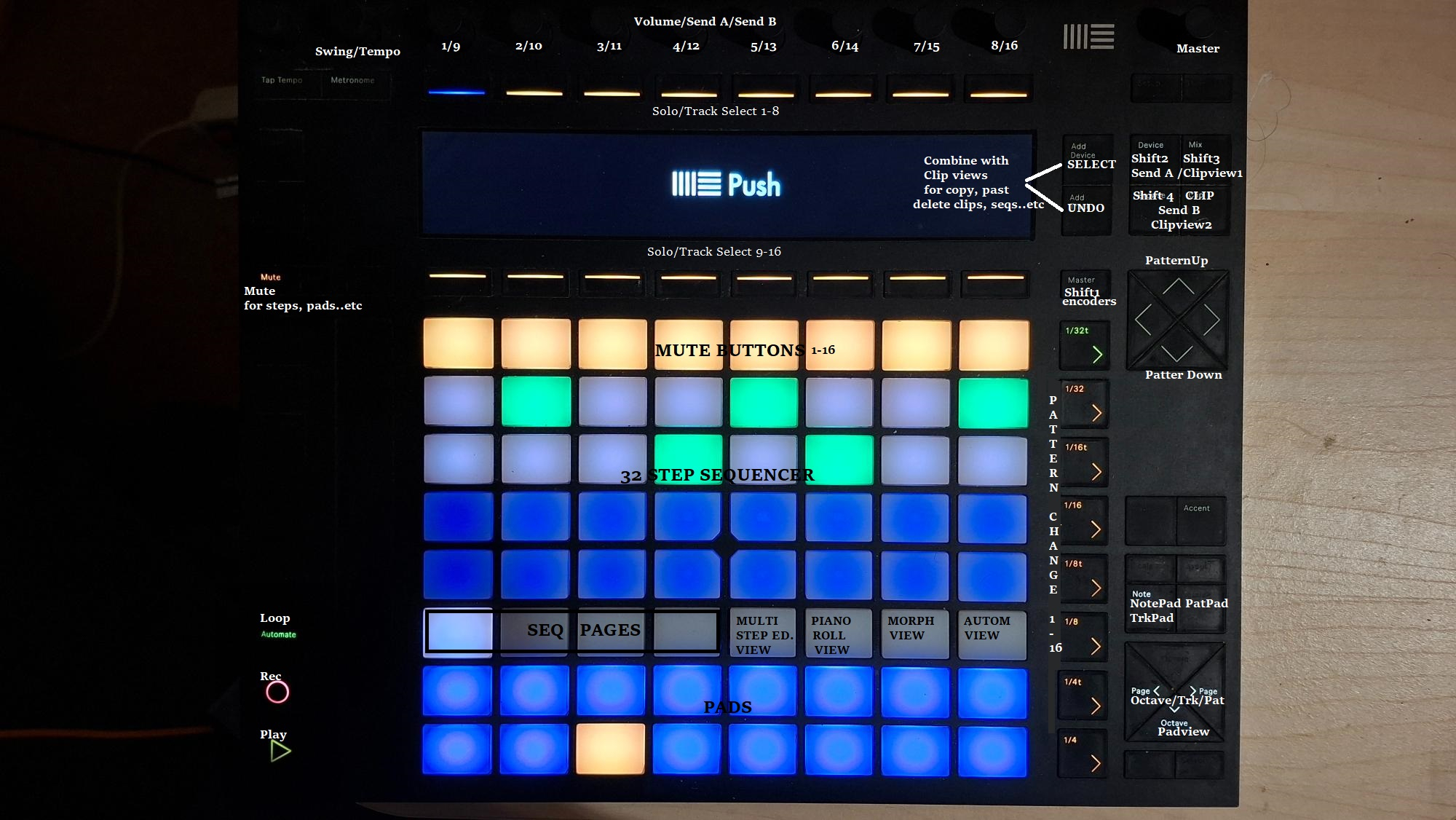
Hi,
I have spent some hours during christmas time with some mapping.
Its Push 2 connected directly to ipad. No display of course 
If you are interested download the file.
DRAMBO - PUSH 2 STANDALONE
PADS
- 1st row: Mute buttons 1-8 and 9-16 while Master Button (shift1) pressed
- 2-5th row: 32 step sequencer
- 6th row: 4 seq page, Multitrack, Piano Roll, Morph Button, Automation view
- 7-8th row: 16 pads
PADS CLIP MODE
first eight clips per track
- Track 1-8: hold Device button
- Track 9-16: hold Mix button
ENCODERS
Swing : Push2 Swing encoder
Master: Push2 Master encoder
Vol 1-16: Encoders above display (hold Master button (shift1) for 9-16
Send A 1-16: Hold Push2 Device button for 1-8, and Mix button for 9-16
Send B 1-16 Hold Push2 Browse button for 1-8, and swith clip mode by pressing clip button for 9-16
BUTTONS
- Play - Push2 Play button
- Rec - Push2 Rec button
- Loop - Push2 Automate button
- Tap Tempo: Push2 Tap Tempo button
- Metronome: Push2 Metronome button
- Mute for other than track mute: Push2 Mute button
- Pads Note mode: Push2 Note button
- Pads Track select mode: Push2 Note button
- Pads Pattern select mode: Push2 Session button
- Pads Left-Right (octave/track/pattern): Push2 Page left-right buttons
- Pads pop-up: Push2 Octave down button
- Step Editor: Push2 Accent button
- Select Mix window: Push2 Navigation Left button
- Select Master window: Push2 Naviagtion Right button
- Pattern Up-Down: Push2 Navigation up-down buttons
- Pattern Selector: Push2 Scene buttons 1-8, and 9-16 with Master held down
- Clip view: Push2 Clip button
- Undo for deleting notes, seequences, clips, etc: Hold Push2 AddTrack button
- Select for copy/paste steps, clips, patterns etc: Hold Push2 AddDevice button. To make chord steps toggle the Select button on Ipad screen.
- Solo & Select buttons x16: First press will solo & select, 2nd press will unsolo, but track still selected: Push2 16 display buttons
OTHER INFO
- Encoders send note messages when you touch it, which make unwanted sounds on selected tracks when touched. These are the lowest notes. To filter them add Note Filter module for each track. From B2-G8. (i have added them to the project file)
- I don't know how to import and set midi maps. I really appreciate for help.
- Please share with me if you would add any additional functions or repairs.
I don't know why i can not attach image and a zip file. But here is a link instead.
https://www.sendspace.com/file/y3jjda
Comments
Re: cannot attach, there seems to be some timeout with vanilla forums that makes the whole ui go unresponsive. What I do is copy the whole text and refresh the page and then paste it again if anything has gone missing
Anyway, regarding your mapping, you seem to have put some thought into this, I suggest you share on the beepstreet forum cause there’s a good chance giku would include it on his next release, and it would be great for the community
Sadly I don’t own a push, so Im unable to test it, but I am quite positive it works 👍
PS: there’s no push template yet, only launchpads and akai mpc so far
Unfortunately the trick doesn't work for me.
I still search the correct topic to share it at beepstreet forum.
Thank you
You mean refresh trick? You can surely post images and zip attachments here, what platform are you in? Phone, pad, desktop?
And giku @ beepstreet is asking for beta testers, so you could just mail him for a code. Let me know if I can help
There’s a size limit though, for pictures I believe 2Mb, for zips I dunno. Maybe that’s the case?
That was...