Loopy Pro: Create music, your way.

What is Loopy Pro?Loopy Pro is a powerful, flexible, and intuitive live looper, sampler, clip launcher and DAW for iPhone and iPad. At its core, it allows you to record and layer sounds in real-time to create complex musical arrangements. But it doesn’t stop there—Loopy Pro offers advanced tools to customize your workflow, build dynamic performance setups, and create a seamless connection between instruments, effects, and external gear.

Use it for live looping, sequencing, arranging, mixing, and much more. Whether you're a live performer, a producer, or just experimenting with sound, Loopy Pro helps you take control of your creative process.

Download on the App Store

Loopy Pro is your all-in-one musical toolkit. Try it for free today.

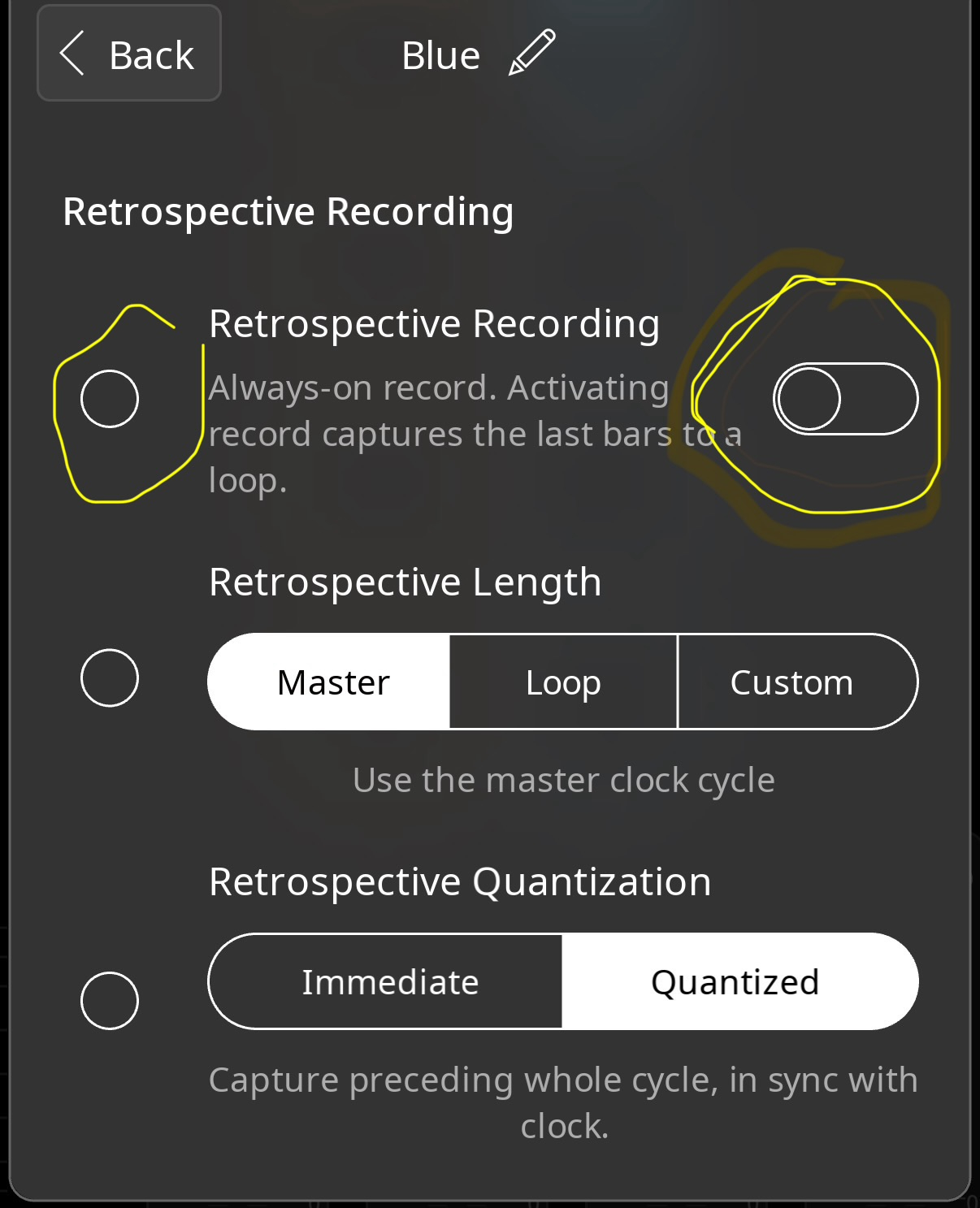
Why are there two toggles for some clip settings?

edited January 3 in Loopy Pro

I did read the friendly manual, but missed the answer if it’s there. See pic below:

Comments

  • edited January 4

    @dokwok2 said:
    I did read the friendly manual, but missed the answer if it’s there. See pic below:

    The circle on the left, is for turning on the overriding of the received setting. The circle on the right is the current setting of that parameter.

    More at:
    https://loopypro.com/manual/#hierarchy-and-overrides

  • edited January 3

    Thank you, Edward. I can see it working that way in the app now that I know what to look for.

    May I humbly suggest that the following lines from the manual suggest some fruitful avenues for improvement? Because LP is so powerful, it's possible to make a right mess of things! A reset switch for existing loops and colors would be helpful.

    Why does Loopy Pro show an override turned on even though it has the same setting as the inherited setting? Any time you turn on an override, it becomes independent of the inherited setting no matter what the setting is. You might turn on an override for the Threshold Recording setting, for instance, because you want to control that clip’s Threshold recording no matter what the global setting is.

    REMOVING OVERRIDES
    To remove an override, tap Edit Overrides, find the overrides setting and remove the checkmark next to the setting. Then, tap DONE.

    As of Loopy Pro 2.0.6, overrides need to be removed manually in the settings panels. There is not an action to remove overrides though you may use the Assign Clip Settings action to change the setting used by an override.

  • @espiegel123 said:

    @dokwok2 said:
    I did read the friendly manual, but missed the answer if it’s there. See pic below:

    The circle on the left, is for turning on the overriding of the received setting. The circle on the left is the current setting of that parameter.

    More at:
    https://loopypro.com/manual/#hierarchy-and-overrides

    @espiegel123, there's a typo, above, (both say "circle on the left") can you update/edit/re-post, please...Thanks

  • @danm said:

    @espiegel123 said:

    @dokwok2 said:
    I did read the friendly manual, but missed the answer if it’s there. See pic below:

    The circle on the left, is for turning on the overriding of the received setting. The circle on the left is the current setting of that parameter.

    More at:
    https://loopypro.com/manual/#hierarchy-and-overrides

    @espiegel123, there's a typo, above, (both say "circle on the left") can you updatedit/re-post, please...Thanks

    Post edited.

  • Thank you again. I don’t know how I missed this in the manual, which I started rereading yesterday.

  • @dokwok2 said:
    Thank you again. I don’t know how I missed this in the manual, which I started rereading yesterday.

    There is a lot there. Easy to miss.

Sign In or Register to comment.