Loopy Pro: Create music, your way.
What is Loopy Pro? — Loopy Pro is a powerful, flexible, and intuitive live looper, sampler, clip launcher and DAW for iPhone and iPad. At its core, it allows you to record and layer sounds in real-time to create complex musical arrangements. But it doesn’t stop there—Loopy Pro offers advanced tools to customize your workflow, build dynamic performance setups, and create a seamless connection between instruments, effects, and external gear.
Use it for live looping, sequencing, arranging, mixing, and much more. Whether you're a live performer, a producer, or just experimenting with sound, Loopy Pro helps you take control of your creative process.
Download on the App StoreLoopy Pro is your all-in-one musical toolkit. Try it for free today.
Can I batch update MIDI Learned bindings when upgrading MIDI foot switch

I've upgraded my MIDI foot switch (from one Morningstar controller to another).
Do I have to manually update each individual binding within all my profiles in all my templates (that I MIDI learned) or is there a way to do this in batch?
I'd like the equivalent of search/replace the old controller info with the new controller info.
Prefer not to have to redo every MIDI learn binding manually, any way to achieve this?
Thanks
Comments
You can transfer all bindings between controllers in one pass (copy or move). You'll have to do it in each profile in each template, but only once for each global profile and you won't have to do every individual binding.
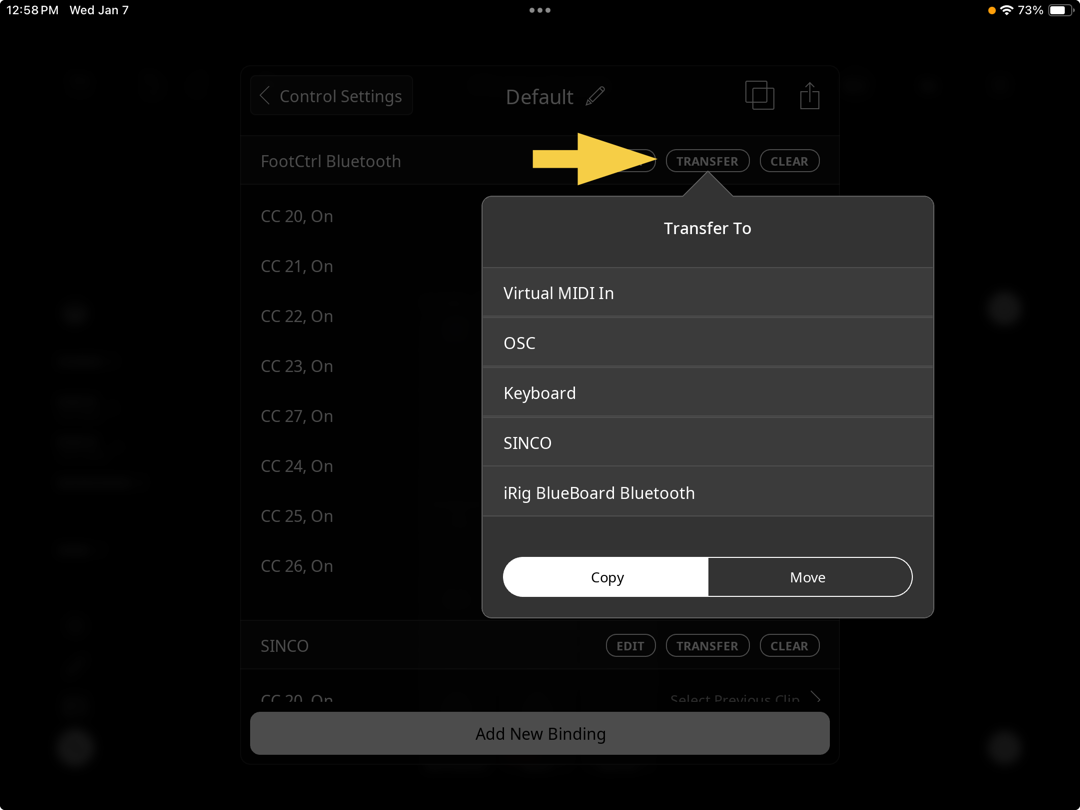
If you set up your new controller with the same events, you can use the transfer option in profiles to copy/move from one device to another.
If you have to re-learn, do it within the profiles. In the profile, copy the bindings to the new device and you can re-learn the trigger without having to do the rest of the device setup.
Thanks @wim and @espiegel123, works very well!
I now have the prior bindings (for mc6 pro) copied to the new foot switch (for mc8 pro) in the control profile.
I'm experiencing an unexpected behavior, though...
Previously, I had the mc6 pro set up to trigger the "A" button in Edward's nav mode/parts mode scene template.
So, pressing a specific foot switch which is mapped to send cc 22 127, then cc 22 0 would press/release that button, causing the value of the radio buttons to nudge up/ascend by 1 (from scene 1, to scene 2, etc).
Now, using the mc8 pro, with the copied bindings (copied using "transfer"), the radio button value is nudging down by 1 each time (ie: from scene 1, to Scene 3, to Scene 2, etc).
I have confirmed using MIDISpy that the same midi value is being sent from the mc8 pro each time the switch is pressed ( ch 1, cc 22 127 then ch 1 cc 22 0 )
Also, I have turned off feedback from loopy pro on the mc8 as I had previously done on the mc6, since w/o turning feedback off, the morningstar switch often acts erratically/reboots.
Any thoughts on what might be going on here, or more information required
Thanks
Are you sure there are no conflicting bindings in the global profile or elsewhere?
I'm looking, @wim...is the only way to check for a conflict to go into every single profile/binding and look for cc22?
Please post screenshots of the bindings. If you are talking about my scenes example, the only bindings to update are the 4 bindings in the pedalboard profile . All the other bindings are internal to the project. Look in each profile, only pedal board should have any bindings to your controller.
yup
In the project being talked about , it should br as straightforward as looking in each profile and seeing if there is a section for an external controller.
All the profiles except pedalboard should have no external bindings.
For example, if it looks like this, you don’t need to look at individual bindings
Only pedalboard should have external bindings
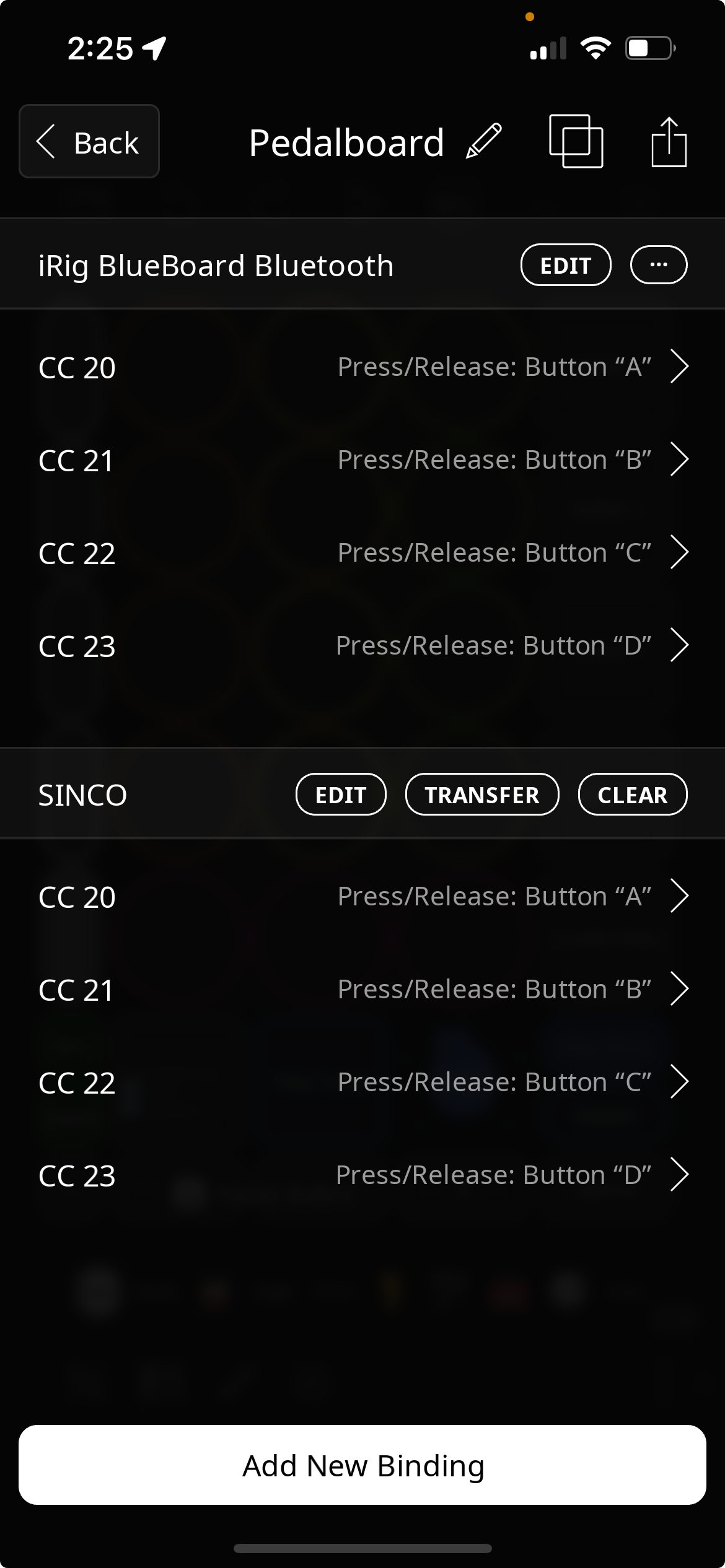
@danm : double check that you didn’t add your controller to Loopy’s mixer and that nothing is routed to the MIDI COMMANDS midi colour.
That project and all my new ones are setup to sandbox external controller bindings to a single press/release per pedal to simplify re-training.
As you strongly encouraged, I've (slightly) updated your draft template :-)
I added a project profile called Misc, and added some external controller bindings, including the ones being discussed here.
Yes, I added the controller to the mixer to start attempting to diagnose this issue...
How would I have been able to use MIDISpy to confirm same midi values are being sent, w/o having added the controller to LP's mixer? Please let me know how and I'll avoid that in the future...(And why exactly is that a problem...Is it b/c it'll pass thru the MIDI to the MIDI COMMANDS midi color?)
I don't see any other external triggers sending cc 22...only other cc 22 is, I believe, in the MIDI COMMANDS.
I do see this in my (added) misc profile (I renamed your "A" button to "A/NavNext"):
@danm : adding the controller to the mixer is ok as long as you make sure it isn’t routed to MIDI CONTROL. You can also run most midi monitors standalone.
The binding in your picture is probably the problem. That picture shows you have mapped that pedal to another action. Find it.
If you press the A button onscreen by hand does it work correctly?
Ha, shows how Loopy centric, I've become...I never run anything stand alone that can run in LP, but that makes sense, thanks for the reminder
I figured out what's going on.
Apparently, when you do the transfer from one device to the other, if you hit the target device twice in the Transfer To screen (as I did, since it wasn't clear exactly what happened when I hit it the first time, since I still saw the source device there...realizing now that there's a "copy" and a "move", with copy being the default), then you end up with duplicate bindings transferred to the new device with no warning.
But the bindings list was so long that I had to scroll down to realize what was going on, not obvious.
Anyway, that was the dupe...Now, having removed all the dupes, it's working as expected.
But here's a key question I have for you: Any idea why having a duplicate of the cc22 binding (like was erroneously created) would cause the radio group to nudge backward vs forward?
Thanks again for your help
Yes
With only three bindings and wrap turned on, executing the action twice would look like it was going backward.
Ya, that's interesting. I'd actually been thinking about adding a button to move the radio group to the previous scene since Edward's original draft only had a button to navigate to the next one...so now at least I know the algorithm. When the scene is greater than 2 and wrap is on, executing the action (n-1) times, where n is the scene number emulates going to previous radio button. Thanks @wim
That's not a recommended approach though because it won't work if you add or take away stops. You can scroll a dial or radio buttons backwards (-1), which is a more straightforward way of doing things.
Agreed @wim . But the foundations of the draft template (created by @espiegel123 and enhanced/updated by me) are pretty sophisticated and I'm hesitant to add too much more in the way of conditional logic work arounds, so that's given me pause when considering adding things like you mention, though perhaps I could figure out a less complicated way to do so that doesn't involve the algorithmic hack I suggested, above
No problem. We'll take it up again in three months when you add a scene or something and your previous scene bindings no longer work and you can't figure out why 😉
@wim, ha! Ya, wish it wasn't the case that a small change or two sometimes results in things we can't figure out w/o sharing so many screenshots and back-and-forth with experts (like you, whose feedback and insight I really, really, really appreciate!).
This dovetails with a conversation I was having with @espiegel123 over in the Slack channel that he said I should have posted in the forum for more to see, so I can share it here too, though perhaps at some point it deserves it's own thread:
I asked the following:
@espiegel123 responded with these helpful and supportive comments:
I'm happy to be investing a lot of time learning Loopy Pro and given the level of dynamism and visual scripting that is involved, I know that I for one would find tremendous value in having some of the above version mgmt and debugging/logging tools...I'd likely be able to figure out many more of these issues on my own. Anyway, just my 2c