Loopy Pro: Create music, your way.
What is Loopy Pro? — Loopy Pro is a powerful, flexible, and intuitive live looper, sampler, clip launcher and DAW for iPhone and iPad. At its core, it allows you to record and layer sounds in real-time to create complex musical arrangements. But it doesn’t stop there—Loopy Pro offers advanced tools to customize your workflow, build dynamic performance setups, and create a seamless connection between instruments, effects, and external gear.
Use it for live looping, sequencing, arranging, mixing, and much more. Whether you're a live performer, a producer, or just experimenting with sound, Loopy Pro helps you take control of your creative process.
Download on the App StoreLoopy Pro is your all-in-one musical toolkit. Try it for free today.
FuzzWah - Vintage Fuzz & Auto-Wah (for iOS and macOS)

Just released:
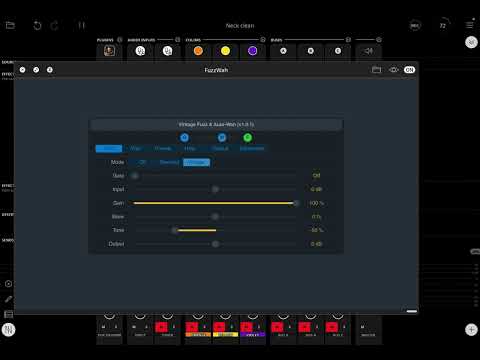
FuzzWah combines two classic effects in one plugin that can be used independently or in series. The fuzz box and wah-wah pedal were among the earliest guitar effects pedals and remain very popular to this day. While I think FuzzWah does work great with guitar, it can also produce interesting results on pretty much anything from drums, synths and even vocals. FuzzWah wasn't designed to be a clones or models of specific hardware effects, but it does draw inspiration from those classic units from the 1960's and 70's, then adds a few extra features. The fuzz section includes an optional "Vintage" mode for a rounder warmer tone, and a Skew option for dialling in that classic gnarly fuzz "ripping" sound. The wah section adds 4 selectable frequency ranges, and an "Auto" (envelope-follower) mode for funky filter auto-wah effects! FuzzWah also includes a simple "set it / forget it" noise gate to keep your signal nice and clean.
Here's a little retro (extremely retro...) demo on guitar.
Available on the App Store now as a universal purchase for $1.99
Comments
Really? Another one??? @Rob_Jackson_Music, you are seriously spoiling us guitarists. My default guitar channel in Logic has become Tuner—>ANALOGyAMP—>Nembrini IR Loader—>AuDelay—>Quantec (one of Logic’s reverbs), with Flangell, Wobulator, GateVerb, FakeTake, and others appearing on demand. FuzzWah is a wonderful addition to the family. Thanks!
I know this has been suggested before, but how about adding an IR loader to ANALOGyAMP, or even as a separate app?
@Rob_Jackson_Music
Thanks for this current run (amp/EQ/gain/flangie/and now fuzz) of guitar focused auv3s. Especially for taking a crack at an emulation of the always digitally tricky fuzz emulation. That short demo vid sounds fannnntastic! Quick question about the auto wah section: would it be able to achieve that Mutron III filter sound (usually likened to late 70s Garcia/Grateful Dead)?
Quick question about the auto wah section: would it be able to achieve that Mutron III filter sound (usually likened to late 70s Garcia/Grateful Dead)?
@Squishy, it definitely reminds me of a Mutron, especially the Snappy Quacky presets. I got a Mutron III when they first came out, mainly for bass. Kinda wish I hadn’t sold it, although it was a pretty noisy pedal.
Oh wow! When they first got released?! I’m a bit younger (40s) so missed the birth of such amazing pedals as the Mu/memory man/those quirky OG Big Muffs and the secondhand market is wayyy outta my wallet’s capabilities… so it’s always nice when these emulations pop up, especially on iOS!
I’ve been using the Mutron in Tonestack and it leaves a bit to be desired, so thanks for the info on this new one! Excited to give it a whirl when I can find the time. Happy picking 🤙
@Schmotown - many thanks and great to hear you're making good use of the guitar related catalogue!
An IR loader has been requested. To be honest, it's not really a good fit with the kind of stuff I like to do. Especially in the case of ANALOGyAMP which was really about how close I could get to a guitar amp sound that I like, with the minimum DSP. An IR loader would impact that. But as per, never say never...
For anyone who doesn't know, the "cab sims" in ANALOGySMP are based on an approximation of the frequency responses of popular guitar speakers using a series of filters. Pretty much how they'd do a emulated speaker output using an analog circuit.
@Squishy - Cheers! I think the legendary Mutron III has definitely got its own thing going on and I certainly wasn't referencing it for the wah side of FuzzWah. I was going more for a classic wah, think Cry Baby, with the option of different frequency ranges as Dunlop have done with some of their later wah pedals. The bandpass filter in FuzzWah is two-pole, like the most of the pedals, and also has a little grit / drive as a nod to the fact the circuits in these wah pedals weren't exactly hi-fi!
@Rob_Jackson_Music
Prost! Thanks for the info, keep up the awesome work. Appreciate ya! 🥂
My brother knew someone associated with Musitronics, the company that made the MuTron and the amazing (for the time) Bi-Phase. I think I got the MuTron-III in 1976.
Purchased after watching Rob's demo for 5 seconds. What a great app!
@Rob_Jackson_Music : Would you please share your settings used at that demo? Thanks in advance.
Thanks so much @filo01 ! I didn't keep the AUM session sadly, but next time I get a chance, I'll see if I can get close.
In the meantime, From memory...
I'd start with the BIG Fuzz Auto-Wah Guitar preset, reduce the Wah Resonance and adjust the Fuzz Tone to taste. So the boost from the Wah is hitting the Fuzz section pretty hard - that's a big part of it. Also, the Auto-Sens will need to be dialled-in for your guitar / playing style.
There's a lot of gain going on here, so definitely recommend using the Gate.
Like I mention in the user guide, I also like to run this setup into an "amp" that is already "cooking" a bit. So if you have ANALOGyAMP, maybe try Channel 2 on the Mr. SG Jr. preset, and adjust Bass / Treble / Cab Sim to taste. Speaking of which...
I used my trusty Gibson SG Junior for the doodle
Nice one
Thanks Rob! I spent a few minutes noodling with the FW, and it's pure joy even with my sloppy playing on cheap Jet strat and a little bit crunchy amp
Sounds GREAT @filo01 ! Thanks so much for sharing.
I love when folks share things like this, it really means a lot to me.