Loopy Pro: Create music, your way.
What is Loopy Pro? — Loopy Pro is a powerful, flexible, and intuitive live looper, sampler, clip launcher and DAW for iPhone and iPad. At its core, it allows you to record and layer sounds in real-time to create complex musical arrangements. But it doesn’t stop there—Loopy Pro offers advanced tools to customize your workflow, build dynamic performance setups, and create a seamless connection between instruments, effects, and external gear.
Use it for live looping, sequencing, arranging, mixing, and much more. Whether you're a live performer, a producer, or just experimenting with sound, Loopy Pro helps you take control of your creative process.
Download on the App StoreLoopy Pro is your all-in-one musical toolkit. Try it for free today.
Comments
@espiegel123, I'm working on it. While I do so, can you answer this question, please:
When I manually select different radio buttons in the CurTarget radio button group the scenes dial state updates at the same time as I select the different radio buttons...can you describe exactly what causes (and how) the activation trigger that the scenes step dial receives, that causes the scenes dial action to trigger and for the two widgets to update concurrently...I see that these two widgets are bound, but what specifically is causing the scenes dial to receive an "Activation Trigger" when I select a radio button...I believe it's an implicit activation trigger that happens since the scenes dial has its own select actions that select the diff buttons on the CurTarget radio group AND the "Perform Action On" option in the dial has been set to "Activation Trigger" AND the State Feedback in the dial is set to First Action, but please confirm...Thanks
@danm asked:
From the manual: “When State Feedback is on, Loopy Pro will automatically adjust the selected step or radio button selection to reflect Loopy Pro’s state. For example, if you have a preset selector dial and change the preset without the dial, Loopy Pro will adjust the dial to reflect the current preset.”
Note that state feedback adjusts what dial step is highlighted—State Feedback does not activate the dial step. It just changes the selection to match the state.
In this case, the dial’s state feedback is set to First Action. The first action of the dial’s steps is to select one of the radio buttons.
So, if the selected radio button changes, the dial step is updated accordingly.
The first dial steps
https://forum.loopypro.com/uploads/editor/p9/udcjub88wez7.png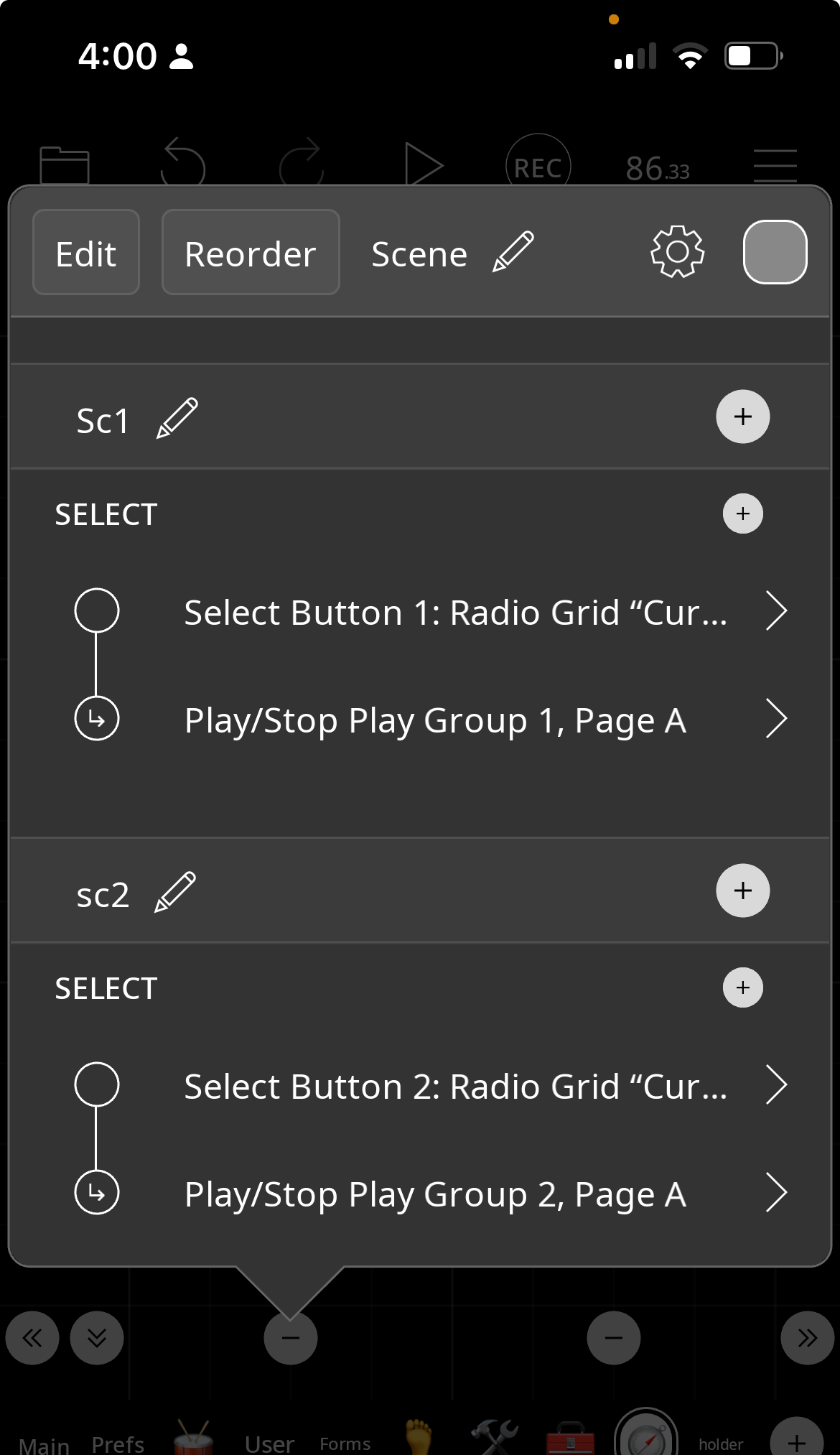
If radio button 1 becomes selected, the dial step whose first action is “select radio button 1” becomes selected.
Thanks @espiegel123 , here are some initial thoughts.
The current implementation of state feedback and how it's used to bind widgets is confusing to me. I think one key reason it is confusing is because Loopy Pro is trying to implement a dependency/observer-observable pattern without exposing a variable/state/model, but rather only actions. I'm not saying it has to expose these things, I'm just commenting on why I think the implementation is currently confusing.
To make it more clear, perhaps
1. Give the user a more explicit way to designate a widget as an "Observer" (or designate it to "Bind" or "Link" to another widget)
2. Have some basic UI to bind/link this observer widget with the widget it is observing/binding
3. When two widgets are bound, in observer/observable relationship, give a hint of this visually when in edit mode by perhaps having a little link icon or something showing that the this widget is bound to another ... then if you go into the widget's edit screen, being able to see which widget it is bound to (perhaps, in order to reduce LOE, showing the bound widget by re-using the same UI for when someone is doing Trigger Widget action and visually selecting the target)
Overall, Loopy Pro offers incredibly powerful capabilities via its visual scripting approach, but the level of sophistication of the visual scripting it offers, without some level of debugging and logging support, means it can be very hard for me to figure things out when issues arise or behavior of the flow becomes confusing...I really like the powerful capabilities of Loopy Pro and realize that debugging/diagnostic tools may not be on the short term roadmap, but wanted to answer your question about what's confusing to me around step dials and state feedback and also offer a suggestion or two, but let me know if this isn't what you were looking for and I'm happy to provide other/different feedback...This thread has definitely helped me figure out a lot more and better understand the semantics of step dials and state feedback...Thanks
@danm: the state feedback model is fairly straightforward/simplistic. Let’s consider just the case where state feedback is on for a widget for first action.
If the first action is something that corresponds to a state, the widget’s highlighting/selection will match that state no matter what caused the state to change.
If you cause clip 1 to play. Any widgets (or dial steps) with state feedback set to first action will highlight/become selected if their action is “play clip 1”. If you select clip 3, widgets (or dial steps, etc) whose first action is “select clip 3)” will become highlighted/selected.
It isn’t so much a case of two widgets being bound together.