Loopy Pro: Create music, your way.
What is Loopy Pro? — Loopy Pro is a powerful, flexible, and intuitive live looper, sampler, clip launcher and DAW for iPhone and iPad. At its core, it allows you to record and layer sounds in real-time to create complex musical arrangements. But it doesn’t stop there—Loopy Pro offers advanced tools to customize your workflow, build dynamic performance setups, and create a seamless connection between instruments, effects, and external gear.
Use it for live looping, sequencing, arranging, mixing, and much more. Whether you're a live performer, a producer, or just experimenting with sound, Loopy Pro helps you take control of your creative process.
Download on the App StoreLoopy Pro is your all-in-one musical toolkit. Try it for free today.
SOLVED iPad battery health 80% limit - weird behavior
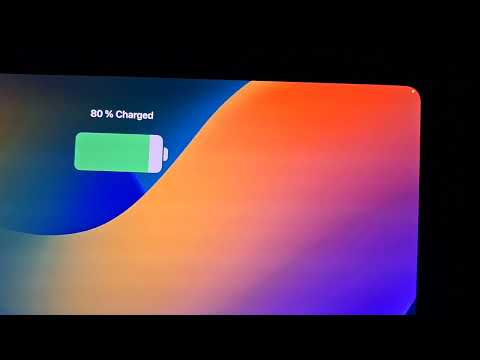
Is there anyone here who uses the 80% battery limit? I tried it today on my new iPad Pro M5, and when charging reached 80%, it behaved strangely. I had Loopy Pro and Tonality running in the background, and when I wanted to turn off the display, it didn't work—it lit up again and cycled between showing of datetime and battery status. Has anyone else encountered this?
Comments
Hi. I've never seen this. Could it be a flakey connection of the charger?
No I guess. All behaves normally when 80% limit restriction is set to OFF and iPad is charged up to 100%.
Never seen this. I’ve been using 80% since I got my A16 iPad on 26.2
That kind of looks to me like the iPad might be locked and face-id isn't kicking in to unlock it.
@offbrands
Separate (standalone)
26.2
I didn't do restart. Now I have set that same scenario set and I'm waiting when charging reach 80% limit again. I'll let you know.
It wasn't my intention. The display became blurry after some time and then I saw that weird behavior described in my first post. So I thought I simply turn off the display but it doesn't work either.
@wim
Not sure because it didn't happen when 80% limit is off. But I will test it again during daylight.
Another test, this time in daylight. The LoopyPro and Tonality were still running. The display was off, but when it reached 80%, it turned on by itself and started cycling, as shown in the video in the introductory post.


When I disconnected the power supply, the display turned off by itself. When I reconnected the power supply, the display started cycling again after a while. When I unlocked the iPad (using Face ID), the battery indicator did this. Is it normal when 80% limit toggle is ON?
Then I let the iPad discharge to 75%, restarted it, connected the power supply, and waited until it reached the 80% limit. Then I launched Loopy Pro and Tonality, and the cycling started again. At first the display is dimmed then turned off and then cycling started.
When I load a project with high CPU consumption in Loopy, the display is permanently ON without cycling (state never changed to dimmed), but there are periodic changes in the battery indicator, as in my video above in this post. When I manually turn off the display by iPad's button then cycling is back
EDIT: It is cycling even when I'm in the different room so out of FaceID camera scope.
Hmmm. This might just be a feature (or problem) of the newest device, iPad Pro M5. Different iPads have different internal firmware. Also, even though it's the "same" iPadOS version, different devices receive different updates, adapted to the device. You should at least report it to Apple.
@offbrands
I think it's just a switch to display the percentage number to the left of the battery icon.
You mentioned you have M2 Air with 80% limit ON. If you had your iPad charged to 80% and connected to a power source, opened some applications that consume a lot of CPU, put them in the background, and turned off the display (or let it dim and turn off), what would happen? Would the display remain off after couple of minutes even under these conditions? Could you try this, please?
@uncledave Thanks for the Apple link. I ordered new 120W charger, and if that doesn't help (or if we don't figure out the cause in the meantime), I would contact Apple.
I have auto-lock on 2 minutes value as well.
Thank you all for your suggestions and help! The charger (not the cable) was indeed the cause. After replacing it, the problem disappeared.