Loopy Pro: Create music, your way.
What is Loopy Pro? — Loopy Pro is a powerful, flexible, and intuitive live looper, sampler, clip launcher and DAW for iPhone and iPad. At its core, it allows you to record and layer sounds in real-time to create complex musical arrangements. But it doesn’t stop there—Loopy Pro offers advanced tools to customize your workflow, build dynamic performance setups, and create a seamless connection between instruments, effects, and external gear.
Use it for live looping, sequencing, arranging, mixing, and much more. Whether you're a live performer, a producer, or just experimenting with sound, Loopy Pro helps you take control of your creative process.
Download on the App StoreLoopy Pro is your all-in-one musical toolkit. Try it for free today.
Devices that respond with colors to apps on IPad?
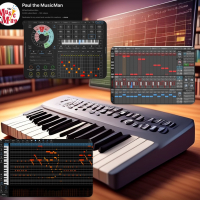
I’m trying to find out which devices are out there that can not only communicate and control an iPad, but also receive state updates and reflect them back, like what and Ableton and Launchpad can do where a loop or track color will change on the device to show what’s going on in the DAW or music app.
It seems like the M-Vave SMC Pad can sort of do this by changing the pad color in response to velocity feedback from an iPad. I’m very interested in what other setups people have that actually show that two-way type of interaction.
Comments
Hi. I believe the problem is not "which devices", but which apps support this for the devices. I know Loopy Pro has a list of the specific controllers it supports. And it's tricky because different similarly-named models can be supported and not. Drambo may also have a list. But most iOS apps simply don't provide any feedback.
Most DAWs and apps don't support state feedback and/or integration with controllers that can react to commands from them. Some devices react to the same messages they send in order to set their colors and position, others require more complicated custom MIDI integration that has to be supported in the DAW.
Of the few that do that I'm familiar with:
Loopy Pro
Drambo
GrooveRider 2
Atom 2 piano roll
Mozaic and Streambyter can be used in some cases to help work with controllers. There are a few scripts available but none provide comprehensive integration.
The Midi Fighter Twister is a really nice controller that has good integration with Loopy Pro.
If you're more specific about which apps you're looking for feedback support from it'll help.
@uncledave - thanks - good point.
@wim - MIDI Fighter Twister looks interesting. As far as apps, the ones I'd be using with the hardware would be Prism MIDI Sequencer, GrooveRider 2, Koala and Logic Pro and BM3 (just recently). I love Loopy Pro, but I just haven't spent enough time with it, so any info would be very welcome.
Btw - here's the video that first prompted me to start looking into hardware with feedback from the iPad app. It's very clever.
NiFox's SMC PAD Presets for Koala Sampler! - TUTORIAL + DEMO
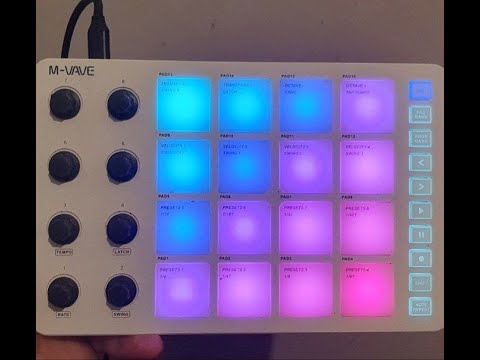
The Loopy Pro manual section linked above is all the info I have about built-in integration as far as Loopy goes. As I mentioned, beyond that gets complicated. Some controllers react to direct midi feedback (which Loopy can supply), but many require custom midi. You can send custom midi messages in response to many actions and events in Loopy Pro but you have to understand midi, the specs of the device, and Loopy's actions system to do things.
Oooh. Maybe I better look at that. I was under the impression that Koala has no midi feedback. I'll have to see if they're sending midi back to the controller or if it's just lighting up pads on its own. It could be that they're routing Koala midi output back to the SMC Pad and that's lighting the pads if they're pressed or sequenced in Koala.
Update - I have not been able to get the SMC- Pad to update pad colors based on incoming data from the iPad, although it is supposed to be possible, so it could be due to iOS limitations with the device or something I’m not doing correctly. If I can get it to work, I’ll post an update here.
Are you using the correct MIDI messages to change the colors? They may not be the same as the messages it sends. You can test this stuff with a quick script in StreamByter or Mozaic.
@uncledave - Great question. I'm using Takeamidi to monitor the MIDI data. I've posted a question in the M-Vave Facebook page to confirm it is supported on iPad, so we'll see if they respond and what the answer is.
Its really hard to find details on the midi implementation. I did see one manual that mentioned "Mackie mode" needing to be engaged for DAW integration. That may mean that it only lights pads according to the terribly opaque Mackie Control Universal protocol. Hopefully that isn't the case.
Ugh. I just saw in a trustworthy video that integration with Live requires MCU (Mackie Control Universal) protocol. Hopefully that ain't the end of the story (because otherwise I might buy one of these).
But that might just be for DAW integration, if the DAW supports Mackie mode. It may not be the only way to control the device by MIDI. For example, my X-Touch Mini controller has Mackie, but also a fairly conventional scheme using notes and CCs.
After a lot of digging, I'm reasonably certain that the SMC-Pads does not work with any two-way communication except in Mackie MCU mode with DAWs that support it. I've seen that stated by a knowledgeable user some time back, but wanted to see if I could verify that myself.
Definitely hoping to be proven wrong.
Got the answer. Per M-Vave, the SMC-Pad does not support control of the LED's via MIDI.
yay! You saved me $75. 😎
Oh ... wait ... sorry to hear that @EdZAB. 😐
No worries at all @wim. I’m enjoying the journey into this path.
I also wish that Launchkey had some interaction with apps/daw just like on Ableton and many other daws on PC...
Launchkey can interact with some apps. It can also receive midi in order to light its pads. Apps like Drambo, Loopy Pro have the ability through customization to do some things, but it's not easy and you need some technical knowledge of MIDI. Beyond that, Mozaic and Streambyter are a scripting plugins that can do more for those who can learn to code in it.
I haven't tried it on Drambo, if there's that's good but it's not native interaction as it could be. Only native interactions i know are the Novation's own apps.
Drambo has the ability to integrate with it via text based configuration files. There are some included and and some contributed by user members. I don't know if there's anything for Launchkey. If you're smarter than I am, then you might have some fun trying to make an integration of your own.
Loopy Pro can send custom MIDI from all it's actions and events. If you know enough about MIDI and have the patience you can make something "sort of" integrated.