Loopy Pro: Create music, your way.
What is Loopy Pro? — Loopy Pro is a powerful, flexible, and intuitive live looper, sampler, clip launcher and DAW for iPhone and iPad. At its core, it allows you to record and layer sounds in real-time to create complex musical arrangements. But it doesn’t stop there—Loopy Pro offers advanced tools to customize your workflow, build dynamic performance setups, and create a seamless connection between instruments, effects, and external gear.
Use it for live looping, sequencing, arranging, mixing, and much more. Whether you're a live performer, a producer, or just experimenting with sound, Loopy Pro helps you take control of your creative process.
Download on the App StoreLoopy Pro is your all-in-one musical toolkit. Try it for free today.
Anyone else missing the save icon in J6 Synth One?
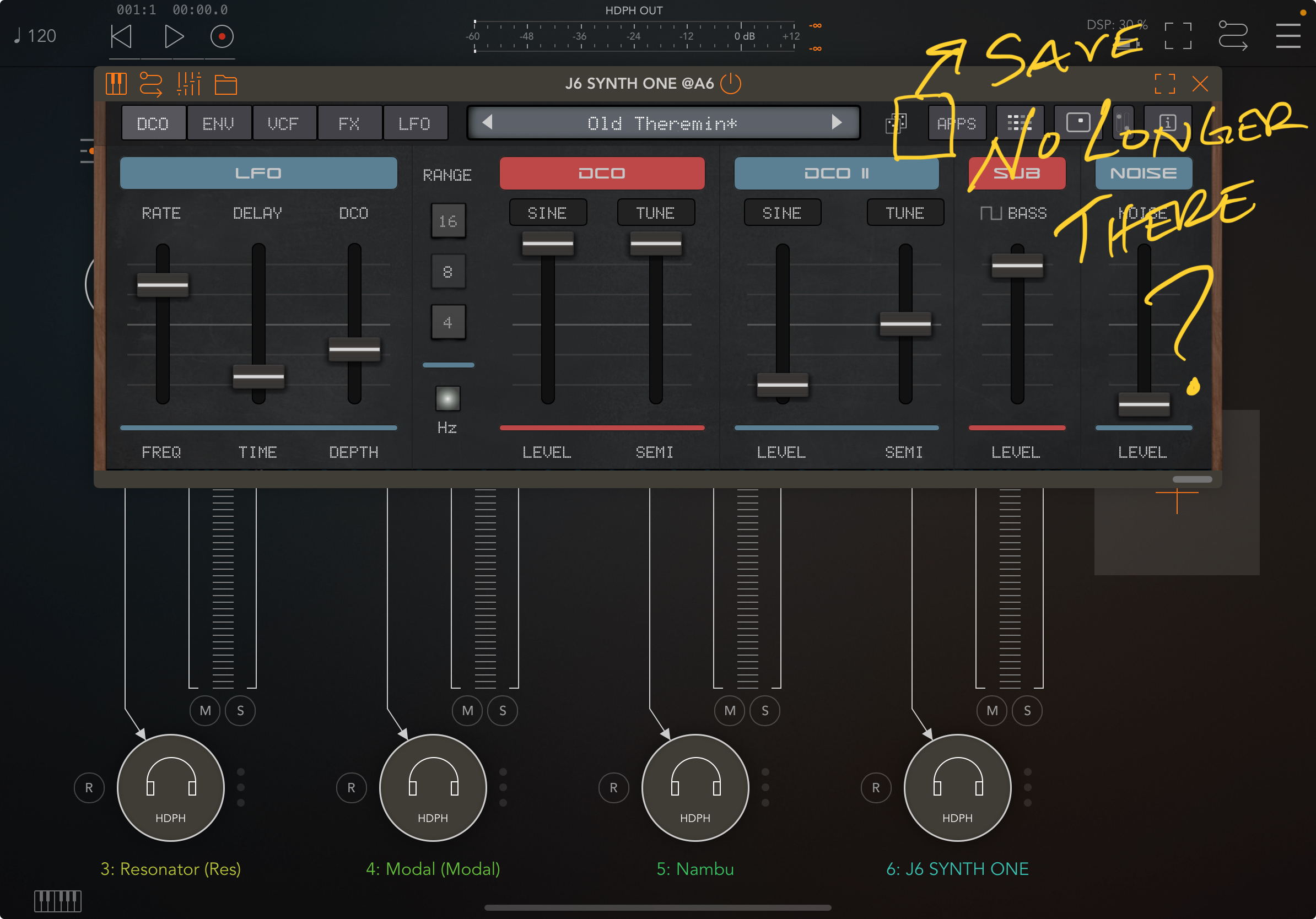
When I run J6 Synth One (version 0.98) in a host (AUM, loopy pro, etc) on my iPad, I’m not seeing the save icon anymore. It used to be there and now it’s not. It’s there when I run the app in standalone on my iPad and it’s there on my phone (12mini) in both hosts and standalone, just not on my iPad in hosts.
I’m on 2021 11” iPad Pro M1 .. iPadOS 18.3
I’ve deleted and reinstalled the app and problem persists .. also dropped an email to the developer(s) and posted the problem on the J6 release thread.
Any other suggestions?
Comments
@mikejohn : try making the window wider:
If the window is narrow , it seems like the button layout can result in things being covered up
Aw man .. I wish it were that simple .. unfortunately, even when maximized, it’s not there — or, rather, there’s like a sliver of the icon showing and if I hit it just right I can save ..
Maximizing might be a problem aspect ratio. Size the window like it is in the first picture then make it wider without making it taller
Yeah .. I’ve tried all kinds of sizes .. nothing. I notice in the photo you posted, you don’t have the “APPS” box next to the sequencer box like I do .. do you know of a way to get rid of that “APPS” box?
@mikejohn I don’t see an APPS box in any version I’ve tried.. standalone, in AUM, in Loopy Pro.. it’s just not there.. Maybe it’s an iPadOS 18 thing? What is your phone running?
I’m on iPad (A16) iPadOS 26.2.1.
I don’t have that APPs button in iOS 17 or 18
What happens when you press on the apps button?
“APPS” opens an ad for other apps ..
@royor phone’s running 18.7.2
Really bizarre.. trying to understand what’s goin’ on..
This screen cap is from the standalone app.. what version of J6 do you have? You’re not on a beta are you?
The latest (0.98) was updated 3 days ago..
The MORE APPS button below, shows an ad for J8..
Can’t get it to disappear unless sizing very small in custom mode in AUM. A16 iPad iPadOS 26.3
Example pic won’t upload…. 😎✌🏼
You need to downsample the screenshot to upload it.
I see the same thing as the OP. iPad Air 11" M2 with iPadOS 26.3, and iPad 6 with iPadOS 17.7.10. Synth One J6 0.98. Cannot find a way to hide the "APPS" button which covers the preset save button. Playing with the window size can make the save icon peek out from behind APPS, and it is just possible to hit it.
Edit: My "More Apps" button shows the same ad for Sega Synth as the APPS button. So some versions of the app are working differently, possibly due to receiving different internet data.
You expect me to think about that in the middle of a blizzard? 😂 😎✌🏼
Tagging @AnalogMatthew for visibility.
Thanks!
It’s been a couple weeks .. still not resolved . Nudging up for visibility @AnalogMatthew
Still an issue .. saw an update today and for a sec got excited .. but it did nothing to resolve the issue of not having access to the save icon on J6 .. after a couple of emails and a few @AnalogMatthew tags I haven’t been able to get developer’s attention for a fix
Did You ever try viewing the plug-in in full-screen mode in AUM?
"after a couple of emails" are you emailing matthew at audiokitpro.com? Apologies if I didn't respond.
Oh, I see the bug. The "Apps" button shouldn't show in AUv3 mode. I'll get that fixed. Thanks!
In the meantime, you can resize the window so the save button shows
Thanks for the response .. I emailed
hello at audiokitpro . com .. that’s all I have
I’ve done all kinds of window resizing and nothing has changed .. glad I was able to get your attention, though! Looking forward to the fix .. been missing J6 in my projects
I hear you. Pushing quick fix now
Thank you!
Update is out, fixed save button.
Thanks @AnalogMatthew 😎✌🏼
Thank you 🍻
Yep, all fixed .. thanks @AnalogMatthew !
Thanks @AnalogMatthew,
The big issue for me was the Sequences not starting at the beginning of a bar on J6 and J8, all fixed now though 👍
Mike🍻