Loopy Pro: Create music, your way.
What is Loopy Pro? — Loopy Pro is a powerful, flexible, and intuitive live looper, sampler, clip launcher and DAW for iPhone and iPad. At its core, it allows you to record and layer sounds in real-time to create complex musical arrangements. But it doesn’t stop there—Loopy Pro offers advanced tools to customize your workflow, build dynamic performance setups, and create a seamless connection between instruments, effects, and external gear.
Use it for live looping, sequencing, arranging, mixing, and much more. Whether you're a live performer, a producer, or just experimenting with sound, Loopy Pro helps you take control of your creative process.
Download on the App StoreLoopy Pro is your all-in-one musical toolkit. Try it for free today.
Cubasis 3.8.3 Available Now!

Hi all,
Please note that Cubasis 3.8.3 for iOS and Android is available now.
Download Cubasis on the App Store
Get Cubasis on Google Play
This update again adds many user‑requested fixes, focusing on general stability and performance improvements across audio, MIDI, tempo, and editing, and also includes the long‑requested Android mouse fix provided by Qt.
If you enjoy using Cubasis, please rate the app on the App Store and Google Play.
Thanks you for your continued support and great feedback.
Enjoy being creative,
Lars
Comments
New in Cubasis 3.8.3
Improvements
Stability & Performance
Editing & Workflow
Audio, Mixdown & Effects
Tempo & Display
Great work thanks for the continuous support @LFS and Cubasis team
Thanks for the update, @LFS is there a way to use a bluetooth keyboard and play the instruments in Cubasas, like you can do on desktop.
@LFS Why don't the sound interruption when turning effects on/off get fixed, 4 in a row now and still ignored. Scandalous!
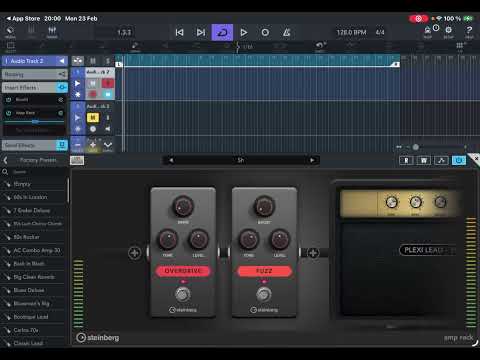
He said it's supposed to be like that. Makes it like a real switch lol
You mean a Bluetooth typing keyboard, right?
I have been using a CME Xkey Air 25 via Bluetooth for all DAWs and instruments for many years. It works flawlessly and with virtually no latency.
He means ‘computer keyboard’, not ‘MIDI keyboard’.
Really!? I missed that, maybe because it's so effing stupid. It's totally unusable if you want to do a recording and automate some effects on/off, not to mention live performance (I don't do those).
I believe it was confirmed on the CB3 forum. It's been complained about a few times, would really do them well to add a toggle to enable/disable the switch noise/silence. If people wanted fake switch clunk noises they'd just add a sample and duck the volume imo
Hi @justaglove Hi @Pxlhg
This is by design, and unfortunately it can’t be changed.
Best,
Lars
Hi @JuniorPops
Thanks for your kind message!
Using Bluetooth keyboards with Cubasis have been fully supported for many years.
To learn more about how to use the feature, you may check the "Setup" article of the Cubasis help.
https://www.steinberg.help/r/cubasis/3.8/en/cubasis/topics/setup_midi_r.html
Hope that helps!
Best,
Lars
Hi all,
Thank you very much for your kind feedback about Cubasis 3.8.3 so far - this is greatly appreciated!
Best,
Lars
It's code not reinforced concrete, of course it can be changed.
Yeah, I gotta say, this feels like an unforced error or even a too precious idea.
In a real world studio this behavior (a clank/stomp sound) would never make to a recording unless the engineer intended to make it so by mic-ing up the pedalboard for foley or special effect.
& guitarists round the world stay hollering at multieffect pedal manufacturers that have even the tiniest of delays in signal when changing presets or effect blocks on & off.
So, to me, this behavior is a significant step back for the image of Cubasis as a real DAW to do real work in & more towards the realm of very niche soundboard apps for grade-schoolers.
A clunk sound enable/disable toggle on settings would be most welcome for this effect.
Right, so if a guitarist (or anyone else) doesn't use the Cubasis built-in amp effects, they're still grade-schoolers, and Cubasis isn't a "real DAW". Please.
You're aware that there are in fact other amp sim AUv3 options for Cubasis?
I’m absolutely aware there are other amp & pedal sims.
I was trying (perhaps poorly) to make the opposite point I think you thought I was making.
I was saying anyone introducing a clunk foley sound to enabling/disabling an effect was tipping into a soundboard app realm.
After listening more carefully to what’s happening today: I now don’t think Cubasis is introducing a clunk sound when disabling effects. Which is good.
What I think is happening is that there’s a mismatch of timing in what seems to be fading down & up audio of the effect (from the tuner for example) quickly, which can cause clicks, being timed poorly with the fading down & up the muted audio out the plugin as a whole.
So the fade out of the plugin itself is supposed to mask the enabling/disabling of the effect, but we’re still hearing clicks as the fade in/out of the effect is faster. & some of those clicks would have a thump to them if the frequency content is low & you’re listening on big monitors.
So I’m gonna retract my judgement about a clunk/foley sound. My bad, I was overheated in my thoughts about what might be happening.
& I’m more sympathetic to the Cubasis developer’s trying to deal with that switch over by doing a volume dip.
This is hard to do in the software world even on dedicated dsp chips as valeton, mooer, nux, line 6, & even boss know. I’m sure it’s even harder to navigate on generic cpus like iPads & iPhones have.
& on further tests. I’m only getting mostly consistent clicks
Consistently - the master on/off pedal, especially when going bypassed to enabled.
Very consistently - the tuner getting enabled or disabled, not every time, but a lot of the time.
Every once in a while - tape delay when enabling.
For all other effects in this plugin, I can’t get a click when enabling / disabling them.
Maybe there’s some special sauce in the tuner’s analysis routine that makes it hard to time the audio stream out of it with the over all volume of the amp sim plugin.
I'm hot on this because the new amp/s sound awesome, I have every option available on iOS (I think) but really have falling in love with these new releases (haven't used the bass much) so, that's why I'm totally stumped that a silence is deliberately introduced when toggling an effect on/off forcing me to stop using them and thus probably Cubasis altogether (speaking for myself only)
Is it ideal? No! But since you are not playing live their is so many work around you can use.
You could have two tracks and switch track when switching effects . You could record on both tracks and just keep the recordings on the needed track.
So many options. It’s far from a deal breaker.
Nice workaround, but if I was planning several pedal changes I’d probably just use something else. Just tried and as expected Nembrini fx/sims don’t cut out the sound (didn’t try any others, pretty sure they don’t.). Definitely needs to be addressed @LFS.
Apparently poor design choices can't be changed ... 🤷🏼♂️
I tried with Overloud TH-U and there's no silence and no clicks/rattle either. I though I should try Yonac as well but had it uninstalled and couldn't bother.
I wonder what "by design" is supposed to do?
The fact you still can’t toggle with a MIDI switch means I really won’t be using the effects much. And even if there is an intentional silence, it’s absurdly long compared to an actual footswitch. It’s literally a full second of silence on a toggle. That’s not realistic behavior at all. The effects sound okay (can’t say I’m all that impressed), but controlling them is really trash.
That’s not at all how a real switch works though. Here’s a comparison of Cubasis’s stomp with a full second of silence vs a real pedal which just…activates.
Like the others said, plenty of other pedal sims act as expected and I can’t see this being something that can’t be fixed in the future. Unless somehow new fangled pedals tend to cut silence completely on toggle, I don’t see how this is acceptable.
Thank you for helping push this rather enigmatic issue further. I hope Lars (@LFS) can have another chat with the coders, maybe slap them around a bit as it seems deserved. (joking)
It just doesn’t make sense. It’s clearly not a programming capabilities thing, since other sims doing have the issue. It can’t be for realism since that’s not how reality works. It can’t be a stylistic choice because how in the world is that beneficial? The issue isn’t the end of the world, but the excuses fall flat when it could just be addressed as “we have other priorities”, “we think these work best for studio purposes”, “we’re not focused on live performance”, or whatever the reason is.
I’m still liking Cubasis, and if you’re recording different chains for different sections the pedals work. But you can’t make a scratch track where an effect kicks in if it cuts the sound. Don’t put your effects in a stomp box design if they’re supposed to be used as bus fx or only for production.
I really hate to say it, but if no headway can be made here or on their forums to change their minds about this design decision ... maybe dinging App Store reviews by a star and commenting on it will get someone's attention.
When I click solo on a track it does not mute all other tracks. I seem to remember it did that that before. Anyone ?
Good point. I wouldn’t ding a point for lacking guitar effects, but to implement them like this and refusing to address it does hold it back in the context of the tool.