Loopy Pro: Create music, your way.
What is Loopy Pro? — Loopy Pro is a powerful, flexible, and intuitive live looper, sampler, clip launcher and DAW for iPhone and iPad. At its core, it allows you to record and layer sounds in real-time to create complex musical arrangements. But it doesn’t stop there—Loopy Pro offers advanced tools to customize your workflow, build dynamic performance setups, and create a seamless connection between instruments, effects, and external gear.
Use it for live looping, sequencing, arranging, mixing, and much more. Whether you're a live performer, a producer, or just experimenting with sound, Loopy Pro helps you take control of your creative process.
Download on the App StoreLoopy Pro is your all-in-one musical toolkit. Try it for free today.
issue with skulptur in logic ipad [solved]

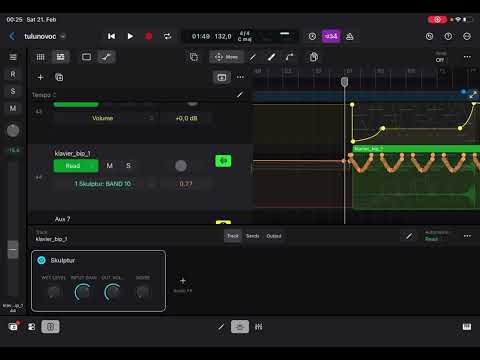
there is an issue with @brambos skulptur in logic ipad.
the freq bands put out their parameter values all the time, when set to cycles
which makes automation of any other of skulpturs parameters relatively impossible.
do you experience the same, or is it yust me?
here is a screen recording.
logic transport is stopped.
Comments
I don’t use Logic Pro, but I’d say that if you want to automate Skupltur freq bands you first need to set it to Faders mode and then set Friction to the maximum. At least that works for me in Drambo.
thank you for the tip! @Grandbear
and update: now skulptur isnt even listed in logic.
at least, i cannot find it any more. not in the bram bos folder...
Yikes, do you have any other hosts you can use to check? Have you tried restarting your iPad?
tried all that, its just gone from logic.
You could try to ‘reset’ Logic in under Settings and Apps, this as Logic ‘disables’ plug-ins that miss-behave in one way or the other.
thanks, resetted logic in settings.
now skulptur is back, misbehaving;)
skulptur got an update today. it now features a switch to disable automation output!
thank you @brambos
