Loopy Pro: Create music, your way.
What is Loopy Pro? — Loopy Pro is a powerful, flexible, and intuitive live looper, sampler, clip launcher and DAW for iPhone and iPad. At its core, it allows you to record and layer sounds in real-time to create complex musical arrangements. But it doesn’t stop there—Loopy Pro offers advanced tools to customize your workflow, build dynamic performance setups, and create a seamless connection between instruments, effects, and external gear.
Use it for live looping, sequencing, arranging, mixing, and much more. Whether you're a live performer, a producer, or just experimenting with sound, Loopy Pro helps you take control of your creative process.
Download on the App StoreLoopy Pro is your all-in-one musical toolkit. Try it for free today.
Ipad to Ableton audio routing question

Hi all,
I’m successfully sending midi from multiple instances of a M4L device in Ableton, via IDAM, into AUM, so that 4 different synths are triggered on midi channels 1-4 respectively. The problem I have is that all 4 synths are going back (again via IDA using a usb-c to usb-c cable) into just one stereo track in Ableton. I simply want those 4 synths to go back into their own audio tracks, for separation. Maybe it’s not possible? Any ideas? @uncledave @wim ?
Comments
I am definitely not an expert in this area and have never done what you want to do, but I’m wondering if the IAA multiple audio output options in AUM would change anything. Maybe by using IAA/Audiobus output channels on each individual output would allow Ableton to identify each individual audio channel separately… I’m totally just guessing here…
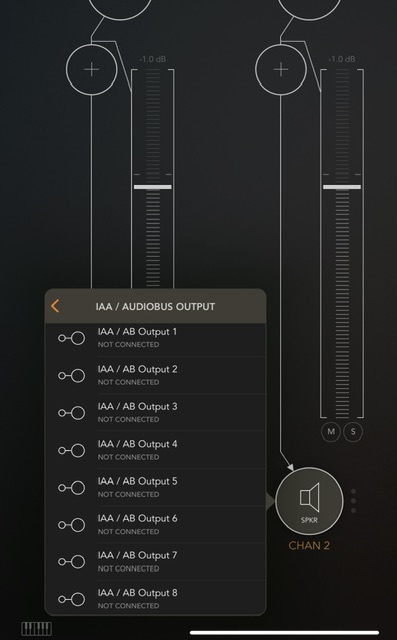
Another potential option might be a hardware mixer, or audio interface with 4 channels, this way you could send the audio out of aum on its own channel, which might help ableton recognize the audio separately on their own individual channel. Again just speculating in an attempt to help. I’m guessing your trying to avoid any interface based off the setup you’re describing, but it might help when assigning where the audio goes…
I’m sure someone out there can answer this much better then me, but I thought it was a great question and I’m interested in the answer too.
Siderack is probably your best (only?) option (without hardware). It's a desktop plugin that communicates with the Novonotes iOS app 'Duo' hosting your synths. In theory you can run multiple send/return plugins across different tracks in Ableton, though I confess I've never tried with more than two.
IDAM is strictly 2 channel only audio.
Near as I can tell in Audio MIDI Setup is that you can only move two channels of audio over IDAM. I'd love to see AUM pick up support of Ableton Link Audio, which should solve this problem.
What about something like sonobus should that help?
Not sure but another potential option.
Solo Contutti Plugin Mobile
Or
Solocontutti Mobile
A couple more worth a look, read up or check the tube to see what they can do, not sure they will help, but they are audio streaming options
Apollo Sound Injector
Wireless Audio AUv3
@kashi - unfortunately iDAM is a single stereo output. There's no way to get multi-channel audio out to a Mac using iDAM. Sonobus and StudioMux are unlikely to work well, unless you're able to set up a wired Ethernet network, and even then you'll have some latency. I haven't tried NovoNotes enough to say if it could be a solution for you, my MacBook Pro is too old and slow.
Audio out to an interface on the Mac, either from an interface, or possibly from headphone output is another way to go, but you get latency from each interface, as well as having to convert from digital to analog and back from analog to digital.
The best option is something like an iConnectivity Audio 4c (recently discontinued) or the 4+ (long continued), or similar possibly the Lewitt Connect 6 or one from Motu, but you'd have to check carefully how many channels they support.
Sorry, there are really no good or inexpensive solutions. tbh, by the time it all adds up, simply rendering to audio on the iPad and airdropping the audio files works out a whole lot easier unless you have to have real-time performance.
btw, Ableton is cooking up Link Audio, that will eventually allow multi-channel audio. However, each developer will need to build in that support into their host apps. I read that AUM will get it, but I wouldn't hold my breath, I also have read for years and years that AUM will get MIDI clock slave too. At any rate, Link Audio is still only in beta. I expect some latency will be an issue with Link Audio too. In their announcement video they state right up front that a wired network will be preferred.
This will be how I do it I think. It’s not a big deal - was just experimenting with different permutations. The fact that I can use the M4L device (it’s called Cartographer, by a super cool guy called Jacob Sachs-Mishlanie, and it’s free!) with all my ipad synths is enough to make me happy for the meantime
Really appreciate everyone’s input though! Thanks @Poppadocrock ! Thanks @steve99 , thanks @mjm1138 and thanks @wim !