Loopy Pro: Create music, your way.
What is Loopy Pro? — Loopy Pro is a powerful, flexible, and intuitive live looper, sampler, clip launcher and DAW for iPhone and iPad. At its core, it allows you to record and layer sounds in real-time to create complex musical arrangements. But it doesn’t stop there—Loopy Pro offers advanced tools to customize your workflow, build dynamic performance setups, and create a seamless connection between instruments, effects, and external gear.
Use it for live looping, sequencing, arranging, mixing, and much more. Whether you're a live performer, a producer, or just experimenting with sound, Loopy Pro helps you take control of your creative process.
Download on the App StoreLoopy Pro is your all-in-one musical toolkit. Try it for free today.
Grainheads by Andrei Nevar - out now!

Standalone only (not auv3...)
Free but one needs to IAP in order to load owns sounds.
https://apps.apple.com/gh/app/grainheads/id6760582834
GrainHeads by Andrei Nevar is a new sequenceable granular sampler/Synthesizer app for iOS and macOS with eight playheads.
a review here:
https://synthanatomy.com/2026/03/grainheads-a-sequenceable-granular-sampler-for-ios-and-macos.html
Comments
This is really good fun and hallelujah a portrait iPhone mode from the get go 🙌🙌🙌
yeah - it is.
and a friendly price it seems.
Great fun, but needs AUv3.
This is pretty nice. Would love to see Grain Rate below 1 second and scatter up to 100%
Grain rates do go below one second! There are various rates which are fractions of a second. I have asked though whether there could be free rate options, as there are quite a limited number of rates currently. Would also benefit from having free pitch options.
It has auv3 but it instacrash here.
@Gavinski @Charlesalbert
just spoke with Andrei and he replied:
"I have currently version 1.6 in review by Apple. That version has both unquantized pitch (default option) and AUv3 working.
As well as some other improvements about presets management and sliders behaviors. "
is being tested as we speak:)
Woah, mental blackout. I meant ABOVE one second.
@Ailerom
I spoke with the coder this morning
and he said the next update will have max 2 sec grain size
but we discussed more and he is trying now to see if 5 sec works.
He's a really nice, responsive dev. And fuck me is he fast haha! How's he making an AUv3 version so quickly, thought it was supposed to be hard to make an AUv3 🤔
@Gavinski
yes he is.
hm - about auv3 - it was there from start:) its in docs!
just doesnt work. It worked for him in Garage Band
and I suggested him to get AUM and Drambo and test/use those too ...:)
he is on the right path fixing all and adding good features/calibrations so
he deserves our love and support
updated
with auv3
and more
AUv3 still completely broken for me in the new update. Usually doesn’t load. If it does load, it’s only for a few seconds before it dies. UI is also completely different from standalone, just a few rows of sliders, none of which respond to touch at all…
Same here in AUM. Dev missed something. ✌🏼😎
Thanks for that. I was not expecting it to happen but sounds like a very approachable and dedicated developer. I can't imagine needing more than 2 seconds personally but I'm sure someone out there would appreciate it. I'll definitely support a developer that is so responsive.
Still not working for me in Aum, but here's a Standalone demo with a bunch of examples using the Pro version, which is totally worth it!
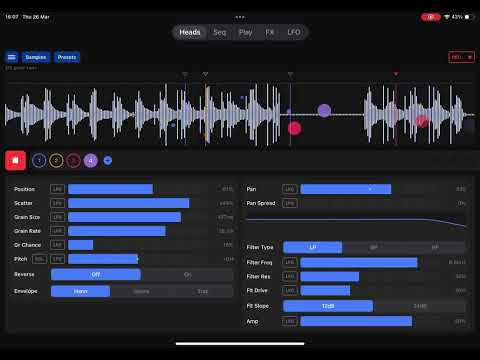
Not sure why but a few things clicked watching this. Thanks for posting.
Really great and inspiring. But it’ annoying that AUv3 have no preset system nor keep sample chosen between sessions
From what I gather AUv3 places restriction on the UI technology which can be used, which was a then-modern option and so older apps would not have used it. The chances of a stand-alone UI using the right tech is surely now quite a bit higher. And pre-development research into options could also steer the direction.
i relly hate the new UI WHY?!
The old one is very efficient, but the slider is more user-friendly on the touchscreen. Please at least keep the original UI as an option.
The new one looks like another application that was ported from Windows without any touchscreen optimization.
I actually like it. Congrats!
This looks like it could be very useful but there are GUI Issues in standalone. I can see the tops of controls at the bottom of the screen on iPad Pro 2017.
Anyone have contact details for the dev?
There are tons of issues with this ui, tons, particularly the AUv3 UI.
AUv3 is straining on the eyes at low brightness. The bouncy thing it does when you drag down is a damn crime against humanity, in my view, when it comes to music apps. Doesn't resize well. Dry wet knob broken. Have reported to dev.
There is a contact form on the website, as is the norm btw. Website is linked to from the AppStore page, I think, or Google it
For sure that's the usual way, only that someone mentioned above that they'd already had contact with the dev.
@Gavinski Yer the devs messed up a bit redesigning this there’s overlap of controls and text in standalone bottom left and he has made everything to hard to read and to faint now on the UI to be a usable really. Also could not change the filter curve ! Anyhow I contacted him and see what he sayes.
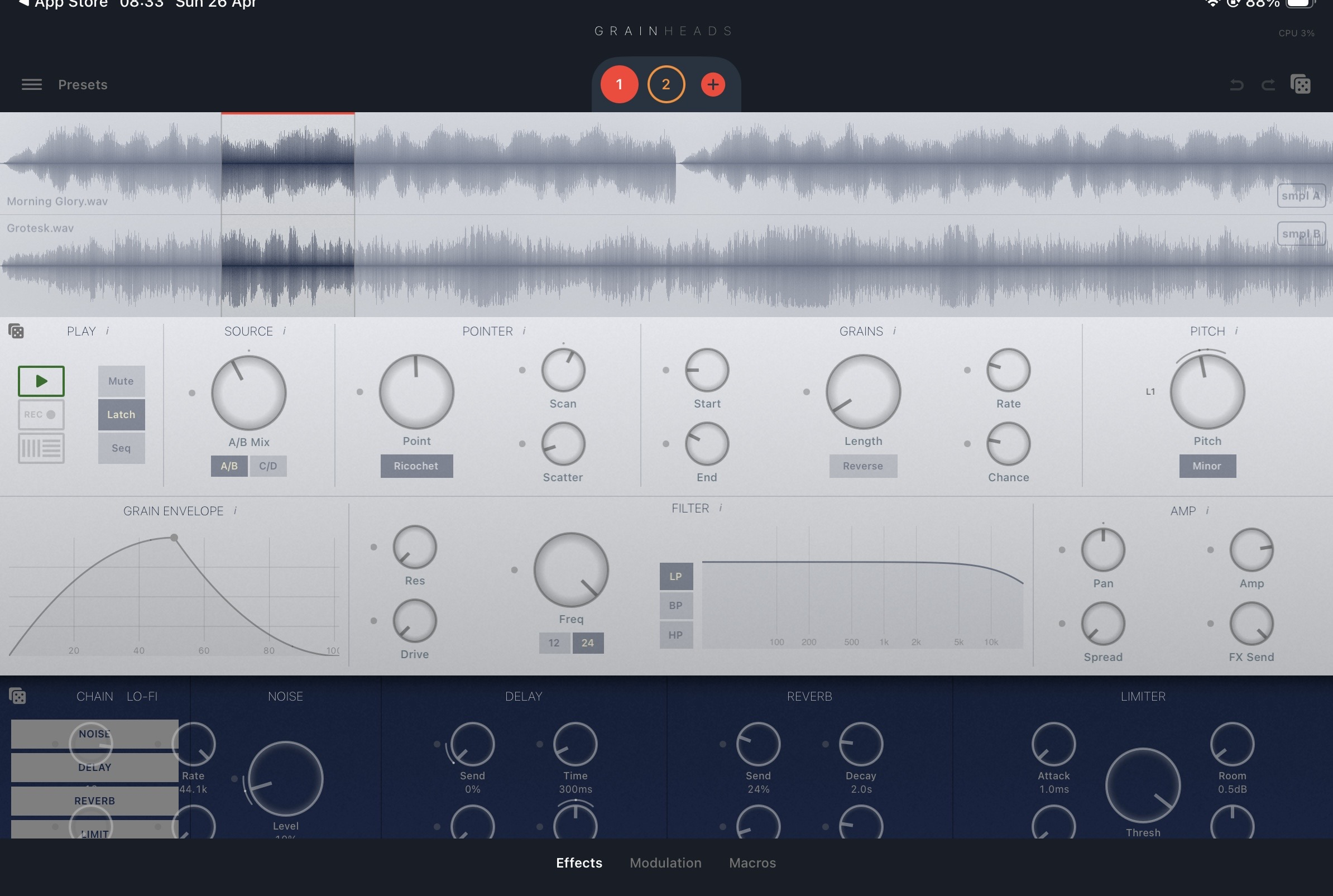
I'm sure he'll improve it, he's definitely been very active in iterating on the initial idea.
There is a bug. iPhone 15 iOS 26
Stand alone.
After importing a sample:
Change scale to minor pent.
Assign modulation LFO 1.
Go to modulation page
Change lfo 1 to triangle and lower frequency
The app gets stuck there and nothing can be changed.