Loopy Pro: Create music, your way.
What is Loopy Pro? — Loopy Pro is a powerful, flexible, and intuitive live looper, sampler, clip launcher and DAW for iPhone and iPad. At its core, it allows you to record and layer sounds in real-time to create complex musical arrangements. But it doesn’t stop there—Loopy Pro offers advanced tools to customize your workflow, build dynamic performance setups, and create a seamless connection between instruments, effects, and external gear.
Use it for live looping, sequencing, arranging, mixing, and much more. Whether you're a live performer, a producer, or just experimenting with sound, Loopy Pro helps you take control of your creative process.
Download on the App StoreLoopy Pro is your all-in-one musical toolkit. Try it for free today.
VAPolyMk5 by Ryo Togawa (Released)

https://apps.apple.com/app/id6761029576
VAPolyMk5 is bitimbral polyphonic synthesizer. Main feature of Mk5 is re-designed step sequencer which contains one note sequencer and three modulation sequencers. Oscillator feature hard sync and through zero FM. Low pass Filter is modeled on cascaded OTA -24dB per octave low pass filter circuit.
Each synthesizer consists of three oscillators, resonant low pass and high pass filter, amplifier, three envelope generators, two LFO and key tracking. Two synthesizers can be configured as layer or split. Mk5 also features global LFO, output morphing, classic ring modulator and easy target assignment for mod wheel and aftertouch.
VAPolyMk5 operates as a stand alone or as an AudioUnit Extension (AUv3) for iPhone, iPad and Mac. Stand Alone supports Ableton Link, MIDI and audio file export. Built-in Effects include delay, chorus, flanger, reverb, eq and compressor. Project files can be saved in iCloud Drive, so that the project can be accessed from iPhone, iPad or Mac.
Main Features
Bi-timbral Polyphonic Synthesizer
Oscillators feature hard sync and through zero FM.
Low pass Filter is modeled on cascaded OTA -24dB per octave low pass filter circuit.
Re-designed step sequencer
Re-designed offset control
Improved output morphing.
Improved classic ring modulator.
Improved key tracking
Easy target assignment for mod wheel and aftertouch
Maximum 8 voice polyphony. it depends on performance of the device it is running.
Built-in effects and piano roll sequencer.
Audio Export. Linear PCM format (AIFF, WAV and CAF) and compressed format (AAC)
Support Audio Unit Extension (AUv3).
Support MIDI 2.0. Support Foot Pedal and Per Note Control.
Support Ableton Link, Bluetooth MIDI, MIDI In / Out.
Works on iPhone, iPad and Mac. Support iCloud Drive to share project files between the platforms.
General Improvements
Support MIDI Foot Pedal (CC#11, CC#64)
Support MIDI2.0 Per Note Control Messages
MIDI CC Settings are saved. It will be recovered when the app launched in the next time.
UI Color can be selected from black, navy, gray or blown.
Adjustable text size for title of controls
Factory Preset 208
Synth CH Preset 256
Effect Preset 40
Default & Macro 8
System Requirements
iOS 17.0 or later
macOS 14.0 or later
Devices with Apple Silicon are recommended. A13 Fusion or above is highly recommended.
AudioUnit Extension (AUv3) requires host application which support AudioUnit Extension.
AudioUnit Extension is supported by Apple Logic and Apple Garage Band on iOS and macOS. For any other DAW, it depends on the application and some of them don’t support AudioUnit Extension.
Sound may be distorted if CPU of the device doesn't have enough power. If it happens reduce number of voices or enable Low Power Mode in setting panel.
App launches in Low Power Mode in the first time on device with iOS earlier than iOS 18.0 as mono-timbral.
Details:
Universal: Yes
Minimum OS version: 16.6
Comments
Wasn’t V4 released not that long ago? Description looks mighty similar to V4 only with the words “improved “ mentioned several times . UI changed up a slight bit .
He’s trolling us now! I give up lol. I don’t even use the built in step sequencer. The synth seems roughly the same.
I've never bothered with these synths. I've honestly got all I need for producing whatever genres I need. Unless it's a simple $4 AUv3 app that specializes in a certain sound (looking at Dark Park), or Synthmaster 3, I really don't wish to bother with much else.
I have some of the synths; I liked VAPoly until he broke the preset system and then released V2 shortly after . I have VAPoly, Mk3, MonoMk2 (which is a poly synth so wtf), VAPolyWest (THAT one is good), VATZFM (ditto) and VAPolyTS (good). No need for the others, and quite frankly it seems like the same app keeps getting released with little difference. If someone can tell me how PolyMT is different from MK4 for instance , I’d be surprised
This guy has to be stopped😂
I have the VAPolyBass, it sounds really good and the filter is excellent, but the preset management is rubbish, there are four separate banks but only one bank number, each bank has 32 presets which are all added together into one bank making a total of 128 presets, the user bank has no number at all. The MIDI Maps don’t save in either standalone mode or AUv3, its supposed to save to the Cloud but I’m damned if I can find it, I tried contacting the developer for more information on these two subjects but no response, so I don’t think I will buy anymore of these apps
I think he should move on to additive or wavetable synthesis. I would love a wavetable synth with an OTA filter, just like my Peak.
Hi. There are two parts to iCloud. There's iCloud Drive which stores files that are publicly visible, similar to the Files app. The other (older) part is "Saved to iCloud", which is private space used by apps for storage and for syncing between devices. You can see the apps using it, but you cannot see their files. Open iCloud in Settings and select "See All" next to "Saved to iCloud" to see the apps using this. You may need to enable this for VAPolyBass, if it is needed to save MIDI maps.
Hi @uncledave,
I checked my settings and VAPolyBass is already enabled, I made a new MIDI Map preset and saved it to the Cloud using the File tab on top left of VAPolyBass, I then reopened the Files tab and selected OPEN, this opened a page on iCloud Drive but there was no sign of any folder or preset belonging to VAPolyBass, Hmm, bit of a mystery.
That enable that you see allows the app to access the private iCloud storage, which does not appear in iCloud Drive. When you save the MIDI map, does the app show the "Files app" interface, or does it just silently save the file? If it saves it silently, it should not offer the Files app to reload it; it should just offer a list of choices.
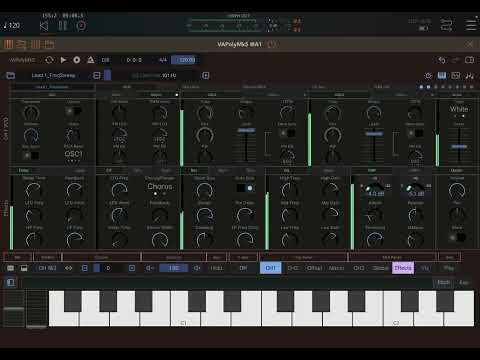
Demo video
The Files app only shows when I try to import the MIDI Map, the Files app opens but there is no folder for VAPolyBass at all, when I shut the app and relaunch it, the Map has gone and I have to connect to my MIDI keyboard and re-assign the Mapping parameters! I just wish the developer would reply to my emails!
Hi @uncledave,
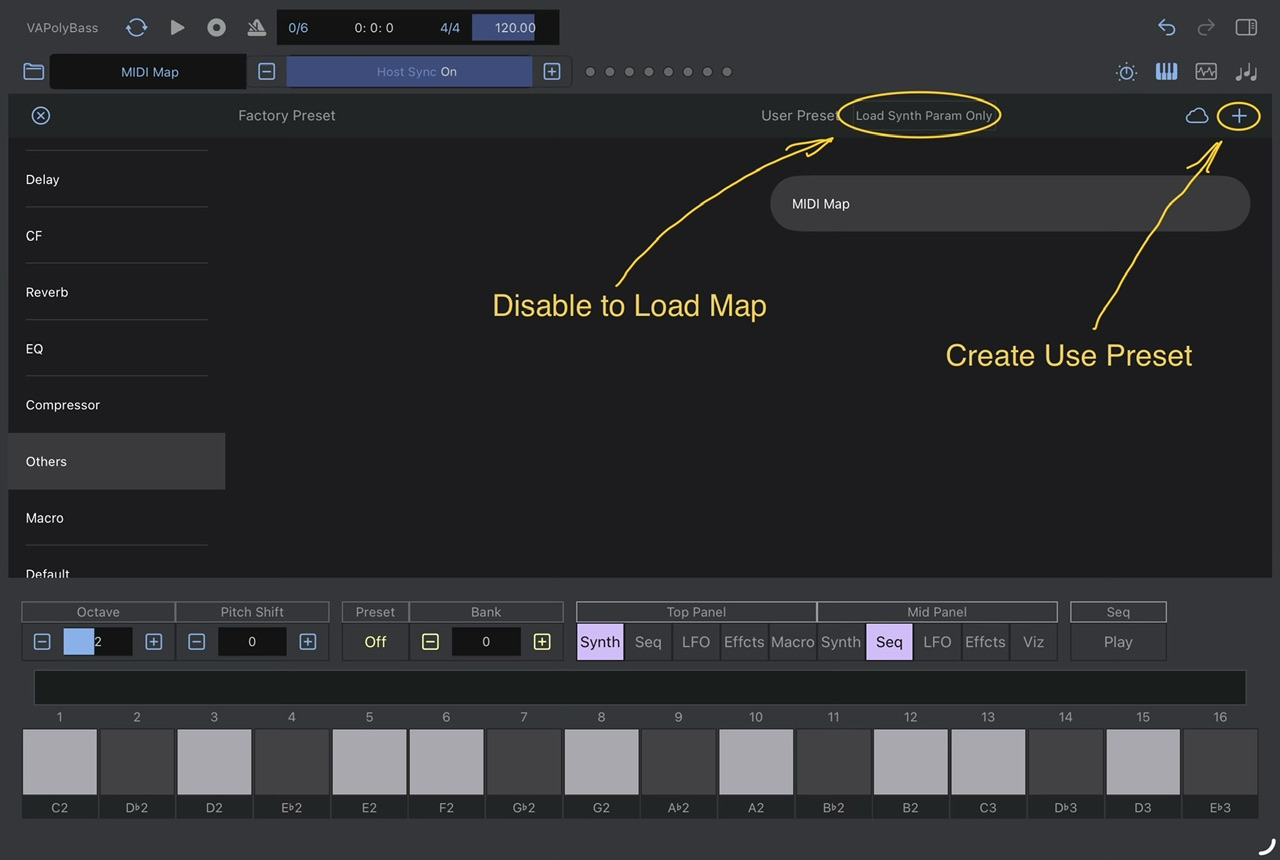
Just in case you are interested, I have figured out how to save and load MIDI Maps in VAPolyBass. Once I have assigned all my parameters, I select OTHERS in the preset list, I tap the small “+” circled in yellow and name my Map preset. The next time I launch VAPolyBass I have to first select OTHERS and make sure the LOAD SYNTH PARAMETERS ONLY is disabled otherwise the Map won’t load 👍
I took the plunge and purchased VAPolyMk5, the Map saves directly into the app apparently, not tried it yet.
Mike
Just purchased the VAPoly16, this is sonically much better than the VAPolyMk5 and VAPolyBass which I previously purchased.